
Official statement
Other statements from this video 21 ▾
- □ Should you update the same page or create a new URL every day for frequently refreshed content?
- □ Should you stop using the manual submission tool in Google Search Console?
- □ Do H2 tags in your footer actually hurt your SEO rankings?
- □ Do HTML5 <header> and <footer> tags really boost your SEO rankings?
- □ Should you really rely on the schema.org validator to optimize your structured data?
- □ Does improving page speed really boost your rankings as fast as everyone claims?
- □ Does Google really crawl all your sitemaps at the same pace?
- □ Does Google really keep crawling a sitemap after you remove it from Search Console?
- □ Is Google really refusing to index your pages even though they're crawled regularly and have no technical issues?
- □ Can you safely use bidirectional canonicals between two site versions without any risk?
- □ Can structured data really replace traditional internal linking strategy?
- □ Why is one x-default enough for your entire multi-domain hreflang configuration?
- □ Should you really avoid product structured data on category pages?
- □ Do you really need to pick one primary language per page if you're targeting multiple markets?
- □ Why is Google completely ignoring your desktop version once mobile-first indexing kicks in?
- □ Can commodity content really survive in Google search results?
- □ Should you isolate your FAQs on separate pages to rank better?
- □ Is Google really cutting back on FAQ rich snippets in search results, and what does that mean for your SEO strategy?
- □ Is Google really ignoring 95% of your submitted URLs—and what does that say about your content?
- □ Does the shift from 'Bad' to 'Medium' on Core Web Vitals really transform your Google rankings?
- □ Does server speed really impact the crawl budget of large websites?
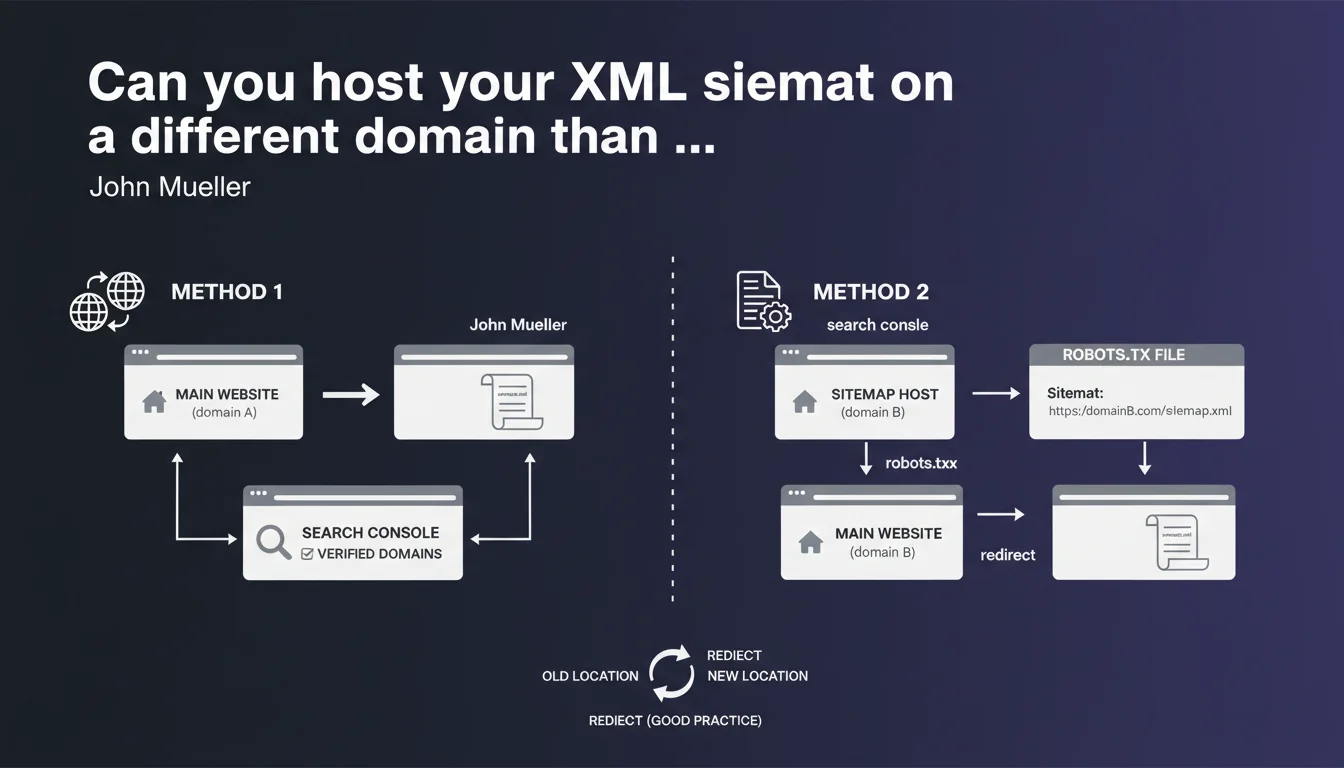
Google explicitly allows hosting a sitemap on a third-party domain. Two options work: verify both domains in Search Console, or declare the remote sitemap via robots.txt with the complete URL. A 301 redirect from the old location is recommended best practice but optional.
What you need to understand
Why would anyone want to host a sitemap on a domain other than their own?
This question may seem counterintuitive. In reality, several real-world use cases justify this architecture: multi-domain sites managed from centralized infrastructure, SaaS platforms that generate sitemaps for their clients, technical migrations where the new CMS isn't yet on the final domain.
Google recognizes this reality by officially validating two methods. The flexibility exists — you just need to know how to leverage it without shooting yourself in the foot.
What are the two methods concretely validated by Google?
First option: verify both domains (your site's domain and the one hosting the sitemap) in Search Console. Simple in theory, but it requires administrative rights on the remote domain — not always straightforward when working through a third-party provider.
Second option: declare the cross-domain sitemap directly in robots.txt using the syntax Sitemap: https://external-domain.com/sitemap.xml. No additional verification needed in Search Console. Google follows the URL, period.
- Both domains must be verified in GSC (option 1) OR declaration via robots.txt (option 2)
- The sitemap: directive in robots.txt accepts complete URLs, even external ones
- No obligation for 301 redirects, but it's good practice to avoid crawl errors
- The remote sitemap must obviously remain accessible via standard HTTP/HTTPS
Does this flexibility have technical limits or pitfalls?
The declaration works, but the domain hosting the sitemap must be accessible to Googlebot. If that domain blocks crawling or imposes IP/geo restrictions, you're out of luck.
Another point: if you change the sitemap location without setting up a redirect, Google may continue searching for the old file for a while. The 301 redirect isn't mandatory according to Mueller, but it prevents unnecessary update delays.
SEO Expert opinion
Is this declaration consistent with real-world observations?
Yes, and it's quite reassuring. We regularly observe configurations where the sitemap is generated by a CDN or third-party platform — and it works without a hitch. Google follows the declared URL, regardless of domain, as long as the file is valid and accessible.
What's missing from Mueller's statement: [To verify] does cross-domain hosting impact the crawl frequency of the sitemap? No official data on that. In practice, as long as the file is accessible and well-formed, we don't observe any notable difference — but it would be good to have a confirmed answer.
In what cases can this configuration cause problems?
First risk: network latency. If the remote domain is slow to respond, Googlebot may abandon the sitemap fetch. This doesn't happen often, but on exotic or misconfigured infrastructure, it's possible.
Second pitfall: access management. If the domain hosting the sitemap changes ownership or configuration without your knowledge, you lose control. Hosting your sitemap on your own domain remains the most robust solution long-term.
Should you prioritize one method over the other?
It depends on your level of control. If you have access to both domains and already manage multiple properties in Search Console, verifying both domains is cleaner and offers more visibility in GSC reports.
If you work through a provider or SaaS platform that generates the sitemap for you, declaration via robots.txt is simpler and doesn't require delegating Search Console access. This is often the method chosen in headless architectures or e-commerce sites on marketplaces.
Practical impact and recommendations
What should you concretely do if you host your sitemap elsewhere?
First, choose the method that fits your needs: cross-verification in GSC or robots.txt declaration. If you opt for robots.txt, add the line Sitemap: https://external-domain.com/sitemap.xml at the end of the file. Then test the URL in the Sitemaps report in Search Console to verify that Google detects and processes it.
Next, set up a 301 redirect if you're migrating from an old location. Even though it's not mandatory according to Mueller, it accelerates Google's update and prevents 404 errors in crawl logs.
What errors should you absolutely avoid?
- Don't declare the sitemap in robots.txt AND Search Console with different URLs — risk of confusion
- Don't host the sitemap on an unverified domain without robots.txt declaration — Google won't find it
- Don't forget to verify that the remote domain actually allows Googlebot to crawl (no IP blocking, no restrictive robots.txt)
- Don't fail to monitor fetch errors in Search Console after setup — access issues go unnoticed
- Don't use a temporary external domain (e.g., temporary CDN) without a migration plan — you lose the sitemap if the domain disappears
How do you verify that everything works correctly?
Go to Search Console > Sitemaps and submit the complete URL of the remote sitemap. If Google processes it without errors, you'll see the number of URLs detected and their indexation status. This is your primary indicator.
On the server logs side, verify that Googlebot is indeed fetching the sitemap file on the remote domain. If you see no hits, either the robots.txt declaration is malformed, or the domain is blocking the bot.
Cross-domain sitemap hosting is officially supported and works well for legitimate use cases. The robots.txt method is simplest if you don't have access to the remote domain in GSC. Stay vigilant about file accessibility and monitor Search Console reports.
These technical configurations can quickly become complex, especially in multi-domain environments or during migrations. If you manage multiple properties or headless architectures, guidance from a specialized SEO agency can save you time and prevent costly indexation errors.
❓ Frequently Asked Questions
Peut-on héberger le sitemap sur un sous-domaine différent du site principal ?
La déclaration via robots.txt fonctionne-t-elle aussi pour les sitemap index ?
Faut-il renvoyer des headers CORS spécifiques pour un sitemap cross-domain ?
Si je change l'URL du sitemap distant, combien de temps avant que Google s'en rende compte ?
Peut-on mixer plusieurs sitemaps hébergés sur différents domaines pour un même site ?
🎥 From the same video 21
Other SEO insights extracted from this same Google Search Central video · published on 05/03/2022
🎥 Watch the full video on YouTube →
💬 Comments (0)
Be the first to comment.