
Official statement
Other statements from this video 23 ▾
- □ Does Google really count every single visible link pointing to your site in Search Console?
- □ Should you really concentrate your content on fewer pages to rank better?
- □ Do Google's product review criteria apply even if your site isn't classified as a review site?
- □ Does Google's Indexing API really work for all types of content?
- □ Does E-A-T Really Impact Google Rankings, or Is It Just a Myth?
- □ Do unlinked brand mentions really boost your SEO rankings?
- □ Do user comments really improve your Google rankings?
- □ Do premium SSL certificates really impact Google rankings?
- □ Does having the same content in both PDF and HTML formats hurt your SEO rankings through cannibalization?
- □ Can you really control PDF indexing through HTTP headers?
- □ Should you still use rel=next and rel=prev tags for pagination in 2024?
- □ Does Googlebot really index all your infinite scroll content?
- □ Should you really index every page on your website?
- □ Should you really worry about the referrer page shown in Google Search Console?
- □ Should you really redirect the old sitemap with a 301 or submit the new one directly instead?
- □ Is a 97% crawl refresh rate actually a positive sign for your website's health?
- □ Does your server speed actually control how often Google crawls your site?
- □ Does Google really slow down crawling after a hosting migration, and how long does it last?
- □ Is the crawl rate parameter really a ceiling rather than something Google will try to maximize?
- □ Can CTR really penalize the rest of your website?
- □ Is internal linking really the most critical factor for SEO success?
- □ Does internal linking really take effect instantly after Google recrawls your pages?
- □ Should you worry if Google isn't crawling all your pages?
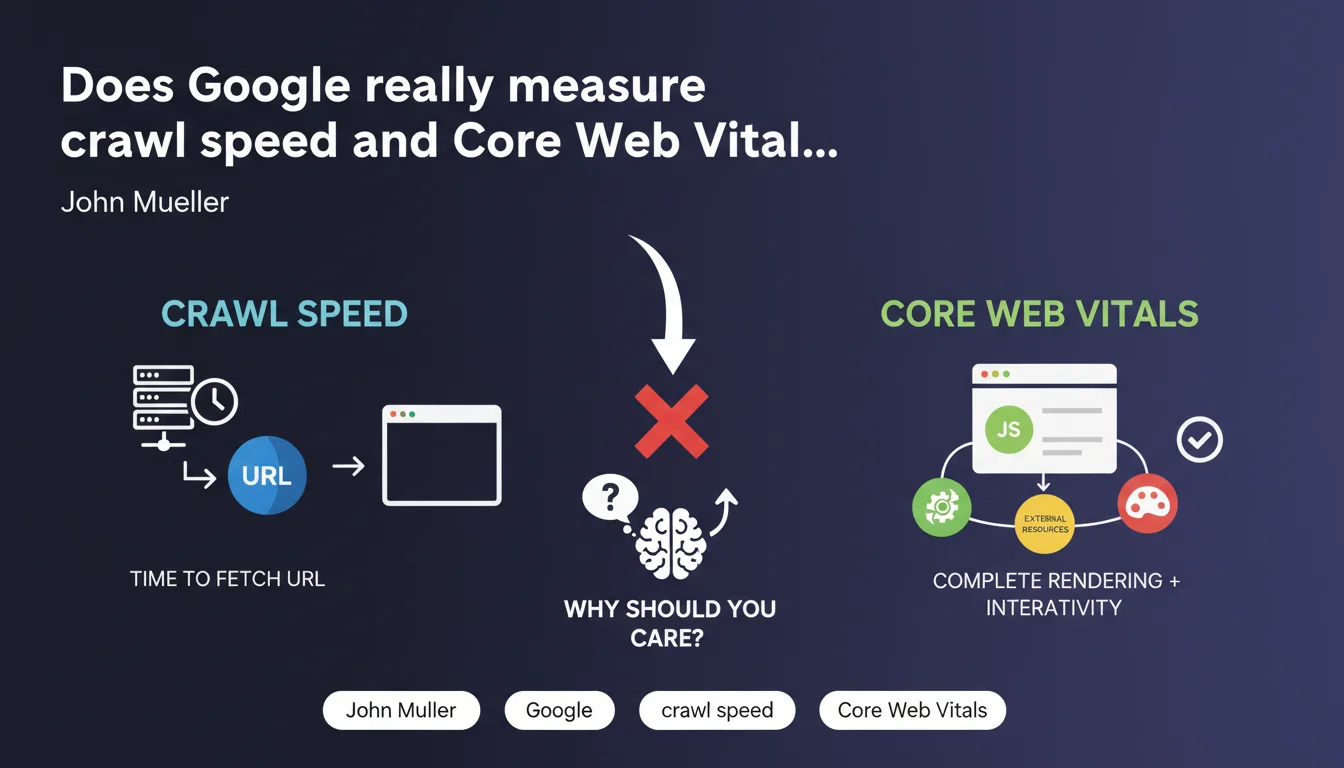
Google clearly distinguishes between crawl speed and Core Web Vitals. The former measures only the time to fetch a URL from the server, without JavaScript or rendering. CWV incorporates the complete user experience: rendering, external resources, interactivity. Confusing the two means missing what really matters.
What you need to understand
What does Google actually mean by "crawl speed"?
Crawl speed measures the time Googlebot needs to fetch raw HTML code from your server. Period. No rendering, no JavaScript execution, no external resource loading.
This is a purely technical metric that concerns infrastructure performance: server response time (TTFB), network latency, resource availability. If your server takes 3 seconds to deliver HTML, your crawl speed is catastrophic — even if the page displays instantly on the user's end.
Do Core Web Vitals measure the same thing?
No. Core Web Vitals evaluate the actual user experience in the browser. They include complete rendering: time to display main content (LCP), responsiveness to interactions (INP), visual stability (CLS).
These metrics integrate JavaScript, CSS, images, external fonts, lazy loading, React/Vue hydration — everything that makes up the perceived experience. A site can have excellent crawl speed (HTML delivered in 200ms) but disastrous CWV (LCP at 5s due to a bloated JS bundle).
Why does this distinction change the game for SEO?
Because Google uses these two metrics for different objectives. Crawl speed impacts crawl budget: the faster your pages are to fetch server-side, the more Googlebot can explore in its allocated time.
CWV influences ranking via the Page Experience signal. Optimizing one without the other is like walking on one leg. A slow server-side site will be crawled infrequently. A fast server-side but poor user experience site will be well-crawled but poorly ranked.
- Crawl speed: server metric, impacts crawl budget and content discovery efficiency
- Core Web Vitals: user metrics, integrate complete rendering and JavaScript, influence rankings
- Optimizing only TTFB doesn't guarantee good CWV if the front-end is poorly built
- Conversely, an ultra-lightweight front-end doesn't compensate for a sluggish server
SEO Expert opinion
Is this distinction new, or is Google just stating the obvious?
Let's be honest: for seasoned SEO professionals, this clarification isn't a revelation. We've known for years that TTFB and LCP don't play in the same league. But Mueller is answering here a recurring confusion among beginners and even some developers who think a CDN + cache solves everything.
What this statement confirms is that Google measures two distinct pipelines. One for exploration efficiency (how many URLs can I crawl per second), another for experience quality (is the user suffering or not). Confusing them means optimizing in the wrong direction.
What nuances should we add to this statement?
Mueller simplifies — intentionally. He says crawl speed "only measures fetch time," but Googlebot doesn't crawl in a vacuum. It accounts for HTTP responses, redirects, 5xx errors, timeouts. A server throwing random 503 errors has catastrophic "speed" even if HTML arrives fast when it works.
Another point: Mueller speaks of "complete rendering" for CWV, but attention — CWV is measured from real users (CrUX), not by Googlebot. The bot can crawl without executing JS (standard mode), or with rendering (WRS), but that doesn't impact CWV. These come from Chrome, not from crawl. [To verify] whether Google also uses Lighthouse synthetic data in certain cases (new sites without Chrome traffic).
In what cases doesn't this rule fully apply?
For sites with tight crawl budgets (large e-commerce, aggregators, news sites), crawl speed becomes critical even with green CWV. If Google takes 2 seconds to fetch each URL, it will only explore 43,000 pages per day with a fixed crawl budget. Reducing to 500ms multiplies the explored surface by 4.
Conversely, for a brochure site of 20 pages, crawl speed is anecdotal. Google will crawl everything anyway. However, poor CWV can tank CTR and bounce rate — thus indirectly impact SEO through behavioral signals.
Practical impact and recommendations
What should you prioritize first: crawl speed or Core Web Vitals?
It depends on your context. If you have millions of pages and Search Console shows uncrawled URLs or saturated crawl budget, server speed is the priority. Reduce TTFB, enable Brotli compression, optimize database queries, scale infrastructure.
If you have a typical site (hundreds to tens of thousands of pages) and your CWV are orange or red, focus on the front-end. LCP, INP, CLS — that's what impacts your ranking and conversion rate. A TTFB of 300ms vs 150ms makes no difference if your LCP is 4 seconds.
How do you precisely measure these two metrics?
For crawl speed, check Search Console > Settings > Crawl Statistics. Google gives you the average download time in milliseconds. Compare with your actual TTFB (curl, WebPageTest, New Relic). If the gap is significant, Googlebot is seeing something different than your users — likely a server geolocation issue or user-agent handling problem.
For Core Web Vitals, rely on real-world CrUX data (PageSpeed Insights, Search Console > Experience > Web Vitals). Lighthouse is useful for diagnostics, but synthetic scores don't always reflect reality. A site might score 95/100 in the lab and crash in production due to real traffic, A/B tests, third-party ads.
What mistakes should you absolutely avoid?
- Don't block CSS/JS in robots.txt to save crawl budget — Google needs these resources to evaluate CWV through rendering
- Optimize only initial HTML and forget critical resources (fonts, hero images, navigation JS) that tank LCP
- Confuse TTFB and FCP: a fast server doesn't guarantee fast First Contentful Paint if the browser waits for 50 external requests
- Ignore crawl budget for large sites: even with perfect CWV, if Google doesn't crawl your new pages, they'll never rank
- Sacrifice UX to shave 50ms off TTFB: the ranking impact of CWV is higher than crawl speed for 99% of sites
❓ Frequently Asked Questions
Un bon TTFB garantit-il de bons Core Web Vitals ?
La vitesse de crawl impacte-t-elle directement mon ranking ?
Googlebot exécute-t-il JavaScript pour mesurer la vitesse de crawl ?
Dois-je optimiser différemment pour Googlebot et pour les utilisateurs ?
Comment savoir si mon crawl budget est saturé ?
🎥 From the same video 23
Other SEO insights extracted from this same Google Search Central video · published on 18/02/2022
🎥 Watch the full video on YouTube →
💬 Comments (0)
Be the first to comment.