
Official statement
Other statements from this video 23 ▾
- □ Does Google really count every single visible link pointing to your site in Search Console?
- □ Should you really concentrate your content on fewer pages to rank better?
- □ Do Google's product review criteria apply even if your site isn't classified as a review site?
- □ Does Google's Indexing API really work for all types of content?
- □ Does E-A-T Really Impact Google Rankings, or Is It Just a Myth?
- □ Do unlinked brand mentions really boost your SEO rankings?
- □ Do user comments really improve your Google rankings?
- □ Do premium SSL certificates really impact Google rankings?
- □ Does having the same content in both PDF and HTML formats hurt your SEO rankings through cannibalization?
- □ Can you really control PDF indexing through HTTP headers?
- □ Should you still use rel=next and rel=prev tags for pagination in 2024?
- □ Should you really index every page on your website?
- □ Should you really worry about the referrer page shown in Google Search Console?
- □ Should you really redirect the old sitemap with a 301 or submit the new one directly instead?
- □ Is a 97% crawl refresh rate actually a positive sign for your website's health?
- □ Does your server speed actually control how often Google crawls your site?
- □ Does Google really measure crawl speed and Core Web Vitals the same way — and why should you care?
- □ Does Google really slow down crawling after a hosting migration, and how long does it last?
- □ Is the crawl rate parameter really a ceiling rather than something Google will try to maximize?
- □ Can CTR really penalize the rest of your website?
- □ Is internal linking really the most critical factor for SEO success?
- □ Does internal linking really take effect instantly after Google recrawls your pages?
- □ Should you worry if Google isn't crawling all your pages?
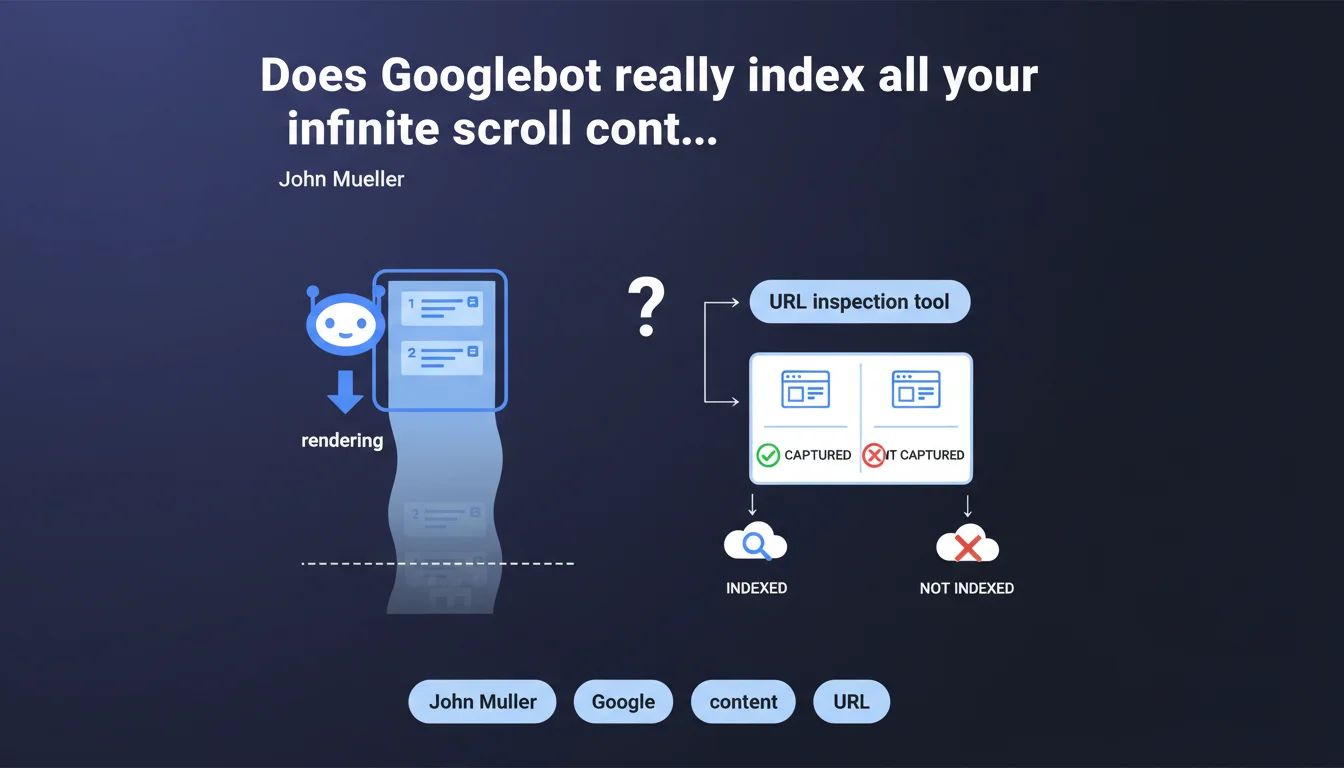
Googlebot uses a very tall viewport during rendering and can partially trigger infinite scroll — loading approximately 2-3 pages of content. Beyond that, nothing guarantees the rest will be captured. The URL inspection tool remains the only reliable way to verify what Google actually sees.
What you need to understand
What is this "very tall" viewport that Mueller is talking about?
Googlebot doesn't render pages with a standard browser viewport (like 1920x1080). It uses a very tall display window, which causes multiple screens of content to load automatically during JavaScript execution. This is what triggers the infinite scroll on certain sites — but only partially.
In practical terms? Googlebot can load the equivalent of 2-3 pages of content before stopping the render. But be careful — it doesn't actively scroll. It simply renders what the viewport automatically triggers.
Why only 2-3 pages and not everything?
Because rendering time is limited. Google allocates a fixed JavaScript execution budget per page: if your script takes too long, Googlebot cuts off before completion. Basic infinite scroll (which loads on scroll) only triggers if the initial viewport is large enough for the loading threshold to be reached.
And that's where the problem lies. Poorly implemented infinite scroll — which waits for a real user event or loads after too long a network delay — simply won't be captured at all.
How do you verify what Googlebot actually sees?
Mueller insists: use the URL inspection tool in Search Console. It's the only reliable way to see the render as Googlebot perceives it. You can visualize the rendered HTML and identify what's missing.
Never rely on testing in your own browser — even when simulating a large viewport. Googlebot's rendering conditions (timeouts, cache, bot detection) differ from those of a real browser.
- Googlebot uses a very tall viewport that can partially trigger infinite scroll
- Only 2-3 pages of content are typically loaded, not the entirety
- The URL inspection tool is essential for verifying actual rendering
- JavaScript timeouts limit what can be captured
SEO Expert opinion
Is this statement consistent with real-world observations?
Yes and no. On sites with basic infinite scroll (intersection observer + fetch), we do observe that Googlebot captures multiple screens. But the figure "2-3 pages" remains unclear — it depends on block heights, API response speed, and crawl budget allocated.
I've seen cases where only 1 additional page was indexed, and others where 5-6 screens got through. Google provides no numerical guarantee, which makes any strategy relying on infinite scroll risky by default. [Must verify] regularly, site by site.
What nuances should be added to this claim?
Mueller talks about "triggering" infinite scroll, not "browsing through" it. Important distinction: Googlebot simulates no user gestures. It doesn't actively scroll. It merely renders what the initial viewport automatically triggers.
If your implementation waits for a real scroll event or click, Googlebot sees nothing. Same problem if the script waits for a delay before loading: if the rendering timeout is exceeded, content remains invisible.
In what cases does this rule not apply?
If your infinite scroll is server-side (classic pagination disguised with cosmetic JS), no problem. Googlebot will crawl paginated URLs normally. But the moment you switch to full client-side with a single URL, you depend entirely on the viewport trick.
Another edge case: sites that load all content at once but visually hide blocks (pure CSS lazy render). There, Googlebot sees everything in the DOM — but watch out for page weight and render time.
Practical impact and recommendations
What should I concretely do if I have infinite scroll?
First step: audit the render using the URL inspection tool for all your high-content pages (listings, blogs, categories). Compare what Google sees with what a user sees after 5-6 scrolls. If the gap is massive, you have an indexation problem.
Next, implement fallback HTML pagination. Even if you keep infinite scroll for UX, add rel="next" / rel="prev" links or crawlable paginated URLs. This gives Googlebot an alternative route to discover all your content.
What mistakes should you absolutely avoid?
Never assume that "if it works in normal navigation, Google indexes everything." Googlebot's rendering has nothing to do with a real browser. Never rely on a scroll event or IntersectionObserver without HTML fallback.
Another classic mistake: test once then forget. Googlebot's behavior evolves, timeouts change, your JS code changes too. If you don't regularly monitor what Google sees, you can lose entire sections of indexation without realizing it.
- Test each page type with Search Console's URL inspection tool
- Implement classic HTML pagination alongside infinite scroll
- Verify that your script doesn't depend on a real scroll event
- Regularly monitor the indexation of dynamically loaded content
- Measure JS render times — if your infinite scroll takes >3s to load, Googlebot may cut off
- Add XML sitemaps for paginated URLs if you switch to hybrid pagination
❓ Frequently Asked Questions
Googlebot scrolle-t-il réellement sur les pages ?
Combien de pages de scroll infini Googlebot peut-il indexer ?
Comment vérifier si mon scroll infini est bien indexé ?
Faut-il abandonner le scroll infini pour le SEO ?
Un IntersectionObserver suffit-il pour que Googlebot charge le contenu ?
🎥 From the same video 23
Other SEO insights extracted from this same Google Search Central video · published on 18/02/2022
🎥 Watch the full video on YouTube →
💬 Comments (0)
Be the first to comment.