
Official statement
Other statements from this video 20 ▾
- □ Comment Google indexe-t-il réellement le contenu des iframes ?
- □ Faut-il vraiment privilégier une structure hiérarchique pour les grands sites ?
- □ Bloquer le crawl via robots.txt : solution miracle contre les liens toxiques ?
- □ Faut-il traduire ses URLs pour améliorer son référencement international ?
- □ Pourquoi Googlebot ignore-t-il la balise meta prerender-status-code 404 dans les applications JavaScript ?
- □ Pourquoi les migrations de sites échouent-elles si souvent malgré une préparation SEO ?
- □ Les doubles slashes dans les URLs sont-ils un problème pour le SEO ?
- □ Comment transférer efficacement le classement de vos images vers de nouvelles URLs ?
- □ Faut-il vraiment s'inquiéter des erreurs 404 sur son site ?
- □ HTTP 200 sur une page 404 : soft 404 ou cloaking ?
- □ Faut-il forcer l'indexation de son fichier sitemap dans Google ?
- □ Faut-il s'inquiéter si Googlebot crawle vos endpoints API et génère des 404 ?
- □ L'accessibilité web est-elle vraiment un facteur de classement Google ou un écran de fumée ?
- □ L'achat de liens reste-t-il vraiment sanctionné par Google ?
- □ Faut-il encore signaler les mauvais backlinks à Google ?
- □ Pourquoi bloquer le crawl via robots.txt empêche-t-il Google de voir votre directive noindex ?
- □ Pourquoi Google refuse-t-il l'idée d'une formule magique pour ranker ?
- □ Pourquoi Google affiche-t-il mal vos caractères spéciaux dans ses résultats ?
- □ Google Analytics et Search Console : pourquoi ces différences de données posent-elles problème ?
- □ Faut-il vraiment viser le SEO parfait ?
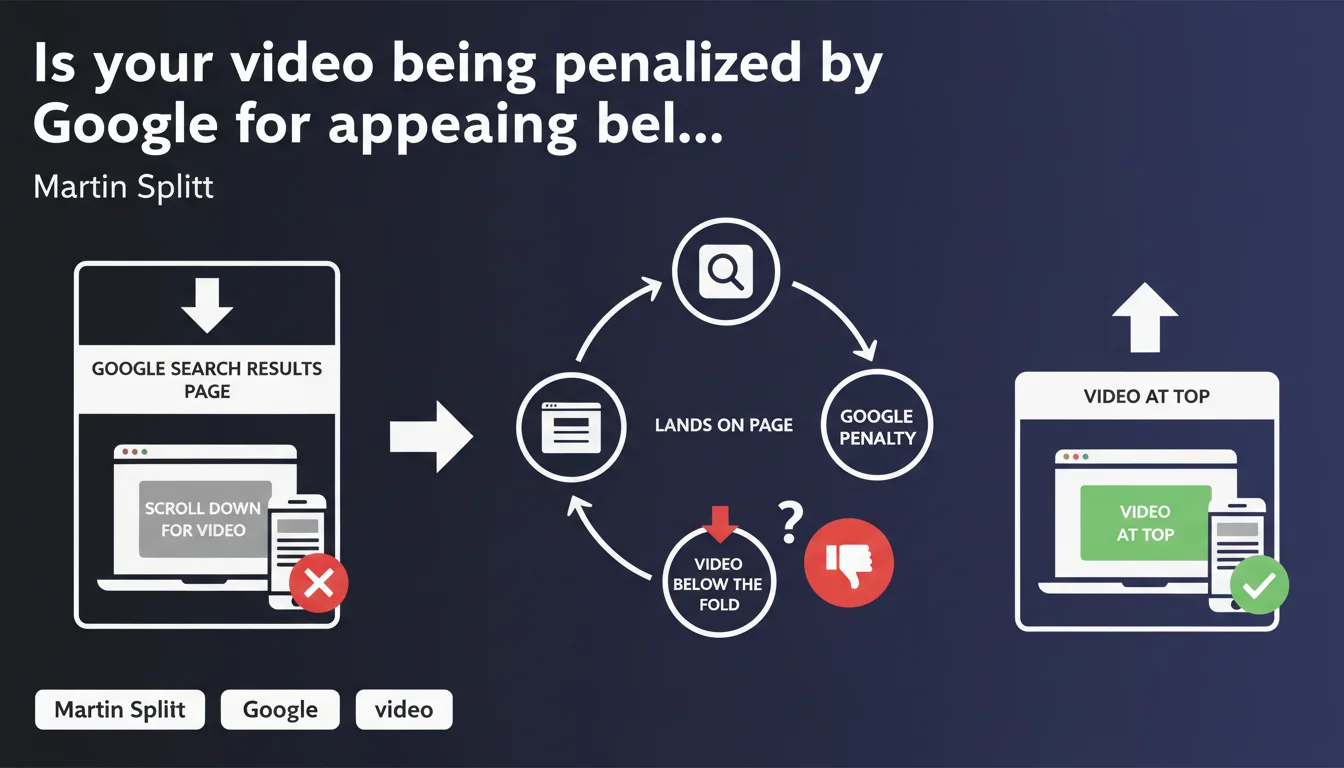
Google now flags a 'Video outside viewport' error in Search Console when a video requires scrolling to become visible after a user clicks through. The recommended solution: place the video at the top of the page so it appears immediately in the initial viewport. This criterion directly impacts eligibility for video rich results.
What you need to understand
What exactly is the 'Video outside viewport' error?
This alert in Search Console means Google has detected a video positioned too far down the page. In practical terms, a user who clicks on a video search result must scroll down to find the promised content.
Google considers this configuration a poor user experience: the visitor expects to see the video immediately upon arriving on the page, not have to search for it. The algorithm measures the video's position in the DOM and its visibility during the initial page load.
Why is Google enforcing this criterion now?
The stated objective is to ensure that video rich results in the SERPs lead to pages where video content is actually the primary focus. If a video is buried in the middle of an article or pushed to the end of a page, Google considers it not to be the main content.
This requirement aligns with the logic of Core Web Vitals and user experience: reducing friction between search intent and immediate satisfaction. Google wants to prevent users from clicking on a video result only to face a wall of text before accessing the content.
Which pages are affected by this error?
All pages containing VideoObject schema markup and aiming to appear in enriched video results. If your video is mid-page or in a sidebar, you could be affected.
Mixed blog pages (text + embedded video), landing pages with explanatory video at the bottom, structured articles with video as a complement — all these configurations can trigger this alert.
- The error specifically concerns eligibility for video rich results, not classic organic search rankings
- Google measures the video's position in the initial viewport (above the fold)
- VideoObject schema markup alone is no longer sufficient — position now matters
- This constraint is added to existing criteria (minimum duration, quality, relevance)
SEO Expert opinion
Is this requirement realistic for all content types?
Let's be honest: forcing video to the top of every page creates a real editorial dilemma for certain formats. An in-depth article that provides context for a video through introductory text loses coherence if you force the video to the very top.
Google seems to favor pages where video IS the primary content, at the expense of hybrid formats where it serves to illustrate or complement. For educational or journalistic content, this constraint can conflict with editorial best practices. [To be verified] whether Google plans exceptions for long, structured content.
What's the distinction between 'outside viewport' and 'primary content'?
Martin Splitt mentions the concept of immediate visibility, but remains vague about the exact tolerance threshold. Does a video visible at 80% in the initial viewport trigger the error? What about mobile vs. desktop formats, where viewport dimensions vary drastically?
Based on field observations, Google appears to apply a binary rule: if the video requires any scrolling, even minimal, it's considered outside viewport. No gray area. The problem: on mobile, placing a 16:9 video at the top consumes the entire screen and pushes title and context down — which can also harm UX. [To be verified] whether Google adjusts its criteria by device.
Does this directive change anything for mixed content pages?
Yes, and that's where it gets tricky. If you have an article with a text introduction followed by an explanatory video, you face a choice: either move the video to the top and break the editorial flow, or forgo video rich results.
Strategically, the question becomes: is it better to optimize for video featured snippets or for engagement and completion rate? If your video traffic primarily comes from YouTube and the page serves as an informational landing page, the trade-off might not be worth it.
Practical impact and recommendations
What should you do concretely if you have this error?
The immediate solution recommended by Google is straightforward: move your video to the top of the page, right after the title or hero header. Ensure it's visible without scrolling on both desktop and mobile.
Then check in Search Console (under Enhancements > Videos) that the error disappears after re-indexing. This can take anywhere from a few days to several weeks depending on how often Google crawls your pages.
What are your alternatives if you don't want to break your editorial structure?
If moving the video up harms your user experience, you can choose to disable VideoObject schema markup on those pages. You'll forgo video rich results, but you'll preserve your structure and engagement rates.
Another option: create a dedicated page for each video (landing page style) where the video is genuinely the primary content, and redirect clicks from rich results to this page. You keep your mixed articles intact and optimize a specific page for Google.
How do you verify your site is compliant?
Use the URL inspection tool in Search Console to test your video pages. Google will tell you if the video is detected outside the viewport. Supplement with manual testing: open the page on different devices and verify that the video is visible without scrolling.
Monitor your CTR on video results before and after making changes. If CTR drops after moving the video up, it might be that your old structure better served user intent — in which case you need to weigh visibility in the SERPs against actual performance.
- Audit all pages with VideoObject schema: video position in the DOM
- Test visibility on mobile and desktop (initial viewport)
- Move videos to the top of pages or create dedicated pages
- Request re-indexing in Search Console
- Monitor engagement metrics post-modification (time on page, video completion rate)
- Track impressions and CTR on video rich results
❓ Frequently Asked Questions
L'erreur 'Vidéo hors du viewport' impacte-t-elle le référencement organique classique ?
Peut-on garder une introduction textuelle avant la vidéo ?
Faut-il supprimer le Schema VideoObject si on ne peut pas remonter la vidéo ?
Cette règle s'applique-t-elle aussi aux vidéos YouTube embarquées ?
Combien de temps faut-il pour que l'erreur disparaisse après correction ?
🎥 From the same video 20
Other SEO insights extracted from this same Google Search Central video · published on 18/12/2023
🎥 Watch the full video on YouTube →
💬 Comments (0)
Be the first to comment.