
Official statement
Other statements from this video 20 ▾
- □ Comment Google indexe-t-il réellement le contenu des iframes ?
- □ Faut-il vraiment privilégier une structure hiérarchique pour les grands sites ?
- □ Bloquer le crawl via robots.txt : solution miracle contre les liens toxiques ?
- □ Faut-il traduire ses URLs pour améliorer son référencement international ?
- □ Pourquoi Googlebot ignore-t-il la balise meta prerender-status-code 404 dans les applications JavaScript ?
- □ Pourquoi les migrations de sites échouent-elles si souvent malgré une préparation SEO ?
- □ Les doubles slashes dans les URLs sont-ils un problème pour le SEO ?
- □ Pourquoi Google pénalise-t-il les vidéos hors du viewport et comment y remédier ?
- □ Comment transférer efficacement le classement de vos images vers de nouvelles URLs ?
- □ Faut-il vraiment s'inquiéter des erreurs 404 sur son site ?
- □ HTTP 200 sur une page 404 : soft 404 ou cloaking ?
- □ Faut-il forcer l'indexation de son fichier sitemap dans Google ?
- □ Faut-il s'inquiéter si Googlebot crawle vos endpoints API et génère des 404 ?
- □ L'achat de liens reste-t-il vraiment sanctionné par Google ?
- □ Faut-il encore signaler les mauvais backlinks à Google ?
- □ Pourquoi bloquer le crawl via robots.txt empêche-t-il Google de voir votre directive noindex ?
- □ Pourquoi Google refuse-t-il l'idée d'une formule magique pour ranker ?
- □ Pourquoi Google affiche-t-il mal vos caractères spéciaux dans ses résultats ?
- □ Google Analytics et Search Console : pourquoi ces différences de données posent-elles problème ?
- □ Faut-il vraiment viser le SEO parfait ?
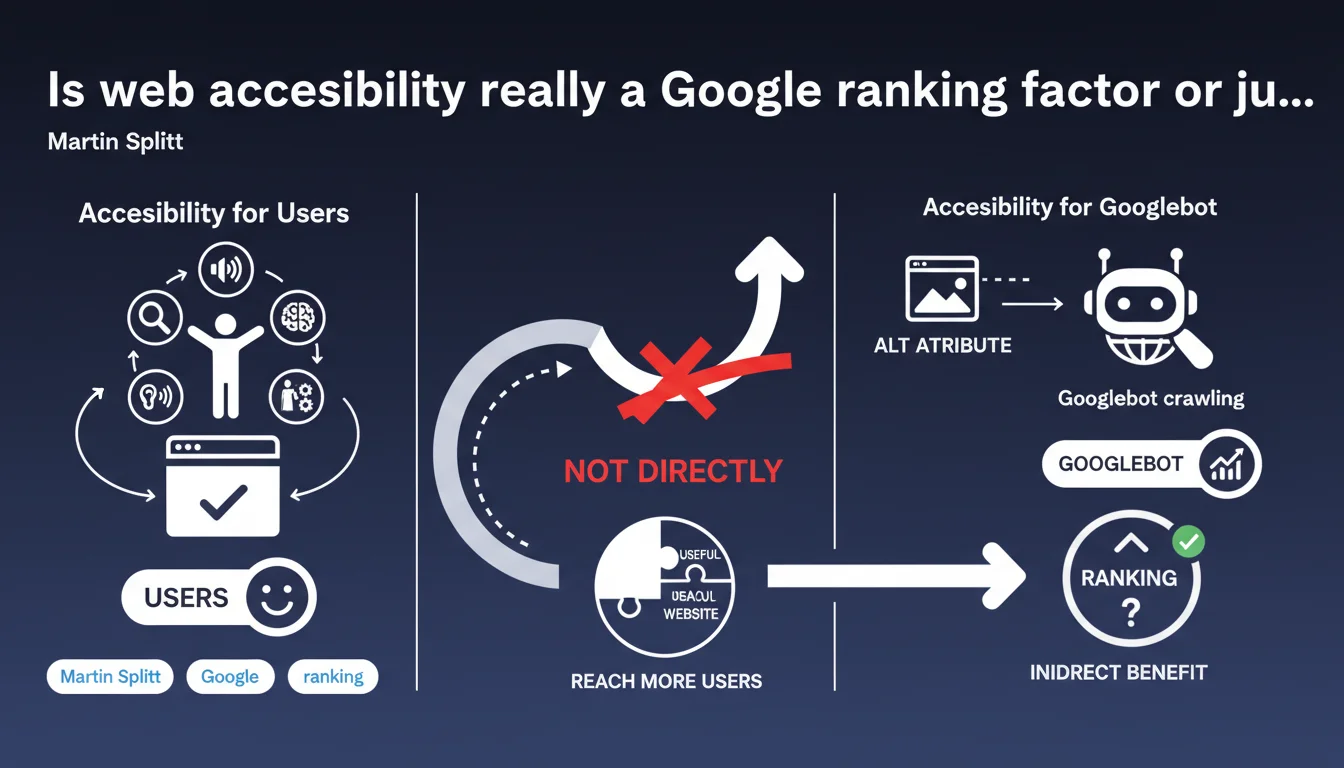
Google claims that accessibility is not a direct ranking factor, but acknowledges that certain accessibility elements (like the alt attribute) help Googlebot. Plain and simple: optimizing for accessibility improves SEO indirectly without being an explicit ranking signal. The real issue remains overall user experience.
What you need to understand
Why does Google clarify that accessibility is not a direct factor?
This statement aims to clear up persistent ambiguity in the SEO community. Many assume that an accessible site benefits from a specific algorithmic boost — something Martin Splitt outright denies.
Google distinguishes here between explicit ranking factors (speed, backlinks, content relevance) and collateral benefits. Accessibility falls into this second category: it doesn't directly change your position in the SERPs, but it influences metrics that do matter.
What accessibility elements concretely impact Googlebot?
Splitt mentions the alt attribute on images, a telling example. Without alternative text, Googlebot loses semantic context. Result: your page deprives itself of a potential indexing layer.
Other aspects matter too: semantic HTML structure (header, nav, main tags) helps the crawler prioritize content. Clean code makes crawling easier — and reduces interpretation errors.
Why emphasize user experience if it's not a ranking signal?
Because user experience indirectly influences rankings. An inaccessible site generates high bounce rates, low session time, fewer conversions — all signals that Google captures through behavioral data.
Moreover, an accessible site expands your audience: visually impaired users, seniors, mobile users in difficult conditions. More qualified audience = more positive signals for Google.
- Accessibility is not an isolated ranking factor that directly weights the algorithm
- Certain accessibility elements (alt, HTML structure) help crawling and indexation
- An accessible site improves user experience, which indirectly impacts SEO
- Google values sites that reach the broadest possible audience
SEO Expert opinion
Is this position consistent with what we observe in the field?
Yes and no. On paper, Google is right: no pure accessibility signal appears in documented patents or leaks. But in practice, sites respecting WCAG standards often perform better — not because of an algorithmic boost, but because they tick other boxes.
An accessible site is generally better coded, faster, more mobile-friendly. Hard to isolate the effect of accessibility alone. It's a correlated variable, not a causal one — and Google plays on this nuance to avoid committing itself.
What gray areas remain in this statement?
Splitt stays vague on the impact of Core Web Vitals and user behavior. An inaccessible site generates frustration — thus potentially poor UX signals. Is this factored in indirectly? [To verify]
Another murky point: the notion of a « useful site ». Google keeps repeating that accessibility contributes to usefulness, but never defines this criterion algorithmically. We're swimming in corporate discourse without measurable data.
In what cases does this rule not really apply?
For local queries and niche markets, an accessible site can make a difference. If your direct competitor has lousy code and you have clean structure, you capture intent better — Google sees it.
Same goes for rich media content (videos, infographics). Without transcripts or descriptive tags, you lose indexing opportunities. Accessibility becomes a concrete SEO lever then, even if Google refuses to call it that.
Practical impact and recommendations
What should you prioritize to leverage this statement?
Focus on elements that serve both accessibility and crawling. The alt attribute, obviously — but also title, aria-label, and Hn hierarchy tags. A clear H1 helps Googlebot as much as a screen reader.
Next, work on semantic HTML structure. Use header, nav, main, footer tags to segment your pages. Google understands your content topology better — as do users.
What critical mistakes should you absolutely avoid?
Never sacrifice accessibility for aesthetic reasons. Insufficient text/background contrast hurts readability — and can influence time spent on the page.
Avoid JavaScript-only menus without HTML fallback. If Googlebot misses your internal links, your internal linking collapses — accessibility or not. Same for forms without explicit labels: hard to fill out, hard to index.
How do you verify your site respects these best practices?
Run your pages through Lighthouse (Accessibility section). Fix critical errors: missing alt text, weak contrasts, missing landmarks.
Also test with a screen reader (NVDA, JAWS): if navigation is chaotic, Googlebot might have the same difficulties. Finally, check Google Search Console to spot orphaned or poorly indexed pages — often linked to structural issues.
- Add a descriptive alt attribute to all important images
- Use a logical heading hierarchy (unique H1, structured H2-H6)
- Implement semantic HTML5 tags (header, nav, main, footer)
- Ensure text/background contrast compliant with WCAG (minimum 4.5:1 ratio)
- Test navigation with keyboard and screen reader
- Verify all internal links are crawlable (not JS-only)
- Audit regularly with Lighthouse and Search Console
❓ Frequently Asked Questions
L'attribut alt des images influence-t-il vraiment le classement Google ?
Un site inaccessible peut-il être pénalisé par Google ?
Faut-il prioriser l'accessibilité ou d'autres optimisations SEO ?
Quels outils utiliser pour auditer l'accessibilité d'un site web ?
Google peut-il détecter si un site respecte les normes WCAG ?
🎥 From the same video 20
Other SEO insights extracted from this same Google Search Central video · published on 18/12/2023
🎥 Watch the full video on YouTube →
💬 Comments (0)
Be the first to comment.