
Official statement
Other statements from this video 9 ▾
- □ Do CSS class names really affect your search engine rankings?
- □ Why does Google require your CSS files to be crawlable?
- □ Is CSS ::before and ::after content really invisible to Google?
- □ Why does Google fail to recognize hashtags generated through CSS ::before?
- □ Why aren't your CSS background images ever showing up in Google Images?
- □ Could strict HTML and CSS separation be the missing piece in your indexation strategy?
- □ Does 100vh really cause indexation problems for your hero images?
- □ Why does Google require <img> tags for stock images instead of CSS?
- □ Can CSS Harm Your SEO Just Like JavaScript Does?
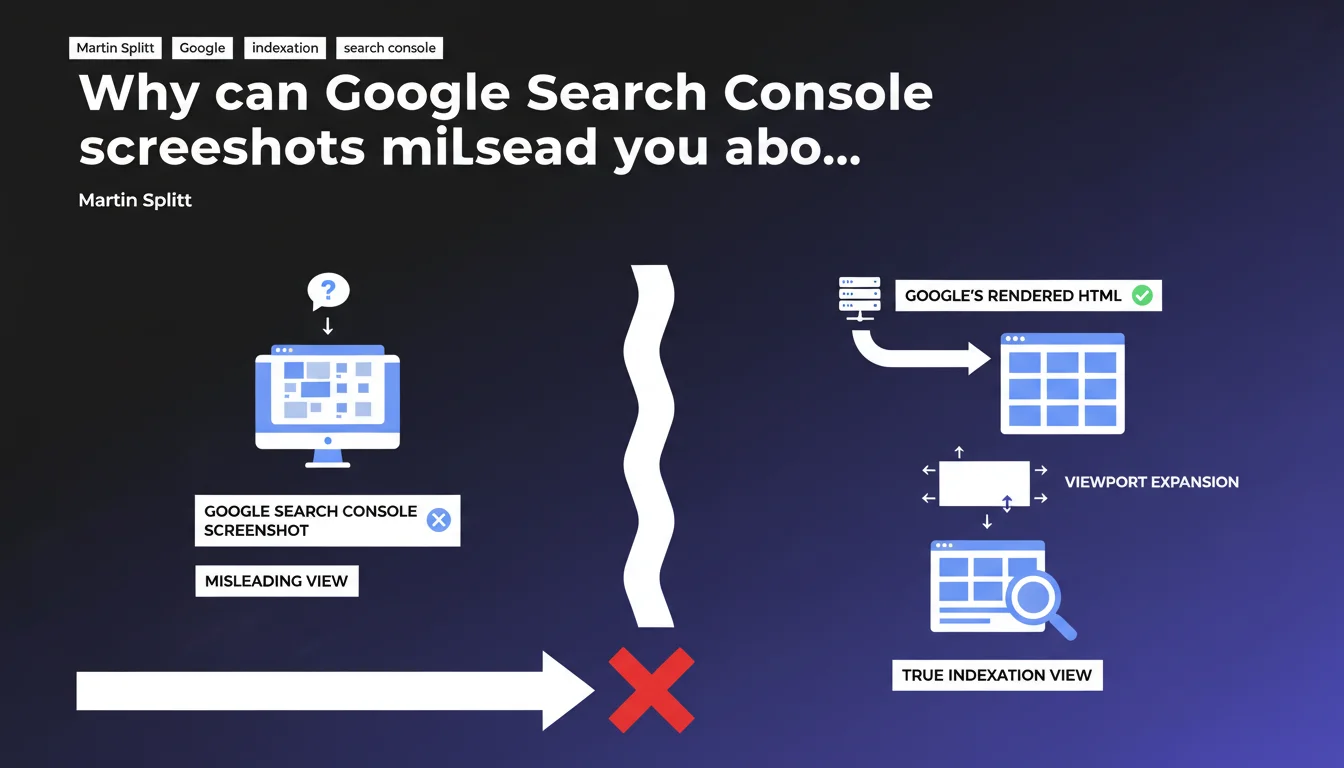
Google uses a technique called viewport expansion that makes its screenshots potentially misleading. To truly verify how Googlebot interprets a page, you must systematically consult the rendered HTML through the URL inspection tool, not rely on the visual preview.
What you need to understand
What is viewport expansion and why does Google use it?
The viewport expansion is a technique used by Google to capture pages in an extended visual format. Concretely, the search engine generates screenshots that sometimes show more content than what the crawler actually sees during indexation.
This divergence creates a problem: what you observe in the Search Console screenshot doesn't necessarily match what Googlebot actually interpreted and indexed. And that's where the diagnosis gets tricky.
What's the difference between the screenshot and the rendered HTML?
The screenshot is a visual representation generated after the fact, potentially modified by viewport expansion. The rendered HTML, on the other hand, is the exact source code as processed by the indexation engine — including JavaScript post-load modifications.
When you diagnose an indexation or rendering issue, this rendered HTML is what matters. The screenshot can show you content perfectly displayed while the crawler wasn't able to access it properly.
In what cases does this confusion cause problems?
Critical situations mainly concern JavaScript-heavy sites where content is injected dynamically. If you rely on the screenshot to validate that Google sees your content, you risk missing malformed tags, unrendered content, or HTML structures misinterpreted.
Typically: a dropdown menu visible on the screenshot but absent from the final DOM, lazy-loaded images not detected, or Schema.org markup injected in JavaScript that doesn't pass through.
- Viewport expansion creates a gap between visual capture and indexation reality
- Rendered HTML is the only reliable source to diagnose how Google interprets a page
- JavaScript-heavy sites are particularly exposed to this confusion
- The screenshot can show content that the crawler never saw
SEO Expert opinion
Is this statement consistent with field observations?
Yes, and it's even a point many SEOs underestimate. We regularly see faulty diagnostics because someone just checked the screenshot. The problem is that Google doesn't communicate clearly enough about this distinction — many Search Console users still don't know that screenshots aren't reliable.
In practice, discrepancies are rare on classic static sites, but become critical as soon as you touch modern JavaScript (React, Vue, Angular). On these architectures, we regularly observe differences between what the screenshot shows and what appears in the rendered HTML.
What nuances should we consider?
First nuance: not all visual elements are necessarily crucial for SEO. A discrepancy on a decorative image or UI element doesn't necessarily impact the indexation of main text content. Let's be honest — you need to prioritize.
Second point: the rendered HTML itself has limitations. It captures a state at a specific moment in time, but doesn't always reflect user interactions or content variations based on context. [To verify]: Google doesn't clarify whether this rendered HTML corresponds to the crawler's first pass or a later state after re-crawling.
In what cases doesn't this rule apply?
If your site is 100% static (pure HTML without JavaScript), the distinction between screenshot and rendered HTML matters little — both should be nearly identical. This is also true for classic WordPress with minimal JavaScript customizations.
Practical impact and recommendations
What should you concretely do to verify Google's rendering?
Systematically use the URL inspection tool in Google Search Console, then click on "View crawled page" and select the HTML tab. This is the code that matters, not the visual preview.
Compare this rendered HTML with your initial source code to identify what was modified by JavaScript. The differences tell you exactly what Google indexes — or doesn't.
What errors should you avoid during diagnosis?
Never rely solely on the screenshot to validate that content is properly crawled. This is the classic mistake that wastes hours on phantom diagnostics.
Also avoid assuming that "if it displays in my browser, Google sees it". Googlebot's rendering can differ — JavaScript timeouts, resources blocked by robots.txt, incomplete execution. Test, don't assume.
How do you integrate this verification into your SEO audits?
Integrate the rendered HTML check into your systematic audit checklist, particularly on strategic pages (homepage, main categories, flagship product pages). Document the discrepancies observed between source and render.
- Always verify rendered HTML through the URL inspection tool in Search Console
- Compare initial source code and rendered HTML to identify JavaScript transformations
- Prioritize strategic pages in your verifications (homepage, categories, flagship products)
- Systematically document gaps between screenshot and rendered HTML
- Never diagnose an indexation issue without consulting the rendered HTML
- Verify that Schema.org markup injected in JavaScript appears in the final render
❓ Frequently Asked Questions
Pourquoi Google ne montre-t-il pas directement le HTML rendu au lieu de la capture ?
Le viewport expansion affecte-t-il l'indexation ou seulement l'affichage de la capture ?
Faut-il vérifier le HTML rendu sur toutes les pages de mon site ?
Comment savoir si mon site est concerné par des problèmes de rendu JavaScript ?
Le HTML rendu dans Search Console correspond-il exactement à ce que voit Googlebot au moment de l'indexation ?
🎥 From the same video 9
Other SEO insights extracted from this same Google Search Central video · published on 24/07/2025
🎥 Watch the full video on YouTube →
💬 Comments (0)
Be the first to comment.