
Official statement
Other statements from this video 20 ▾
- □ Comment Google indexe-t-il réellement le contenu des iframes ?
- □ Faut-il vraiment privilégier une structure hiérarchique pour les grands sites ?
- □ Bloquer le crawl via robots.txt : solution miracle contre les liens toxiques ?
- □ Faut-il traduire ses URLs pour améliorer son référencement international ?
- □ Pourquoi Googlebot ignore-t-il la balise meta prerender-status-code 404 dans les applications JavaScript ?
- □ Pourquoi les migrations de sites échouent-elles si souvent malgré une préparation SEO ?
- □ Les doubles slashes dans les URLs sont-ils un problème pour le SEO ?
- □ Pourquoi Google pénalise-t-il les vidéos hors du viewport et comment y remédier ?
- □ Comment transférer efficacement le classement de vos images vers de nouvelles URLs ?
- □ Faut-il vraiment s'inquiéter des erreurs 404 sur son site ?
- □ HTTP 200 sur une page 404 : soft 404 ou cloaking ?
- □ Faut-il forcer l'indexation de son fichier sitemap dans Google ?
- □ Faut-il s'inquiéter si Googlebot crawle vos endpoints API et génère des 404 ?
- □ L'accessibilité web est-elle vraiment un facteur de classement Google ou un écran de fumée ?
- □ L'achat de liens reste-t-il vraiment sanctionné par Google ?
- □ Faut-il encore signaler les mauvais backlinks à Google ?
- □ Pourquoi Google refuse-t-il l'idée d'une formule magique pour ranker ?
- □ Pourquoi Google affiche-t-il mal vos caractères spéciaux dans ses résultats ?
- □ Google Analytics et Search Console : pourquoi ces différences de données posent-elles problème ?
- □ Faut-il vraiment viser le SEO parfait ?
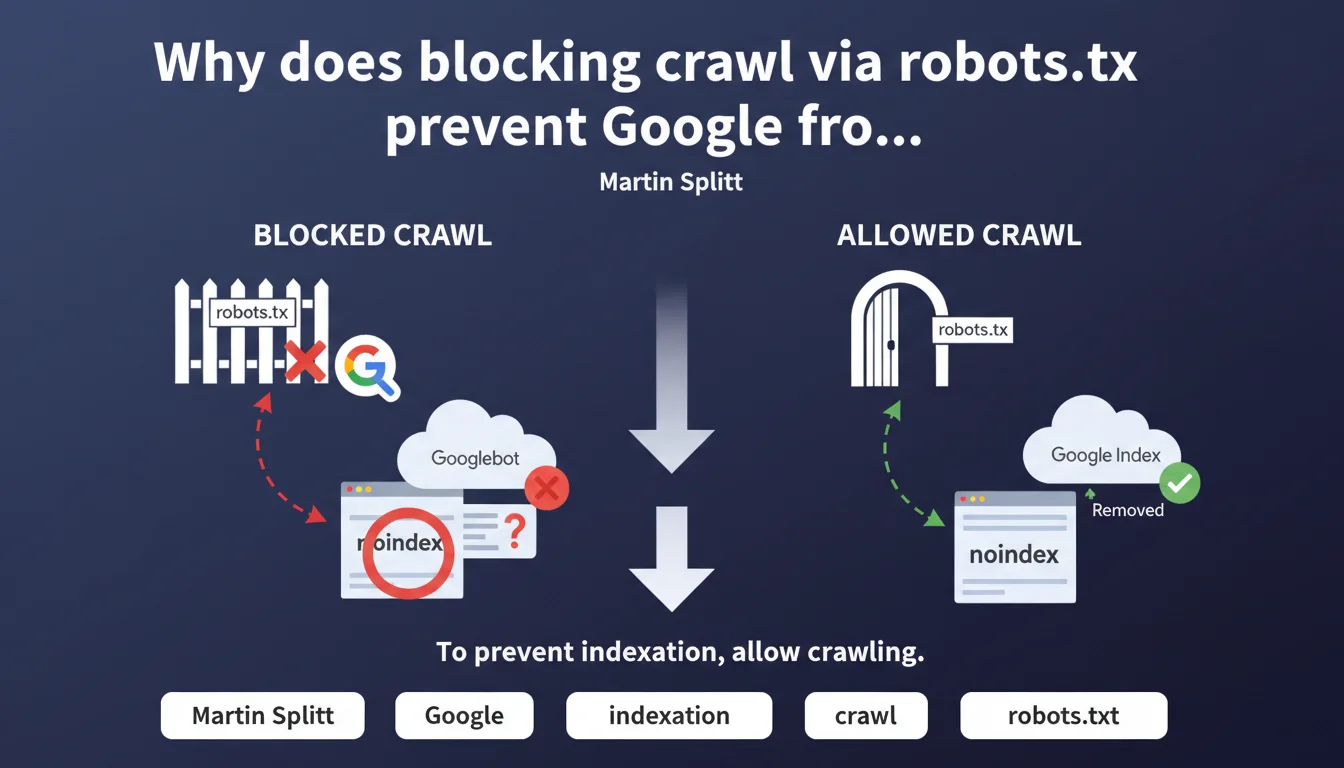
If you block a URL in robots.txt, Googlebot cannot crawl it and therefore never detects the noindex tag present on that page. To effectively deindex, you must instead allow crawling so Google can read the noindex instruction. It's a common technical trap that produces the opposite effect of what you're trying to achieve.
What you need to understand
What is the technical error behind this problem?
The robots.txt intervenes before Googlebot makes any HTTP request to your server. It's an upstream filter that says "you can proceed" or "move along".
If you block a URL in robots.txt, Googlebot never loads the page. It therefore never sees the HTML code, the HTTP header, or the meta noindex tag that you've carefully placed. Result: the URL can remain indexed indefinitely, with an empty or generic snippet, because Google never received the order to remove it.
Why does Google index URLs blocked by robots.txt?
Because robots.txt only controls crawling, not indexation. Google can discover a URL through an external link, a sitemap, or a mention somewhere on the web.
If that URL is blocked by robots.txt, Google can still decide to index it anyway — without content, just the URL and possibly anchor text retrieved from links pointing to it. This is particularly visible on sensitive pages (admin, staging, parameters) that you thought were protected.
How does the noindex directive actually work?
The meta robots noindex tag (or the X-Robots-Tag HTTP header) can only be read if Googlebot actually accesses the page. It's an instruction located in the server response.
Once read, Google progressively removes the URL from its index. But this reading only occurs if crawling is allowed. Hence the basic rule: to properly deindex, allow crawling and then block after removal from the index if needed.
- Robots.txt = crawling control, not indexation
- Noindex = indexation instruction, requires crawling to be seen
- Blocking the crawl of a noindexed page prevents Google from reading that instruction
- A URL blocked by robots.txt can still be indexed if Google discovers it elsewhere
- To deindex: allow crawling, wait for removal, then block if necessary
SEO Expert opinion
Is this statement consistent with practices observed in the field?
Absolutely. It's actually one of the most frequent errors I see in technical audits. Teams that want to hide sensitive pages (dev environments, test pages, duplicate content) block them in robots.txt thinking they'll never be indexed.
Except they are — with a snippet that says "No information available for this page". And they stay there, sometimes for months, because Google never got to read the noindex directive we had put in place anyway. The robots.txt then becomes a lock against deindexation, not a protection.
Should you always prioritize noindex over robots.txt to control indexation?
Not systematically. If you have thousands of low-value pages (filter facets, internal search results, infinite pagination), noindex will force Googlebot to crawl all those URLs to read the instruction.
Result: you consume crawl budget for nothing. In this case, robots.txt can be more efficient — as long as you accept that some of these URLs may remain potentially indexed if they were discovered before the block. [To verify]: Google claims that crawl budget is not a problem for most sites, but on high-volume sites, field observation shows otherwise.
What if a page is already indexed and blocked by robots.txt?
This is the trickiest scenario. You must temporarily remove the robots.txt block, add a noindex tag, then wait for Google to crawl the page and remove it from the index.
Once deindexed (verify via Search Console or a site: query), you can restore the robots.txt block if you really don't want it to be crawled anymore. But keep in mind that an external link discovered later could reindex it — without content this time, just the URL.
Practical impact and recommendations
What should you do concretely to manage noindex and robots.txt?
First, audit the URLs blocked in robots.txt and check if they appear in Google's index (site: query or Search Console). If so, you have a configuration problem to fix.
Next, establish a clear rule: for any page you want to deindex, you must allow crawling while Google reads the noindex tag. Only after confirmed removal can you potentially block crawling — if it really makes sense.
For sensitive pages (admin, staging), real protection is HTTP authentication or IP blocking, not robots.txt. Robots.txt is a public file that anyone can read — including to discover URLs you'd prefer to keep discreet.
What errors should you absolutely avoid?
Never tell yourself "I'll block everything in robots.txt, so nothing will be indexed". That's false. Google can index without crawling, and it will if the URL is mentioned anywhere.
Also avoid constantly switching between robots.txt and noindex on the same URLs — it creates confusion in Google's processing and lengthens deindexation times. Choose a strategy and stick with it.
How do you verify that your configuration is correct?
- Extract all URLs blocked in robots.txt using a crawler (Screaming Frog, Oncrawl)
- Cross-reference with a Search Console export (Coverage) to see if any are indexed
- For each indexed + blocked URL, temporarily remove the block and add noindex
- Verify after 2-4 weeks that the URL has disappeared from the index (site: query or GSC)
- Restore robots.txt only if necessary (often, noindex is sufficient)
- Test URL inspection in GSC to confirm that Google sees the noindex directive
- Document the logic (which sections in noindex, which in robots.txt, why)
❓ Frequently Asked Questions
Peut-on utiliser robots.txt pour empêcher l'indexation ?
Si une page est déjà indexée et bloquée par robots.txt, comment la désindexer ?
Noindex en meta ou en HTTP header : y a-t-il une différence face à robots.txt ?
Faut-il toujours laisser crawler les pages noindex pour le crawl budget ?
Google peut-il ignorer robots.txt et crawler quand même ?
🎥 From the same video 20
Other SEO insights extracted from this same Google Search Central video · published on 18/12/2023
🎥 Watch the full video on YouTube →
💬 Comments (0)
Be the first to comment.