
Official statement
Other statements from this video 17 ▾
- □ Pourquoi votre site n'apparaît-il pas dans Google : indexation ou ranking ?
- □ Pourquoi Google pousse-t-il Search Console pour diagnostiquer l'indexation ?
- □ L'URL Inspection Tool de Search Console remplace-t-il vraiment le test d'indexation manuel ?
- □ Le rapport d'indexation de la Search Console suffit-il vraiment à diagnostiquer vos problèmes d'indexation ?
- □ Faut-il vraiment chercher à indexer 100% de ses pages ?
- □ Pourquoi Google indexe-t-il toujours la page d'accueil en premier sur un nouveau site ?
- □ Pourquoi la page d'accueil de votre nouveau site ne s'indexe-t-elle pas ?
- □ Votre site est-il vraiment absent de l'index Google ou juste victime de la canonicalisation ?
- □ Hreflang fausse-t-il vos rapports d'indexation dans Search Console ?
- □ Pourquoi vos pages 'site en construction' ne seront jamais indexées par Google ?
- □ Pourquoi certaines pages s'indexent en quelques secondes et d'autres jamais ?
- □ Google peut-il encore indexer l'intégralité du web ?
- □ Google applique-t-il vraiment un quota d'indexation par site ?
- □ Faut-il supprimer l'ancien contenu pour améliorer l'indexation du nouveau ?
- □ Faut-il vraiment utiliser la fonction 'Demander une indexation' de la Search Console ?
- □ L'opérateur site: est-il vraiment fiable pour mesurer l'indexation de votre site ?
- □ Comment exploiter vraiment l'opérateur site: au-delà de la simple vérification d'indexation ?
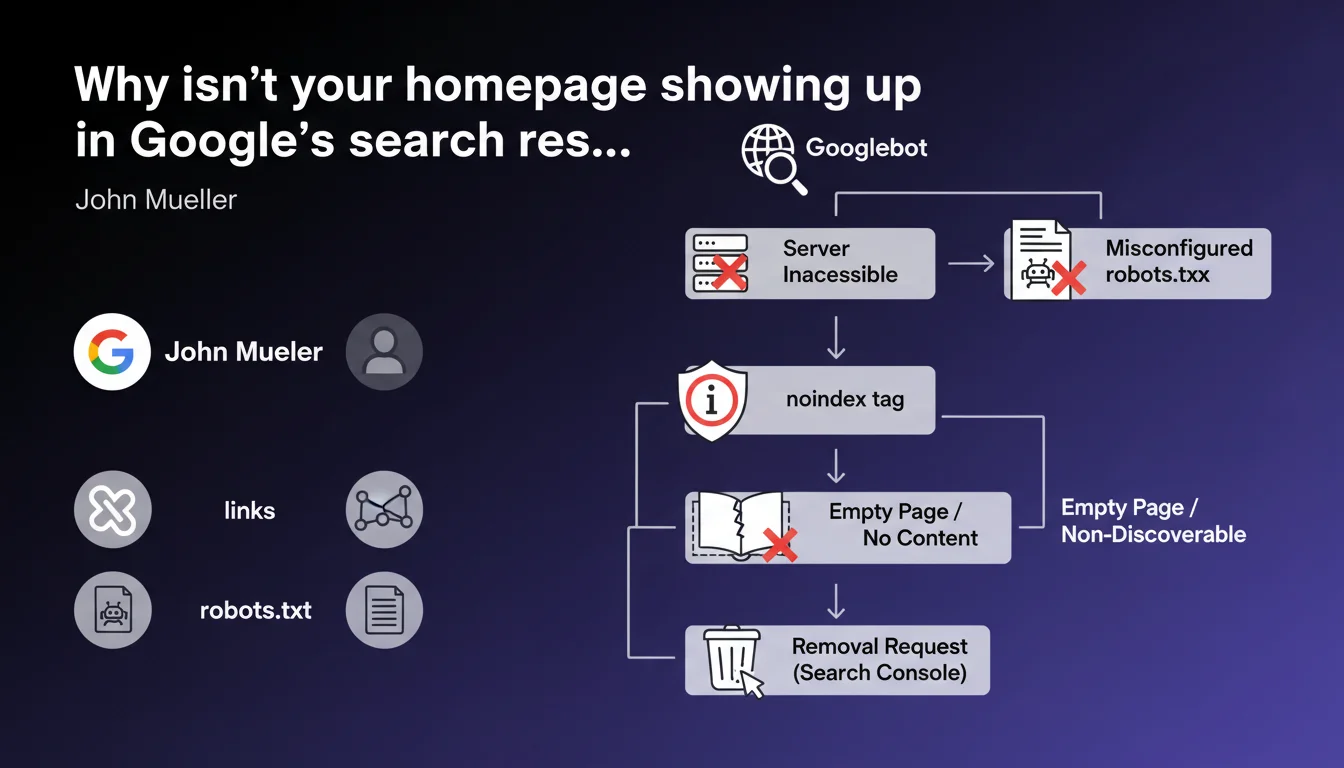
John Mueller lists the technical causes that block homepage indexation: inaccessible server, misconfigured robots.txt, noindex tag, empty or invisible page for Googlebot, isolated site without incoming links, or removal request via Search Console. Six recurring obstacles that, once identified, are often resolved in minutes — but can paralyze a site for weeks if you don't know where to look.
What you need to understand
When a homepage refuses to get indexed, panic sets in quickly. Yet Mueller reminds us here that the causes are often straightforward and fall into six distinct categories.
Understanding these blocks also means understanding the logic of crawling and indexation: Google doesn't guess, it applies strict rules.
What are the most common technical obstacles?
The first, often underestimated: the inaccessible server. If Googlebot can't reach the URL, nothing happens. Repeated timeouts, persistent 5xx errors, IP blocked by firewall — all commonplace but dangerous scenarios.
Next, robots.txt. A Disallow: / directive or a misplaced rule is enough to block everything. And no, Google won't send an email to flag the error.
Third case: the noindex tag active, sometimes forgotten after a launch or inherited from a poorly cleaned staging environment. It hides in the <head> or in the HTTP header — two distinct places to check.
Can a page be empty in Google's eyes without being empty for users?
Absolutely. A page lacking indexable content can display images, JavaScript, iframes — but if no HTML text is present at the time of initial crawl, Google has nothing to work with.
Sites with 100% client-side JavaScript rendering (CSR) often suffer this fate. If the server returns a nearly empty DOM and content only appears after script execution, Googlebot might miss it on the first pass — even if a second render eventually arrives.
What does "non-discoverable site" mean in this context?
A site without incoming links is invisible. Google discovers URLs by crawling links — not by telepathy.
If no external site points to your homepage, you haven't submitted an XML sitemap, and Google had never crawled your domain before, your site stays off the radar. It's rare for a homepage, but it happens on new domains or poorly executed migrations.
- Six main causes: server, robots.txt, noindex, empty content, lack of links, manual removal.
- Each cause has its own diagnosis — no universal solution.
- Most blocks are detected via Search Console, crawl tools, or a simple
curlcommand. - Google never warns about a configuration error — it's up to the SEO professional to check.
SEO Expert opinion
Mueller presents a complete and unsurprising inventory. These six points are taught from the basics of SEO — but their recurrence proves they remain frequent blind spots, even among experienced teams.
What's missing here: prioritization. All these problems don't have the same likelihood or severity. A failing robots.txt or a forgotten noindex tag are encountered far more often than a truly empty homepage or a completely isolated site.
Is this list exhaustive or does it hide other cases?
It covers the essentials, but not everything. For example: poorly managed redirect chains, canonicals pointing elsewhere, or a server returning a 200 status for a soft 404 page (ghost error invisible to standard tools).
Another case not mentioned: manual penalty. If Google has applied a manual action to the site, indexation can be blocked or significantly slowed — and Search Console displays a specific notification. [To verify] whether this statement implicitly includes this case under "removal request".
Finally, Mueller says nothing about normal indexation timelines. How long to wait before diagnosing a problem? 48 hours? One week? Two? No numerical guidance — which leaves room for interpretation.
What interpretation mistakes should you avoid?
First mistake: believing a homepage must index instantly. On a new domain without authority or backlinks, indexation can take time even without technical obstacles.
Second mistake: confusing crawling and indexation. Google can crawl a page without indexing it — by editorial choice, insufficient quality, or perceived duplication. Server logs show Googlebot's visit, but the URL remains absent from the index.
Practical impact and recommendations
How do you diagnose homepage indexation blocking?
First step: Search Console. Use the URL inspection tool on your homepage. If Google indicates "URL not indexed", the report details the exact reason — noindex tag, robots.txt, server error, etc.
Second verification: test direct accessibility with curl -I https://yoursite.com or a tool like Screaming Frog. Check the HTTP status, headers (X-Robots-Tag), and any possible meta robots tag in the <head>.
Third point: check your robots.txt file via yoursite.com/robots.txt and test it in Search Console (robots.txt testing tool). A single misplaced line is enough to block everything.
What if the page is empty in Googlebot's eyes?
Compare the HTML source (Ctrl+U in your browser) and the DOM displayed after JavaScript execution. If main content only appears in the final DOM, it's a client-side rendering issue.
Possible solutions: switch to server-side rendering (SSR), use static pre-generation (SSG), or at minimum add basic HTML content directly to the server response.
Caution: Google may eventually index JavaScript content via the second render — but it takes time, and it's never guaranteed. Better not to rely on it for a homepage.
What mistakes should you avoid to ensure smooth indexation?
Never leave a noindex tag active in production. Set up automated alerts (via monitoring or CI/CD) to detect this tag on strategic pages.
Don't block access to critical resources (CSS, JS) in robots.txt — even if Google can technically index the page, it disrupts rendering and content understanding.
Avoid multiple redirects to the homepage. A 301 → 302 → 200 chain slows crawling and can create indexation ambiguities.
- Verify the homepage's HTTP status (must be 200, not 3xx or 5xx)
- Inspect the robots.txt file and test with the Search Console tool
- Check for the absence of noindex tag in the
<head>and HTTP headers - Ensure text content is present in the HTML source, not only in JavaScript
- Verify that at least one external link or XML sitemap points to the homepage
- Check Search Console for any active manual action or removal request
- Compare server logs and crawl reports to identify any intermittent errors
Mueller's six causes are clear, but their cross-referenced diagnosis requires rigor and method. A homepage that refuses to index often hides multiple overlapping problems — a failing robots.txt and a forgotten noindex tag, for example.
The apparent complexity of these checks, especially on hybrid technical stacks (SSR/CSR, CDN, multiple environments), can justify a thorough technical SEO audit. Specialized SEO agencies have advanced crawl tools, continuous monitoring, and field expertise that accelerates diagnosis — and especially, prevents missing an underlying structural problem.
❓ Frequently Asked Questions
Une homepage peut-elle être crawlée mais non indexée ?
Combien de temps faut-il attendre avant de diagnostiquer un problème d'indexation ?
Un site 100% JavaScript peut-il indexer sa homepage normalement ?
Faut-il soumettre manuellement la homepage via Search Console pour accélérer l'indexation ?
Une homepage sans backlinks externes peut-elle s'indexer ?
🎥 From the same video 17
Other SEO insights extracted from this same Google Search Central video · published on 22/06/2023
🎥 Watch the full video on YouTube →
💬 Comments (0)
Be the first to comment.