
Official statement
Other statements from this video 15 ▾
- □ Are ranking fluctuations really normal, or could they be hiding a technical issue?
- □ Does Google really use one global index for all countries?
- □ Should you still trust the site: operator to diagnose your indexation status?
- □ Does user engagement really influence your Google rankings?
- □ Why do high-traffic pages carry more weight in your Core Web Vitals score?
- □ Does Google really segment websites by template type when evaluating Page Experience?
- □ How many internal links should you actually place on each page to boost your SEO?
- □ Why does your internal linking tree structure really matter to Google?
- □ Does your homepage distance really impact how fast Google indexes your pages?
- □ Does Google really ignore your URL structure for SEO rankings?
- □ Why do Search Console positions fail to reflect your actual search rankings?
- □ Does Google really distinguish between 'edit video' and 'video editor' as different user intentions?
- □ Does your FAQ schema markup really need to be on the ranking page to generate rich snippets?
- □ Do footer links carry the same SEO weight as links in your main content?
- □ Is mobile-first indexing really impacting your Google rankings?
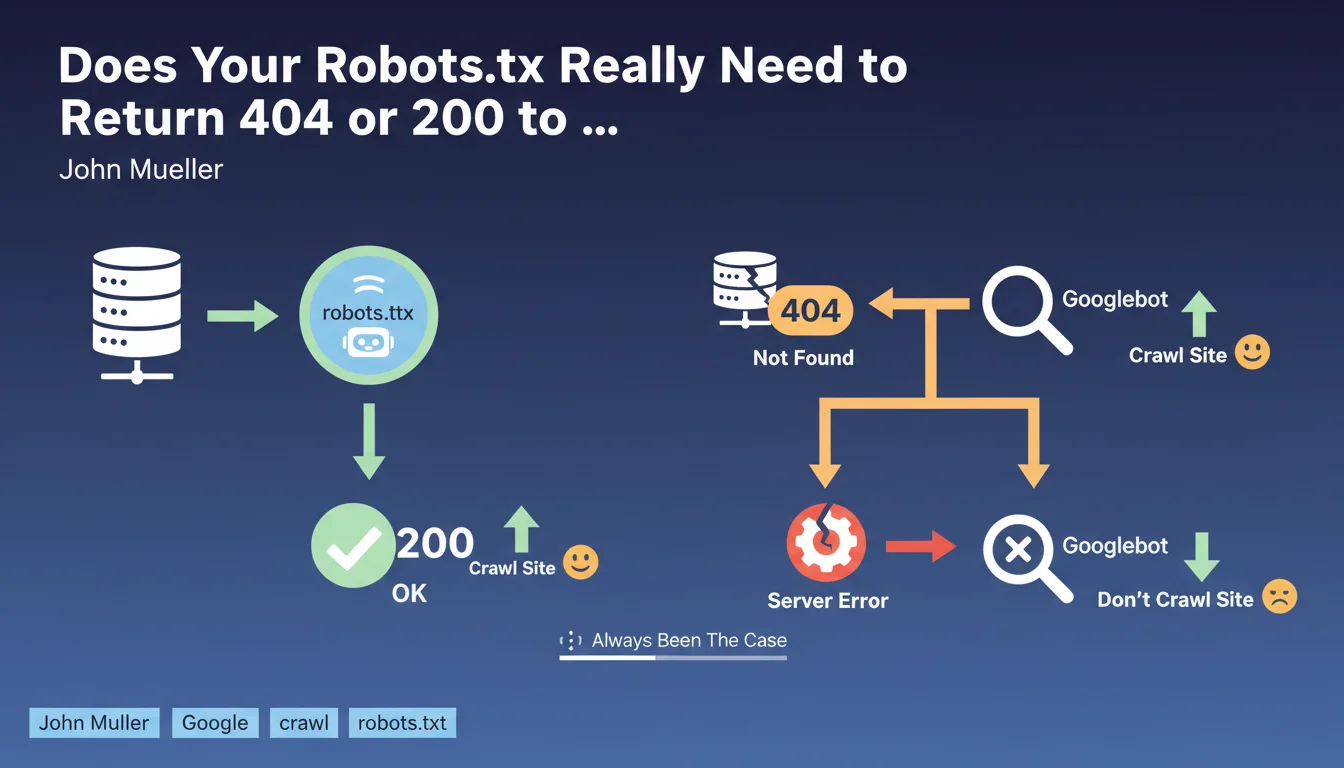
Google requires that the robots.txt file return either a 200 (file exists) or a 404 (file absent) status code. If the server returns a 5xx error, Googlebot considers it a technical problem and suspends crawling the site. This rule is nothing new — it has applied since Google's earliest days.
What you need to understand
Why Does Google Stop Crawling When Robots.txt Returns a 5xx Error?
When Googlebot requests /robots.txt, it expects a clear response: the file exists (200) or it doesn't (404). In either case, the bot knows how to proceed.
If the server returns a 5xx error (500, 503, etc.), Google interprets this as a temporary server malfunction. As a precaution, it suspends crawling to avoid overwhelming an already struggling site. This isn't a penalty — it's a protective measure.
What Actually Happens If Robots.txt Returns a 5xx Code?
The site becomes temporarily uncrawlable. Googlebot will return to try again later, but as long as the error persists, no pages will be explored.
If the problem lasts several days, pages can begin disappearing from the index due to lack of refresh. New pages won't be discovered. It's a complete blockage of the crawl pipeline.
Does This Rule Apply to Other HTTP Status Codes Too?
No. Only 5xx errors trigger this cautious behavior. A 404 simply means "no robots.txt, I'll crawl everything." A 200 indicates a valid file to respect.
3xx redirects are generally followed, but Google recommends avoiding complex redirect chains on this critical file. A 401/403 code is treated as intentional blocking — equivalent to a complete Disallow: / .
- A 404 on robots.txt = no crawl restrictions
- A 200 on robots.txt = file is read and applied
- A 5xx error = crawl suspended until resolved
- 3xx redirects work but are discouraged for this critical file
- A 401/403 is equivalent to blocking the entire site
SEO Expert opinion
Does This Statement Really Reflect Real-World Behavior?
Yes, and it's verifiable in minutes. Trigger a 500 error on your robots.txt in dev or preprod, monitor Search Console: you'll see crawling drop sharply.
This behavior has been documented for years in official guidelines, but many developers still don't know about it. Result: a poorly tested update, a CDN switching to error mode, and suddenly nothing moves on the indexation side.
Why Do Some Sites Temporarily Escape This Rule?
Google can show temporary tolerance on high-authority sites or those with stable crawl history. If your robots.txt crashes for 15 minutes, Googlebot won't panic immediately.
But don't rely on it. A new site, a low-authority domain, or an error persisting for several hours? Crawling stops dead. [To be verified]: the exact tolerance duration varies by site, and Google publishes no official figures.
Should You Really Monitor This File Like a Critical Resource?
Absolutely. The robots.txt file is one of the first resources queried by all bots — Google, Bing, and even more aggressive third-party crawlers.
A server buckling under load can start returning 503s precisely on this file. And there's the domino effect: no legitimate crawl, so no fresh indexing, so visibility drops. All because a 200-byte text file is no longer accessible.
Practical impact and recommendations
How Can You Verify That Your Robots.txt Returns the Correct HTTP Code?
Use curl from the command line: curl -I https://yoursite.com/robots.txt. The first line should display HTTP/1.1 200 or HTTP/1.1 404.
On the Search Console side, the URL Inspection tool also tests robots.txt automatically. If Google detects a problem, it alerts you directly in the "Coverage" section.
What Should You Do If Your Server Regularly Returns 5xx Errors?
First, isolate the cause: server load, database timeout, CDN issue? Your server logs are your best ally.
If the problem is traffic spikes, consider serving robots.txt from a static cache or dedicated CDN. This file rarely changes — no reason it should hit your entire application stack.
What Mistakes Should You Avoid When Managing Robots.txt?
Never block this file through another mechanism (HTTP authentication, overly strict IP whitelisting). Googlebot must be able to access it before crawling anything else.
Also avoid generating this file dynamically if your CMS is fragile. A static robots.txt, version-controlled, and served directly by your web server is infinitely more reliable.
- Regularly test the HTTP code returned by /robots.txt (200 or 404 only)
- Set up monitoring alerts on this file (Uptime Robot, Pingdom, etc.)
- Verify that your CDN/WAF doesn't interfere with robots.txt access
- Serve this file statically rather than through dynamic generation
- Check Search Console weekly to detect crawl anomalies
- Document the exact file path in your infrastructure (server root, CDN, cache)
❓ Frequently Asked Questions
Un site sans robots.txt peut-il être correctement indexé par Google ?
Combien de temps Google tolère-t-il une erreur 5xx sur robots.txt avant de suspendre le crawl ?
Est-ce que Bing et les autres moteurs appliquent la même règle ?
Peut-on rediriger /robots.txt vers une autre URL ?
Que se passe-t-il si robots.txt retourne un code 403 (Forbidden) ?
🎥 From the same video 15
Other SEO insights extracted from this same Google Search Central video · published on 14/03/2022
🎥 Watch the full video on YouTube →
💬 Comments (0)
Be the first to comment.