
Official statement
Other statements from this video 15 ▾
- □ Les fluctuations de classement sont-elles vraiment normales ou cachent-elles un problème technique ?
- □ Google utilise-t-il vraiment un seul index mondial pour tous les pays ?
- □ Faut-il encore se fier aux résultats de la requête site: pour diagnostiquer l'indexation ?
- □ L'engagement utilisateur influence-t-il réellement le classement Google ?
- □ Pourquoi les pages à fort trafic pèsent-elles plus dans le score Core Web Vitals ?
- □ Combien de liens internes faut-il placer par page pour optimiser son SEO ?
- □ Pourquoi la structure en arbre de votre maillage interne compte-t-elle vraiment pour Google ?
- □ La distance depuis la homepage influence-t-elle vraiment la vitesse d'indexation ?
- □ Pourquoi la structure d'URL n'a-t-elle aucune importance pour Google ?
- □ Pourquoi les positions Search Console ne reflètent-elles pas la réalité du classement ?
- □ Google distingue-t-il vraiment 'edit video' et 'video editor' comme des intentions différentes ?
- □ Le balisage FAQ doit-il obligatoirement figurer sur la page indexée pour générer un rich snippet ?
- □ Les liens en footer ont-ils la même valeur SEO que les liens dans le contenu ?
- □ L'indexation mobile-first a-t-elle un impact sur vos classements Google ?
- □ Faut-il vraiment qu'un robots.txt inexistant retourne un 404 pour éviter de bloquer Googlebot ?
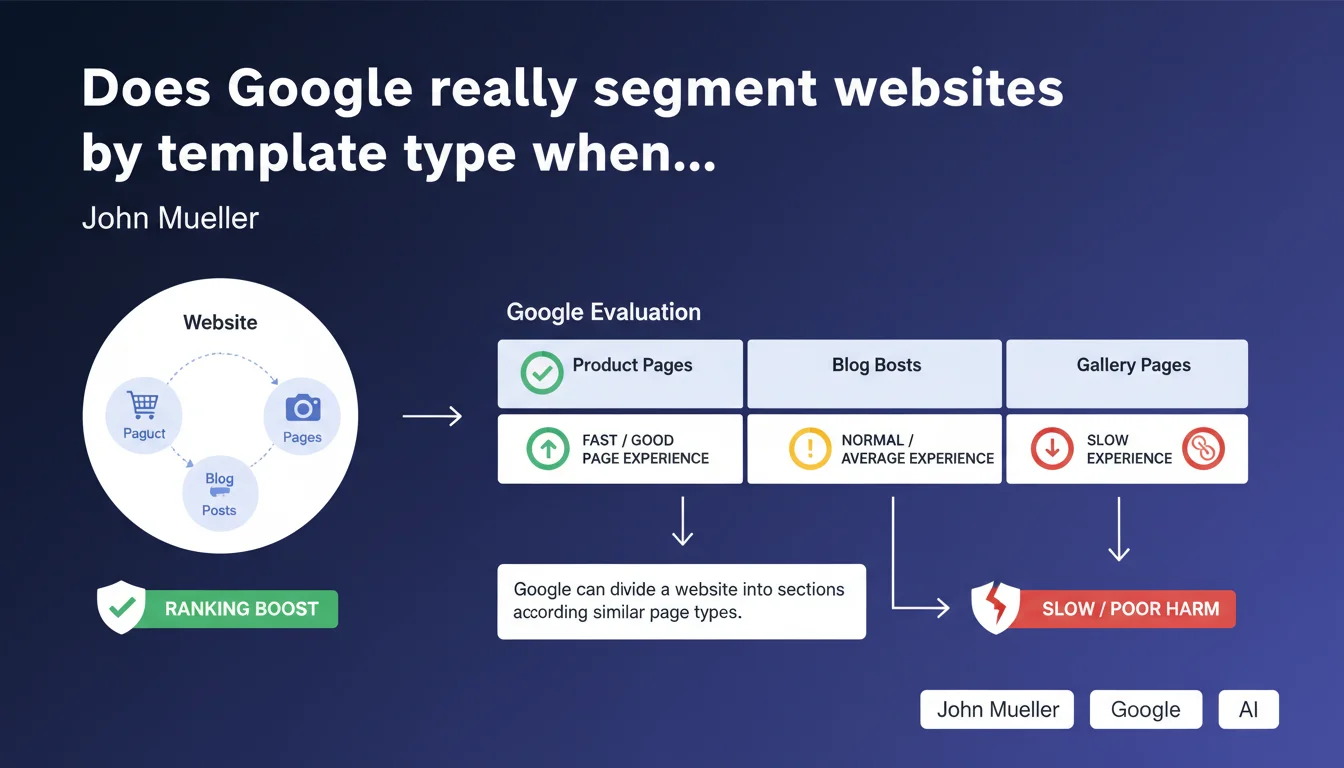
Google can split a website into sections based on similar page types if sufficient data exists. In practice: if your product pages are fast but your blog pages are slow, only the latter will be penalized by Page Experience updates. This granularity is a game-changer for optimization strategies.
What you need to understand
How does Google identify different template types on a website?
Google doesn't settle for a global evaluation of your site. The search engine analyzes structural patterns and detects groups of pages sharing similar characteristics — HTML architecture, recurring elements, loading behaviors.
This segmentation relies on analyzing sufficient data volumes. A small site with 20 pages probably won't have this granularity. But an e-commerce platform with thousands of product sheets, category pages, a blog, and landing pages? Google can absolutely distinguish each type.
Why does this approach change the logic of Page Experience optimization?
Before this clarification, many believed that a slow template could drag down the entire site. The reality is more nuanced: Google evaluates each segment independently.
If your product pages display excellent Core Web Vitals but your blog articles are catastrophic, only these editorial pages will suffer the negative impact. Your product sheets retain their Page Experience advantage. It's a surgical approach rather than a blanket one.
What conditions must be met for this segmentation to activate?
John Mueller mentions a key prerequisite: "sufficient data available". Translation? Google needs a substantial volume of pages per template to establish reliable statistics.
A site with 10 product sheets probably won't benefit from this granularity. But once you reach hundreds or thousands of pages per type, the engine can build distinct performance profiles.
- Google segments by template patterns, not manually by your folder structure
- Segmentation requires sufficient data volume per page type
- Each segment is evaluated independently for Page Experience
- A fast template doesn't compensate for a slow template — they live their separate lives
- This logic applies specifically to Page Experience updates
SEO Expert opinion
Is this granularity truly new or just a clarification?
Let's be honest: this statement doesn't fundamentally change how Google works, it clarifies a mechanism already in place. Field analysis has long shown that not all templates on a site perform uniformly in the SERPs.
What's new is the official confirmation that Google actively segments by page types. It puts an end to speculation about the "domino effect" a bad template might have on the entire domain.
In what cases doesn't this rule really apply?
The devil hides in the phrase "sufficient data". [To verify]: what exactly is this threshold? 100 pages per template? 500? Google doesn't specify, and that's problematic for mid-sized sites.
For a site with 50 product sheets and 30 articles, it's highly likely that Google doesn't have enough material to segment. Result: a more global evaluation, where a failing template can indeed contaminate the site's overall perception.
Does this logic extend beyond Page Experience?
Mueller's statement specifically targets Page Experience. But field observations suggest that Google applies similar logic to other criteria — content quality, semantic depth, freshness.
A blog neglected for three years doesn't necessarily sabotage your ultra-optimized product sheets. The engine understands that different sections of a site have distinct editorial lives. This contextual intelligence goes well beyond Page Experience, even if Google doesn't officially admit it for all signals.
Practical impact and recommendations
What should you do concretely to leverage this segmentation?
Prioritize your strategic templates. Identify page types that generate the most organic traffic and conversions. Focus your Core Web Vitals optimization efforts on these segments first.
If your product pages represent 80% of revenue, your blog generates 5% of traffic, and your resources are limited — the choice is clear. Optimize what matters first.
How do you measure the performance of each segment independently?
Use Google's tools by segmenting your analysis. In Search Console, filter Core Web Vitals reports by URL groups. PageSpeed Insights and Lighthouse can be automated via API to test representative samples of each template.
Create dedicated dashboards by type. Don't settle for a global view — it masks critical disparities between your segments. An average score of 70 can hide one template at 95 and another at 40.
What mistakes should you absolutely avoid with this approach?
Don't completely neglect a segment just because it generates little traffic. Google evaluates overall domain quality, and a catastrophic template can harm your algorithmic reputation even if it's marginal.
Also avoid over-optimizing one template at the expense of real user experience. Core Web Vitals are just one signal among many — an ultra-fast template but void of value won't perform.
- Map all your template types and their page volumes
- Measure Core Web Vitals separately for each segment
- Prioritize optimization of high-impact business templates
- Automate monitoring by type (Search Console API, Lighthouse CI)
- Document architectural differences between templates to understand performance gaps
- Test optimizations on a sample before global rollout
- Regularly reassess segmentation if your architecture evolves
❓ Frequently Asked Questions
Google segmente-t-il tous les sites par type de template ?
Un mauvais template peut-il quand même nuire à l'ensemble du site ?
Comment savoir si mon site bénéficie de cette segmentation ?
Cette logique de segmentation s'applique-t-elle à d'autres signaux que Page Experience ?
Faut-il créer des sous-domaines pour isoler les templates problématiques ?
🎥 From the same video 15
Other SEO insights extracted from this same Google Search Central video · published on 14/03/2022
🎥 Watch the full video on YouTube →
💬 Comments (0)
Be the first to comment.