
Official statement
Other statements from this video 16 ▾
- □ Le balisage Local Business doit-il vraiment se limiter à une seule ville ?
- □ Schema.org : pourquoi Google ignore-t-il une partie de vos balises structurées ?
- □ Faut-il vraiment rédiger du texte descriptif autour de vos illustrations pour ranker dans Google Images ?
- □ Faut-il publier tous les jours pour améliorer son référencement Google ?
- □ Le nombre de mots est-il vraiment sans importance pour le référencement ?
- □ Les mots-clés dans les URLs ont-ils encore un impact en SEO ?
- □ Les images consomment-elles vraiment du budget de crawl au détriment de vos pages stratégiques ?
- □ Peut-on vraiment lancer deux sites quasi-identiques sans risquer de pénalité Google ?
- □ Pourquoi vos liens JavaScript doivent absolument utiliser des balises A avec href valide ?
- □ L'audio sur une page influence-t-il réellement le classement Google ?
- □ Faut-il vraiment éviter de modifier les balises meta avec JavaScript ?
- □ Les mises à jour algorithmiques de Google sont-elles vraiment différentes des pénalités ?
- □ Pourquoi Google ne communique-t-il que sur une fraction de ses mises à jour d'algorithme ?
- □ Les données structurées améliorent-elles vraiment votre classement dans Google ?
- □ Faut-il vraiment éviter d'utiliser noindex et canonical sur la même page ?
- □ Les données structurées vidéo servent-elles uniquement à l'indexation ?
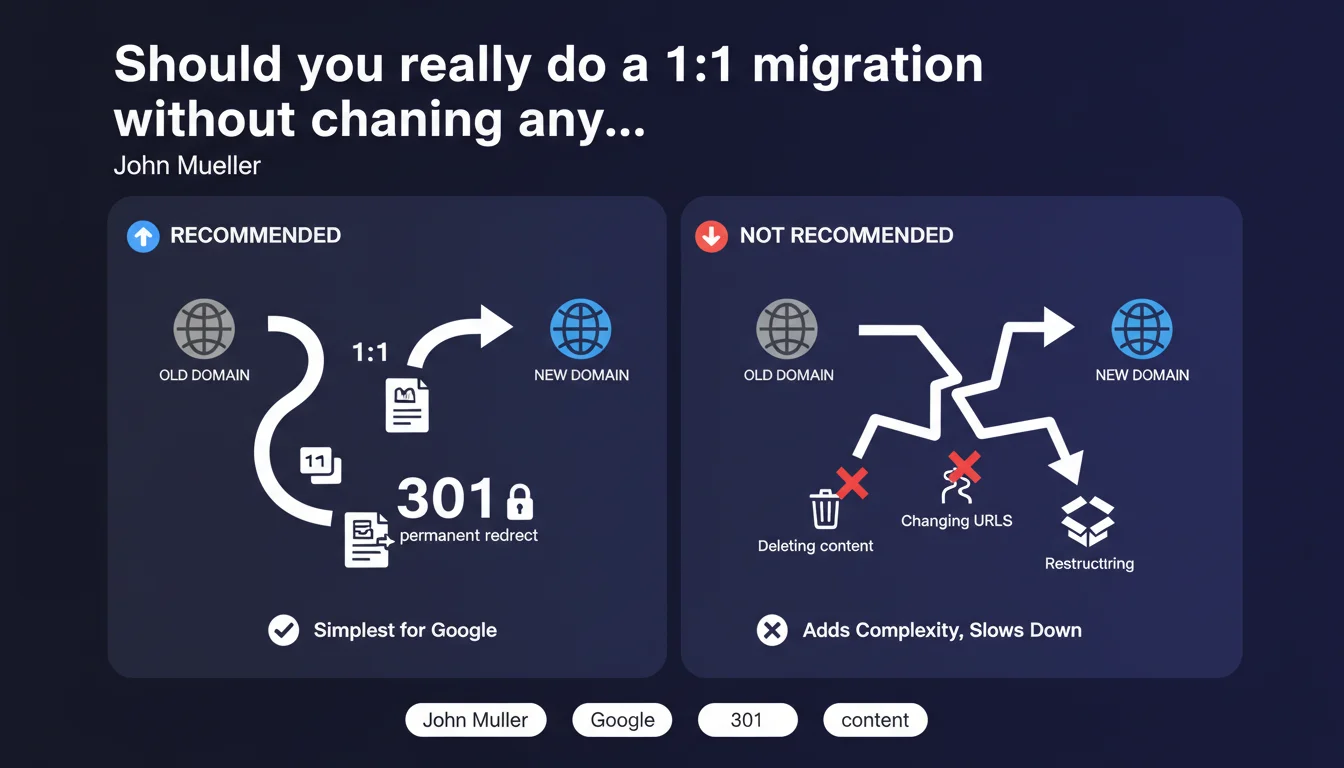
Google recommends transferring your entire site 1:1 to the new domain with 301 redirects, without modifying URLs or removing content. Any simultaneous restructuring adds complexity and slows down the transfer of ranking signals. Simplicity remains the key to a successful migration.
What you need to understand
Why does Google insist on 1:1 transfer?
The logic is straightforward: the more you simplify Google's work, the faster it transfers your signals. When every URL from the old domain redirects to its exact equivalent on the new domain, the algorithms only need to "copy-paste" the ranking signals. No ambiguity, no hesitation.
As soon as you change the structure — merging pages, deleting content, modifying URLs — Google must recalculate the relevance of each page. This slows down the process and increases the risk of temporary (or permanent) ranking loss.
What does "1 for 1" concretely mean?
Each URL from the old domain must redirect in 301 to a unique URL on the new domain, ideally with the same path. If olddomain.com/page-a existed, it redirects to newdomain.com/page-a.
No multiple redirects to the same destination page. No "creative" consolidation of several old URLs to a new one. And most importantly, no content removal without a clear strategy — Google reads this as an ambiguous signal.
What do we mean by "added complexity"?
Any simultaneous change to the migration slows down the transfer. Restructuring the site architecture, modifying URLs, deleting entire sections — each of these choices forces Google to reassess your site's relevance from scratch.
Mueller doesn't say it's impossible, but that it's risky and slower. If you absolutely must restructure, do it before or after the migration, never during.
- 301 redirects: the only valid option to preserve signals
- 1:1 transfer: each old URL points to its exact equivalent
- No simultaneous restructuring: changing the architecture or URLs complicates the process
- No content removal: unless you accept losing the associated signals
- Simplicity = speed: the less Google has to recalculate, the faster it transfers
SEO Expert opinion
Is this recommendation still relevant today?
Yes, but with a caveat. Google's recommendation is primarily aimed at "clean" migrations, where the site is working well and the only goal is to change domains. In that case, touching anything else is genuinely counterproductive.
However, many migrations happen in the context of a complete redesign or strategic restructuring. Saying "don't change anything" becomes untenable — and Mueller knows this. He doesn't say it's forbidden, he says it's slower and riskier. Important distinction.
In what cases can you deviate from the 1:1 rule?
When the original site contains obsolete, duplicate, or low-value content. Redirecting 10,000 pointless pages to the new domain won't help you — you're transferring noise, not useful signals.
Same applies if you're merging multiple old sites into one new domain. There, 1:1 becomes mechanically impossible. In these cases, embrace the complexity and prepare for a longer migration. [To verify]: Google gives no concrete figures on actual transfer delays depending on the scenario — we remain in vague territory.
What if the current structure is a disaster?
Let's be honest: many sites deserve structural overhaul. Poor URLs, illogical architecture, cannibalization… migrating it as-is just moves the problem.
In that case, two options. Either you restructure before the migration (on the old domain), then migrate cleanly in 1:1. Or you accept that the migration will be slower and riskier, and you document each redirection choice to trace the logic. But don't expect immediate transfer.
Practical impact and recommendations
What should you do concretely before migration?
Audit the old site to identify pages to keep, those to delete (truly useless), and those to merge. Prepare a precise redirection plan: each source URL must have a defined target URL.
Set up 301 redirects server-side (not in JavaScript, not meta refresh). Test them on a staging environment before switching. And most importantly, keep the old domain active long enough — at least 6 months, ideally 12.
What mistakes should you absolutely avoid?
Don't redirect everything to the new domain's homepage. That's the worst possible strategy — you lose all the granularity of your signals. Each page must have its own logical destination.
Avoid redirect chains (A → B → C). Google follows redirects, but each hop dilutes signals. And don't change the new domain's URLs after migration — you'd break the freshly implemented redirects.
How do you verify the migration is going well?
Monitor Search Console: the "Address Change" report tells you if Google properly detected the migration. Track the evolution of impressions and clicks on the new domain — they should gradually replace those from the old one.
Verify that external backlinks point to the old domain (which redirects). If important sites update their links to the new domain, that's a bonus, but it's not required — redirects are sufficient.
- Audit the old site: identify pages to migrate, delete, or merge
- Prepare a detailed 1:1 redirection plan (each source URL = 1 target URL)
- Configure 301 redirects server-side (Apache, Nginx, CDN)
- Test redirects on a staging environment
- Declare the address change in Search Console
- Keep the old domain active for at least 6-12 months
- Monitor impressions, clicks, and rankings on the new domain
- Avoid any simultaneous structural changes (URLs, architecture)
❓ Frequently Asked Questions
Combien de temps faut-il conserver l'ancien domaine actif après la migration ?
Peut-on migrer vers un nouveau domaine et restructurer le site en même temps ?
Faut-il rediriger les pages obsolètes ou les supprimer définitivement ?
Les redirections 301 font-elles perdre du PageRank ?
Comment déclarer une migration de domaine dans la Search Console ?
🎥 From the same video 16
Other SEO insights extracted from this same Google Search Central video · published on 07/09/2022
🎥 Watch the full video on YouTube →
💬 Comments (0)
Be the first to comment.