
Official statement
Other statements from this video 14 ▾
- □ Google choisit-il vraiment les titres de page indépendamment de la requête de l'utilisateur ?
- □ Changer un nom de ville suffit-il à créer des doorway pages condamnables par Google ?
- □ Faut-il vraiment centraliser son contenu compétitif plutôt que le dupliquer ?
- □ Découvert mais non indexé : Google n'a-t-il vraiment jamais crawlé ces pages ?
- □ Pourquoi Google refuse-t-il d'indexer un site techniquement parfait ?
- □ Faut-il vraiment faire confiance aux recommandations de vos outils SEO ?
- □ Faut-il encore corriger les redirections cassées longtemps après une migration ?
- □ Passer d'un ccTLD à un gTLD suffit-il pour conquérir de nouveaux marchés internationaux ?
- □ Sous-domaine ou sous-répertoire : Google a-t-il vraiment une préférence ?
- □ Pourquoi les clics par page et par requête diffèrent-ils dans Search Console ?
- □ Les erreurs de données structurées bloquent-elles vraiment l'indexation de vos pages ?
- □ Le maillage interne révèle-t-il vraiment l'importance de vos pages à Google ?
- □ L'attribut target des liens a-t-il un impact sur le référencement Google ?
- □ Faut-il vraiment supprimer tous les breadcrumbs schema sauf un pour éviter la confusion ?
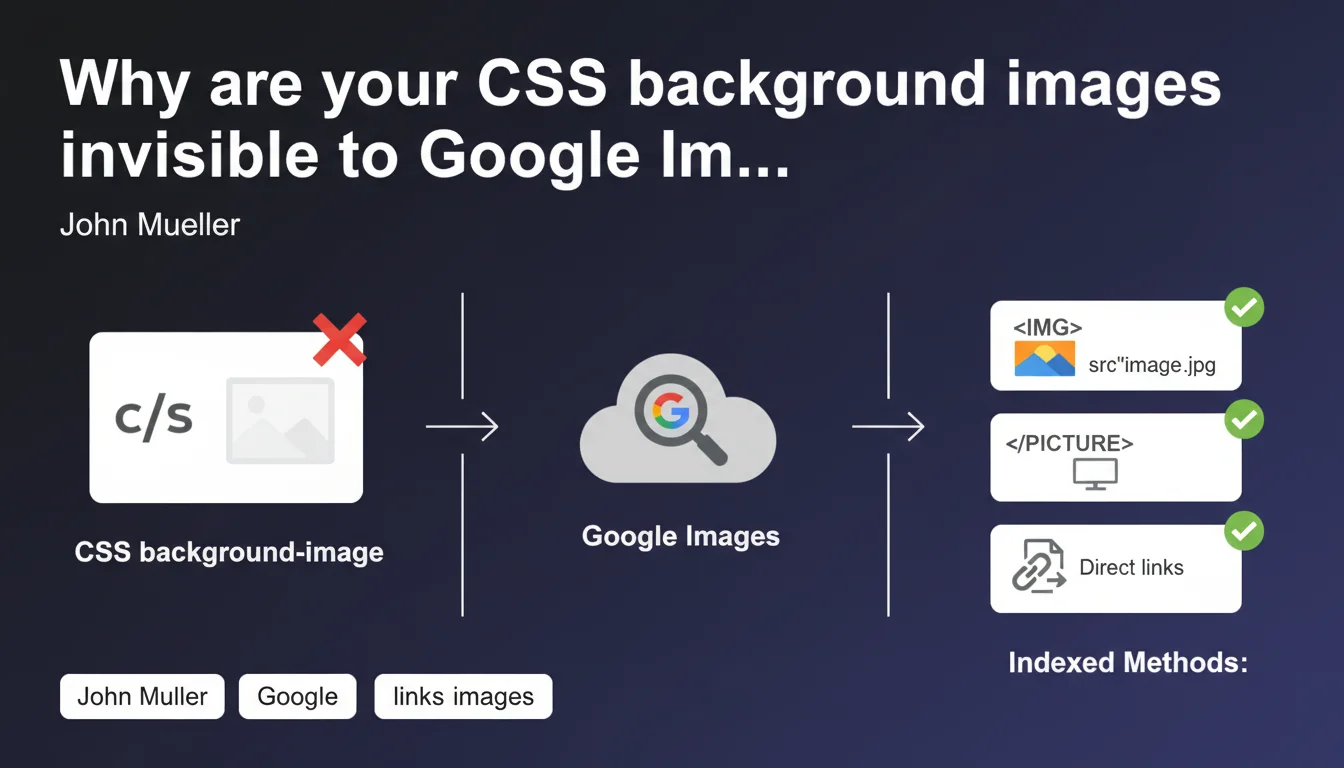
Google does not index images embedded via CSS background-image for Google Images. Only <img> tags, <picture> elements, and direct links to image files are detected and considered. If you want an image to appear in image search results, it must use a standard HTML method.
What you need to understand
What is the technical difference between an img tag and a CSS background-image?
The tag is a semantic HTML element designed to display visual content. It has a src attribute that points to the image file, an alt attribute for text description, and can be enriched with structured data. Google considers it as content in its own right.
The CSS background-image, on the other hand, falls under graphical presentation. It's a style property applied to an element to modify its visual appearance. No alt tag, no clear semantics — just decoration from the engine's perspective.
Does Google really crawl CSS to detect images?
Yes, Google analyzes CSS files and can technically detect image URLs within them. But — and this is where it gets tricky — this technical capability doesn't mean indexing for Google Images.
The crawler identifies these resources for rendering reasons (particularly for PageSpeed Insights or mobile evaluation), but they are not processed as image content eligible for visual indexing.
Why this distinction between content images and presentation images?
Google seeks to index images that carry information, not decorative elements. A product photo in an e-commerce listing? Content. A gradient background or graphical pattern in the background? Pure presentation.
The tag sends a clear signal: "this is an important image with context and description". The background-image says: "this decorates the page". And Google respects this logic.
- CSS background-image images are not indexed for Google Images
- Only standard HTML methods (
,
, direct links) are considered - Google can crawl CSS but does not treat these images as content
- The distinction is based on semantics: content vs. presentation
- The absence of an alt attribute on background-images makes them ineligible for indexing
SEO Expert opinion
Is this rule absolute or are there exceptions observed in practice?
In the field, this rule is verified almost systematically. Crawl audits show that images in background-image never appear in Google Images, even on massively crawled sites with significant crawl budgets.
However, note: this limitation concerns only Google Images. For the visual rendering of the page (Core Web Vitals, mobile evaluation), Google loads and analyzes these CSS images perfectly. They therefore impact LCP if they are large, even if they are not indexed.
What nuances should be added to this Mueller statement?
Mueller speaks of images "generally" not detected — which leaves room for interpretation. Let's be honest: in practice, we've never observed a reliable exception. The "generally" is probably a legal precaution rather than a hint at special cases.
A rarely mentioned point: direct links to image files are mentioned as a valid method. Concretely? A simple link in content can be enough to get an image indexed, even without an img tag. Useful for lightweight galleries or downloads.

Does this limitation impact other SEO aspects beyond Google Images?
Indirectly, yes. An image in background-image cannot carry structured data (schema.org ImageObject type, for example). It also cannot benefit from an alt attribute, which weakens accessibility and deprives Google of a valuable contextual text signal.
For e-commerce sites or portfolios, this is a potential blind spot: if your product visuals are in CSS, you lose a non-negligible source of qualified traffic. [To be verified]: some SEO professionals argue that Google could one day analyze the visual context around a background-image via AI — but no official confirmation to date.
Practical impact and recommendations
What should you do concretely on your existing pages?
Audit your templates and identify all important images displayed via background-image. Useful tools: DOM inspection in DevTools, Screaming Frog crawl in "JavaScript Rendering" mode, or manual CSS analysis.
For each image you want indexed in Google Images, replace the background-image with an or
How to handle design constraints that impose a background-image?
Common case: a full-width hero visual with overlaid text. Pragmatic solution: use an tag in absolute position or with object-fit: cover, then position the text on top in relative/absolute.
More modern alternative: the
What errors should you avoid when migrating to img tags?
Don't duplicate the image by keeping both the background-image and a hidden tag (display:none or opacity:0). Google detects this type of manipulation and could ignore the image, or even apply a penalty for deceptive content.
Another trap: forgetting to fill in the alt attribute after migration. An img tag without alt is technically indexable, but you lose a valuable contextual signal. Write concise, descriptive alt text, not keyword stuffing.
- Identify all images in background-image with SEO value (products, portfolios, editorial content)
- Replace them with
or
tags with src and alt attributes properly set - Verify that the visual rendering remains identical after migration (object-fit, position, z-index)
- Add ImageObject structured data if relevant (products, recipes, articles)
- Check in Google Search Console that new images are properly detected ("Images" report)
- Never hide an
tag in CSS just to work around the rule — Google detects it
- Optimize image weight (WebP, lazy loading) to not degrade Core Web Vitals
❓ Frequently Asked Questions
Une image en background-image CSS impacte-t-elle le positionnement général de ma page ?
Peut-on utiliser un lazy loading sur des images en background-image ?
Les images en background-image sont-elles prises en compte pour l'accessibilité ?
Un lien direct vers une image (balise <a>) suffit-il pour l'indexer dans Google Images ?
Faut-il supprimer tous les background-image de mon site pour le SEO ?
🎥 From the same video 14
Other SEO insights extracted from this same Google Search Central video · published on 22/03/2022
🎥 Watch the full video on YouTube →
💬 Comments (0)
Be the first to comment.