
Official statement
Other statements from this video 20 ▾
- □ Does Google really index iframe content as part of the parent page — or treats it as completely separate?
- □ Should you really prioritize a hierarchical structure for large websites?
- □ Is blocking crawl via robots.txt really the miracle solution against toxic links?
- □ Should you translate your URLs to boost international SEO rankings?
- □ Does Googlebot really ignore the meta prerender-status-code 404 tag in JavaScript applications?
- □ Why do site migrations fail so often even with careful SEO preparation?
- □ Are double slashes in URLs really hurting your SEO performance?
- □ Is your video being penalized by Google for appearing below the fold, and how can you fix it?
- □ How can you successfully transfer your image rankings to new URLs without losing search visibility?
- □ Should you really worry about 404 errors on your website?
- □ Should you force your sitemap file indexation in Google?
- □ Should you worry when Googlebot crawls your API endpoints and generates 404 errors?
- □ Is web accessibility really a Google ranking factor or just a smoke screen?
- □ Does Google really penalize paid link purchases, or is it just a myth?
- □ Should you still report bad backlinks to Google in 2024?
- □ Why does blocking crawl via robots.txt prevent Google from seeing your noindex directive?
- □ Is Google really rejecting the idea of a magic formula to rank higher?
- □ Why is Google displaying your special characters as gibberish in search results?
- □ Why are the data discrepancies between Google Analytics and Search Console causing so much confusion for SEO professionals?
- □ Should you really be chasing perfect SEO?
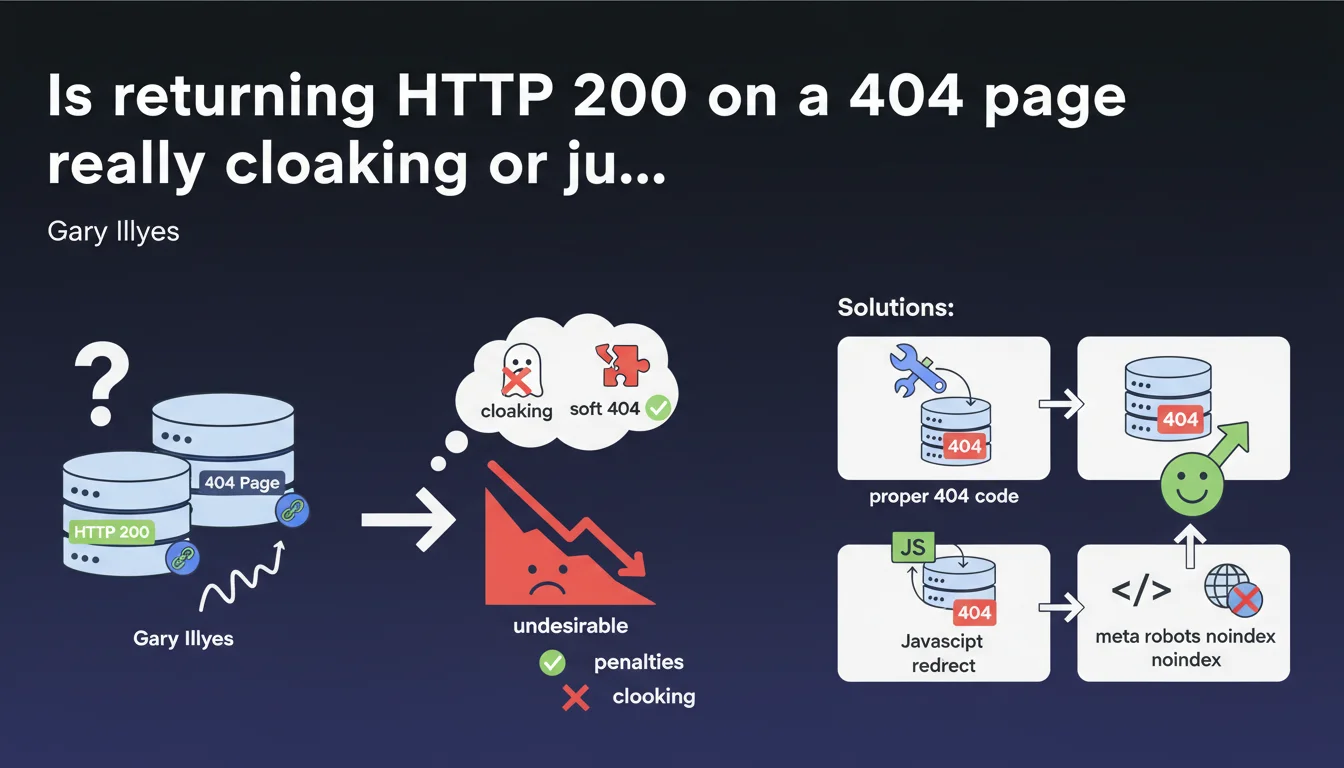
Returning an HTTP 200 status code on a page that should display 404 is not considered cloaking by Google, but rather a soft 404. There's no direct penalty, but it's undesirable. Google recommends three solutions: configure a proper 404, redirect via JavaScript to a page with 404 status, or dynamically add noindex via JavaScript.
What you need to understand
What's the difference between soft 404 and cloaking?
The cloaking consists of serving different content to search engines and users, with intent to manipulate. A soft 404 is something else entirely: a non-existent page that returns an HTTP 200 code (success) instead of a 404 (not found).
Google does not consider this practice cloaking because there is no deliberate intent to deceive. Simply poor technical configuration. The engine detects that the page contains no relevant content and treats it accordingly.
Why is this a problem for SEO?
A soft 404 creates confusion for Googlebot. The server says "everything is fine" (200) while the page doesn't exist. Google must therefore spend its crawl budget analyzing the content and guessing that it's an error.
Result: empty URLs can remain indexed temporarily, polluting your index. You're wasting crawl resources on pages with no value instead of dedicating them to your important content.
Does Google penalize soft 404s?
No, there's no direct algorithmic penalty. Google's John Mueller is clear on this. But "no penalty" doesn't mean "no consequences".
You're creating a technical inefficiency that slows down the indexing of your new pages and dilutes the overall quality of your index. On a large site, this translates into thousands of phantom URLs that clutter your Search Console.
- Soft 404 ≠ cloaking: no malicious intent detected by Google
- No direct penalty, but proven crawl budget waste
- Index pollution with contentless URLs that remain temporarily visible
- Automatic detection by Google via page content analysis
SEO Expert opinion
Does this statement change anything in practice?
Not really. SEO professionals have known for a long time that soft 404s are a technical issue, not an attempt to manipulate. What's interesting is that Google officially confirms that it doesn't confuse technical incompetence with attempted cheating.
That said — and this is where it gets tricky — Google keeps talking about "solutions" without specifying their real-world implications. For example, using JavaScript to redirect to a proper 404 or inject a noindex: does that really solve the crawl budget problem if the server keeps returning 200? [To be verified]
Are all the proposed solutions equivalent?
No. And that's a weak point in this statement. Configuring a proper 404 code server-side remains the cleanest and clearest solution for Googlebot. No ambiguity, no dual interpretation.
JavaScript solutions (redirect or dynamic noindex) work, but they introduce a layer of complexity. Googlebot must execute the JS, interpret the instruction, then act on it. On heavy or poorly configured sites, this can create indexing delays.
What if you inherit a site with thousands of soft 404s?
Let's be honest: on a legacy site with poor architecture, fixing all soft 404s at once can be a huge undertaking. Prioritize. Start with high-traffic potential sections and the most-used templates.
For less critical pages, a JavaScript noindex directive can be an acceptable short-term workaround. But don't kid yourself: it's a band-aid, not a definitive solution. The real work is to fix the server logic so it returns the correct HTTP codes from the start.
Practical impact and recommendations
What should you do concretely?
Priority one: identify all soft 404s on your site. Search Console flags them in the "Coverage" section under the "Excluded - Page not found (404)" label. But be careful: this report isn't exhaustive.
Cross-reference this data with your server logs. Look for URLs that return a 200 code but whose content is empty or matches an error template. That's often where undetected soft 404s hide.
What mistakes should you absolutely avoid?
Don't just hide the problem. Adding noindex to a page returning 200 doesn't solve the crawl budget waste issue. Googlebot still has to load the page to read the noindex.
Also avoid exotic JavaScript redirects that send to whimsical substitute pages. Google wants a proper 404 or clear noindex, not a redirect to your homepage or a random category page.
- Check Search Console for pages flagged as soft 404
- Analyze server logs to find URLs returning 200 with empty content
- Configure the server to return a proper HTTP 404 code on non-existent pages
- If server modification is impossible, implement a JS redirect to a proper 404
- Test JavaScript rendering with Google's URL inspection tool
- Monitor crawl budget evolution after fixing (via logs)
How do you verify that the fix works?
Manually test your error pages with an HTTP tool (browser extension, cURL, Screaming Frog). Verify that the status code is indeed 404 or 410, not 200. Then run the URL through Search Console's inspection tool to confirm that Google sees the correct code.
Next, monitor the coverage reports. Fixed soft 404s should gradually disappear. If they don't after a few weeks, your fix isn't being properly picked up — likely a JS rendering issue or server configuration problem.
❓ Frequently Asked Questions
Un soft 404 peut-il entraîner une désindexation complète du site ?
Faut-il utiliser un code 410 (Gone) plutôt que 404 pour les pages définitivement supprimées ?
Google peut-il confondre une vraie page avec peu de contenu et un soft 404 ?
La redirection JavaScript vers une 404 est-elle aussi efficace qu'un vrai code serveur ?
Combien de temps faut-il pour que Google retire les soft 404 corrigés de la Search Console ?
🎥 From the same video 20
Other SEO insights extracted from this same Google Search Central video · published on 18/12/2023
🎥 Watch the full video on YouTube →
💬 Comments (0)
Be the first to comment.