
Official statement
Other statements from this video 10 ▾
- □ Can poorly optimized snippets really tank your organic traffic?
- □ Is your crawl request volume suddenly hitting zero in Search Console? Here's why it matters.
- □ Does a robots.txt disallow directive really block snippet generation in search results?
- □ Does Search Console really catch all your crawl problems automatically?
- □ Is Search Console really enough to diagnose your indexing problems?
- □ Can Lighthouse really replace a professional SEO audit?
- □ Can a misconfigured robots.txt really kill your snippets and crawl traffic?
- □ Should you really be monitoring your robots.txt continuously?
- □ Should you really test your robots.txt before every modification?
- □ Should you block certain sections of your website in the robots.txt file?
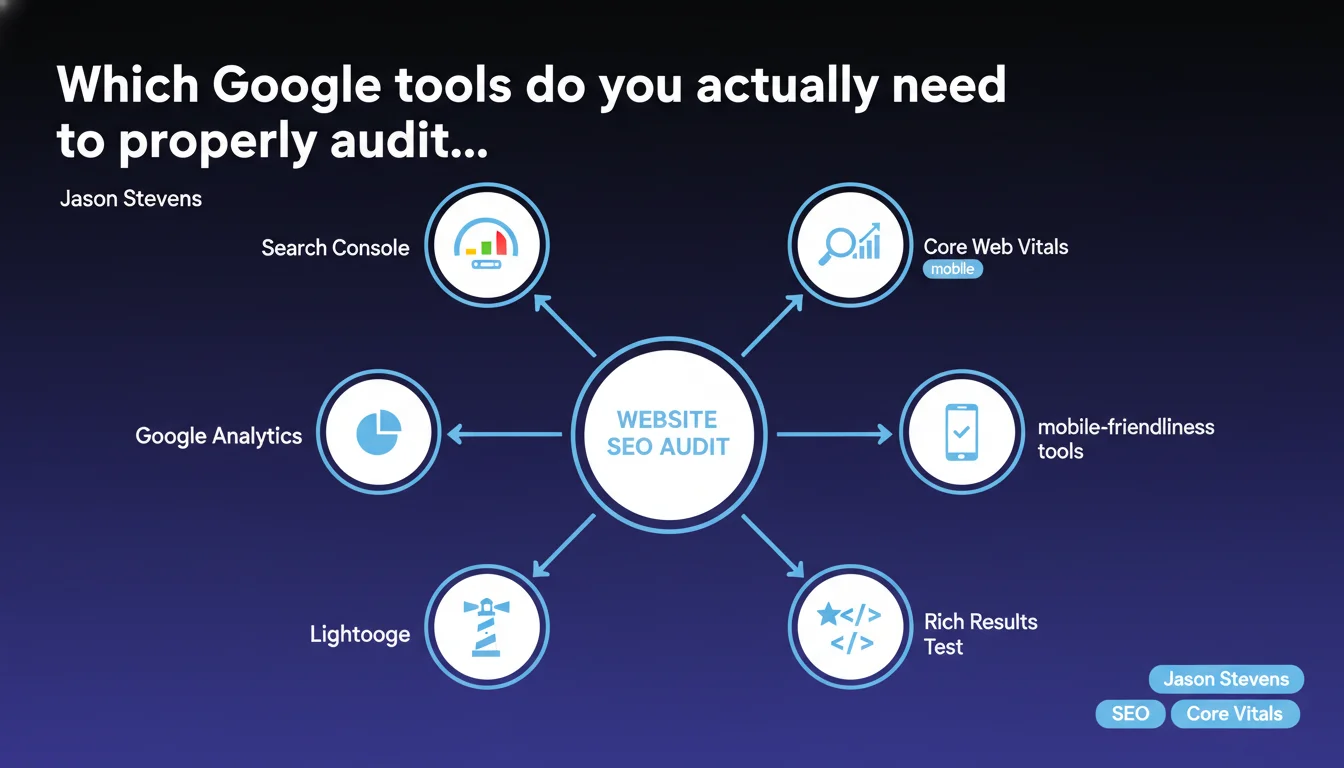
Google officially recommends a suite of 6 tools to audit a website: Search Console, Core Web Vitals, mobile-friendliness testing, Rich Results Test, Lighthouse, and Analytics. This statement formalizes a multi-angle approach that covers technical aspects, performance, and user data. The key issue: don't rely on just one tool to get a complete picture.
What you need to understand
Why does Google propose a list of tools rather than one centralized audit solution?
Google has never developed an all-in-one SEO audit tool, and that's no accident. Each tool in the suite covers a specific scope: Search Console for crawling and indexation, Core Web Vitals for user experience performance, Lighthouse for technical diagnosis on the browser side.
This fragmentation reflects the complexity of modern SEO. A site can be technically flawless on the server side but fail on UX metrics. Conversely, a fast site can have critical indexation errors that are invisible without Search Console.
What exactly does each of these tools cover in an SEO audit?
Search Console remains the reference for everything related to crawling, indexation, and search signals (queries, rankings, clicks). It's the "Google bot" view of your site.
Core Web Vitals (accessible via PageSpeed Insights or Search Console) measures LCP, FID, and CLS — the three UX metrics Google uses as a ranking factor. Mobile-friendliness tests mobile compatibility, a baseline criterion since Mobile-First Indexing.
Rich Results Test validates structured data and its eligibility for rich results. Lighthouse audits performance, accessibility, PWA, and best practices on the browser side. Google Analytics provides behavioral data: traffic, conversions, user journeys.
Is this tool suite sufficient for a complete SEO audit?
No. These tools cover the "Google-centric" scope well but leave out entire areas: competitive analysis, in-depth semantic audit, cannibalization detection, server log analysis, page depth tracking.
They provide a fragmented view that you need to know how to cross-reference. For example, a speed issue detected in Lighthouse may be linked to a blocked resource problem visible in Search Console.
- Search Console = crawling/indexation/query view
- Core Web Vitals = UX metrics prioritized for ranking
- Mobile-friendliness = basic mobile compatibility test
- Rich Results Test = structured data validation
- Lighthouse = browser-side technical audit (performance, accessibility)
- Google Analytics = user behavior data
- These tools complement each other but don't cover 100% of an SEO audit
SEO Expert opinion
Is this recommendation truly surprising for an SEO practitioner?
Let's be honest: no serious SEO professional is discovering this list. These tools have already been at the core of our audits for years. What's interesting is that Google is formalizing this multi-tool approach rather than claiming that one tool alone is enough.
That said, the statement remains vague about the weighting to give each tool. Not all signals carry the same weight. A site with mediocre Core Web Vitals but exceptional content can outrank a competitor that's technically perfect but poor in added value. [To be verified]: Google never specifies the relative importance of each component.
What limitations should you know about these Google tools?
First limitation: data latency. Search Console can take several days to report critical indexation problems. Core Web Vitals are based on aggregated field data over 28 days — not ideal for detecting a sudden regression.
Second limitation: these tools only show what Google wants you to see. They don't reveal internal scoring mechanisms, exact penalty thresholds, or algorithmic trade-offs. Lighthouse can give a 95/100 score to a site that's stagnating in visibility.
Third practical limitation: none of these tools automatically cross data. Detecting that a traffic drop in Analytics coincides with an indexation decline in Search Console and a degradation of CWV requires manual correlation work.
In which cases is this tool suite insufficient?
On sites with thousands of pages, server log analysis becomes essential to understand how Googlebot actually crawls. On e-commerce sites, auditing facets, filters, and canonicals requires specialized tools that Google doesn't provide.
For internal duplicate content, semantic cannibalization, or internal PageRank issues, you need to cross crawl data (Screaming Frog, Oncrawl) with Search Console data. Google tools alone aren't sufficient to diagnose these problems.
Practical impact and recommendations
What should you do concretely with this tool list?
Start by configuring each tool correctly. Search Console must be linked to all domain variants (www, non-www, http, https). Analytics must exclude internal traffic and be configured with relevant conversion goals.
Next, implement a monthly review process: extract Search Console errors, track Core Web Vitals on strategic pages, verify rich results after each schema markup change, run Lighthouse audits on key conversion pages.
The trap: treating these tools in silos. You need to cross-reference signals. A page that converts well (Analytics) but has catastrophic CWV deserves optimization. A technically perfect page (Lighthouse 100) that receives no clicks (Search Console) has a relevance or title/meta problem.
What mistakes should you avoid when using these tools?
Classic mistake: over-optimizing for Lighthouse score at the expense of real user experience. A score of 100 guarantees nothing if actual users experience degradation (intrusive ads, popups, misleading content).
Another trap: ignoring Search Console alerts because "the site is doing well." Indexation errors, mobile-friendliness issues, or manual penalties show up there first. An ignored alert after several weeks can become critical.
Don't blindly trust aggregated Core Web Vitals data. These metrics can mask significant disparities between user segments (mobile vs desktop, fast vs slow connections, geographic regions).
- Configure all tools with the correct scopes and properties
- Plan a systematic monthly review of each tool
- Cross-reference data: look for correlations between traffic drops (Analytics), errors (Search Console), and performance (CWV)
- Don't optimize only for scores — keep focus on real user experience
- Document alerts and detected errors to track their evolution
- Supplement this suite with third-party tools for advanced analysis (logs, semantics, competition)
- Train technical teams to interpret Lighthouse and PageSpeed Insights recommendations
❓ Frequently Asked Questions
Search Console suffit-il pour auditer un site ou faut-il vraiment utiliser tous ces outils ?
Les Core Web Vitals sont-ils vraiment un facteur de classement important ?
Peut-on remplacer Lighthouse par PageSpeed Insights ?
Google Analytics est-il indispensable pour le SEO ou peut-on s'en passer ?
Faut-il auditer toutes les pages du site avec Lighthouse ou se concentrer sur certaines ?
🎥 From the same video 10
Other SEO insights extracted from this same Google Search Central video · published on 10/01/2023
🎥 Watch the full video on YouTube →
💬 Comments (0)
Be the first to comment.