
Official statement
Other statements from this video 17 ▾
- □ Is your site missing from Google because of indexation issues or poor ranking?
- □ Why does Google really push Search Console as the gold standard for indexation diagnostics?
- □ Does Google's URL Inspection Tool really replace manual indexation testing?
- □ Is Google's Search Console indexation report really enough to diagnose all your indexation problems?
- □ Should you really stress about indexing 100% of your website pages?
- □ Does Google really prioritize indexing the homepage first on brand new sites?
- □ Why isn't your new website's homepage getting indexed by Google?
- □ Why isn't your homepage showing up in Google's search results yet?
- □ Is your website really missing from Google's index, or could canonicalization be playing tricks on you?
- □ Is hreflang distorting your indexation reports in Search Console?
- □ Why do some pages get indexed in seconds while others never appear in Google at all?
- □ Can Google still index the entire web?
- □ Does Google really impose an indexation quota on your website?
- □ Does deleting old content really boost your new pages' indexation speed?
- □ Should you really be using Google Search Console's 'Request indexing' button?
- □ Is the site: operator truly reliable for measuring your website's indexation?
- □ What can you really do with the site: operator beyond just checking indexation?
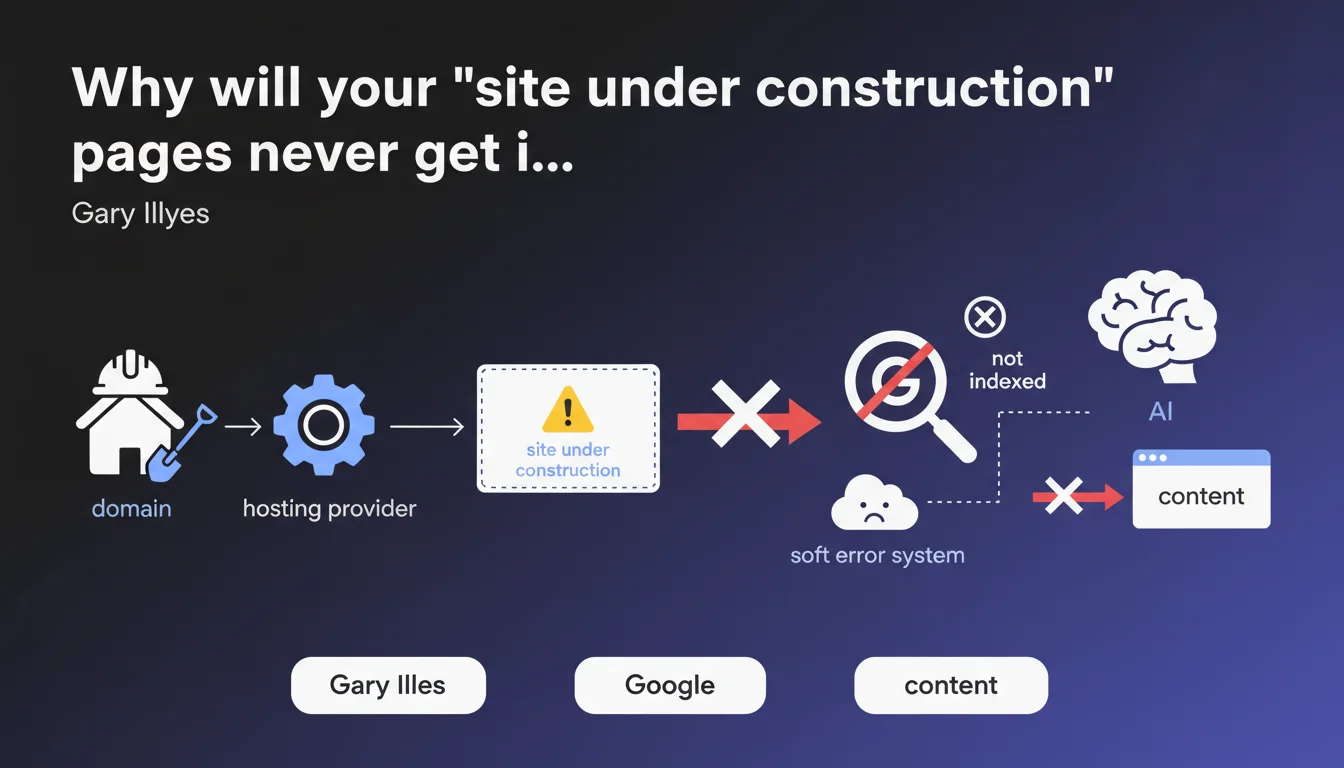
Google automatically detects generic construction pages created by hosting providers and treats them as soft errors — they are never indexed. These standardized templates don't count as real content in the algorithm's eyes. If your newly purchased domain displays a default hosting provider page, you're invisible.
What you need to understand
What is a soft error in Google's ecosystem?
A soft error refers to a non-blocking error detected by Googlebot during crawling, but which doesn't generate a classic HTTP error code (404, 500, etc.). The server returns a 200 OK, but the content is deemed invalid or valueless.
In the case of construction pages, the hosting provider technically returns a normal response, but Google identifies the standardized template and classifies it as non-indexable. No penalty — just a discreet exclusion.
How does Google detect these generic pages?
Hosting providers use identical templates for all their new domains: same HTML structure, same meta tags, often the same text content. Google spots these repetitive patterns at massive scale.
The algorithm crosses multiple signals: recurring page structure, absence of unique content, newly registered domain, presence of hosting provider mentions. When these indicators converge, the verdict is rendered.
What's the difference from a real maintenance page?
A personalized maintenance page, created by you with a 503 HTTP code and a Retry-After header, signals temporary unavailability. Google understands and comes back later.
Hosting provider templates, meanwhile, communicate nothing — they just display a generic placeholder with a 200. Google can't guess when you plan to publish real content, so it simply ignores it.
- Soft errors are silent errors: no warning signal in Search Console, just non-indexation
- Google identifies hosting templates through pattern recognition at web scale
- A legitimate maintenance page requires a 503 code and a Retry-After header to be handled correctly
- Newly purchased domains with default pages remain invisible until real content is published
- No penalty or negative impact on the domain — just temporary index exclusion
SEO Expert opinion
Does this automatic detection really work 100% of the time?
Let's be honest: Google maintains a massive database of hosting provider templates. For the big players (OVH, GoDaddy, Ionos, etc.), detection is nearly perfect. I've seen hundreds of cases where these pages never appear, even after several weeks.
Where it breaks down — and Google won't tell you this — is with small regional hosting providers or custom templates. If your hosting provider uses a unique design for their construction pages, there's a window where Google might temporarily index before understanding. [To be verified] on larger samples, but on-the-ground observation suggests a very low false negative rate.
What about manually created 'coming soon' pages?
Now that's the real question. Google is talking here about pages automatically generated by the hosting provider. If you create your own temporary page with minimal content, technically it's no longer a detectable template.
Result? It might get indexed, but with poor content that tanks your Quality Score from the start. Worst case: you then launch your real site, but Google keeps this first mediocre impression cached. I've seen new domains take 2-3 months to recover from this.
Do soft errors affect other types of content?
Absolutely. Error pages that return 200 instead of 404, empty pages generated by CMS, category templates without products — all of this can fall into this category.
The problem is Google doesn't exhaustively list what triggers a soft error. You often discover the issue when Search Console shows pages discovered but never indexed, with no clear explanation. Official documentation remains fuzzy on the exact criteria — frustrating when you're trying to diagnose.
Practical impact and recommendations
What should you do if you just bought a domain?
First reflex: check immediately what page displays by default. If it's a hosting provider template (hosting provider logo visible, 'domain parked' mentions, etc.), you have two options.
Option 1 — you're not ready to publish: block the domain with a robots.txt file (Disallow: /) and add a noindex meta tag to the temporary page. Prevent Google from crawling empty space.
Option 2 — you can publish quickly: replace the default page with real content, even if minimal. A real homepage with unique text, even 200 words, beats a detectable template. Then submit the URL via Search Console.
How do you diagnose if your pages are victims of soft errors?
Go to Search Console → Pages → Not indexed. Look for 'Discovered - currently not indexed' or 'Crawled - currently not indexed' statuses. If these pages match generic content or templates, you have your answer.
Cross-reference with URL inspection: if Google returns 'URL is on Google' = false but 'crawling allowed' = true, it's often a soft error. The crawler passes, sees the content, but refuses to index.
What mistakes to absolutely avoid when launching a site?
Mistake #1: leaving pre-production sites accessible publicly without noindex. Google crawls, indexes incomplete content, and you start with a handicap.
Mistake #2: using a 'coming soon' page with polished design but zero text content. Even if it's not a hosting provider template, Google can treat it as empty and ignore it.
Mistake #3: not monitoring the first few weeks. Check Search Console daily after going live — if your key pages aren't indexing within 48-72h, dig immediately.
- Inspect your hosting provider's default page right after domain purchase
- Block indexation with robots.txt + noindex meta tag until the real site is ready
- Avoid generic 'coming soon' pages without unique text content
- Use a 503 code + Retry-After for real scheduled maintenance
- Monitor Search Console within 48-72h of going live
- Manually submit your main URLs through URL inspection
- If soft error detected: fix the content, then request reindexation
❓ Frequently Asked Questions
Un template d'hébergeur peut-il être indexé si je modifie légèrement le texte ?
Combien de temps faut-il pour qu'une vraie page remplace un soft error dans l'index ?
Les soft errors apparaissent-ils dans les rapports Search Console ?
Faut-il configurer un redirections 301 si j'ai lancé avec une page template ?
Cette détection concerne-t-elle uniquement les domaines neufs ?
🎥 From the same video 17
Other SEO insights extracted from this same Google Search Central video · published on 22/06/2023
🎥 Watch the full video on YouTube →
💬 Comments (0)
Be the first to comment.