
Official statement
Other statements from this video 20 ▾
- □ Why can't Google ever guarantee that your users will land on the right language version of your site?
- □ Are automatic redirects really killing your international SEO rankings?
- □ Should you really block JavaScript execution for SPAs with server-side rendering?
- □ Should you really tag foreign words with the lang attribute for SEO purposes?
- □ Does duplicate content really trigger a Google penalty?
- □ Does Google really respect rel=canonical or is it just a suggestion that gets ignored?
- □ Are FAQs in blog articles really worth it for SEO rankings?
- □ Is hreflang really essential for managing a successful international website?
- □ Does Google's web cache actually affect your search rankings?
- □ How does Google really customize search results based on location and language? Here's what actually happens behind the scenes
- □ Does noindex really help you save crawl budget, or is it the wrong tool for the job?
- □ Do you really need to stick to just one topic on your site to rank well?
- □ How many links can you really put on a page without triggering a Google penalty?
- □ Does the referrer URL in Search Console really affect your search rankings?
- □ Does word count really matter for SEO ranking?
- □ Should you worry about reusing the same text blocks across multiple pages?
- □ Does Google really accept machine-translated content on multilingual websites?
- □ Do you really need to duplicate the Organization schema on every page of your website?
- □ Can self-hosted reviews display star ratings in Google search results for local businesses?
- □ Why do website mergers produce unpredictable results in Google's eyes?
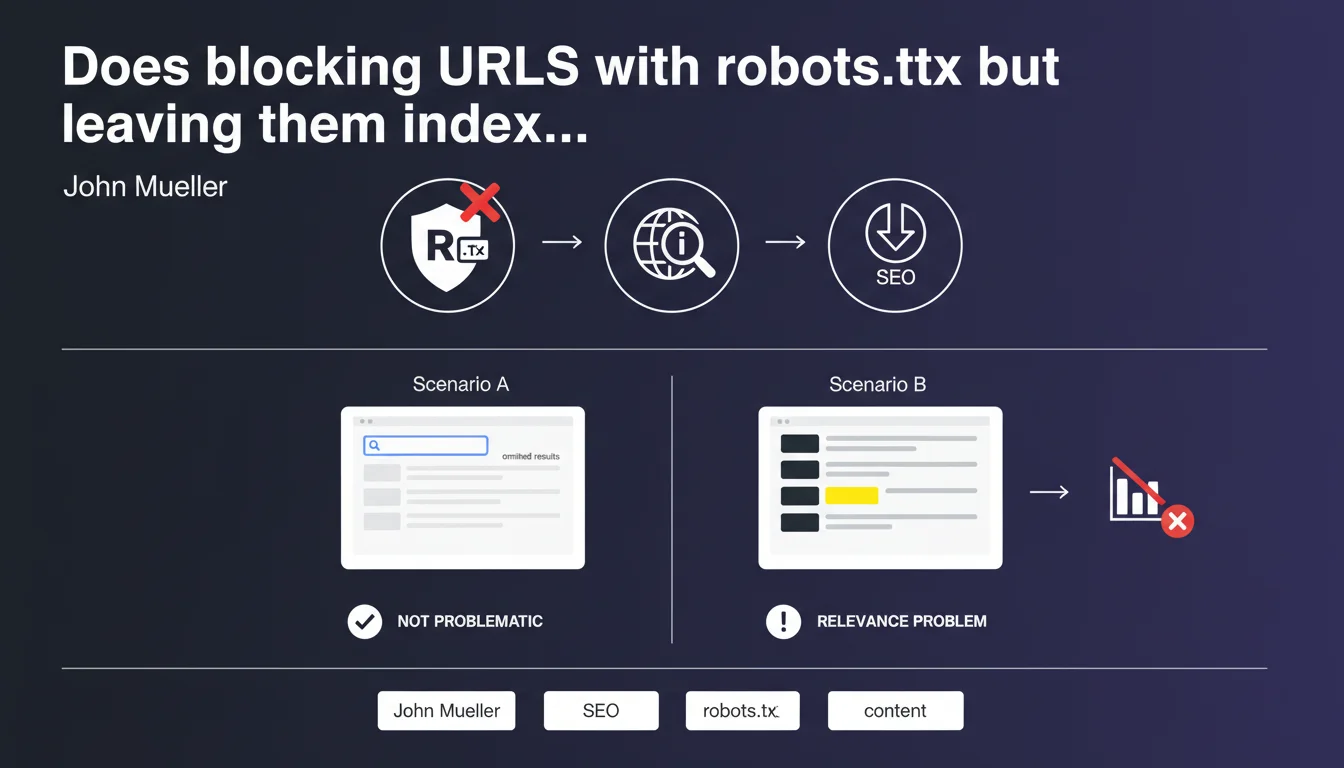
URLs blocked by robots.txt that appear only in the omitted results of a site: search have no impact on site performance. The only real problem emerges when these URLs rank in place of your main content — a sign of a relevance issue that needs fixing.
What you need to understand
Why do URLs blocked by robots.txt end up indexed?
Blocking a URL via robots.txt prevents Googlebot from crawling the page, but doesn't prevent its indexation. If other sites link to this URL with an anchor text, Google can index it without ever seeing its content.
The engine then relies on external signals — backlinks, anchor text, context — to create a minimal entry in its index. This is where these ghost URLs come from, appearing with the note "No information available for this page".
What does "omitted results" mean in a site: search?
When you search site:yourdomain.com, Google displays the pages it considers most relevant first. Secondary, redundant, or low-quality URLs are relegated to the omitted results — accessible by clicking the link at the end of the list.
These pages exist in the index but Google estimates they offer no value to the user. According to Mueller, if your URLs blocked by robots.txt are stuck in there, it has no consequence.
When do these URLs become a real problem?
The alarm goes off when a URL blocked by robots.txt ranks in the main search results instead of your legitimate content. This reveals a relevance issue: Google can't identify which page best represents your topic.
In concrete terms? You may have duplicate content issues, keyword cannibalization, or your strategic pages lack clear signals (canonical tags, internal linking, semantic optimization).
- robots.txt blocking doesn't prevent indexation if backlinks exist
- URLs indexed without crawled content can end up in omitted results
- As long as they remain invisible in regular search, there's no negative impact
- If they rank replacing your real content, you have a relevance problem
- The signal to watch: substitution in SERPs, not mere presence in the index
SEO Expert opinion
Is this statement consistent with real-world observations?
Yes, completely. We regularly see URLs blocked by robots.txt that sit in the index without ever causing ranking issues. The real criterion is visibility in SERPs, not simple indexation.
What Mueller doesn't clarify — and this is where it gets tricky — is how Google decides which URL deserves to rank or not. "Relevance" remains a fuzzy concept. [To verify] on large volumes of indexed URLs: at what point does Google start thinking your site lacks structural clarity?
In which cases does this rule not apply?
If you block with robots.txt pages that receive massive backlinks and significant direct traffic, Google may judge them more relevant than your official pages — even without crawling their content. Result: they rank, and you lose control.
Another edge case: multilingual or multi-version sites. Blocking one version with robots.txt without clear hreflang tags can create indexation chaos. Google clings to external links and ends up displaying the wrong language version in SERPs.
Should you really ignore these indexed URLs?
Let's be honest: having hundreds of URLs blocked but indexed is rarely a good sign. Even if Mueller says it's not a problem, it's often a symptom of wasted crawl budget or fuzzy architecture.
If you don't want a page indexed, the best practice is to leave it crawlable and add a noindex tag. Or, if it has no SEO value, delete it outright with a 410 Gone.
Practical impact and recommendations
What should you actually do if blocked URLs are ranking?
First, identify why Google judges them more relevant than your official pages. Compare signals: age, backlinks, anchor text, position in internal linking. Most of the time, the problem stems from lack of clarity on the page meant to rank.
Next, strengthen the relevance of your legitimate content: optimize title/meta tags, enrich content, add targeted internal links, acquire quality backlinks. The goal: give Google an indisputable signal about which page to prioritize.
What mistakes should you absolutely avoid?
Never combine robots.txt and noindex. This is a classic mistake: you block a URL via robots.txt then add a noindex tag to it. Google can't crawl the page, so never sees the noindex directive — result: the URL stays indexed indefinitely.
Don't let useless URLs linger in the index under the pretext that "it doesn't cause problems". It's true while they're invisible, but an algorithm change or a surge in backlinks could propel them into SERPs overnight.
How do you audit and clean up effectively?
Run a site:yourdomain.com search and browse the omitted results. Note all URLs blocked by robots.txt that appear. Cross-reference this list with your server logs to see if Google attempts to crawl them despite the block.
For truly useless URLs, the best solution remains permanent deletion with a 410 Gone code. For those with value but shouldn't be indexed, remove them from robots.txt and add a noindex tag.
- Run regular site: searches to detect indexed blocked URLs
- Never block via robots.txt a page you want to deindex — use noindex
- Strengthen the relevance of your official pages with optimized content and targeted internal links
- Permanently delete (410) URLs with no SEO value instead of blocking them
- Verify your canonical tags and hreflang are consistent
- Monitor backlinks pointing to blocked URLs — they can create issues
❓ Frequently Asked Questions
Peut-on désindexer une URL en la bloquant simplement par robots.txt ?
Les URLs bloquées par robots.txt mais indexées consomment-elles du crawl budget ?
Comment savoir si une URL bloquée se classe dans les résultats principaux ?
Faut-il supprimer toutes les URLs bloquées par robots.txt de l'index ?
Peut-on combiner robots.txt et balise noindex ?
🎥 From the same video 20
Other SEO insights extracted from this same Google Search Central video · published on 21/10/2022
🎥 Watch the full video on YouTube →
💬 Comments (0)
Be the first to comment.