
Official statement
Other statements from this video 14 ▾
- □ Les liens sortants de sites pénalisés sont-ils vraiment ignorés par Google ?
- □ Faut-il abandonner définitivement les annuaires et le bookmarking social pour son SEO ?
- □ Google ignore-t-il vraiment les liens spam automatiquement ?
- □ Faut-il vraiment utiliser l'outil de désaveu de liens Google ou simplement les ignorer ?
- □ Le choix de votre CMS et du langage de programmation affecte-t-il vraiment votre SEO ?
- □ Les mots-clés dans les URL ont-ils vraiment un impact sur le référencement ?
- □ La profondeur de l'URL des images bloque-t-elle vraiment le crawl de Googlebot ?
- □ Les données Search Console reflètent-elles vraiment ce que voient vos utilisateurs ?
- □ Faut-il abandonner le dynamic rendering pour le SEO ?
- □ Faut-il vraiment optimiser les noms de fichiers images pour le SEO ?
- □ Le schema markup invalide pénalise-t-il vraiment votre référencement ?
- □ Faut-il vraiment se préoccuper de la différence entre redirections 301 et 302 ?
- □ Le contenu boilerplate étendu pénalise-t-il vraiment votre référencement ?
- □ Un changement de domaine peut-il vraiment se faire sans perte de trafic SEO ?
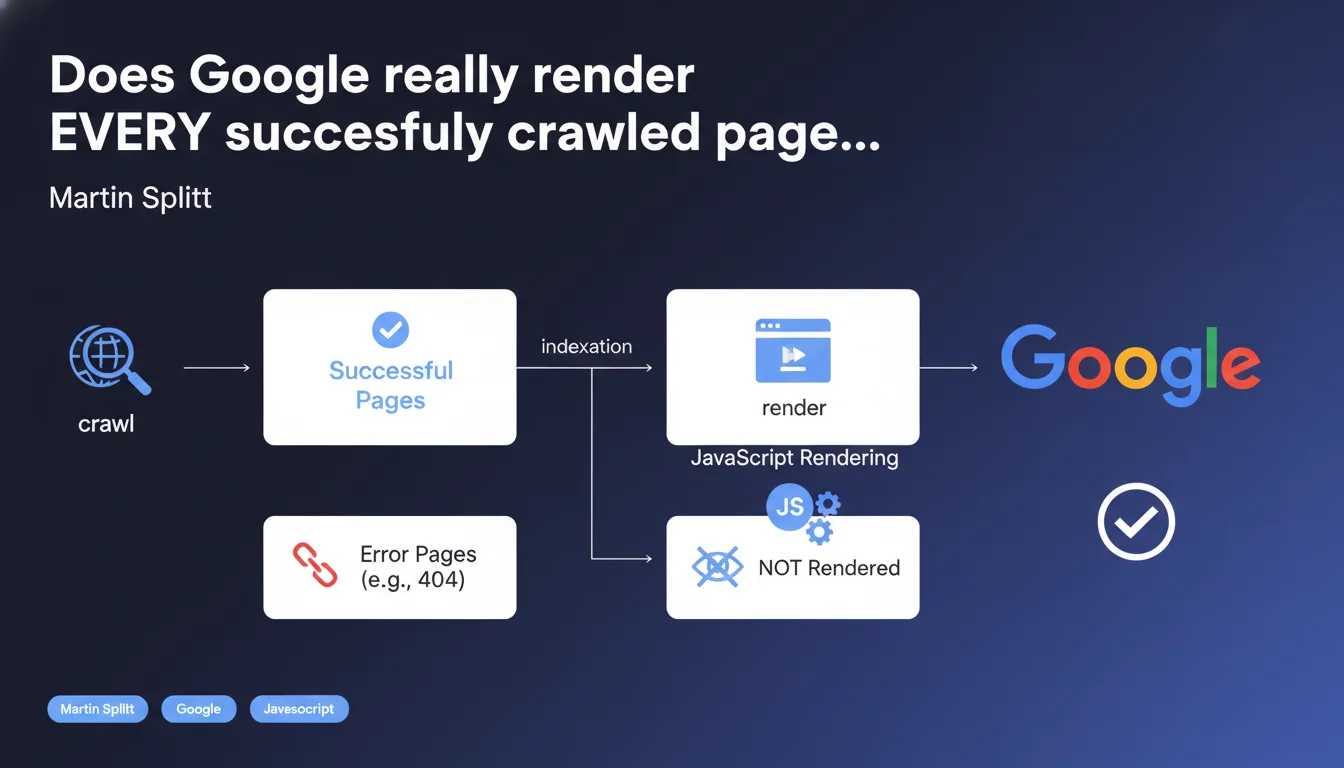
Google claims that all properly crawled pages are rendered by Googlebot — only errors (404, 5xx) escape rendering. JavaScript rendering is integrated into the normal indexation process, it's no longer an optional or secondary step. Concretely, if your page loads without an HTTP error, it will be rendered, period.
What you need to understand
This statement from Martin Splitt cuts through persistent misconceptions: no, Googlebot doesn't just analyze raw HTML and move on. JavaScript rendering is part of the standard indexation pipeline.
In other words, if your page loads correctly (code 200), Google will execute the JS, wait for the DOM to stabilize, then index the dynamically generated content. The only exceptions are pages that return HTTP errors — 404, 503, severe timeouts.
Is JavaScript rendering really systematic for all crawled pages?
Yes, according to Splitt. Any page that responds with a success code (2xx or 3xx redirected to 2xx) goes through the rendering phase. This means that crawl budget doesn't directly impact rendering: if Googlebot visits the page, it renders it.
Caution though — "rendering" doesn't mean "instant rendering." There can be a delay between initial crawl (raw HTML) and full rendering (JS executed). This gap can influence how quickly updates become visible in the index.
What prevents a page from being rendered, concretely?
HTTP errors are the main blocker. A 404, a 5xx, a network timeout — anything that prevents Googlebot from retrieving the base HTML content stops the process before rendering even begins.
Pages blocked by robots.txt are never crawled, so never rendered. Orphaned or poorly linked pages may be crawled late or never, which delays or cancels rendering. Finally, if JavaScript crashes or loops indefinitely, rendering can fail or stop prematurely — but Google technically considers it to have *attempted* to render the page.
Why is this precision about the "normal process" important?
Because it definitively buries the myth that Google wouldn't index JavaScript-generated content "by default." Rendering is not a bonus reserved for large sites — it's the standard.
That said, "normal" doesn't mean "foolproof." Sites with poorly optimized JS (heavy scripts, blocked resources, aggressive lazy-loading) can suffer partial or incomplete rendering. Google *tries* to render everything, but the quality of the result depends on your technical implementation.
- Every page crawled successfully (2xx) is rendered by Googlebot — JS rendering is integrated into the standard indexation process
- Only HTTP errors (404, 5xx, timeouts) prevent a page from being rendered
- Crawl budget doesn't directly affect rendering — if Google visits the page, it renders it
- A delay may exist between crawl and full rendering, impacting the speed of indexing updates
- Rendering can fail or be partial if JS is poorly optimized (heavy scripts, blocked resources, client-side errors)
SEO Expert opinion
Is this statement consistent with real-world observations?
Overall, yes. Tests with Google Search Console (URL inspection tool) indeed show that Googlebot renders most pages — even those with heavy React or Vue. The live rendering screenshots in GSC confirm that JS is executed.
But here's where it gets tricky: "systematic" rendering doesn't guarantee *complete* or *fast* rendering. I've seen sites where elements loaded via Intersection Observer or after an asynchronous delay never appear in Google's snapshot. Technically, the page was rendered — but not long enough to capture all the content.
[To verify]: Google doesn't communicate a clear SLA on wait time before final snapshot. Some talk about 5 seconds, others about 10. In reality, it probably varies based on the crawl budget allocated to the domain and server load.
What nuances should be added to this statement?
"All successfully crawled pages" — OK, but what is a "successful" crawl? An empty 200 HTML that loads content via JS 3 seconds later, is that successful HTTP... but an SEO failure if Google snapshots before content is visible?
Another point: Splitt doesn't mention pages with obfuscated JavaScript, critical console errors, or client-side redirect loops. These technical cases can cause partial rendering or silent abandonment. Google "attempts" to render, but if the script crashes, indexing will be incomplete — and you'll have no clear alert in GSC.
In what cases doesn't this rule really apply?
Pages blocked by robots.txt or meta robots noindex are never rendered (or ignored after rendering). Orphaned pages without internal links may be discovered via sitemaps, but if Googlebot never visits them, they'll never be rendered either.
Soft 404s (pages returning 200 with empty content or "page not found" in JS) are technically rendered, but Google may interpret them as errors after analysis. Finally, pages under failing HTTPS connections or invalid certificates may be refused before crawl — so never rendered.
Practical impact and recommendations
What should you verify first on your site?
First step: Google Search Console, URL inspection tool. Test your critical pages and compare live rendering with what you see in the browser. If content blocks are missing, then rendering failed or stopped too early.
Next, check blocked resources in GSC (CSS, JS, images). If critical files are blocked by robots.txt, rendering will be incomplete. Fix these blocks immediately.
Finally, track JavaScript errors in the console. A script that crashes can stop rendering before all content is visible. Use tools like Lighthouse or GTmetrix to identify critical client-side errors.
What errors should you absolutely avoid?
Never rely solely on native or aggressive lazy-loading to load critical content. If Googlebot snapshots before the trigger, content will be invisible. Prioritize SSR (Server-Side Rendering) or prerendering for strategic pages.
Avoid blocking essential JS/CSS resources via robots.txt — it's a common mistake that sabotages rendering. And don't blindly trust "Google renders everything": test, validate, iterate.
Also beware of client-side JavaScript redirects (window.location) without HTTP equivalents. Google may follow them... or not. Always prefer a server-side 301/302 redirect instead.
How to optimize your site to guarantee complete rendering?
Implement Server-Side Rendering (SSR) or Static Site Generation (SSG) for high-SEO-impact pages. This guarantees content is available in raw HTML without depending on JS.
If you stay with CSR (Client-Side Rendering), ensure critical content displays in less than 3 seconds after initial load. Test with Google's "Mobile-Friendly Test" to see what Googlebot actually captures.
Finally, use structured data (JSON-LD) directly in the initial HTML rather than injected in JS afterward. Google can index them even in JS, but raw HTML remains more reliable.
- Test rendering of your critical pages via the URL inspection tool in GSC
- Verify that no critical JS/CSS resources are blocked by robots.txt
- Track JavaScript errors on the client side that can stop rendering
- Prioritize SSR/SSG for strategic pages rather than pure CSR
- Ensure critical content appears within 3 seconds of page load
- Inject structured data directly into initial HTML, not only via JS
- Avoid aggressive lazy-loading for content essential above the fold
- Use HTTP redirects (301/302) rather than JavaScript for URL changes
JavaScript rendering is now the norm at Google — but this norm relies on solid technical implementation on your end. Sites that neglect JS optimization, block critical resources, or rely on haphazard lazy-loading risk partial rendering... even if Google "tries" to index everything.
These technical optimizations — SSR, resource management, JS performance — can quickly become complex, especially on modern architectures (React, Vue, Next.js). If you notice gaps between what you see and what Google indexes, it may be wise to consult a JavaScript SEO specialist agency for an in-depth audit and tailored support. Because the devil is always in the implementation details.
❓ Frequently Asked Questions
Googlebot rend-il les pages même si elles utilisent un framework JavaScript moderne comme React ou Vue ?
Si une page retourne un code 200 mais affiche du contenu vide en HTML brut, sera-t-elle quand même indexée ?
Les pages bloquées par robots.txt sont-elles rendues par Google ?
Combien de temps Google attend-il avant de capturer le rendu final d'une page ?
Une erreur JavaScript côté client peut-elle empêcher l'indexation d'une page ?
🎥 From the same video 14
Other SEO insights extracted from this same Google Search Central video · published on 04/05/2023
🎥 Watch the full video on YouTube →
💬 Comments (0)
Be the first to comment.