
Official statement
Other statements from this video 16 ▾
- □ Do you really need to notify Google when redesigning your website?
- □ Does Google really detect WEBP format through the HTTP header rather than the file extension?
- □ What does Google really consider a prominent video, and why does it matter for your search rankings?
- □ Does multilingual duplicate content really hurt your international SEO rankings?
- □ Should you choose a ccTLD over .com to target a local market?
- □ Why does Google insist on isolating site migrations from any other redesign work?
- □ Is AdsBot skewing your Search Console crawl data without you knowing?
- □ Should you consolidate all hreflang annotations in one sitemap or split them by language?
- □ Does Google offer a button to force massive reindexing of a website after a redesign?
- □ Strong vs Bold: Does Google really make a difference between these two tags?
- □ Does LCP really only measure what's visible in your viewport at load time?
- □ Is an XML sitemap really essential for Google to index your website?
- □ Should you use hreflang 'de' or 'de-de' to target German speakers?
- □ Does Google really retry indexing your pages after a 401 error or server downtime?
- □ Does nesting your structured data really help Google understand what your page is actually about?
- □ Should you really prioritize alt text over OCR for extracting text from images?
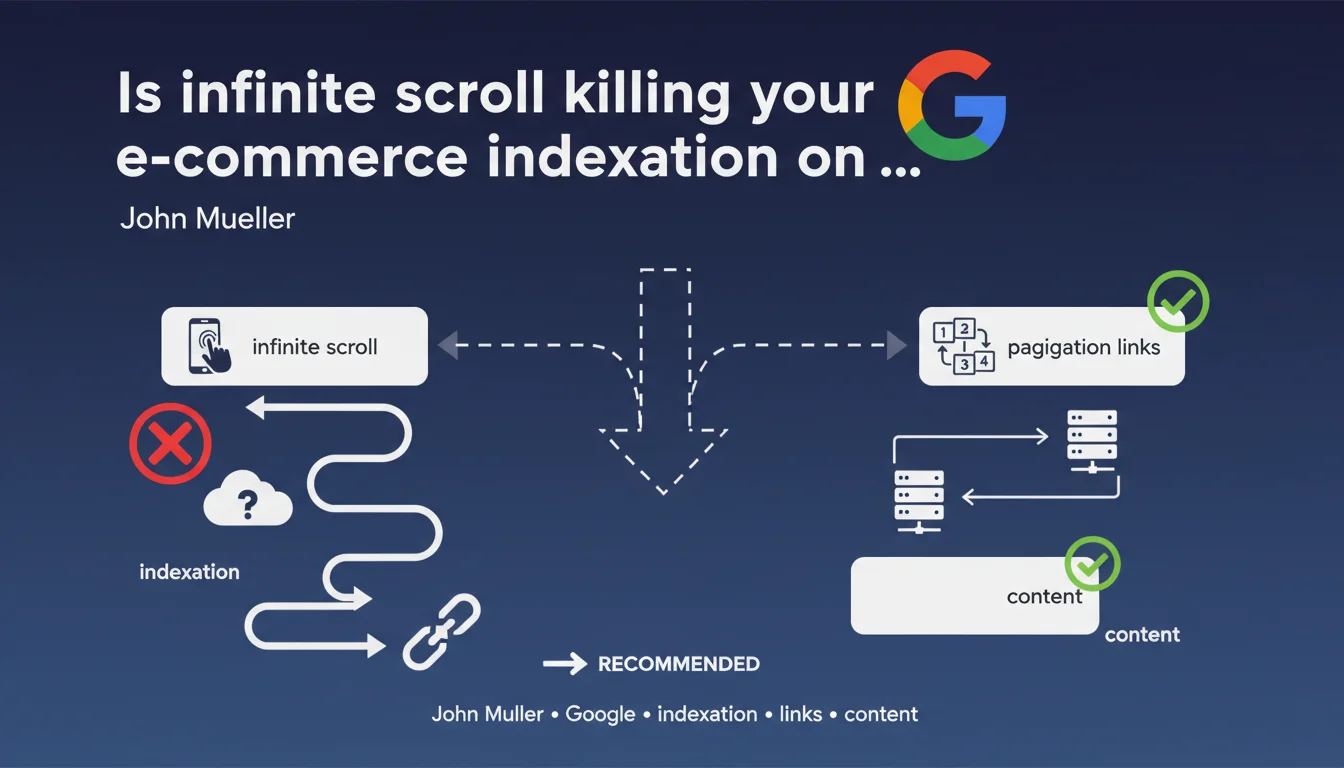
Google recommends adding classic pagination links alongside infinite scroll. Infinite scrolling requires scroll simulation (viewport expansion) which proves ineffective and can block content indexation. For e-commerce sites, pagination remains the most reliable solution to guarantee complete catalog exploration.
What you need to understand
Why does infinite scroll cause problems for search engines?
Google's crawlers don't navigate like regular users. They analyze the initial DOM of a page, execute JavaScript, then must detect whether additional content loads on scroll.
To handle infinite scroll, Google uses a technique called viewport expansion: the bot simulates a progressive enlargement of the window to trigger the loading of new elements. This approach consumes enormous resources and doesn't guarantee that all content will be discovered — especially if the JavaScript implementation has latencies or complex loading conditions.
What exactly is viewport expansion?
It's a technical simulation where Googlebot artificially extends the display area to force scroll events to trigger. The problem? This method isn't instantaneous, depends on server responsiveness, and most importantly, it isn't prioritized in crawl budget allocation.
If your site loads content on scroll asynchronously with delays or conditions (complex intersection observers, throttling, aggressive lazy loading), Googlebot may simply give up before discovering everything.
What are the direct consequences for an e-commerce site?
A catalog of 500 products presented in infinite scroll may see only the first 50 products indexed. Product pages lower in the stream receive no classic HTML links, so no direct crawl signal.
Result: orphaned pages, invisible in the index, even though they're technically accessible to real users. Organic traffic concentrates on a fraction of the catalog, and SEO potential is wasted.
- Infinite scroll without pagination makes crawler exploration inefficient
- Viewport expansion consumes crawl budget with no guarantee of results
- Products at the bottom of the page risk never being indexed
- Classic pagination as a complement is Google's recommended solution
SEO Expert opinion
Is this recommendation really new?
No. Google has been hammering this message for years, but the nuance here lies in the phrase "strongly recommended". It's no longer soft advice — it's a direct warning for e-commerce sites betting everything on infinite scroll without a safety net.
In the field, we observe that sites adopting infinite scroll without complementary pagination suffer from truncated indexation. Server logs show that Googlebot often stops after just dozens of elements, even if the page contains hundreds.
Are all types of infinite scroll affected equally?
Here you need to make a distinction. Infinite scroll on a blog page or news feed poses fewer problems than a product catalog. Why? Because blog articles are generally accessible through other paths (menu, sitemap, internal links). E-commerce products, however, often depend solely on the category page to be discovered.
If your infinite scroll loads content already accessible elsewhere (solid internal linking, exhaustive XML sitemap), the risk is lower. But if that content exists nowhere else as a classic HTML link, you're playing Russian roulette with your indexation. [To verify] in your own crawl logs.
Does complete pagination really solve all problems?
Almost. Classic pagination with rel="next" and rel="prev" links (even though Google no longer officially uses them) offers a clear and predictable crawl path. Each page has a distinct URL, bounded content, calculable crawl budget.
But beware: poorly designed pagination (duplicate URLs, inconsistent canonicals, orphaned pages) can create other problems. The devil is in the implementation details.
Practical impact and recommendations
What needs to be implemented concretely on an e-commerce site?
Add classic HTML pagination links at the bottom of your category pages, even if infinite scroll remains active for user experience. These links should point to distinct URLs (ex: /category?page=2, /category?page=3) and be present in the DOM without requiring JavaScript interaction.
Each paginated page must have its own URL, its own bounded content, and consistent canonical tags. Infinite scroll can coexist: users scroll, bots click pagination links.
How do you verify that Googlebot is exploring your entire catalog?
Analyze your server logs. Identify category page URLs and verify how many products Googlebot actually discovers. If you notice the bot systematically stops after X elements, that's a symptom of a viewport expansion problem.
Also check Search Console: how many product pages are indexed compared to the total number in your catalog? A significant gap (> 20%) signals an exploration issue.
What errors should you avoid during implementation?
Don't create duplicate content between paginated pages and infinite scroll. If /category displays products 1-50 in infinite scroll, /category?page=1 must display exactly the same products 1-50, not a random variation.
Avoid canonicalizing to page 1 for all paginated pages — this is a classic mistake that defeats the purpose of pagination. Each page should be self-canonical or use rel="next"/rel="prev" if you want to indicate a series.
- Add HTML pagination links to complement infinite scroll
- Use distinct URLs for each pagination page (ex: ?page=2)
- Verify these links are present in the initial DOM, not injected by JS after interaction
- Configure coherent canonicals (self-canonical for each page)
- Analyze server logs to verify Googlebot behavior
- Compare the number of indexed products with total catalog in Search Console
- Test crawl with Screaming Frog or similar tool to simulate bot behavior
❓ Frequently Asked Questions
Peut-on utiliser le scroll infini ET la pagination sur la même page ?
Le sitemap XML compense-t-il l'absence de pagination ?
Faut-il utiliser rel='next' et rel='prev' sur les pages paginées ?
Le lazy loading des images pose-t-il les mêmes problèmes que le scroll infini ?
Comment gérer les filtres de catégorie avec scroll infini et pagination ?
🎥 From the same video 16
Other SEO insights extracted from this same Google Search Central video · published on 09/03/2023
🎥 Watch the full video on YouTube →
💬 Comments (0)
Be the first to comment.