
Official statement
Other statements from this video 22 ▾
- □ Why doesn't Google Search Console's average position reflect a theoretical ranking but actual display results instead?
- □ Can you really afford to wait for an unstable ranking to stabilize on its own?
- □ Does boosting your SEO really require producing more content?
- □ Does the location of your XML sitemap really affect crawl efficiency?
- □ Should you really use the URL inspection tool to index a brand new website?
- □ How long does it really take to see your new backlinks in Google Search Console?
- □ Why do Search Console and Analytics data never really match up?
- □ Is Google Search Console really collecting all the data from your massive e-commerce site?
- □ Should you really prefer noindex over disallow to control indexation in Google?
- □ Can out-of-stock product pages really trigger soft 404 errors in Google's eyes?
- □ Do Google's testing tools really crawl in real-time or do they rely on cached data?
- □ Does Google really use different ranking algorithms depending on your industry?
- □ Why does Google deprioritize crawling low-effort aggregator sites?
- □ Does Google really count clicks on rich results the same way as organic clicks?
- □ Does the order of links in your HTML code really affect Google's crawl priority?
- □ Should you really avoid URLs with parameters for SEO?
- □ Why does robots.txt prevent Google from crawling your pages but still allow them to be indexed?
- □ Are out-of-stock products hurting your e-commerce site's overall search rankings?
- □ Does partial duplicate content really hurt your search rankings?
- □ Does Google really ignore your canonical tags when it decides pages are too similar?
- □ Does Google really use just one signal to choose which URL to canonicalize among your duplicate content?
- □ Do brand mentions without backlinks actually help your SEO rankings?
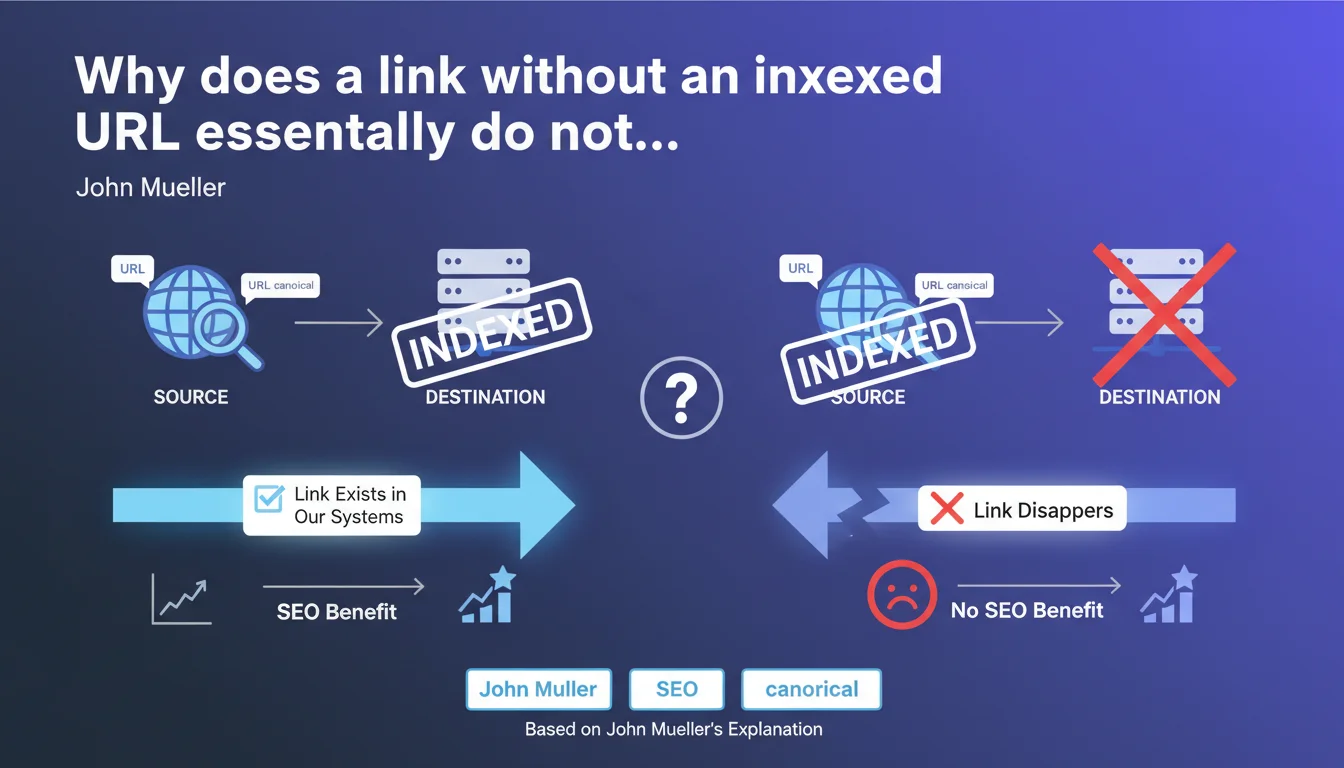
Google only counts a link if both the source AND destination are canonical URLs that are indexed. If either one is missing from the index, the link is simply ignored — it disappears from Google's systems. In practice: a backlink from a deindexed page has zero value, and pointing to a blocked or non-indexed page transfers nothing.
What you need to understand
What does "indexed canonical URL" really mean?
Google only works with canonical URLs — the reference version of a page that Google has decided to display in its search results. If you have multiple variants of the same page (HTTP/HTTPS, www/non-www, URL parameters), Google picks one as canonical.
Indexation is the fact that Google has actually stored this URL in its database and considers it eligible to appear in search results. Without indexation, there is no consideration — neither for content nor for links.
What exactly happens to a link where one end is missing?
Mueller is categorical: the link disappears. Google doesn't know what to do with it, so it completely ignores it. No PageRank transfer, no authority signal, no thematic signal. The link is as useful as a nofollow link multiplied by zero.
Let's be honest — we already knew that a backlink from a deindexed page had no weight. What Mueller confirms here is that this is also true for the destination: pointing to a non-indexed page creates no SEO benefit, even if the source is powerful.
Why does Google work this way?
The search engine works with a link graph between indexed URLs. Each link is an edge between two nodes in this graph. If a node doesn't exist (non-indexed page), the edge cannot exist either — it leads nowhere or comes from nowhere.
This is a fundamental architectural constraint: Google cannot assign value to a link without knowing both endpoints. It does not store "pending links" in hopes that a page will be indexed later.
- A link only exists in Google's systems if both source AND destination are indexed
- The URL must be the canonical version recognized by Google, not a variant
- A backlink from a deindexed page = zero SEO value
- An internal link to a blocked page (robots.txt, noindex) = useless for PageRank
- Google does not "set aside" links waiting for indexation — they disappear
SEO Expert opinion
Is this rule consistent with what we observe in the field?
Completely. Tests conducted by the SEO community have confirmed for years that a backlink from a deindexed page brings strictly nothing. We see this regularly with sites that get links from directories or aggregators whose pages are never indexed — zero impact.
What's interesting is that Mueller also emphasizes the destination. Some practitioners still think that an internal link to a noindex page "still counts" for site structure. No. If the target page is not indexed, the link transfers nothing and structures nothing in Google's systems.
What are the gray areas in this statement?
Mueller talks about "indexed canonical URLs," but doesn't specify how long a page must remain indexed for its outgoing links to count. If a page is indexed and then quickly deindexed, does it retroactively lose the value of its outgoing links? [To be verified] — no official data on this.
Another point: what about pages in crawl but not in indexation ("Discovered - currently not indexed" status)? Technically, they're not indexed, so links shouldn't count. But if Google crawls them regularly and stores a record of their links while awaiting future indexation? Mueller says no, but on-the-ground observations suggest that some signals can be "pre-calculated" — it's fuzzy.
In what cases does this rule cause problems?
The classic scenario: you have a new site with little authority. Google indexes your pages slowly. For weeks, some are in "Discovered - currently not indexed." During this period, all internal links pointing to these pages are useless — they transmit nothing.
Result: your internal linking doesn't work at full capacity, which further slows down the indexation of pages waiting. This is a vicious circle that many e-commerce or editorial sites suffer without realizing it.
Practical impact and recommendations
How can you verify that your links really count?
First, make sure all your strategic pages are indexed. Use Search Console: "Coverage" or "Pages" section. Any page in "Discovered, currently not indexed" or "Excluded" is useless for internal linking and benefits from no backlink.
Next, check your backlink sources. A link from a site whose pages are never indexed will bring you nothing — even if the domain seems powerful. Cross-reference your backlinks (Ahrefs, Majestic) with the actual indexation status of source pages via a "site:URL" search on Google.
What mistakes must you avoid at all costs?
Don't waste your crawl budget on pages you don't want to index. If you block a section in noindex or robots.txt, avoid heavily linking it from your indexed pages — those links are lost.
Another trap: poorly configured canonicals. If Google chooses a canonical URL different from the one you're targeting, all your internal links pointing to your preferred version are ignored — Google mentally redirects them to the canonical, but it doesn't always work as intended.
What should you concretely do to maximize the value of your links?
- Audit the indexation status of all your pages in Search Console — eliminate "Discovered, currently not indexed"
- Focus your internal linking on pages actually indexed
- Verify that your backlinks come from indexed pages (test "site:URL" on Google)
- Fix canonicals so Google properly recognizes your target URLs
- Avoid heavily pointing to noindex or blocked pages — it serves no purpose
- Relaunch indexation of strategic blocked pages via "Request indexation" in Search Console
❓ Frequently Asked Questions
Un lien depuis une page en noindex compte-t-il ?
Que se passe-t-il si la page cible est indexée puis désindexée ?
Un lien interne vers une page « Discovered - currently not indexed » sert-il à quelque chose ?
Comment savoir si mes backlinks proviennent de pages indexées ?
Une canonical mal configurée peut-elle faire perdre des liens ?
🎥 From the same video 22
Other SEO insights extracted from this same Google Search Central video · published on 28/03/2022
🎥 Watch the full video on YouTube →
💬 Comments (0)
Be the first to comment.