
Official statement
Other statements from this video 9 ▾
- □ Pourquoi un échec de rendu JavaScript peut-il retarder votre indexation de plusieurs semaines ?
- □ Le JavaScript est-il vraiment indexé par Google ou faut-il encore s'en méfier ?
- □ Pourquoi le rendu côté client pose-t-il un problème structurel pour le crawl Google ?
- □ Le rendu côté serveur est-il vraiment plus fiable que le rendu client ?
- □ Faut-il abandonner le rendu côté client pour améliorer son référencement naturel ?
- □ Faut-il vraiment privilégier le code 410 au 404 pour signaler une page supprimée ?
- □ Est-ce que Google traite vraiment les codes 429, 503 et 500 de la même manière ?
- □ Les domaines Web3 (.eth) sont-ils crawlables par Google ?
- □ Pourquoi vos utilisateurs tapent-ils le nom de votre marque dans Google plutôt que votre URL ?
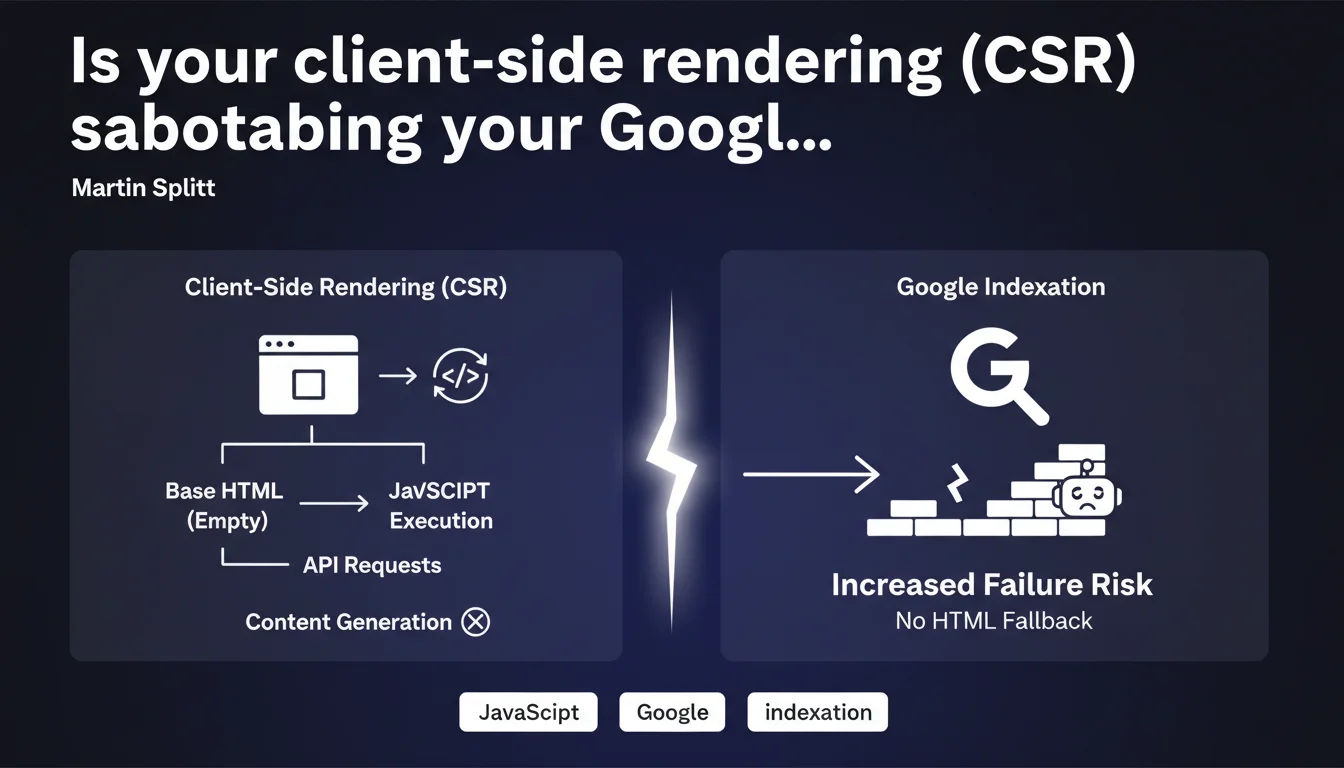
Google confirms that pages using client-side rendering (CSR) require complete rendering by Googlebot, with no safety net. If JavaScript fails, no fallback HTML content exists, drastically increasing indexation failure risks. A technical architecture that could cost you dearly in visibility.
What you need to understand
How does CSR really differ from other rendering modes?
Client-side rendering (CSR) sends to the browser — and to Googlebot — virtually empty HTML. All visible content comes from JavaScript that queries APIs to retrieve data, then dynamically builds the DOM.
Unlike SSR (Server-Side Rendering) where HTML arrives already complete, or hydration where minimal HTML skeleton exists, CSR leaves Google facing a blank page. The bot must execute the JS, wait for API responses, then assemble the final content.
Why does Google emphasize the absence of any "fallback" option?
This is the crucial point: with SSR or pre-rendering, if JavaScript breaks, Google can still index the static HTML present in the server response. A safety net.
In pure CSR, this safety net doesn't exist. If JavaScript rendering fails — timeout, network error, JS bug, resource blocked by robots.txt — Google sees nothing. Zero indexable content. The page risks being considered empty or low-quality.
What are the concrete risks of indexation failure?
Google has confirmed repeatedly that its rendering system is not foolproof. Multiple factors can cause rendering to fail:
- Timeout: if your APIs take too long to respond, Googlebot may abandon before getting the final content
- JavaScript errors: a JS bug not caught in development can block the entire bot rendering process
- Blocked resources: if a critical JS file is blocked by robots.txt or inaccessible, rendering fails completely
- Limited crawl/render budget: Google cannot infinitely render all your CSR pages, especially on large sites
- Network latency: bots crawl from distributed datacenters, sometimes with less optimal connections than your local tests
SEO Expert opinion
Is this statement consistent with what we observe in the field?
Absolutely. Full CSR sites — particularly those built on React/Vue/Angular without SSR — regularly encounter unexplained indexation problems. Pages that "disappear" from the index, partially crawled content, abnormally long indexation delays.
We also notice that Google Search Console frequently reports "Discovered - currently not indexed" errors on these architectures. The bot successfully visited the page, but failed to extract enough content to justify indexation.
What nuances should be added to this statement?
Martin Splitt doesn't say that CSR is impossible to index — only that it's riskier. Google manages it, but with a significantly higher error margin than other architectures.
We must also distinguish pure CSR from hybrid CSR. Some frameworks generate a minimal HTML skeleton with metadata and basic structure, then hydrate the rest with JS. This isn't SSR, but it's not pure CSR either — and it already limits risks.
[Needs verification] Google never provides precise figures on JavaScript rendering failure rates. It's impossible to know if we're talking about 1%, 5%, or 15% of affected CSR pages. This opacity makes objective risk assessment difficult for your specific project.
In what cases does CSR remain a viable option?
On application interfaces where SEO isn't critical: SaaS dashboards, back-offices, business tools. There, CSR brings responsiveness and simplifies development without business consequences.
For editorial content, product sheets, landing pages — anything that needs to rank — pure CSR is a risky bet. Unless you implement ultra-tight monitoring and pre-rendering mechanisms for Googlebot.
Practical impact and recommendations
What should you do concretely if your site uses CSR?
First, audit your actual indexation. Use Search Console to identify "Discovered - currently not indexed" pages and compare with your server logs. If you have significant gaps between crawled and indexed pages, that's an alarm signal.
Next, test Googlebot rendering via the URL inspection tool in GSC. Look at the "rendered" version: if it's empty or incomplete, you have confirmation of a JS rendering problem.
Monitor your Core Web Vitals from the bot's perspective. LCP (Largest Contentful Paint) in CSR is often catastrophic because content doesn't appear until after several seconds of JS + API calls. Google may consider the page too slow and deprioritize it.
What errors should you absolutely avoid?
Never block your JavaScript files via robots.txt. This is a classic error that prevents Google from rendering your pages. Also verify that your APIs don't block the Googlebot user-agent.
Avoid overly long JavaScript dependency chains. If your app.js loads a framework that loads modules that call APIs that return JSON that generates HTML… you multiply failure points.
Don't ignore server-side timeout issues. If your APIs take 5 seconds to respond on average, Googlebot won't wait. Optimize backend latency before worrying about the frontend.
How do you migrate to a more SEO-friendly architecture?
If you're on a modern framework (Next.js, Nuxt, SvelteKit), switch to SSR or SSG (Static Site Generation) for SEO-critical pages. You keep responsive UX on the client side, but Google receives complete HTML on the initial request.
For legacy sites in pure React/Vue, consider a targeted pre-rendering solution: statically generate priority pages (categories, top product sheets) and leave CSR for the rest. This is a pragmatic compromise.
If budget allows, a progressive refactor toward SSR is the most profitable investment long-term. You eliminate the risk at the source rather than working around it with technical patches.
- Audit current indexation via Search Console and server logs
- Test Googlebot rendering with the URL inspection tool
- Measure LCP from the bot's perspective and optimize API response times
- Verify that JS and APIs are accessible to Googlebot
- Progressively migrate to SSR/SSG for strategic pages
- Implement automated indexation monitoring (via GSC API)
- Document JS dependencies to limit failure chains
❓ Frequently Asked Questions
Le CSR est-il complètement à bannir pour le SEO ?
Le pre-rendering résout-il le problème du CSR pour Google ?
Comment savoir si mes pages CSR sont correctement indexées ?
Les Core Web Vitals sont-ils pénalisés en CSR ?
Next.js et Nuxt résolvent-ils automatiquement le problème ?
🎥 From the same video 9
Other SEO insights extracted from this same Google Search Central video · published on 30/05/2023
🎥 Watch the full video on YouTube →
💬 Comments (0)
Be the first to comment.