
Official statement
Other statements from this video 11 ▾
- □ Does intensive crawling really guarantee a high-quality website?
- □ Does forcing Google to crawl more pages actually boost your search rankings?
- □ Can you really boost your site's crawl budget by contacting Google?
- □ Why does Google crawl some sites more frequently than others?
- □ Is Google Really Pushing the If-Modified-Since Header to Cut Crawl Costs?
- □ Do URL parameters really create an infinite crawl space for Google?
- □ Is Google really hiding the secret to faster indexing in your Crawl Stats?
- □ Is a slow server response time killing your crawl budget?
- □ Does Googlebot really crawl links sequentially like a user navigating from page to page?
- □ Should you really optimize crawl budget when Google has unlimited resources?
- □ Are sitemaps really essential for optimizing your site's crawl performance?
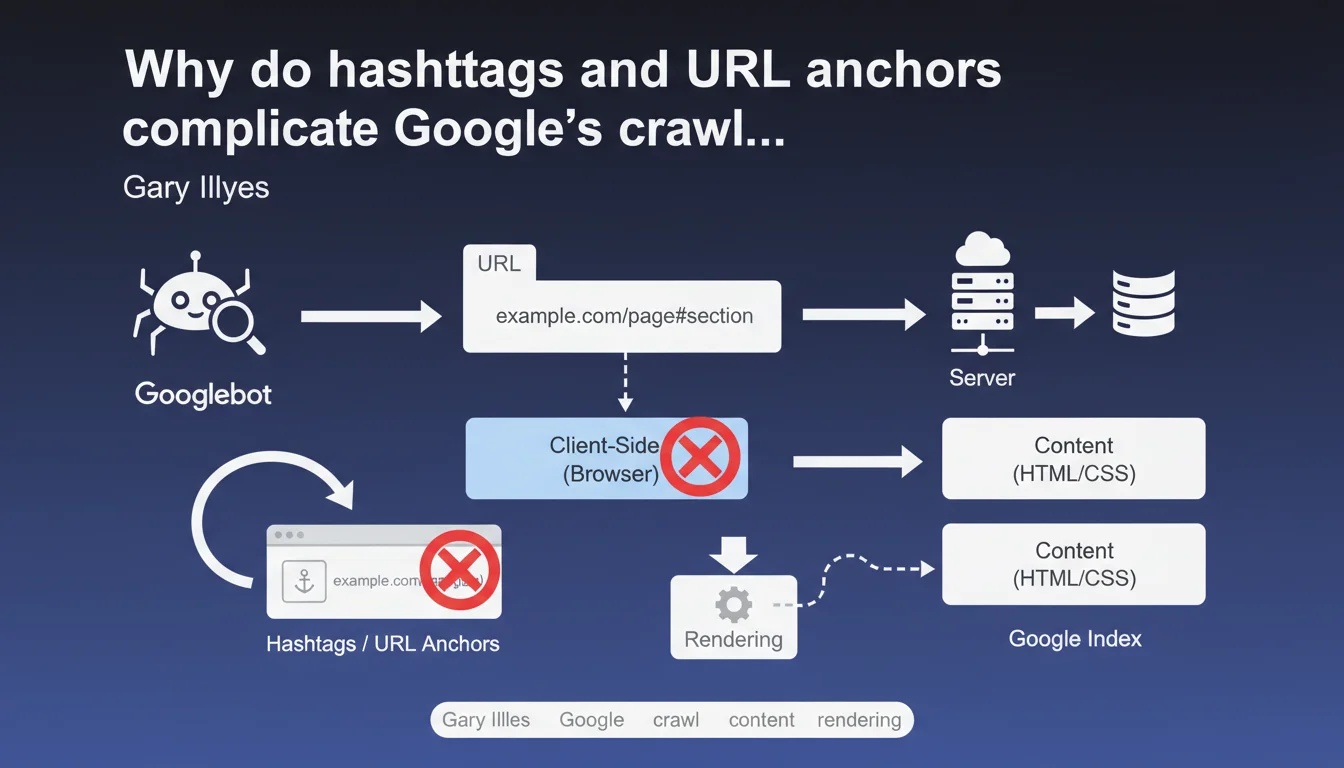
URL fragments (everything after the #) are processed only on the browser side and remain invisible to Googlebot without JavaScript rendering. In practice, if your architecture relies on anchors to structure content, Google may never discover certain sections — unless you force rendering, which consumes crawl budget.
What you need to understand
What's the difference between a complete URL and an anchor fragment?
A standard URL like example.com/page is entirely transmitted to the server during the HTTP request. However, everything that follows the # symbol — called a fragment or anchor — remains strictly on the client side. The browser uses it to scroll to an element on the page or trigger JavaScript, but this fragment is never sent to the server.
For Googlebot in standard crawl mode (without rendering), it's as if these anchors don't exist. It sees example.com/page, period. If your dynamic content depends on a #section-2 to display, Google won't see it on the first pass.
How can Google still access this content?
Google has the capability to perform JavaScript rendering — in other words, it can execute your page's JS the same way a browser would. But this process happens in a separate queue, with variable delays (sometimes several days), and consumes far more resources than a simple HTML crawl.
If your navigation relies heavily on anchors and JavaScript rendering is delayed, certain sections risk being never discovered or indexed. That's where things get stuck for single-page sites or poorly configured SPAs.
Which architectures are affected by this problem?
Primarily Single Page Applications (SPAs), sites built with JavaScript frameworks (React, Vue, Angular), and one-page sites with anchor-based navigation. If your main menu uses links like href="#services" without real distinct URLs, you're directly impacted.
Standard sites that use anchors only for internal scrolling (table of contents, back-to-top buttons) don't pose major issues — as long as the content is already present in the initial HTML.
- URL fragments (#) are never transmitted to the server during an HTTP request
- Googlebot in standard crawl mode doesn't see anchors without rendering
- JavaScript rendering arrives after the initial crawl, with unpredictable delays
- SPA or one-page architectures are most exposed to this discoverability risk
- Without distinct URLs for each section, internal linking and crawl budget suffer
SEO Expert opinion
Does this statement match what we observe in practice?
Yes, absolutely. We regularly see SPAs with catastrophic indexation rates because Google never rendered certain routes. Deferred rendering is an established fact — and when crawl budget is tight, some pages may wait weeks before being rendered.
Where Gary Illyes remains vague is on the exact rendering priorities. What signals trigger fast rendering versus slow or never? We lack concrete data. [To verify] in your own server logs and Search Console.
Should you therefore ban all use of anchors?
No, and that would be a mistake. Anchors remain perfectly valid for improving user experience — tables of contents, smooth internal navigation, deep linking in rich content. The real problem is when the entire architecture relies on anchors without distinct URLs.
If your critical content is accessible via a real URL and anchors just serve as UX shortcuts, no problem. It's exclusive use of anchors to segment content that's invisible on the HTML side that causes issues.
What are the truly reliable solutions today?
Server-Side Rendering (SSR) or static generation remain the safest approaches. Next.js, Nuxt, Gatsby — all these frameworks allow you to generate complete HTML on the server side. Googlebot sees the content immediately, without depending on rendering.
Otherwise, Dynamic Rendering (serving pre-rendered HTML only to bots) works, but Google has already hinted that this was only a temporary solution. Long-term, it's better to bet on SSR or systematic pre-rendering.
Practical impact and recommendations
What should you check first on your site?
Start by identifying whether your main navigation or strategic content depends on anchors. Inspect your internal links: if you see many href="#" or href="#section" without distinct URLs, that's a red flag.
Next, test the raw HTML with a curl or View Source in your browser. If entire blocks of content don't appear without JavaScript enabled, Google may miss them on the first crawl.
How do you fix an architecture too dependent on anchors?
The clean solution is to migrate to distinct URLs for each important section. Instead of example.com/services#consulting, create example.com/services/consulting. You maintain a real crawlable URL structure, with internal linking possibilities and monitoring in Search Console.
If a complete redesign isn't feasible in the short term, SSR or pre-rendering can serve as a workaround. But be careful — it's just a band-aid if the underlying architecture remains flawed.
What mistakes should you absolutely avoid?
Never rely on JavaScript rendering as a default solution. Some sites wait months before Google renders certain pages — and sometimes it never happens. Crawl budget isn't infinite, especially on medium-sized sites.
Another trap: internal links to anchors without HTML fallback. If your internal linking relies on onclick or JS events to load content, Google will never follow these links in standard crawl mode.
- Audit your internal links: identify all
href="#"and verify whether they hide critical content - Test raw HTML (curl, View Source) to confirm content is present without JS
- Check Search Console coverage reports: missing pages may signal a discoverability issue
- Prioritize distinct URLs for each strategic section rather than anchors
- If you're using a JS framework, implement SSR or static generation
- Monitor rendering delays with server logs and crawl tools
❓ Frequently Asked Questions
Google indexe-t-il le contenu chargé via des ancres JavaScript ?
Les ancres nuisent-elles au référencement dans tous les cas ?
Peut-on utiliser des SPAs sans compromettre le SEO ?
Comment vérifier si mon site est impacté par ce problème ?
Le Dynamic Rendering est-il une solution viable à long terme ?
🎥 From the same video 11
Other SEO insights extracted from this same Google Search Central video · published on 08/08/2024
🎥 Watch the full video on YouTube →
💬 Comments (0)
Be the first to comment.