
Official statement
Other statements from this video 9 ▾
- □ Do CSS class names really affect your search engine rankings?
- □ Why does Google require your CSS files to be crawlable?
- □ Is CSS ::before and ::after content really invisible to Google?
- □ Why aren't your CSS background images ever showing up in Google Images?
- □ Could strict HTML and CSS separation be the missing piece in your indexation strategy?
- □ Does 100vh really cause indexation problems for your hero images?
- □ Why can Google Search Console screenshots mislead you about your site's indexation?
- □ Why does Google require <img> tags for stock images instead of CSS?
- □ Can CSS Harm Your SEO Just Like JavaScript Does?
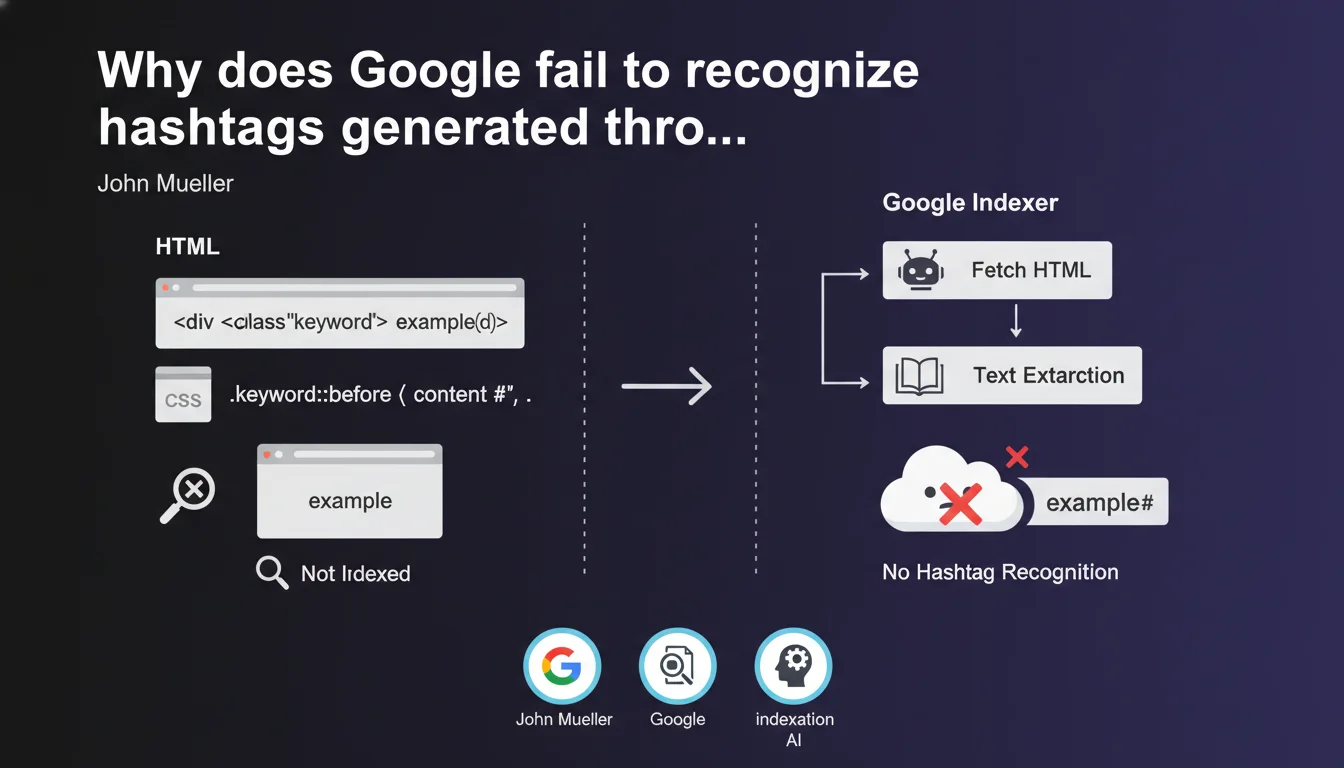
Google identified a problematic case: a website was adding hashtags (#) via CSS ::before in front of keywords, but the indexation system did not recognize them. Since the # symbol exists only in the visual rendering through CSS and not in the HTML source, it becomes invisible to Googlebot. This practice amounts to attempting to manipulate the display without modifying the actually indexable content.
What you need to understand
How does Google handle content generated via CSS?
Googlebot analyzes the raw HTML of a page, not its final visual rendering. When an element is added via CSS ::before or ::after, it exists only in the browser's display — it's a cosmetic layer.
The indexation engine therefore does not see these symbols. If your HTML contains <span>SEO</span> and CSS adds a # in front, Google indexes "SEO", not "#SEO". The hashtag simply does not exist for it.
Why do some sites use this technique?
The objective was probably to create visual hashtags to improve appearance without touching the HTML. Perhaps for aesthetic reasons, or to retroactively transform words into hashtags without modifying the CMS.
The problem? This approach assumes that Google indexes what a user sees. That's false. Google indexes what is in the source DOM, before any CSS or client-side JavaScript transformation.
What is the difference with content hidden via CSS?
Google penalizes cloaking and text hidden intended only for robots. Here, it's the opposite: content visible to humans but invisible to robots.
It's not spam in the strict sense, but it creates a gap between SEO intent and technical reality. If you want Google to understand that these are hashtags, they must be in the HTML.
- Content generated via ::before and ::after is not indexed by Google
- Googlebot reads the source HTML, not the final CSS rendering
- A hashtag must be present in the HTML code to be recognized as such
- This practice creates a discrepancy between what the user sees and what Google indexes
- No direct penalty, but a total loss of SEO effectiveness for these elements
SEO Expert opinion
Is this report from the indexation team really surprising?
Let's be honest: no. Any SEO professional who understands the basics of crawling and indexation knows that CSS is not indexable content. What's interesting is that Google takes the trouble to publicly flag it.
It reveals two things. First, that this practice exists enough to warrant an alert. Second, that even in 2025, many sites still confuse visual rendering and crawlable content.
Do hashtags really have an SEO impact outside of social networks?
Here's the real issue. On a standard web page, a hashtag has no particular status for Google. It's not a ranking signal, nor a semantic tag recognized like <h1> or <strong>.
Hashtags work on Twitter, Instagram, LinkedIn because these platforms use them as an internal categorization system. On your website? It's just text. Adding a # in front of "SEO" changes absolutely nothing for Google compared to writing "SEO" plain and simple.
So why was this site bothering to add them via CSS? Probably to mimic the aesthetics of social networks, without realizing that it brought no SEO value — even if the hashtags had been indexed.
What other CSS techniques pose similar problems?
Any content generated via CSS pseudo-elements is invisible to Google. This includes icons added via ::before (often Unicode characters or Font Awesome), labels, customized list numbers, etc.
And the same logic applies to JavaScript that modifies the DOM after loading: if the content is not in the initial HTML and Google doesn't execute or poorly executes it, it won't be indexed. The difference? JavaScript, Google attempts to render it. CSS ::before? Never.
Practical impact and recommendations
What should you check on your site right now?
Open your browser's DevTools. Inspect elements that appear to contain symbols, icons or important text. If you see ::before or ::after in the CSS, and that content has semantic or SEO value, you need to move it to the HTML.
Concretely? Search your stylesheets for instances of content:. If it generates visible text that makes sense to the user — not just decoration — that's a red flag.
How to fix this type of error without breaking the design?
If you want indexable hashtags, write them directly in the HTML. <span class="hashtag">#SEO</span>. You can then style this span via CSS to look exactly like what you want.
For icons, use inline SVG tags or images with alt attribute, not CSS pseudo-elements. For labels or counters, include them in the markup with data-attributes or hidden spans if needed — but in the source DOM.
The principle is simple: anything that needs to be understood by Google must be in the HTML. CSS is for beautifying, not creating content.
What mistakes should you avoid to not reproduce this problem?
- Never use ::before or ::after to add text with semantic or SEO value
- Verify that important visual elements (prices, labels, hashtags) are indeed in the source HTML
- Test your pages with an SEO crawler (Screaming Frog, OnCrawl) to see what Google actually sees
- Use the URL Inspection tool in Search Console to compare raw HTML and rendering
- Train dev and design teams on the distinction between indexable content and CSS decoration
- Regularly audit CSS modifications that affect strategic areas (titles, descriptions, keywords)
This statement from Google is a reminder of a fundamental principle: indexable content lives in HTML, not in CSS. The ::before and ::after pseudo-elements are invisible to Googlebot.
If your site uses CSS to add symbols, labels or text that have semantic value, you're losing an indexation opportunity. The solution is straightforward: integrate these elements directly into the markup.
These adjustments may seem minor, but they're part of a broader technical redesign that often touches front-end architecture, the CMS, and dev workflows. If you identify this type of problem in multiple places on your site, assistance from an SEO-specialized agency can save you significant time — and prevent scattered fixes that don't address the root cause.
🎥 From the same video 9
Other SEO insights extracted from this same Google Search Central video · published on 24/07/2025
🎥 Watch the full video on YouTube →
💬 Comments (0)
Be the first to comment.