
Official statement
Other statements from this video 17 ▾
- 1:24 Why is Google republishing guides on robots.txt and meta robots right now?
- 7:02 Does GoogleBot really crawl URLs that your site never created?
- 7:27 Why do Search Console and Google Analytics show different numbers?
- 7:27 Does GoogleBot really crawl URLs your site never created?
- 8:07 Why does Search Console show completely different data than Google Analytics?
- 8:51 How long does it actually take Google to detect and process a noindex tag fix?
- 9:49 Why does Google take so long to recognize the removal of a noindex tag?
- 11:11 Does special character encoding in source code really harm your SEO rankings?
- 11:11 Does special character encoding in your source code actually hurt your SEO rankings?
- 11:47 What's the safest way to prevent Google from crawling your PDFs without accidentally getting them indexed?
- 14:14 How long does Google really take to display your new site name in search results?
- 14:14 How can you force Google to display your site's correct name in the SERPs?
- 14:59 Does Google really penalize brand names that are too similar to competitors in search results?
- 15:14 Could similar brand names harm your SEO performance and search visibility?
- 19:01 Why won't Google reveal its exact criteria for adult content classification?
- 20:13 Does Google penalize a site that's 100% HTTPS with no HTTP version?
- 20:30 Does running an HTTPS-only website actually hurt your SEO rankings?
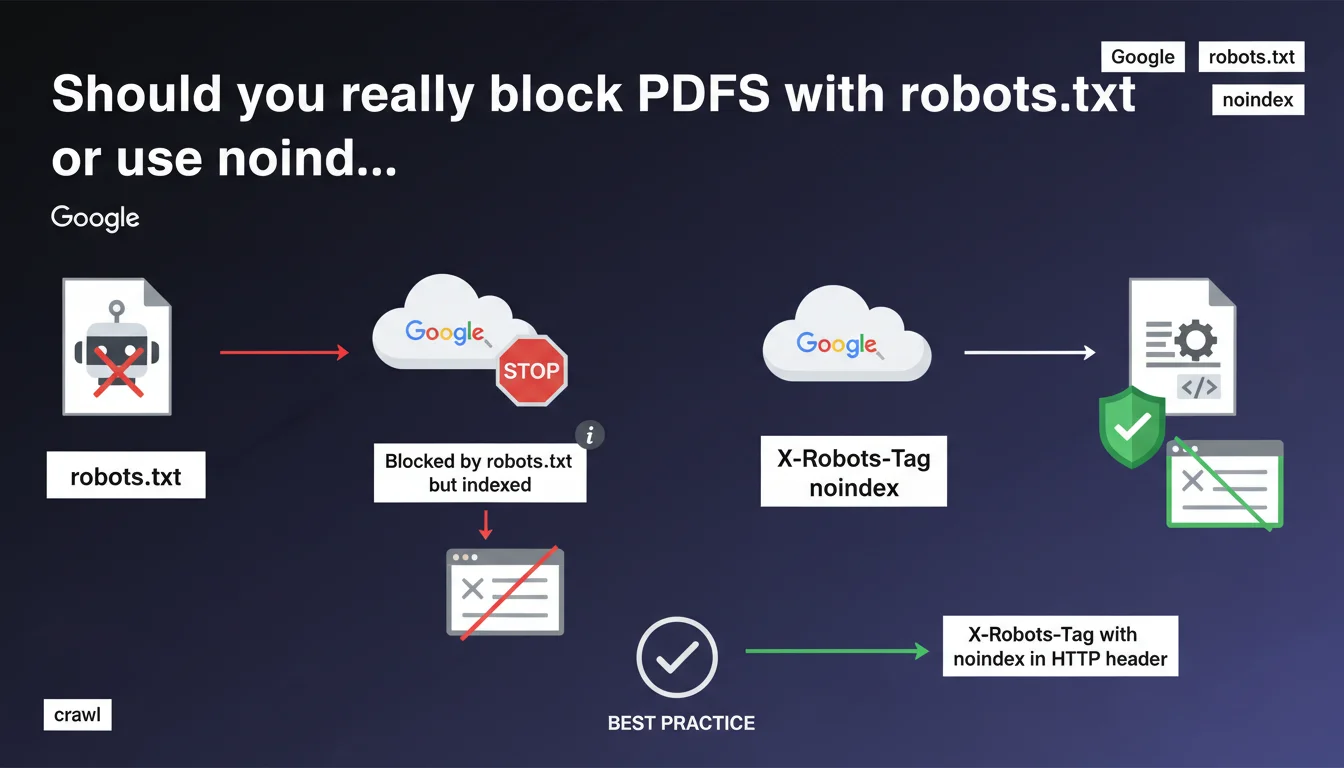
Blocking a PDF via robots.txt doesn't prevent Google from indexing it — it can do so without crawling it, but the page won't be displayed in search results. Google recommends using X-Robots-Tag: noindex in the HTTP header instead to properly control PDF file indexation.
What you need to understand
Why can a PDF blocked by robots.txt still be indexed?
Google differentiates between crawling and indexation. Blocking a PDF file with robots.txt prevents Googlebot from downloading it and reading its content. But if this PDF receives external or internal links, Google can create an index entry based solely on external signals: anchor text, link context, and the URL itself.
This is what the 'Blocked by robots.txt but indexed' status means in Search Console. The page exists in the index, but Google notes that it won't be displayed in search results — at least eventually. This mechanism creates a gray area that often confuses SEO practitioners.
What's the difference between 'indexed' and 'displayed in search results'?
A URL can be technically indexed without ever appearing in the SERPs. Google sometimes maintains phantom entries in its index, notably to preserve its link graph structure or for internal technical reasons.
In the case of a PDF blocked by robots.txt, the URL can remain in the index as long as links point to it. But without crawled content, Google cannot evaluate its relevance — so it remains invisible to users. This is a transitional state that should resolve over time.
Why does Google recommend X-Robots-Tag instead of robots.txt for PDFs?
The HTTP header X-Robots-Tag: noindex provides clean and explicit control over indexation. Unlike robots.txt, which blocks crawling without preventing indexation, X-Robots-Tag allows Google to crawl the file to discover the directive, then respect the noindex.
This approach eliminates ambiguity. Google clearly understands that you don't want the PDF indexed, and no phantom entry remains in the index. This is the recommended method for PDF files, images, or any non-HTML content you want to exclude from search results.
- Robots.txt blocks crawling but doesn't prevent partial indexation based on external signals
- The 'Blocked by robots.txt but indexed' status signals a URL that's indexed without crawled content, ultimately invisible in the SERPs
- X-Robots-Tag: noindex in the HTTP header guarantees explicit control over PDF indexation
- Google can maintain phantom entries in its index as long as links point to the blocked URL
SEO Expert opinion
Is this statement consistent with real-world observations?
Fundamentally, yes. The behavior described matches what we've observed in Search Console for years. PDFs blocked by robots.txt regularly appear with this ambiguous 'indexed but blocked' status, especially if they receive quality backlinks.
However — and this is where it gets tricky — Google remains vague about the timeline. 'Won't be displayed in results going forward' doesn't mean much. How long can a URL remain in this limbo state? Weeks? Months? [To verify] Google provides no specific timeframe, which complicates diagnosis during SEO audits.
What are the concrete risks with robots.txt on sensitive PDFs?
The real problem is information leakage. If you block a confidential PDF with robots.txt thinking it will remain invisible, you're mistaken. The URL can appear in search results with a snippet generated from anchor text or the URL structure itself.
I've seen cases where internal documents appeared in Google with titles reconstructed from backlinks, even though they were blocked in robots.txt. Result: clicks, 403 or 404 errors on the user side, and complete confusion. For any content you truly want to hide, robots.txt isn't enough — you need server authentication or explicit noindex.
Why is X-Robots-Tag the most reliable solution?
Because it eliminates all ambiguity. Google crawls the file, reads the noindex directive in the header, and removes the URL from the index. No intermediate state, no phantom entry lingering for weeks.
Implementation is simple on the server side — just a few lines in Apache or Nginx. The only drawback: Google must be able to crawl the file to read the directive. If you block it simultaneously in robots.txt, the directive will never be read. This is why Google insists on this method rather than robots.txt for managing PDF indexation.
Practical impact and recommendations
What should you do if you want to prevent PDF indexation?
Forget robots.txt for this use case. Instead, configure an X-Robots-Tag: noindex in your PDFs' HTTP header. On Apache, add this directive to your .htaccess or VirtualHost config:
<FilesMatch "\.pdf$">
Header set X-Robots-Tag "noindex, nofollow"
</FilesMatch>
On Nginx, use this syntax in your server or location block:
location ~* \.pdf$ {
  add_header X-Robots-Tag "noindex, nofollow";
}
Verify afterward with a curl -I https://yoursite.com/file.pdf that the header is present. If you manage thousands of PDFs, automate this verification using a crawler like Screaming Frog or OnCrawl.
How do you fix PDFs already blocked by robots.txt?
Start by identifying the relevant URLs in Search Console, Coverage section, filtered by 'Blocked by robots.txt but indexed'. Note the complete list.
Then remove the Disallow rules for these PDFs from your robots.txt. Simultaneously add X-Robots-Tag: noindex in the HTTP header of these files. Google can then crawl them, read the directive, and properly remove them from the index.
Wait a few weeks for Google to recrawl. If you're in a hurry, manually submit the URLs using the URL inspection tool in Search Console. Warning: this method only works for limited volumes — beyond 50-100 PDFs, you need to let natural crawling do its job.
What mistakes should you absolutely avoid?
- Never block a sensitive PDF only with robots.txt — the URL can leak into the SERPs
- Don't add X-Robots-Tag to a URL already blocked in robots.txt — Google won't be able to read the directive
- Don't brutally remove robots.txt rules without implementing an alternative (noindex or authentication)
- Don't ignore the 'Blocked by robots.txt but indexed' status in Search Console — it's a signal of ambiguity to address
- Don't confuse 'indexed' with 'displayed in search results' — a URL can be indexed without ever appearing in the SERPs
❓ Frequently Asked Questions
Peut-on bloquer un PDF en robots.txt tout en évitant qu'il soit indexé ?
Combien de temps une URL reste-t-elle dans l'état 'Bloqué par robots.txt mais indexé' ?
Le X-Robots-Tag fonctionne-t-il sur tous les types de fichiers ?
Que faire si mes PDF sont déjà indexés et je veux les supprimer ?
Peut-on combiner robots.txt et X-Robots-Tag sur un même PDF ?
🎥 From the same video 17
Other SEO insights extracted from this same Google Search Central video · published on 27/03/2025
🎥 Watch the full video on YouTube →
💬 Comments (0)
Be the first to comment.