
Official statement
Other statements from this video 17 ▾
- 1:24 Why is Google republishing guides on robots.txt and meta robots right now?
- 7:02 Does GoogleBot really crawl URLs that your site never created?
- 7:27 Why do Search Console and Google Analytics show different numbers?
- 7:27 Does GoogleBot really crawl URLs your site never created?
- 8:07 Why does Search Console show completely different data than Google Analytics?
- 8:51 How long does it actually take Google to detect and process a noindex tag fix?
- 9:49 Why does Google take so long to recognize the removal of a noindex tag?
- 11:11 Does special character encoding in source code really harm your SEO rankings?
- 11:11 Does special character encoding in your source code actually hurt your SEO rankings?
- 11:51 Should you really block PDFs with robots.txt or use noindex instead?
- 14:14 How long does Google really take to display your new site name in search results?
- 14:14 How can you force Google to display your site's correct name in the SERPs?
- 14:59 Does Google really penalize brand names that are too similar to competitors in search results?
- 15:14 Could similar brand names harm your SEO performance and search visibility?
- 19:01 Why won't Google reveal its exact criteria for adult content classification?
- 20:13 Does Google penalize a site that's 100% HTTPS with no HTTP version?
- 20:30 Does running an HTTPS-only website actually hurt your SEO rankings?
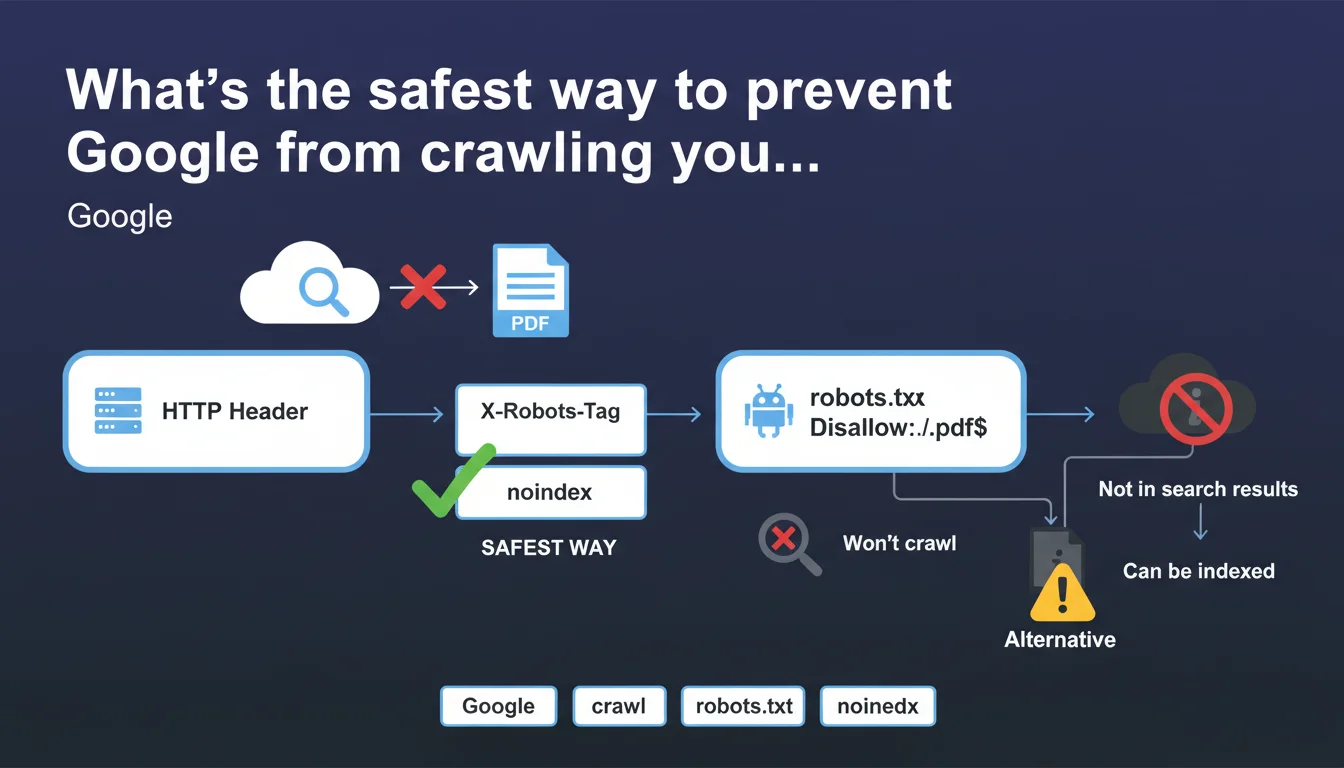
Google recommends the HTTP header X-Robots-Tag with noindex to block PDFs from crawling. Robots.txt is a fallback option, but beware: a PDF blocked by robots.txt can still be indexed without appearing in search results. A paradox you absolutely need to master.
What you need to understand
Why does Google distinguish between crawling and indexing for PDFs?
The confusion stems from a fundamental misunderstanding: blocking crawl does not block indexing. When you use robots.txt to deny access to a PDF, Googlebot cannot download it. That makes sense.
But if that file is linked from other pages, Google can create a phantom entry in its index — without ever reading the content. The PDF exists in the database, it just won't show up in the SERPs. This is what Google politely calls "indexed but not displayed."
What's the concrete difference between X-Robots-Tag and robots.txt?
The X-Robots-Tag: noindex header applies the moment Googlebot accesses the file. It crawls, reads the header, understands the instruction, and doesn't index. Clean and simple.
Robots.txt intervenes earlier: it prevents crawling altogether. Googlebot never opens the PDF. The problem? Without access to the file, it can't read any embedded noindex directive. If backlinks point to that PDF, Google can still reference it by default — with a generic title and visible URL.
Why does robots.txt remain an option if X-Robots-Tag is superior?
Because not everyone has control over server configuration. Modifying HTTP headers for a specific MIME type requires access to .htaccess, nginx.conf, or equivalent — a luxury not always available on shared hosting CMS platforms.
Robots.txt is a universal fallback, editable via basic FTP. Google tolerates it but warns of its limitations. In other words: if you have the technical choice, use X-Robots-Tag. Otherwise, accept the risk of phantom indexing.
- X-Robots-Tag noindex: recommended method, full control over indexing
- Robots.txt: fallback solution, risk of indexing without appearing in results
- A PDF blocked by robots.txt can appear in Google's index with a visible URL but no snippet
- Phantom indexing occurs mainly if the PDF receives external links
SEO Expert opinion
Does this directive really solve all scenarios?
No. And Google doesn't detail the gray areas. Consider a PDF hosted on a third-party CDN — you have neither access to HTTP headers nor a dedicated robots.txt file. What do you do? The guidance remains silent.
Another blind spot: dynamically generated PDFs via URL parameters. Blocking by pattern in robots.txt quickly becomes unmanageable. Dynamic X-Robots-Tag in the generation script would be ideal, but it assumes a mastered technical stack. Many sites find themselves stuck between clean theory and real-world constraints.
Is indexing without display truly neutral for SEO?
[To verify] Google claims that a PDF indexed but not displayed doesn't pollute the SERPs. Technically true. But what about the crawl budget consumed on these phantom URLs? No official data.
On large sites with thousands of PDFs, this parasitic indexing could theoretically dilute bot attention. Nothing proven, but Google's silence on this specific point doesn't inspire confidence. On uncertain ground, it's better to avoid any unintended indexing.
Does robots.txt always block indexing?
Let's be honest: no. If a PDF circulates heavily via backlinks before being blocked, Google may have already crawled and indexed it. Blocking it later via robots.txt prevents re-crawling but doesn't force deindexing of the existing entry.
To purge the index, you must either temporarily lift the robots.txt block and add X-Robots-Tag noindex (a tricky technical contradiction), or go through Search Console with a manual removal request. A heavy process, often poorly documented by Google itself.
Practical impact and recommendations
Which method should you prioritize based on your server setup?
If you control Apache or Nginx: add X-Robots-Tag: noindex to the configuration for all .pdf files. Example Apache in .htaccess:
<FilesMatch "\.pdf$">
Header set X-Robots-Tag "noindex"
</FilesMatch>
On shared hosting or restricted CMS platforms (free WordPress.com, Wix, etc.), use robots.txt instead. But regularly audit with site:yourdomain.com filetype:pdf in Google to detect any phantom indexing despite the block.
How do you handle PDFs already indexed that you want to remove?
Three steps — and this is where things often get stuck:
1. If blocked by robots.txt, temporarily lift the block
2. Add X-Robots-Tag noindex to these files
3. Wait for re-crawl (force via Search Console if urgent), then reinstate robots.txt if desired
A counter-intuitive process: you must allow crawling to inject the non-indexing directive. Google never clarifies this clearly in its guides, which generates repeated errors.
What pitfalls should you absolutely avoid?
Don't block with robots.txt and X-Robots-Tag simultaneously on a PDF already indexed. Googlebot won't be able to read the noindex header since robots.txt prevents it from accessing the file — a vicious circle.
Another classic mistake: believing that Disallow: /*.pdf in robots.txt is enough to deindex. It's not. It prevents new crawls, but the historical index persists. Always verify the actual state via Search Console, Coverage section.
- Audit server access: do you have rights to modify HTTP headers?
- If yes: implement X-Robots-Tag noindex for all sensitive PDFs
- If no: use robots.txt while accepting the risk of indexing without display
- Check monthly with site:domain.com filetype:pdf for undesired indexing
- To deindex a PDF blocked by robots.txt: lift the block, add noindex, wait for re-crawl
- Never combine robots.txt and X-Robots-Tag on the same file already in the index
- Document the chosen strategy in an internal process to avoid future inconsistencies
❓ Frequently Asked Questions
Peut-on utiliser meta robots noindex directement dans un PDF ?
Un PDF bloqué par robots.txt apparaît-il dans Google Images ?
Faut-il bloquer les PDF internes type documentation technique ?
Combien de temps faut-il pour qu'un PDF bloqué disparaisse de l'index ?
Un PDF avec X-Robots-Tag noindex consomme-t-il du crawl budget ?
🎥 From the same video 17
Other SEO insights extracted from this same Google Search Central video · published on 27/03/2025
🎥 Watch the full video on YouTube →
💬 Comments (0)
Be the first to comment.