
Official statement
Other statements from this video 18 ▾
- □ Does canonical alone really prevent syndicated content from appearing in Discover, or do you actually need to add noindex?
- □ Does Google really penalize multiple domains targeting the same market, or is this just another SEO myth?
- □ Are your JavaScript library vulnerabilities causing your Google rankings to plummet?
- □ Can you really prevent Google from crawling certain parts of a webpage?
- □ Is it really worth your time submitting an XML sitemap to Google?
- □ Why isn't schema.org compliance enough to guarantee Google rich results?
- □ Do HSTS headers really impact your SEO performance?
- □ Does Google really reprocess your sitemap on every crawl?
- □ Does Google really care about the difference between HTML and XML sitemaps? Here's what John Mueller revealed
- □ Does Google really ignore structured data that contains parsing errors?
- □ Do numbers in your URLs really hurt your search rankings?
- □ Does index bloat really exist at Google?
- □ Does Google really issue official SEO certifications?
- □ Do multiple navigation menus really hurt your SEO?
- □ Are host groups really a sign of cannibalization you need to fix?
- □ Can you really disavow toxic backlinks by targeting their IP address in Google's tool?
- □ Should you remove the NOODP meta tag from your Blogger sites?
- □ How do you get a video thumbnail in Google search results: what does Google really mean by 'main content'?
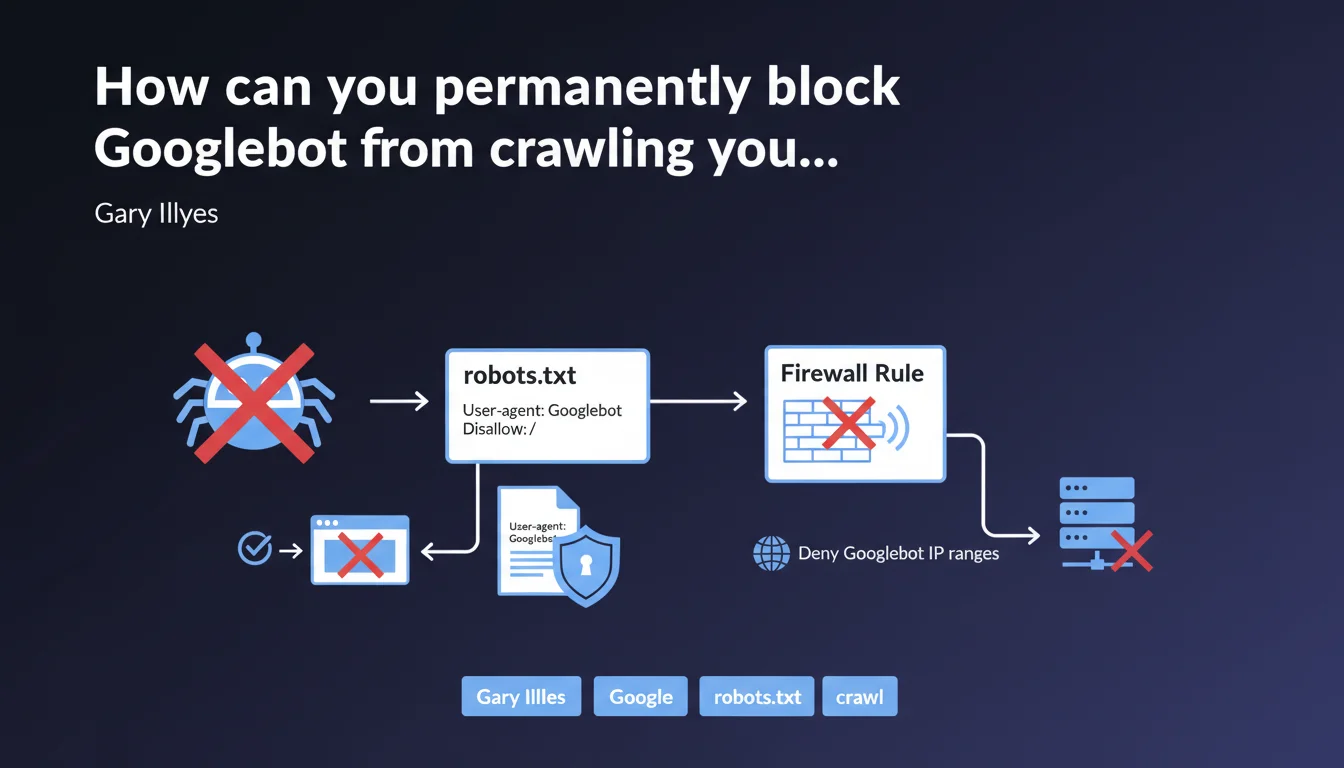
Google confirms two methods to block Googlebot: a disallow / rule in robots.txt to prevent crawling, or firewall rules blocking official IP ranges to cut off complete network access. The first method stops crawling, the second prevents any connection.
What you need to understand
What's the difference between blocking crawl and blocking network access?
The robots.txt with disallow / asks Googlebot not to explore your pages, but the bot can still technically access your server. It simply respects the non-exploration instruction.
The firewall blocking cuts access at the infrastructure level: requests from Googlebot IP ranges are denied before they even reach your application. It's a hard block, with no room for negotiation.
Why does Google propose two distinct approaches?
Because needs vary depending on context. A site that wants to temporarily exit the index will prefer robots.txt, which is easily reversible. A server facing load or security issues will opt for firewall blocking, which is more radical.
Concretely? If you block via robots.txt, your already-indexed URLs will remain visible in search results with the note "No information available." With a firewall, Google can't even check the robots.txt file.
Where can you find Googlebot's official IP ranges?
Google maintains verification documentation listing the IP ranges used by its crawlers. These ranges evolve, which is why it's crucial never to hardcode fixed IPs in your firewall rules.
The recommended method is to use reverse DNS lookups to verify that the IP belongs to googlebot.com, then confirm with a forward DNS lookup. Otherwise, you risk blocking fake Googlebots or, worse, letting malicious crawlers disguised as Google through.
- robots.txt disallow / = polite request not to crawl, Googlebot respects but can technically access
- Firewall blocking = technical refusal at network level, no requests reach the server
- Already-indexed URLs remain visible with robots.txt, become inaccessible with firewall
- Google IP ranges change: always verify via reverse/forward DNS
- Never block by fixed IP without regular verification
SEO Expert opinion
Is this statement complete for all scenarios?
No, and that's where it gets tricky. Gary Illyes presents two methods without clarifying their implications for deindexation. Blocking crawl via robots.txt doesn't prevent Google from keeping your URLs in the index with outdated metadata.
For clean deindexation, you need to combine robots.txt with 410 Gone codes or use Search Console. Firewall blocking, meanwhile, causes server errors that can keep URLs in the index for weeks before Google removes them. [To verify]: the exact purge delay after IP blocking remains unclear in official documentation.
What are the risks with a poorly configured firewall block?
The first pitfall: accidentally blocking other Google crawlers (Google-InspectionTool, AdsBot, etc.) that use different IP ranges. If you only block googlebot.com, you're letting dozens of other Google user-agents through.
The second: false positives. Some proxies, VPNs, or CDNs may temporarily share IP ranges close to Google's. Too broad a block cuts access to legitimate users.
When should you avoid these blocking methods?
If your goal is to cleanly deindex pages, robots.txt + noindex meta tag remains superior. Google must be able to crawl the page one last time to read the noindex.
Firewall is relevant for staging environments, sites victimized by aggressive scraping attacks, or migrations where the old domain must be cut off abruptly. But for a production site that simply wants to temporarily exit the index? That's using a sledgehammer to hang a picture.
Practical impact and recommendations
How do you implement effective robots.txt blocking?
Add these two lines at the top of your robots.txt file:
User-agent: Googlebot
Disallow: /
Verify immediately in Google Search Console using the robots.txt testing tool. An incorrect syntax (missing space, wrong case) renders the directive ineffective.
Caution: this rule only blocks Googlebot. To block all Google crawlers (Google-InspectionTool, AdsBot-Google, Googlebot-Image, etc.), use User-agent: *. But be aware this also blocks Bing, Yandex, and all other engines.
What's the procedure for firewall blocking?
First, get the official IP range list from Google documentation (googlebot.com via DNS lookup). Then configure your firewall rules (iptables, AWS Security Groups, Cloudflare, etc.) to deny these ranges.
Test with a tool like cURL by simulating a request from a Googlebot IP. If you get a connection error, the block works. Otherwise, verify your firewall is at the closest network level (not just a .htaccess).
Schedule a monthly check of Google's IP ranges. They change without notice, and outdated blocking either lets new crawlers through or cuts access to legitimate services.
What mistakes should you absolutely avoid?
- Never block Googlebot without first removing URLs from the index via Search Console
- Don't confuse
User-agent: Googlebot(web crawl) withUser-agent: *(all bots) - Never hardcode Google IPs in a firewall without an update process
- Always test robots.txt with the GSC tool before production deployment
- Always have an IP whitelist for your admin tools if you block at firewall level
- Document the reason for the block to prevent a colleague from accidentally removing it
❓ Frequently Asked Questions
Le blocage par robots.txt retire-t-il mes pages de l'index Google ?
Puis-je bloquer Googlebot tout en laissant passer Bing et les autres moteurs ?
Combien de temps après un blocage pare-feu mes pages disparaissent-elles de Google ?
Le blocage robots.txt affecte-t-il Google Search Console ?
Les plages IP de Googlebot changent-elles souvent ?
🎥 From the same video 18
Other SEO insights extracted from this same Google Search Central video · published on 07/06/2023
🎥 Watch the full video on YouTube →
💬 Comments (0)
Be the first to comment.