
Official statement
Other statements from this video 18 ▾
- □ Canonical seul ne suffit pas pour bloquer le contenu syndiqué dans Discover : faut-il vraiment ajouter noindex ?
- □ Deux domaines pour un même pays : où commence vraiment la manipulation ?
- □ Les failles JavaScript de vos bibliothèques font-elles chuter votre positionnement Google ?
- □ Faut-il encore perdre du temps à soumettre son sitemap XML ?
- □ Pourquoi les données structurées Schema.org ne suffisent-elles pas toujours pour obtenir des résultats enrichis Google ?
- □ Les en-têtes HSTS ont-ils vraiment un impact sur votre référencement ?
- □ Google retraite-t-il vraiment votre sitemap à chaque crawl ?
- □ Sitemap HTML vs XML : pourquoi Google insiste-t-il sur leur différence de fonction ?
- □ Les données structurées avec erreurs sont-elles vraiment ignorées par Google ?
- □ Les chiffres dans vos URLs pénalisent-ils vraiment votre référencement ?
- □ L'index bloat existe-t-il vraiment chez Google ?
- □ Comment bloquer définitivement Googlebot de votre site ?
- □ Google délivre-t-il vraiment des certifications SEO officielles ?
- □ Plusieurs menus de navigation nuisent-ils vraiment au SEO ?
- □ Les host groups indiquent-ils vraiment une cannibalisation à corriger ?
- □ Peut-on désavouer des backlinks toxiques en ciblant leur adresse IP ?
- □ Faut-il supprimer la balise meta NOODP de vos sites Blogger ?
- □ Comment obtenir une vignette vidéo dans les SERP : qu'entend Google par « contenu principal » ?
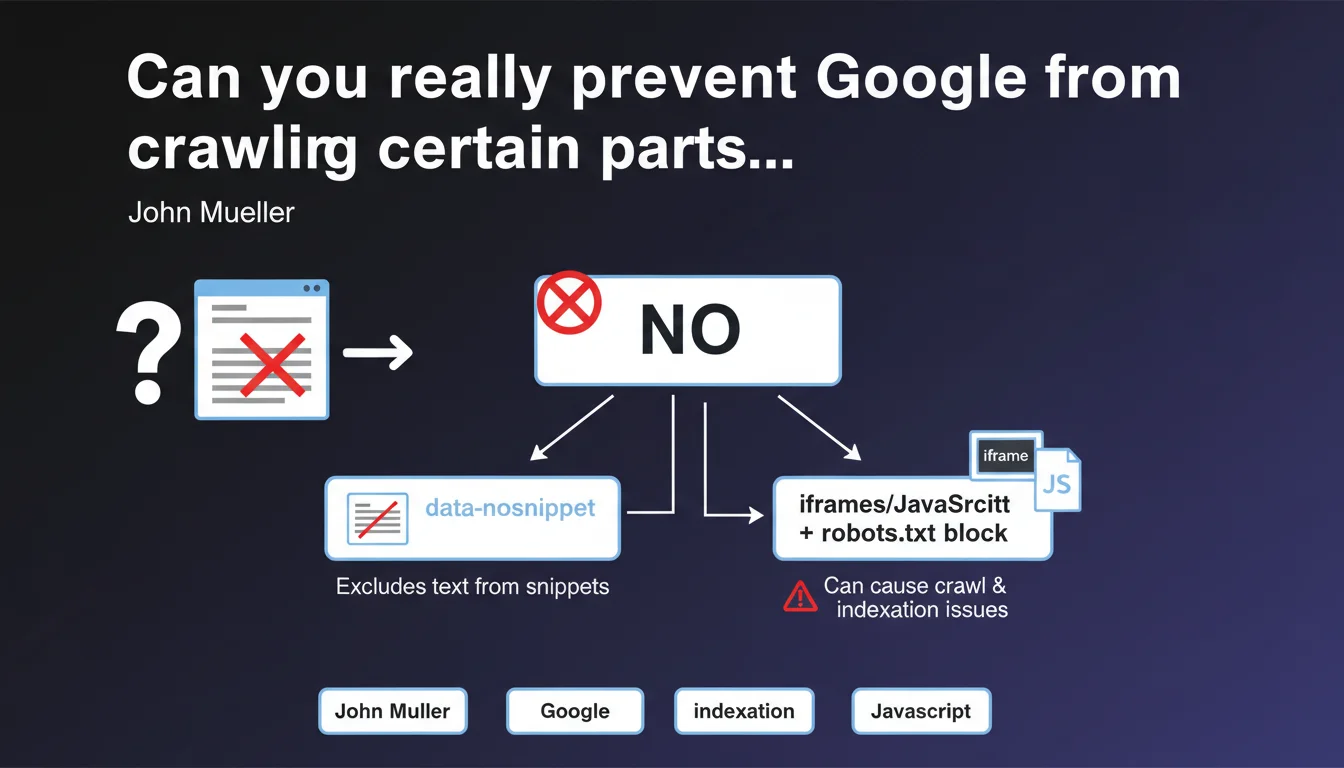
Google states it's impossible to block Googlebot from crawling a specific HTML section of a page. Alternatives like data-nosnippet or using iframes/JavaScript blocked by robots.txt exist, but the latter method risks compromising crawl and indexation.
What you need to understand
Mueller's statement addresses a frequently asked question: how can you selectively hide content from the bot without impacting the overall visibility of the page? The answer is unequivocal — technically, it's impossible.
Why does this technical limitation exist?
Googlebot processes an HTML page as a single document. There is no standard directive that allows you to say "crawl everything except this <div>". The robots.txt file operates at the URL level, not at the level of a code fragment.
The alternative methods mentioned don't actually block crawling. The data-nosnippet attribute prevents display in search result snippets, but the content is well crawled and can influence rankings. As for iframes or scripts blocked by robots.txt, they create opaque zones that disrupt Google's understanding of the page.
What are the consequences of blocking via robots.txt?
Blocking JavaScript or iframes via robots.txt introduces blind spots in Google's analysis of your page. Google cannot assess whether these resources contain essential content, internal links, or elements affecting UX.
Result: you risk partial indexation, or even devaluation if Google suspects that critical information is being hidden from it. It's a risky bet, rarely justified.
- No HTML directive allows you to block crawling of a specific section
- The data-nosnippet attribute hides text in snippets, without blocking crawling
- Blocking iframe/JS via robots.txt can harm overall page indexation
- Crawling operates at the URL level, not at the DOM element level
SEO Expert opinion
Does this statement match real-world observations?
Absolutely. In 15 years of practice, I've never seen a reliable method to selectively block crawling of a section without side effects. Attempts via JavaScript obfuscation or aggressive lazy-loading create more problems than they solve.
The confusion often stems from a misunderstanding of objectives. If you want to hide content from users while keeping it crawlable (for SEO purposes), that's one thing. If you want to hide it from Google, that's another — and the latter is almost impossible to do cleanly.
When does this limitation really cause problems?
Frankly? Rarely. Legitimate use cases are limited. You might want to prevent internal duplicate content (filters, facets) from being crawled — but then, the real issue is URL parameter management and canonicals, not blocking a <section>.
E-commerce sites with third-party widgets (reviews, chat) sometimes worry about their impact. [To be verified]: Google claims to ignore non-relevant content, but nobody has real visibility into this sorting. If a third-party block really pollutes your semantics, it's better to load it deferred after initial rendering — not block it via robots.txt.
Are there viable workarounds?
Technically, yes. Loading content via Ajax after initial crawling, using loading="lazy" attributes combined with conditional rendering... But these gymnastics weaken your architecture and create gaps between what Google sees and what users see.
Practical impact and recommendations
What should you do if you really want to hide content from Google?
First question: why do you want to do it? If it's to avoid duplicate content, use noindex on the relevant pages or work on your canonicals. If it's to hide spam or keyword stuffing... stop that immediately.
If the need is legitimate (sensitive data, restricted content), the right approach is to place this content behind mandatory login or serve it as a PDF blocked by robots.txt. But let's be honest — these cases are marginal.
How do you use data-nosnippet effectively?
The data-nosnippet attribute (or its <span class="nosnippet"> tag version) prevents display in rich snippets, featured snippets, and quick answers. The content remains crawled and indexed, but invisible in SERPs.
Concrete use case: hiding legal notices, terms and conditions, contact information that you don't want to see appearing in snippets. Useful, but no impact on crawling itself.
- Accept that partial crawling of an HTML page is not possible without risk
- Use
data-nosnippetonly to control display in results, not crawling - Avoid blocking JavaScript or iframes via robots.txt except in very specific, controlled cases
- For sensitive content, prioritize authentication or page-level noindex
- Systematically test the impact using the URL Inspection tool in Search Console
- Don't try to manipulate what Googlebot sees — user/bot consistency is key
Fine-grained crawl management at the HTML element level requires solid technical expertise and a deep understanding of Googlebot mechanics. Configuration errors can heavily impact your organic visibility. If you're unsure about your site's crawl architecture or managing complex content (facets, filters, third-party widgets), an audit by a specialized SEO agency will help you identify at-risk areas and implement sustainable solutions tailored to your business context.
❓ Frequently Asked Questions
L'attribut data-nosnippet empêche-t-il Googlebot de crawler le contenu ?
Puis-je bloquer une iframe tierce pour éviter qu'elle pollue mon crawl budget ?
Existe-t-il une balise HTML pour dire à Google de ne pas crawler une div spécifique ?
Si je charge du contenu en Ajax après le rendu initial, Google le verra-t-il ?
Le lazy-loading d'images ou de sections peut-il bloquer leur crawl ?
🎥 From the same video 18
Other SEO insights extracted from this same Google Search Central video · published on 07/06/2023
🎥 Watch the full video on YouTube →
💬 Comments (0)
Be the first to comment.