
Official statement
Other statements from this video 14 ▾
- □ Can you really use a single subdirectory to manage multiple international markets with hreflang?
- □ Why doesn't Google index every single URL on your site?
- □ Can you use third-party reviews to power product rich results on Google?
- □ Is Google really penalizing your site, or is it just an algorithm update?
- □ Should you really abandon NALT thesaurus URIs to boost your SEO rankings?
- □ Why are robots.txt unreachable errors always your own fault?
- □ Should you really maintain redirects when migrating to a new domain?
- □ Should you really worry about millions of unindexed URLs on your website?
- □ Is deliberately serving different HTTP status codes to Googlebot really that risky for your site?
- □ Does Google really treat 308 and 301 redirects the exact same way?
- □ Does content quality really impact how fast Google indexes your pages?
- □ Does Google really distinguish between WiFi and Wi-Fi for SEO purposes?
- □ Does a zero review count hurt your product page's search rankings?
- □ Why do some migrated sites appear in Google within minutes while others take months to show up?
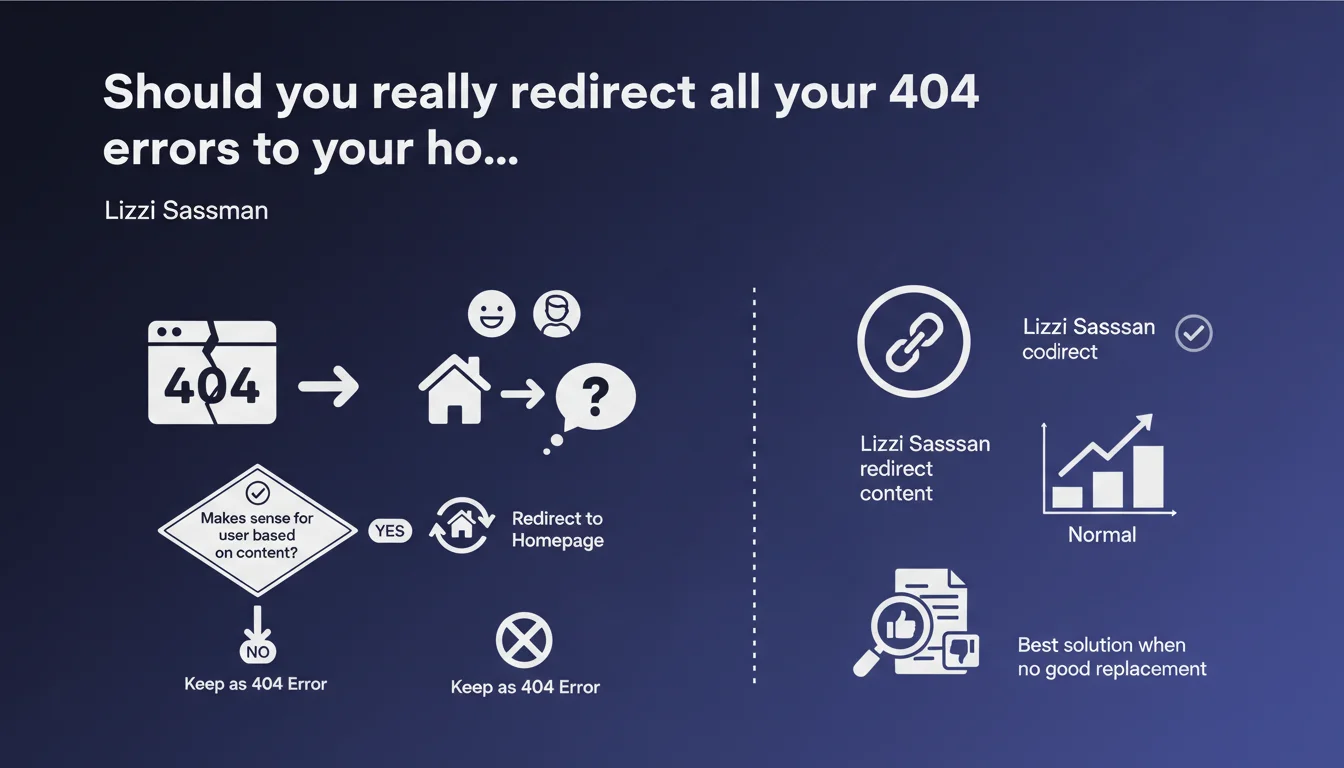
Google says that automatically redirecting 404 pages to your homepage isn't always the best solution. The decision depends on actual user value — sometimes a clear 404 error is better than a confusing redirect. 404s are normal on the web and won't penalize your site if they're legitimate.
What you need to understand
Why is Google challenging this common practice?
For years, many SEOs have automatically redirected every deleted page to the homepage out of habit. The idea: avoid 404 errors to prevent "losing" the user or wasting SEO juice.
Except Google contests this oversimplified logic. Lizzi Sassman reminds us that user experience must take priority over technical reflexes. If someone is looking for a specific product and lands on your generic homepage, that's confusing — not helpful.
What exactly does Google say about 404 errors?
404 errors are normal on the internet. They won't harm your crawl budget or rankings as long as they correspond to content that's actually deleted or nonexistent.
The message is clear: don't try to hide your 404s at all costs. If a page has no relevant replacement, let the 404 display properly. It's an honest response to the browser and to users.
- 301 redirects to your homepage only pass PageRank if the target content is truly relevant
- A well-managed 404 (custom page, alternative suggestions) can be more useful than a forced redirect
- Google analyzes context: a 404 on a product discontinued 3 years ago isn't a negative signal
- The decisive criterion remains user intent: does the redirect destination answer their original query?
When is redirecting to your homepage still acceptable?
If the deleted content was generic or your homepage offers clear navigation to nearby alternatives, it can be justified. Typically: an outdated "About Us" page redirecting to a refreshed version on your homepage.
But if you delete a specific product page, redirecting to your homepage of 5,000 products helps no one. Better to redirect to the parent category or a pre-filtered search page.
SEO Expert opinion
Does this recommendation contradict real-world practices?
Not really — it mainly clarifies a gray area that many were exploiting poorly. In reality, mass redirects to the homepage have always had questionable SEO impact.
Testing shows that Google doesn't always pass PageRank through these "catch-all" redirects. If the target content doesn't match the original page at all, the engine may treat the redirect as a soft 404 — essentially useless.
Let's be honest: this statement mainly confirms what experience has taught us for years. Blind redirects create noise in your logs, complicate your audits, and deliver no measurable value.
What nuances are missing from this statement?
Google remains vague on the quantitative threshold. How many 404s are "normal" before it becomes a sign of a poorly maintained site? [To verify] — no official metric exists.
Same for PageRank transmission: Google says relevant redirects preserve it, but doesn't specify how it evaluates this "relevance." It's a black box — we observe the effects, but the exact criteria remain opaque.
When doesn't this rule apply?
When you have an obvious replacement page: discontinued product replaced by a new model, updated article republished under a new URL, merged category. There, the 301 redirect to relevant content remains standard.
Google's advice targets situations where you have no valid equivalent. In that specific case, owning the 404 and offering a well-designed error page (suggestions, search, main categories) will be more effective than a meaningless redirect.
Practical impact and recommendations
What should you actually do with your deleted pages?
First step: audit your existing redirects to the homepage. List them all and ask yourself for each one: "If I were the user, would this destination answer my need?"
If the answer is no, three options: redirect to a more relevant page (category, filtered search, product equivalent), create a 410 Gone page if the content is permanently deleted, or leave a clean 404 with alternative navigation.
For future deletions, establish a decision workflow: does a direct replacement exist? Is the parent category close enough? If not, take the 404 with an optimized error page.
How do you optimize your 404 error pages?
A good 404 page contains: a clear message (no tech jargon), a visible search bar, links to your main categories or popular content, and ideally suggestions based on the requested URL (if technically feasible).
Avoid the trap of the "fun" 404 with jokes and GIFs — that ages poorly and doesn't help users. Stay functional and solution-focused. The goal: let users bounce to relevant content in one click.
- Audit all your current redirects to the homepage in Google Search Console
- Identify relevant alternatives (category, search, equivalent product) for each deleted URL
- Replace non-relevant homepage redirects with 404s or targeted redirects
- Create or improve your custom 404 page with navigation and search
- Monitor your 404s in Search Console to detect abnormal spikes
- Document your decision-making process for future page deletions
- Verify your 404s return the proper HTTP 404 code (not 200 or 302)
❓ Frequently Asked Questions
Les erreurs 404 pénalisent-elles mon référencement ?
Une redirection 301 vers la homepage conserve-t-elle le PageRank ?
Vaut-il mieux utiliser un code 410 ou 404 pour les pages définitivement supprimées ?
Comment savoir si mes redirections homepage sont traitées comme des soft 404 ?
Faut-il supprimer les redirections homepage déjà en place ?
🎥 From the same video 14
Other SEO insights extracted from this same Google Search Central video · published on 12/04/2023
🎥 Watch the full video on YouTube →
💬 Comments (0)
Be the first to comment.