
Official statement
Other statements from this video 20 ▾
- □ Les liens internes dans le header ou le footer ont-ils moins de valeur SEO ?
- □ Google pénalise-t-il vraiment un site qui achète des liens en masse ?
- □ Faut-il vraiment viser la perfection technique pour bien ranker sur Google ?
- □ Pourquoi Google crawle-t-il moins votre site s'il le trouve de mauvaise qualité ?
- □ Le statut « Crawlée, actuellement non indexée » est-il vraiment un signal de qualité insuffisante ?
- □ Les données structurées invalides peuvent-elles pénaliser votre référencement ?
- □ Faut-il s'inquiéter d'une baisse du nombre de pages indexées ?
- □ Crawlée non indexée vs Découverte non indexée : vraiment équivalent ?
- □ Peut-on vraiment contrôler les images affichées dans les snippets Google ?
- □ Pourquoi Google pénalise-t-il le contenu dupliqué entre sites de franchises ?
- □ CCTLD, sous-domaine ou sous-répertoire : quelle structure pour le géociblage international ?
- □ Le code 503 protège-t-il vraiment vos pages de la désindexation en cas de panne ?
- □ Les liens dofollow accidentels dans vos RP vont-ils vous pénaliser ?
- □ Peut-on vraiment utiliser l'outil de changement d'adresse pour fusionner ou diviser des sites ?
- □ Les données structurées améliorent-elles vraiment le référencement ou juste l'affichage ?
- □ Google va-t-il un jour afficher les Core Web Vitals directement dans les résultats de recherche ?
- □ Restructuration d'URL : pourquoi Google provoque-t-il des fluctuations pendant deux mois ?
- □ Le linking interne surpasse-t-il vraiment la structure d'URL pour le SEO ?
- □ Faut-il vraiment calculer le PageRank interne pour optimiser son site ?
- □ Google peut-il vraiment identifier la langue principale d'une page multilingue sans pénaliser votre SEO ?
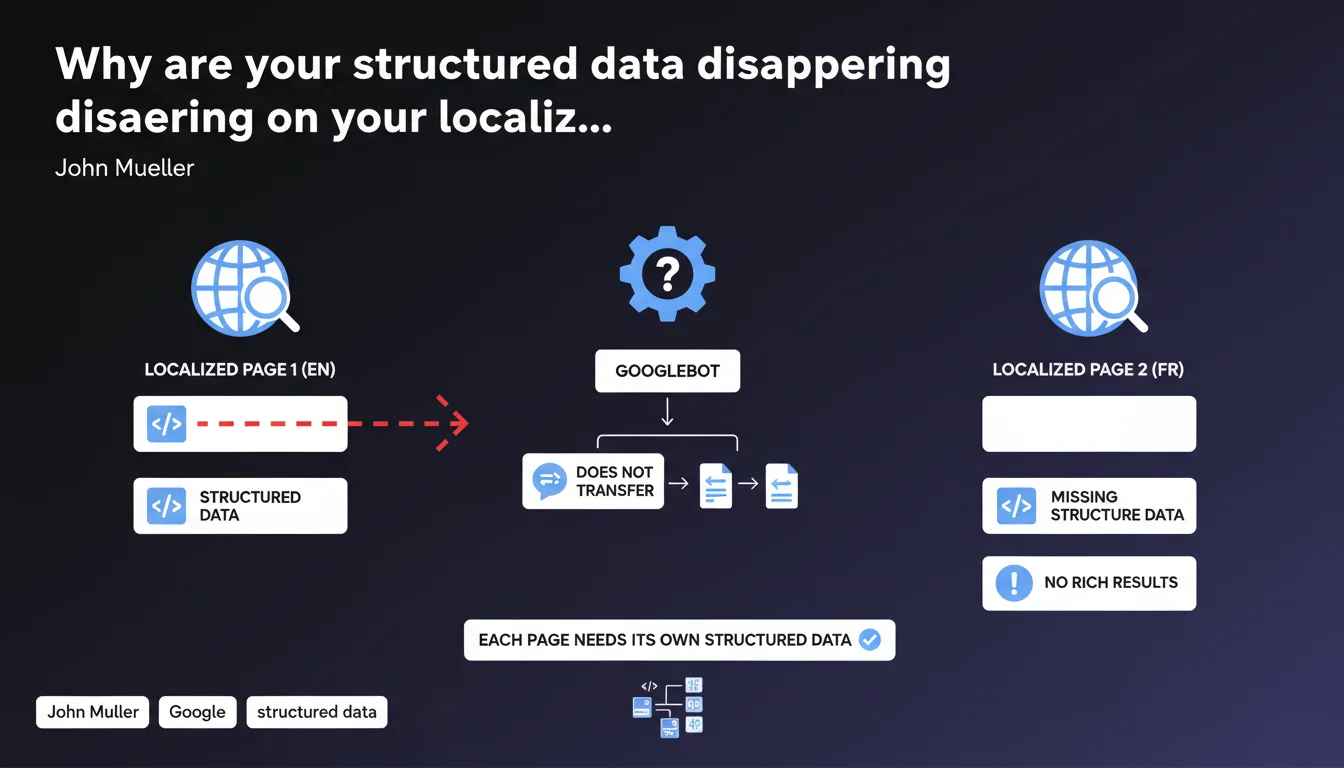
Google does not automatically transfer structured data between page versions (especially localized ones). Each URL must include its own Schema.org markup if you're targeting rich results. Overlooking this principle risks losing rich snippets, FAQs, or structured products on your language or regional variants.
What you need to understand
What does "not transferred" actually mean in practical terms?
Google treats each URL as an autonomous entity. If your French page /fr/product-x contains a Schema Product markup, your English version /en/product-x does not inherit it — even if both share the same translated content.
The engine parses the HTML of each variant independently. No Schema detected in the DOM? No rich result is possible, regardless of the presence of an hreflang or a canonical tag pointing to another version.
Why can't Google duplicate structured data itself?
Technically, Google could cross-reference hreflang and Schema to propagate metadata. But this would introduce risks: prices displayed in euros on a US page, Paris store hours on a London shop, etc.
Mueller's statement is therefore as much a design choice as a technical limitation. Google prefers that each webmaster explicitly declares their metadata per URL — it's more reliable than propagation heuristics.
What types of pages are affected?
All variants that share the same content under distinct URLs: language versions (hreflang), AMP/non-AMP versions, mobile/desktop separate versions (increasingly rare), or printable pages.
- Localized pages with hreflang: each language requires its own Schema Product, FAQPage, etc.
- Legacy mobile-separate architectures (m.site.com): the Schema from www.site.com does not apply to m.site.com
- AMP versions: although often associated via
<link rel="amphtml">, they must carry their own structured markup - Pages with UTM parameters or session identifiers: if Google indexes them, they are treated as distinct URLs
SEO Expert opinion
Is this rule really enforced in all cases?
In the field, we observe some ambiguous behaviors. AMP pages linked via amphtml sometimes appear to "inherit" the Schema from the canonical page in mobile SERPs — but this is not officially documented.
Similarly, some sites have noticed active rich snippets on hreflang variants without explicit Schema, probably because Google merged signals when clustering results. But relying on this is a risky bet. [To verify] in your own tests: the rule stated by Mueller remains the only guarantee.
What errors commonly stem from this lack of awareness?
First common reflex: mark up the main page in English and assume translations will benefit from the same treatment. Result? No rich results in German, Spanish, or Japanese, even though the content is identical.
Second pitfall: copy-paste the JSON-LD from one language to another without adapting values. A "price": "99 USD" displayed on a .fr page generates inconsistencies — Google may ignore the markup or display an incorrect price.
In what cases can you skip duplicating the Schema?
If you use a strict canonical strategy where all variants point to a single reference URL (for example, all versions redirect via 301 to /en/), then a single implementation suffices. But in that case, you're giving up indexed multilinguality.
Another scenario: pages with no ambition for rich results — legal notices, T&Cs, etc. — can skip duplicated Schema. But as soon as an eligible element (FAQ, breadcrumb, article) appears, the rule applies.
Practical impact and recommendations
What do you need to do concretely for each page variant?
Start with an audit of your localized or alternative URLs. List all AMP versions, hreflang, regional subdomains. For each one, check the presence and validity of the Schema via Rich Results Test.
Next, create a dynamic JSON-LD generation system: your CMS must inject markup based on language, currency, local hours, etc. No manual copy-paste — it's unmanageable at scale.
- Identify all distinct URLs that share content (hreflang, AMP, separate mobile)
- Test each variant in Rich Results Test — never assume a page inherits Schema from another
- Adapt sensitive values: price, currency, availability, address, language of the
inLanguageattribute - Automate generation via CMS templates or server scripts (PHP, Node, Python) to avoid manual errors
- Check in Search Console the coverage of rich results by language/region
What errors should you absolutely avoid?
Never leave hardcoded values in a JSON-LD copied between languages. A "address": "123 Main St, New York" on a .de page is ridiculous — and Google can penalize the markup as deceptive.
Also avoid marking up only the desktop version if you have a separate mobile architecture (m.site.com). Mobile users won't see rich snippets, which degrades CTR.
How can you verify your site is compliant?
Review your Search Console reports in the "Enhancements" section. Filter by country or language if possible. An absence of rich results in certain geographic areas often signals missing Schema.
Also use crawlers (Screaming Frog, OnCrawl) to extract the JSON-LD from each URL and compare variants. A quick diff reveals inconsistencies in price, address, or language.
❓ Frequently Asked Questions
Les données structurées d'une page desktop sont-elles transférées vers la version mobile ?
Le hreflang permet-il de partager les données structurées entre langues ?
Dois-je dupliquer le Schema sur toutes mes pages AMP ?
Un Schema Product en anglais sur /en/ peut-il s'afficher sur /fr/ via canonical ?
Comment automatiser la génération de Schema multilingue ?
🎥 From the same video 20
Other SEO insights extracted from this same Google Search Central video · published on 21/01/2022
🎥 Watch the full video on YouTube →
💬 Comments (0)
Be the first to comment.