
Official statement
Other statements from this video 20 ▾
- □ Les liens internes dans le header ou le footer ont-ils moins de valeur SEO ?
- □ Google pénalise-t-il vraiment un site qui achète des liens en masse ?
- □ Faut-il vraiment viser la perfection technique pour bien ranker sur Google ?
- □ Pourquoi Google crawle-t-il moins votre site s'il le trouve de mauvaise qualité ?
- □ Le statut « Crawlée, actuellement non indexée » est-il vraiment un signal de qualité insuffisante ?
- □ Les données structurées invalides peuvent-elles pénaliser votre référencement ?
- □ Faut-il s'inquiéter d'une baisse du nombre de pages indexées ?
- □ Crawlée non indexée vs Découverte non indexée : vraiment équivalent ?
- □ Pourquoi Google pénalise-t-il le contenu dupliqué entre sites de franchises ?
- □ CCTLD, sous-domaine ou sous-répertoire : quelle structure pour le géociblage international ?
- □ Le code 503 protège-t-il vraiment vos pages de la désindexation en cas de panne ?
- □ Les liens dofollow accidentels dans vos RP vont-ils vous pénaliser ?
- □ Peut-on vraiment utiliser l'outil de changement d'adresse pour fusionner ou diviser des sites ?
- □ Pourquoi vos données structurées disparaissent-elles sur vos pages localisées ?
- □ Les données structurées améliorent-elles vraiment le référencement ou juste l'affichage ?
- □ Google va-t-il un jour afficher les Core Web Vitals directement dans les résultats de recherche ?
- □ Restructuration d'URL : pourquoi Google provoque-t-il des fluctuations pendant deux mois ?
- □ Le linking interne surpasse-t-il vraiment la structure d'URL pour le SEO ?
- □ Faut-il vraiment calculer le PageRank interne pour optimiser son site ?
- □ Google peut-il vraiment identifier la langue principale d'une page multilingue sans pénaliser votre SEO ?
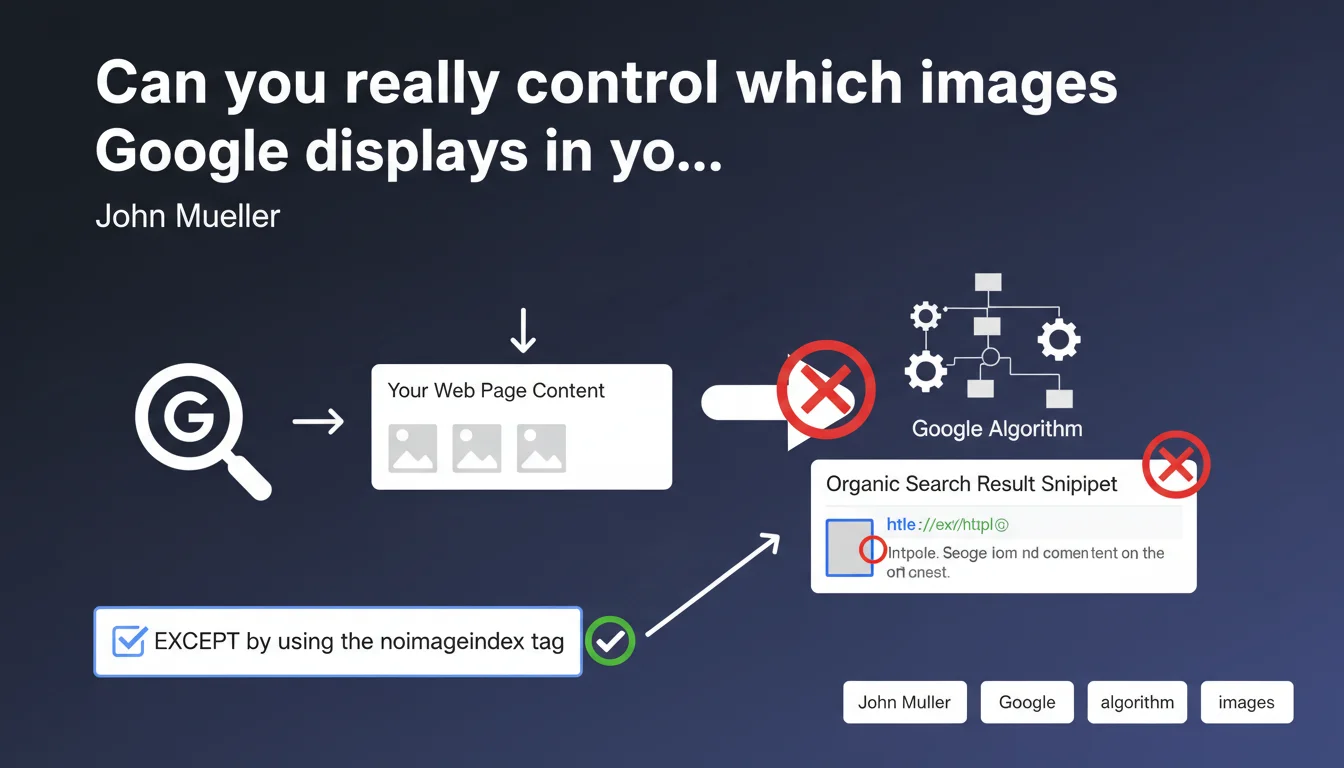
Google automatically selects images displayed in organic snippets through its algorithms, without relying on any specific markup. Webmasters cannot force a particular image to appear, except by completely blocking image indexing with the noimageindex tag. The only real control option remains binary: all or nothing.
What you need to understand
How does Google's image selection mechanism actually work?
Google uses visual relevance algorithms to determine which image to display in a snippet. This process does not rely on schema.org, Open Graph tags, or any form of structured markup you might implement.
The search engine analyzes all images present on the page, evaluates their contextual relevance to the query, their technical quality, their position in the DOM, and other undocumented signals. It's a black box optimized for user experience — not for webmaster control.
Why does this automatic approach create problems?
Because it generates situations where Google's chosen image doesn't match the one you would have highlighted. A secondary photo, an out-of-context graphic, or even an advertisement banner can end up in a snippet if the algorithm deems it relevant.
This unpredictability complicates your strategy for appearing in SERPs. You lose editorial control over your storefront in search results, even though this image plays a role in click-through rates.
What is the only control option available?
The noimageindex tag. It prevents Google from indexing a specific image or all images on a page if applied globally via robots meta tag.
But it's a drastic option: either the image is indexable and potentially usable in a snippet, or it disappears completely from Google Images and snippets. No middle ground, no prioritization.
- Google selects snippet images algorithmically, regardless of markup
- No schema.org, Open Graph, or other tag allows you to force a specific visual
- The noimageindex tag is the only control tool — but it completely excludes the image
- The choice remains binary: let Google decide or block image indexing entirely
SEO Expert opinion
Does this statement match real-world observations?
Yes, and it's frustrating. We regularly see cases where Google displays a secondary image in a snippet, sometimes even an inappropriate one, ignoring the main visual positioned well at the top of the page with a descriptive alt text.
Tests with schema.org ImageObject, og:image tags, or even strategic positioning in HTML provide no guarantees. The algorithm follows its own logic — likely related to visual semantic relevance detected by computer vision models, not declarative signals.
What are the gray areas in this statement?
Mueller doesn't specify the exact criteria the algorithm prioritizes. Image size? Ratio? DOM position? Alignment between image content and query? [To verify] — Google remains vague about the precise signals.
Another murky point: the impact of the noimageindex tag on overall page ranking. Could blocking all images on a page to avoid an unfavorable snippet harm your Google Images visibility and indirectly impact SEO? No official data on this.
In which cases does this limitation truly impact business?
Mainly on e-commerce and media sites. A product displayed with a poor photo in a snippet can tank your CTR. A news article illustrated by an off-topic image creates an impression of irrelevance.
For B2B sites or purely text-based content, the impact is marginal. But as soon as the image plays a role in the click decision, losing this control becomes a real competitive handicap against competitors who, through luck or empirical optimization, achieve a more engaging snippet.
Practical impact and recommendations
What can you concretely do to maximize your chances?
Even without direct control, certain practices increase the probability that Google will choose your desired image. Placing the main visual in the top third of the viewport remains a solid foundation.
Use high-resolution images (minimum 1200px wide) with a 16:9 or 4:3 ratio, modern formats (WebP, AVIF), and optimized file size. Alt attributes should be descriptive and contextualized — not to force selection, but to strengthen semantic relevance.
Avoid decorative images, blurry logos, or advertising banners at the top of the page. If Google scans these elements first and deems them "indexable," they may end up in a snippet by default.
What critical mistakes should you absolutely avoid?
Don't use noimageindex on all your pages out of frustration. You would lose all presence in Google Images, which generates qualified traffic in many sectors.
Don't neglect poorly configured lazy loading. If your main images load too late or remain invisible to Googlebot, the engine may ignore them and select a secondary visual loaded inline.
- Position the priority image in the top third of the page
- Use high-resolution visuals (1200px+ wide) with standard ratio
- Write descriptive and contextualized alt attributes
- Avoid decorative or advertising images at the top of DOM
- Verify that lazy loading doesn't hide main images from Googlebot
- Test snippet display via Google Search Console and adjust if necessary
- Use noimageindex only on truly problematic images, not globally
❓ Frequently Asked Questions
La balise Open Graph og:image influence-t-elle le choix de l'image en snippet Google ?
Peut-on utiliser schema.org pour indiquer une image préférée à Google ?
Si je bloque une image avec noimageindex, reste-t-elle visible sur ma page ?
Google peut-il choisir une image d'une autre page de mon site pour mon snippet ?
Comment savoir quelle image Google affiche actuellement pour ma page ?
🎥 From the same video 20
Other SEO insights extracted from this same Google Search Central video · published on 21/01/2022
🎥 Watch the full video on YouTube →
💬 Comments (0)
Be the first to comment.