
Official statement
Other statements from this video 14 ▾
- 5:33 Can you really control which image appears in Google's text search results?
- 7:30 Why do your Search Console reports keep contradicting each other?
- 8:40 Should you really upload your disavow list only on the current domain?
- 10:06 Is Google really ranking your internal pages above your category pages—and should you be worried?
- 11:21 Why does the public URL test fail so frequently in Search Console?
- 13:33 Does Google really prioritize content quality over technical optimization when facing the 'Crawled - not indexed' status?
- 15:15 Do 'Crawled – not indexed' pages really harm your entire website's visibility?
- 18:55 Does Google really interpret the intention behind your searches better than you think?
- 21:21 Do simple URLs really impact your Google rankings?
- 22:22 Can Google ignore your JavaScript if you place a noindex tag in the head?
- 24:24 Are iframes in your <head> really killing your SEO?
- 26:06 How can you accurately verify redirect behavior for Googlebot?
- 28:06 Can a misconfigured 301 redirect actually block your pages from being indexed?
- 30:28 How can you control the date displayed in Google search results?
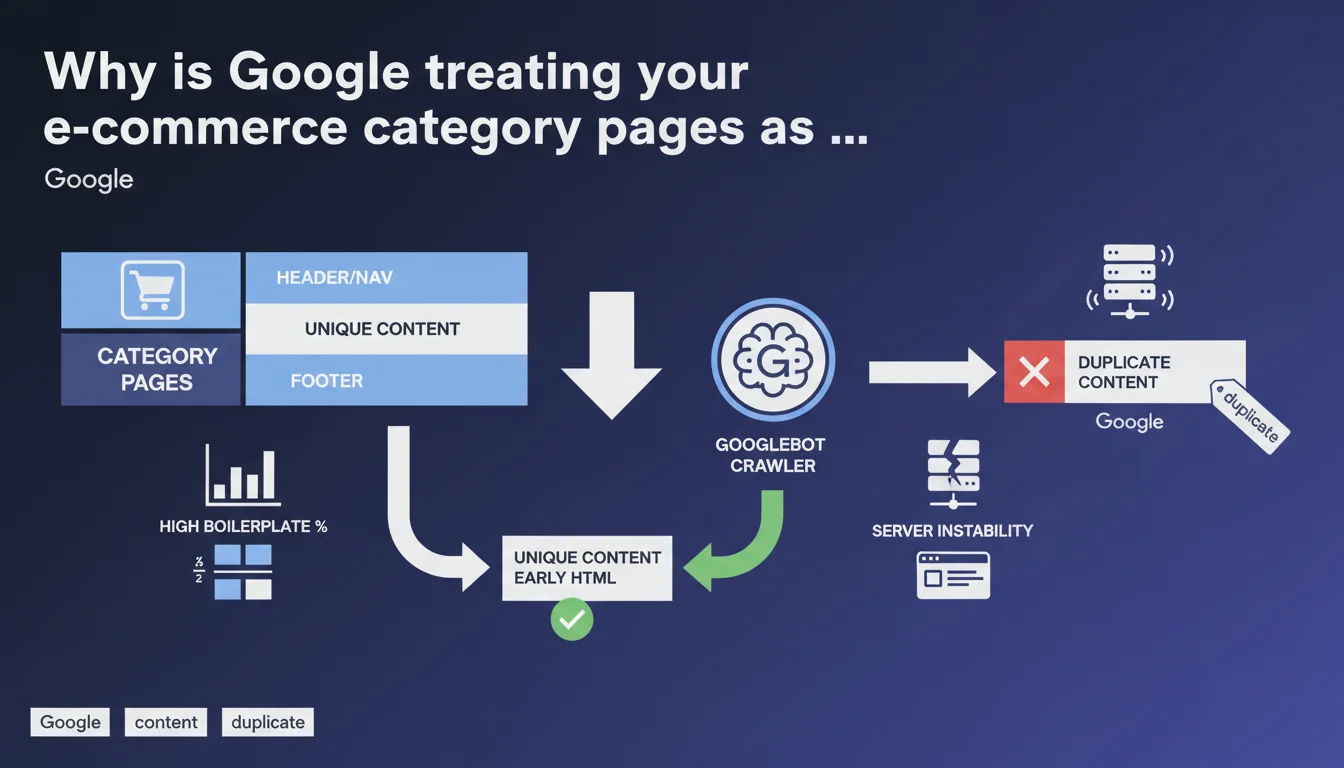
Google considers your category pages duplicated when boilerplate (navigation, header, footer) overwhelms unique content. Server instability makes it worse by preventing complete crawling. Direct solution: place your specific content at the top of the HTML code, before everything else.
What you need to understand
What makes a category page "duplicated" in Google's eyes?
The issue isn't really that your pages look alike visually — that's inevitable on an e-commerce site with hundreds of categories. What triggers the duplication signal is the ratio between boilerplate content and unique content. If your navigation, multiline header, faceted filters and footer represent 80% of the HTML code, Google sees virtually no difference between your categories.
Concretely, the algorithm compares pages with each other. If two URLs share 90% of their crawlable content, they're candidates for deduplication. One will be indexed, the other won't — or worse, one will be arbitrarily preferred when it's not the most strategic choice.
How can server instability turn a normal page into a duplicate?
Often overlooked point: a server that times out or intermittently returns 500 responses prevents Googlebot from retrieving complete content. If the crawler only accesses the first kilobytes of HTML — meaning header, nav, beginning of sidebar — it never sees your unique descriptive block placed at the bottom of the page.
Result: technically, your pages do have differentiating content, but Google can't access it. It therefore categorizes them as nearly identical. Instability creates a side effect that structurally mimics duplication.
Why does placing unique content early in HTML change the game?
Google crawls HTML sequentially. The first kilobytes carry more weight in uniqueness evaluation — it's pure algorithmic pragmatism. If your unique text appears after 150 lines of <nav> and faceted filters, it arrives late in parsing and carries less weight in the diff.
By reversing the order — unique content first, boilerplate after — you force Google to encounter immediately what distinguishes your pages. Even if the crawler stops midway (timeout, crawl budget exhausted), it has already ingested the essentials.
- Boilerplate drowns out the unique signal if its volume greatly exceeds specific content
- Server instability amplifies the problem by preventing access to content located low in the HTML
- HTML code order directly influences Googlebot's detection of uniqueness
- A page can be technically unique but perceived as duplicate for purely technical reasons (partial access, unfavorable ratio)
SEO Expert opinion
Is this statement consistent with on-the-ground observations?
Totally. I've seen hundreds of e-commerce sites with category pages deindexed or merged in the index even though they had unique descriptions — but placed after 200 lines of markup. Standard diagnostics consistently reveal catastrophic content-to-boilerplate ratios. Google isn't lying about this one.
What's less often said: the quality of unique content matters too. If you move up 50 words of generic, keyword-stuffed text to the top of HTML, it solves nothing. Uniqueness isn't just a positioning matter, it's also a substance matter. But Google remains coy about this quality threshold — [To verify] according to what exact criteria is text judged "sufficiently unique" beyond its simple lexical difference.
Server instability: convenient excuse or real structural problem?
Both. Yes, many e-commerce sites undersizing their servers and suffering timeouts during crawl peaks. But this mention from Google also serves to absolve the algorithm: "If we're not indexing your pages, maybe your infrastructure is acting up." Convenient.
In reality, I've seen sites with solid infrastructure (CDN, aggressive caching, advanced monitoring) still encounter category duplication issues. Instability is an aggravating factor, not the root cause. The real problem remains HTML design — but Google prefers to also point the finger at hosting to dilute its own algorithmic responsibility.
Placing content at the top of HTML: silver bullet or stopgap?
It's an effective stopgap, not a silver bullet. Moving unique content up mechanically improves detection, that's undeniable. But it can create UX friction (your designer will scream) and it doesn't address the underlying problem: too much boilerplate.
The real solution involves lightening navigation, reducing repetitive elements, genuinely differentiating your categories with substantial content. Moving up 3 lines of generic text won't save anyone. It's a useful technical hack, but it needs to be paired with serious editorial redesign.
Practical impact and recommendations
What should you audit first on your category pages?
First reflex: measure the ratio of unique content to boilerplate. Take the HTML source of a category, isolate everything strictly identical between two categories (header, nav, footer, filter sidebar). Compare to the volume of truly specific text. If you're below 20% unique content, you're in the red zone.
Second audit: check your server logs during Googlebot crawl peaks. Timeouts? Intermittent 500s? Partial responses? If yes, your infrastructure is throttling indexation before the algorithm even evaluates your content. APM monitoring is essential.
How to restructure HTML without breaking UX?
Use CSS Grid or Flexbox with order to decouple visual order from DOM order. Place your unique content block early in HTML (right after <main>), but display it visually where it makes sense for the user. Crawlers read the DOM, humans see the CSS rendering.
Another technique: lazy-load heavy boilerplate (secondary navigation, reassurance modules) or inject it client-side after first paint. Googlebot will see your unique content first, UX stays intact. Watch out for JS rendering — ensure Google accesses content even if injected post-load.
What mistakes to absolutely avoid?
Don't fall into the "invisible unique content" trap (white text on white, display:none on load). Google detects these patterns and can penalize. Content must be truly accessible, just prioritized in code order.
Also avoid duplicating your editorial effort: some sites create near-identical category descriptions because they lack clear briefs. Uniqueness isn't declared in HTML, it's built first in the CMS. If your writers are going in circles, moving the block up won't change anything.
- Audit the unique content-to-boilerplate ratio on a representative sample of categories
- Check server logs to detect timeouts and 5xx errors during crawls
- Move unique content blocks to the beginning of
<main>in the DOM - Use CSS Grid/Flexbox order to maintain desired visual display
- Lighten navigation and repetitive modules (reassurance, redundant filters)
- Genuinely differentiate editorial content between categories (strict editorial brief)
- Monitor indexation impact via Search Console (indexed pages, coverage)
- Test UX/conversion impact before global rollout (A/B test if sufficient volume)
Let's be honest: restructuring HTML, lightening boilerplate and orchestrating editorial redesign across an e-commerce catalog is a significant technical and organizational undertaking. Between dev constraints, UX trade-offs and coordination with content teams, complexity escalates quickly.
If you identify these issues on your site but lack internal resources or expertise to pilot the remediation, bringing in specialized support can dramatically accelerate resolution. A technical SEO agency will thoroughly audit your stack, propose custom implementations and track indexation impact without monopolizing your teams for months.
❓ Frequently Asked Questions
Quel est le seuil de ratio contenu unique / boilerplate toléré par Google ?
Faut-il aussi remonter les avis clients et les filtres à facettes dans le HTML ?
Comment vérifier que Googlebot accède bien à mon contenu unique même en bas de page ?
Un CDN ou un cache agressif peut-il aggraver l'instabilité perçue par Googlebot ?
Puis-je utiliser du lazy loading pour différer le boilerplate sans pénalité SEO ?
🎥 From the same video 14
Other SEO insights extracted from this same Google Search Central video · published on 05/03/2026
🎥 Watch the full video on YouTube →
💬 Comments (0)
Be the first to comment.