
Official statement
Other statements from this video 14 ▾
- 5:33 Peut-on vraiment contrôler quelle image apparaît dans les résultats de recherche texte ?
- 7:30 Pourquoi vos rapports Search Console se contredisent-ils constamment ?
- 10:06 Pourquoi Google classe-t-il vos pages internes au-dessus de votre page catégorie ?
- 11:21 Pourquoi le test d'URL publique échoue-t-il si souvent dans Search Console ?
- 13:33 Pourquoi Google privilégie-t-il la qualité du contenu sur la technique face au statut 'Crawlé - non indexé' ?
- 15:15 Est-ce que des pages « Crawlé - non indexé » pénalisent tout votre site ?
- 16:27 Pourquoi Google détecte-t-il mes pages catégories e-commerce comme du contenu dupliqué ?
- 18:55 Comment Google interprète-t-il réellement l'intention derrière vos requêtes ?
- 21:21 Les URLs simples influencent-elles vraiment le classement Google ?
- 22:22 Pourquoi Google peut-il ignorer votre JavaScript si vous placez un noindex dans le head ?
- 24:24 Les iframes dans le <head> sabotent-elles vraiment votre SEO ?
- 26:06 Comment vérifier précisément le comportement des redirections pour Googlebot ?
- 28:06 Une redirection 301 mal configurée peut-elle bloquer l'indexation de vos pages ?
- 30:28 Comment contrôler la date affichée dans les résultats de recherche Google ?
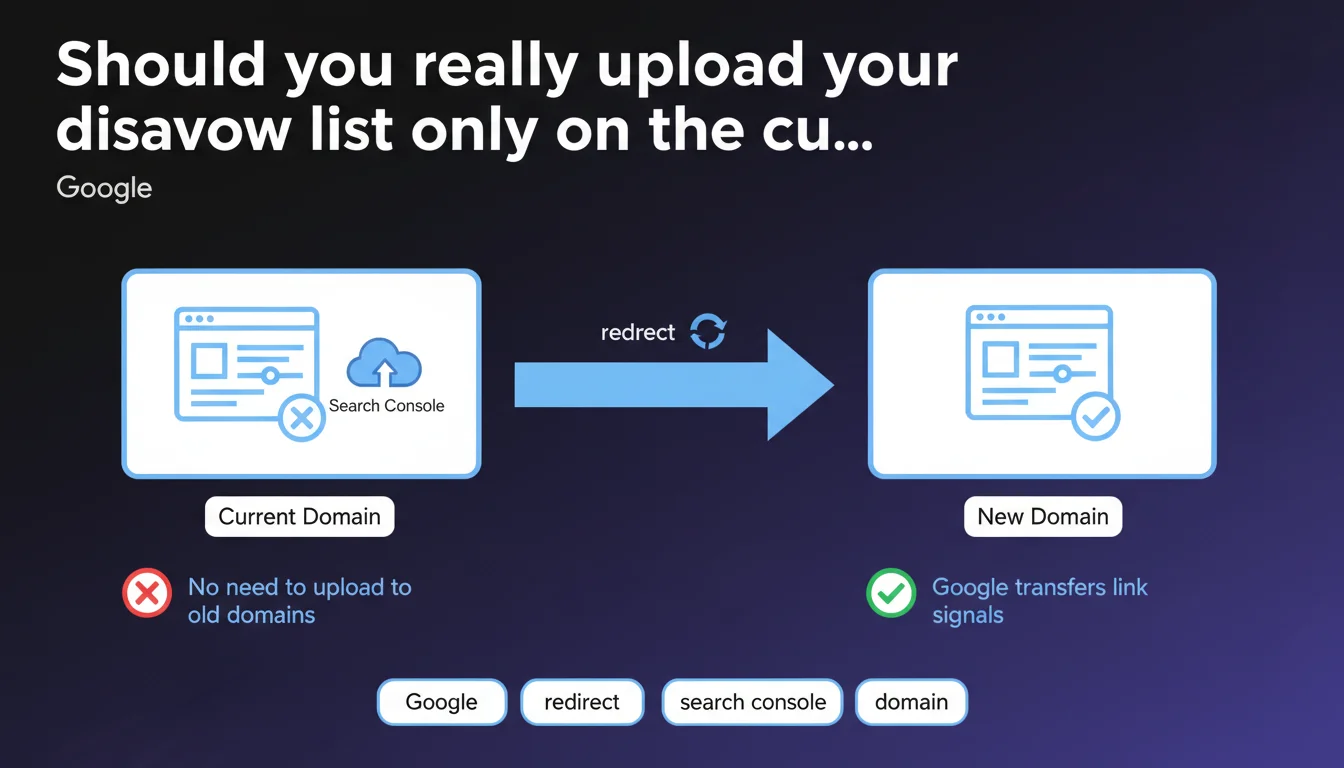
Google confirms that a disavow list should only be uploaded to the Search Console property of the current domain. If you migrate a site with properly configured 301 redirects, link signals (including disavowals) are automatically transferred to the new domain. No need to duplicate disavow files on old domains.
What you need to understand
Why is this clarification important for site migrations?
During a domain migration, the question of managing toxic links systematically arises. Many SEO practitioners wonder if they should maintain separate disavow lists for each version of the domain (old and new).
Google settles it: if your 301 redirects are properly in place, the search engine automatically transfers all signals — including link disavowals. You therefore only manage a single file on the current domain.
How does Google transfer link signals between domains?
The process relies on permanent redirects. When Googlebot crawls a URL redirected via 301, it consolidates the signals from the old URL to the new one. This includes PageRank, authority, anchor text… and disavowals.
This consolidation explains why maintaining multiple disavow lists would be redundant. The search engine no longer actively crawls the old domain once the migration is processed — it therefore has no reason to consult a disavow file uploaded there.
What are the key takeaways?
- A single disavow file to manage on the Search Console property of the current domain.
- Properly configured 301 redirects are the essential condition for signal transfer.
- Google requires no manual action on old Search Console properties after migration.
- This rule applies to both complete migrations and redesigns with domain changes.
- Disavowal remains a last resort tool — Google recommends prioritizing manual cleanup when possible.
SEO Expert opinion
Is this statement consistent with real-world observations?
In practice, yes. SEOs who have migrated domains with active disavow lists notice that disavowed toxic backlinks don't haunt the new domain. Google handles the transfer well.
However — and here's where it gets tricky — the official documentation doesn't specify how long this transfer takes. Is it instantaneous? Must you wait for Google to recrawl all old URLs? [Needs verification] on sites with millions of pages.
In what cases might this rule show its limitations?
First case: partial migrations. If you only redirect part of the site and maintain the old domain active on certain sections, the question becomes more complex. Google says nothing about this hybrid scenario.
Second case: sites that suffered massive negative attacks just before or during the migration. If thousands of spam links point to the old domain, does the disavow uploaded on the new domain block them retroactively? Logic says yes, but no concrete data from Google.
Should you preemptively disavow before a migration?
Let's be honest: many SEOs upload a disavow list "just in case" before migrating, even though Google says it's unnecessary. This is a defensive approach that makes sense on sites with a questionable link profile.
The problem? Google never explicitly confirms that the disavowal is taken into account instantly. If you migrate the day after uploading, does the transfer include a disavowal not yet processed? [Needs verification] — no official answer on this.
Practical impact and recommendations
What should you do concretely during a domain migration?
First step: audit your link profile on the old domain before the migration. Identify toxic backlinks, spammy ones, or those from link networks. Use standard tools (Search Console, Ahrefs, Majestic, SEMrush) to detect anomalies.
If you already have an active disavow list on the old domain, don't worry. Once the migration is complete and 301 redirects are in place, upload this same list (updated if necessary) to the new Search Console property. Google will handle the rest.
What errors should you absolutely avoid?
Classic mistake: uploading a disavow list on the old domain after the migration, thinking you'll "secure" the old URLs. It's pointless. Google no longer actively crawls a redirected domain — your file will never be taken into account.
Another trap: removing 301 redirects too soon. Some hosting providers or web agencies advise removing them after 6 months to "lighten the server load." Bad idea. Without redirects, Google loses the connection between old and new domain — and your disavow list no longer covers backlinks pointing to the old URLs.
How can you verify that everything is working correctly?
- Verify that all 301 redirects are in place and point to the correct URLs on the new domain (manual testing + Screaming Frog crawl).
- Add the new domain to Search Console and verify ownership via DNS or HTML file.
- Upload the disavow list only on the new domain via Google's official tool.
- Monitor the evolution of your link profile in Search Console for 3 to 6 months post-migration to detect any toxic links that might reappear.
- Verify that old URLs generate no 404 errors (except those intentionally removed).
- Keep 301 redirects active for at least 12 months — ideally, permanently.
❓ Frequently Asked Questions
Dois-je supprimer l'ancienne liste de désaveu après migration ?
Que se passe-t-il si je n'ai pas de liste de désaveu sur l'ancien domaine ?
Combien de temps faut-il pour que Google transfère les signaux après migration ?
Les redirections 302 ou 307 transfèrent-elles aussi les désaveux ?
Faut-il désavouer les backlinks de l'ancien domaine avant de migrer ?
🎥 From the same video 14
Other SEO insights extracted from this same Google Search Central video · published on 05/03/2026
🎥 Watch the full video on YouTube →
💬 Comments (0)
Be the first to comment.