
Official statement
Other statements from this video 14 ▾
- 5:33 Can you really control which image appears in Google's text search results?
- 7:30 Why do your Search Console reports keep contradicting each other?
- 8:40 Should you really upload your disavow list only on the current domain?
- 10:06 Is Google really ranking your internal pages above your category pages—and should you be worried?
- 11:21 Why does the public URL test fail so frequently in Search Console?
- 13:33 Does Google really prioritize content quality over technical optimization when facing the 'Crawled - not indexed' status?
- 15:15 Do 'Crawled – not indexed' pages really harm your entire website's visibility?
- 16:27 Why is Google treating your e-commerce category pages as duplicate content?
- 18:55 Does Google really interpret the intention behind your searches better than you think?
- 21:21 Do simple URLs really impact your Google rankings?
- 22:22 Can Google ignore your JavaScript if you place a noindex tag in the head?
- 26:06 How can you accurately verify redirect behavior for Googlebot?
- 28:06 Can a misconfigured 301 redirect actually block your pages from being indexed?
- 30:28 How can you control the date displayed in Google search results?
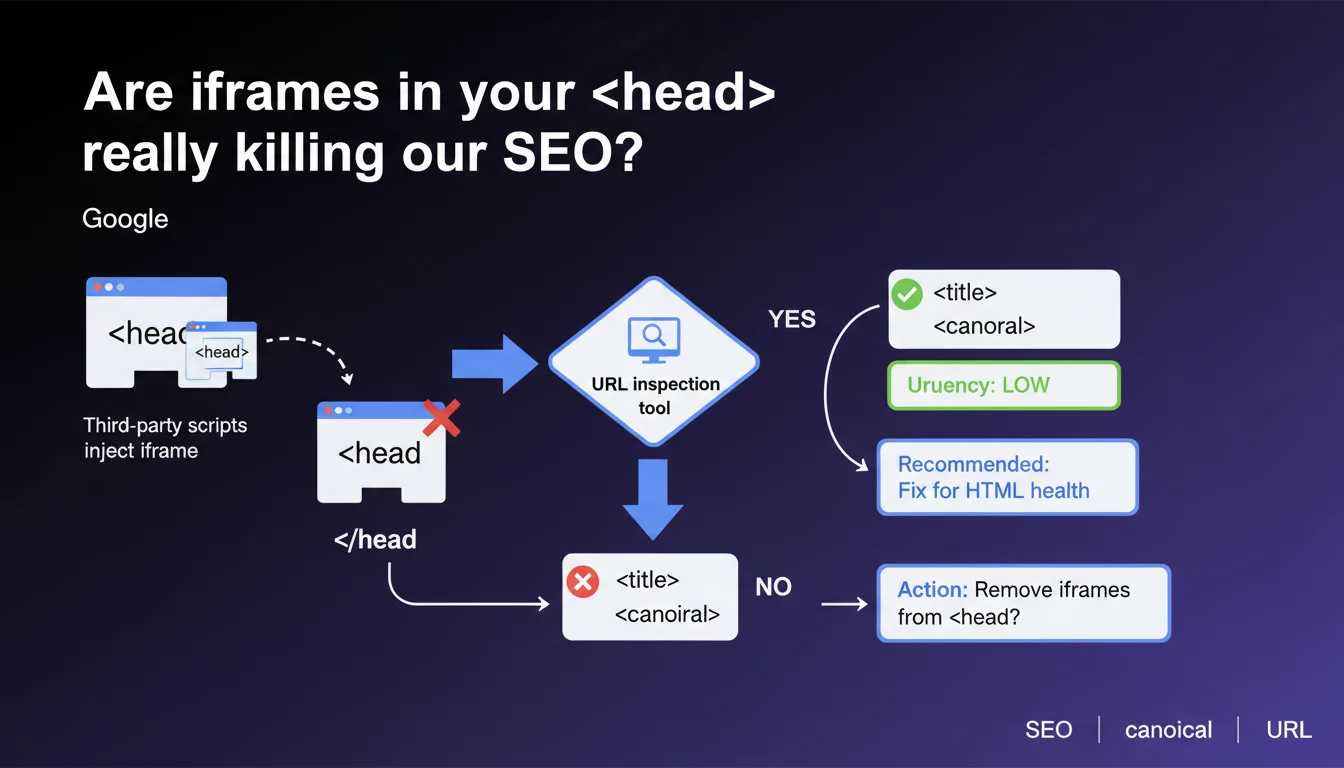
Google confirms that iframes injected into the <head> by third-party scripts can prematurely close this tag, but the urgency remains low if the URL inspection tool validates the recognition of critical tags (title, canonical). The fix remains recommended to maintain healthy HTML.
What you need to understand
Why do iframes end up in the ?
This phenomenon occurs almost exclusively through third-party scripts: tracking pixels, poorly configured tag management systems, advertising solutions that inject code asynchronously. These scripts can create DOM elements where they shouldn't be.
The problem? An iframe opened in the often forces the browser to prematurely close this section. The rest of the HTML then shifts into the , even if you had planned to place other critical tags there.
Which tags are at risk of being impacted?
Primarily the SEO metadata placed after the iframe injection: title, canonical, meta description, hreflang, Open Graph. If the iframe is created early in the head, these tags can end up orphaned or misinterpreted by parsers.
Google does point out, however, that if the URL inspection tool confirms proper recognition of these tags, the immediate SEO impact remains limited. It's the browser that compensates, not necessarily Googlebot.
Why does Google describe the urgency as "low"?
Because Googlebot has HTML reconciliation mechanisms: even if the DOM is broken, the search engine can often extract critical metadata. The inspection tool serves precisely to verify what Google actually "sees" after rendering.
But be careful: low urgency doesn't mean no risk. Invalid HTML can trigger unpredictable behavior on other crawlers (social networks, aggregators) or slow down client-side rendering.
- Iframes in the head generally come from poorly managed third-party scripts
- They can prematurely close the
<head>tag and move metadata into the<body> - SEO urgency remains low if the URL inspection tool confirms recognition of critical tags
- The fix remains recommended to ensure valid HTML and avoid unpredictable behavior
SEO Expert opinion
Is this recommendation consistent with real-world observations?
Absolutely. We regularly observe that Googlebot manages to extract the right metadata even on pages with degraded HTML. Google's JavaScript rendering includes a "cleanup" phase that catches some of the structural errors.
On the other hand, crawlers from LinkedIn, Facebook, or Twitter are less tolerant. A prematurely closed head can corrupt your Open Graph tags and display broken previews when shared. That's where it hurts — not necessarily in the SERPs.
When should you really worry?
If the URL inspection tool shows missing or incorrect metadata, urgency increases. This means Google's compensation isn't enough. In that case, the fix becomes a priority.
Another problematic case: sites with multiple third-party scripts that interfere with each other. An iframe created early can trigger a domino effect and corrupt the entire head. There, we move beyond an isolated case into structural technical debt.
Is "HTML health" a ranking signal?
Google has always denied that W3C validity is a direct factor. But clean HTML improves performance indirectly: faster rendering, fewer display bugs, better compatibility with Core Web Vitals.
And let's be honest: a site that leaves iframes lying around in the head often signals weak technical governance. The real problems are probably elsewhere — blocking JavaScript, heavy resources, broken internal linking.
Practical impact and recommendations
How do you verify if your site is affected?
First step: inspect the source code (Ctrl+U) and look for <iframe tags between <head> and </head>. If you find any, note their origin (the src attribute or inline scripts).
Next, use the URL inspection tool in Google Search Console. Go to the "Rendered HTML" tab and verify that your critical tags (title, canonical, meta description) appear correctly. If yes, urgency remains low — but don't fall asleep on the job.
What concrete actions should you take?
Identify the third-party script responsible: Google Tag Manager, Facebook pixel, A/B testing solution? Many of these tools offer configuration options to control where and when the code injects.
Then move the injection to the end of the body or use conditional asynchronous loading. If it's an external partner (ad network, chat tool), contact them to request compliance. Some will refuse — it's up to you to weigh the ROI.
- Inspect the source code to detect iframes in the
<head> - Verify with the URL inspection tool that critical tags are recognized by Google
- Identify the third-party script responsible (GTM, pixels, A/B testing)
- Move the injection to the end of the
<body>or use asynchronous loading - Regularly audit third-party scripts to prevent new wild injections
- Test the impact on social sharing (Open Graph, Twitter Cards)
Should you block suspicious third-party scripts?
Only if the SEO or UX cost outweighs the business benefit. A poorly injected conversion pixel can harm your HTML, but removing it can break your marketing attribution. It's a trade-off, not a pure technical decision.
Ideally, externalize the management of these scripts through a consent management platform (CMP) that loads resources conditionally and in the right order. This reduces the risk of chaotic injection.
<head> using the URL inspection tool. If everything is recognized, plan a fix in the medium term to clean up your HTML. If tags are missing, act quickly by identifying and relocating the faulty script. These optimizations can quickly become complex when multiple third-party scripts interact or when your technical stack imposes specific constraints. In these cases, calling on a specialized SEO agency allows you to get a precise diagnosis and tailored support to untangle these issues without breaking your tracking system or marketing integrations.❓ Frequently Asked Questions
Une iframe dans le <head> peut-elle empêcher l'indexation de ma page ?
Comment savoir si mes balises sont bien reconnues malgré une iframe dans le head ?
Les iframes dans le head affectent-elles les Core Web Vitals ?
Dois-je désactiver Google Tag Manager si c'est lui qui injecte l'iframe ?
Les crawlers de réseaux sociaux gèrent-ils aussi bien ces erreurs HTML que Googlebot ?
🎥 From the same video 14
Other SEO insights extracted from this same Google Search Central video · published on 05/03/2026
🎥 Watch the full video on YouTube →
💬 Comments (0)
Be the first to comment.