
Official statement
Other statements from this video 22 ▾
- □ Why doesn't Google Search Console's average position reflect a theoretical ranking but actual display results instead?
- □ Can you really afford to wait for an unstable ranking to stabilize on its own?
- □ Does boosting your SEO really require producing more content?
- □ Does the location of your XML sitemap really affect crawl efficiency?
- □ Should you really use the URL inspection tool to index a brand new website?
- □ How long does it really take to see your new backlinks in Google Search Console?
- □ Why do Search Console and Analytics data never really match up?
- □ Is Google Search Console really collecting all the data from your massive e-commerce site?
- □ Can out-of-stock product pages really trigger soft 404 errors in Google's eyes?
- □ Do Google's testing tools really crawl in real-time or do they rely on cached data?
- □ Does Google really use different ranking algorithms depending on your industry?
- □ Why does Google deprioritize crawling low-effort aggregator sites?
- □ Does Google really count clicks on rich results the same way as organic clicks?
- □ Does the order of links in your HTML code really affect Google's crawl priority?
- □ Should you really avoid URLs with parameters for SEO?
- □ Why does robots.txt prevent Google from crawling your pages but still allow them to be indexed?
- □ Are out-of-stock products hurting your e-commerce site's overall search rankings?
- □ Does partial duplicate content really hurt your search rankings?
- □ Does Google really ignore your canonical tags when it decides pages are too similar?
- □ Does Google really use just one signal to choose which URL to canonicalize among your duplicate content?
- □ Do brand mentions without backlinks actually help your SEO rankings?
- □ Why does a link without an indexed URL essentially do nothing for your SEO?
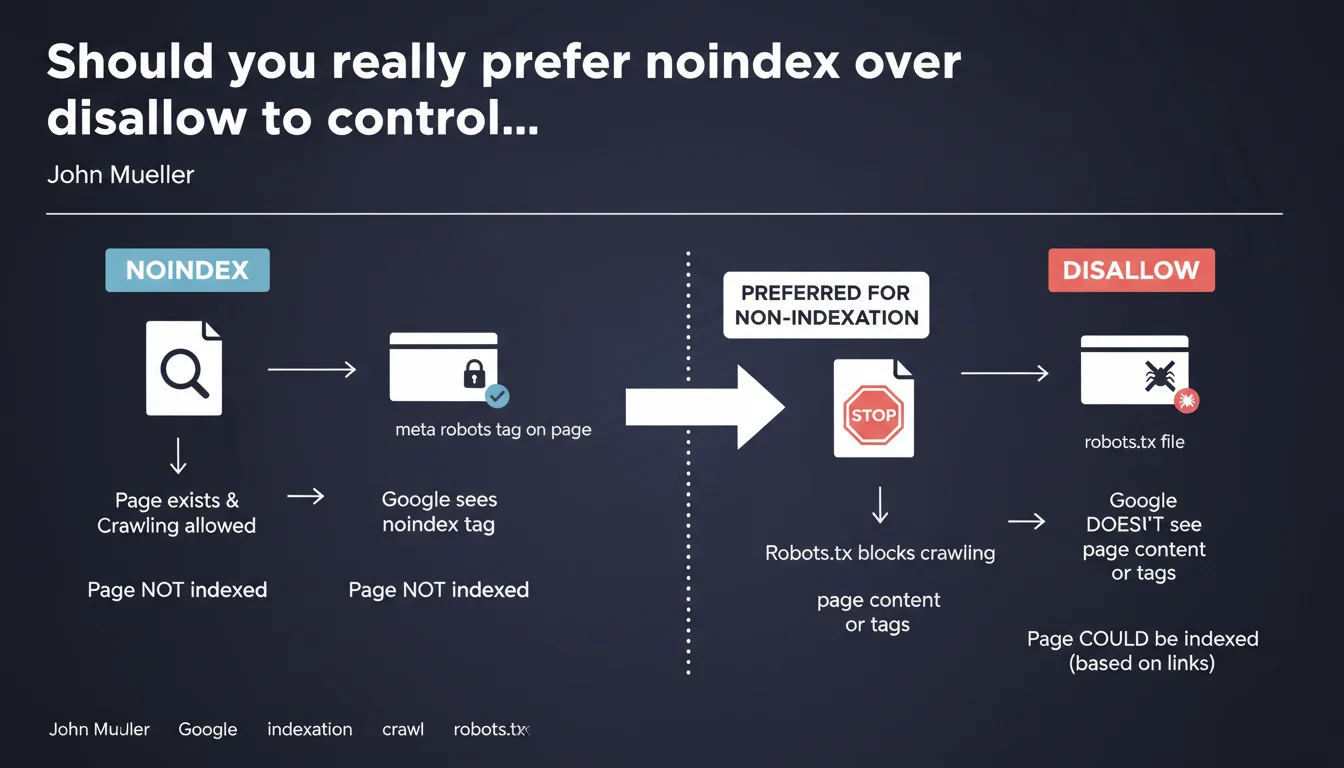
Google explicitly recommends using noindex rather than disallow in robots.txt to block indexation. The distinction is crucial: disallow prevents crawling, so Google cannot read the noindex tag. For noindex to work, you must allow robot access to the page.
What you need to understand
Why is this distinction between noindex and disallow so critical?
Both directives may seem similar on the surface, but they operate at completely different levels. Disallow in robots.txt blocks crawling: Googlebot cannot even access the page to analyze its content.
Noindex, on the other hand, requires the robot to crawl the page to detect the meta robots tag. This is where the paradox emerges for many SEOs: how can Google read a directive on a page it's not allowed to crawl?
What actually happens if you block with disallow?
If you block a URL via robots.txt, Google cannot crawl the page. Result: it never detects the noindex tag you may have placed on it.
In some cases, Google can still index the URL (without content or meta description) if it discovers it through external backlinks. You end up with an indexed page you didn't want, simply because you used the wrong tool.
When should you use one or the other?
The logic is straightforward: if you don't want a page to appear in SERPs, use noindex. If you want to save crawl budget on unnecessary resources (heavy JS/CSS files, session URLs, infinite facets), then disallow can make sense.
- Noindex = indexation control (the page can be crawled, but must not appear in search results)
- Disallow = crawl budget savings (the page will not be visited by robots)
- Blocking a page with disallow does not prevent its indexation if it receives external links
- For a noindex tag to be read, crawling must be allowed
SEO Expert opinion
Is this recommendation consistent with real-world observations?
Yes, and it's actually a classic trap. I've seen dozens of sites block sensitive pages via robots.txt thinking they're protecting them from indexation, only to find them in Google later with the notice "No information available for this page."
The problem is that many CMS platforms and SEO plugins still confuse the two concepts. Some tools even offer a "block indexation" checkbox that automatically adds a disallow, which is counterproductive.
Are there cases where this rule deserves nuance?
There are rare situations where combining both can make sense. For example, if you've already de-indexed an entire section with noindex and then want to stop crawling to reclaim budget, you can add disallow afterward.
But be careful: once crawling is blocked, Google can no longer verify that noindex is still in place. If you remove noindex before adding disallow, you risk re-indexation. [To verify] on large volumes with Search Console before any changes.
What is the real risk of misconfiguration?
The main risk is exposing URLs you want to keep private. Test pages, staging environments, duplicate content, faceted filters — all of this can end up indexed despite a robots.txt meant to protect them.
Practical impact and recommendations
What should you concretely do to correct a misconfiguration?
First, identify all URLs currently blocked in robots.txt that should not be indexed. Export the list from your robots.txt file, then cross-reference it with indexed URLs in Search Console.
Next, for each affected URL: remove the disallow directive, add a <meta name="robots" content="noindex, follow"> tag in the head, and let Google re-crawl. You can force crawling via the URL inspection tool in GSC.
What mistakes should you absolutely avoid?
Never block a page via robots.txt hoping it will disappear from the index. If it's already indexed, blocking crawling will keep it there indefinitely.
Another common mistake: adding noindex and disallow simultaneously on new pages. Google will never see the noindex, and you lose control.
- Audit your current robots.txt file and list all disallow directives
- Check in Search Console whether any blocked URLs appear in the index
- Replace disallow with noindex for all pages to exclude from SERPs
- Keep disallow only for unnecessary resources (session parameters, supplementary files)
- Test changes on a staging environment before deployment
- Use the URL inspection tool to force re-crawling after modifications
How can you verify the configuration is correct?
Use the robots.txt testing tool in Search Console to validate that critical URLs are not blocked. Then manually inspect a few pages with the URL inspection tool to confirm the noindex tag is properly detected.
A crawl with Screaming Frog or Sitebulb in Googlebot mode can also reveal inconsistencies: blocked pages present in the sitemap, or pages with noindex inaccessible due to a disallow.
❓ Frequently Asked Questions
Peut-on utiliser disallow et noindex en même temps ?
Si une page est déjà indexée, disallow va-t-il la désindexer ?
Comment désindexer rapidement une page indexée par erreur ?
Le noindex empêche-t-il le passage de PageRank ?
Faut-il ajouter nofollow en plus de noindex ?
🎥 From the same video 22
Other SEO insights extracted from this same Google Search Central video · published on 28/03/2022
🎥 Watch the full video on YouTube →
💬 Comments (0)
Be the first to comment.