
Official statement
Other statements from this video 23 ▾
- □ Google compte-t-il vraiment tous les liens visibles dans Search Console ?
- □ Faut-il vraiment concentrer son contenu sur moins de pages pour ranker ?
- □ Les critères d'avis produits Google s'appliquent-ils même si votre site n'est pas classé comme site d'avis ?
- □ L'API Indexing de Google fonctionne-t-elle vraiment pour tous les contenus ?
- □ L'E-A-T influence-t-il vraiment le classement Google ou n'est-ce qu'un mythe ?
- □ Les mentions de marque sans lien ont-elles un impact sur votre référencement ?
- □ Les commentaires d'utilisateurs améliorent-ils vraiment le classement dans Google ?
- □ Les certificats SSL premium influencent-ils vraiment le référencement Google ?
- □ PDF et HTML avec le même contenu : faut-il craindre une cannibalisation dans les SERPs ?
- □ Peut-on vraiment piloter l'indexation des PDF via les headers HTTP ?
- □ Faut-il encore utiliser rel=next et rel=prev pour la pagination ?
- □ Googlebot peut-il vraiment indexer vos contenus en défilement infini ?
- □ Faut-il vraiment indexer toutes les pages de son site ?
- □ Faut-il s'inquiéter de la page référente affichée dans Google Search Console ?
- □ Faut-il vraiment rediriger l'ancien sitemap en 301 ou soumettre le nouveau directement ?
- □ Pourquoi 97% de crawl refresh est-il un signal positif pour votre site ?
- □ Vitesse de crawl et Core Web Vitals : pourquoi Google fait-il la distinction ?
- □ Pourquoi Google ralentit-il son crawl après un changement d'hébergement ?
- □ Le paramètre de taux de crawl est-il vraiment un plafond et non un objectif ?
- □ Le CTR peut-il vraiment pénaliser le reste de votre site ?
- □ Le maillage interne est-il vraiment l'élément le plus déterminant pour le SEO ?
- □ Le linking interne agit-il vraiment instantanément après recrawl ?
- □ Faut-il s'inquiéter si Google ne crawle pas toutes vos pages ?
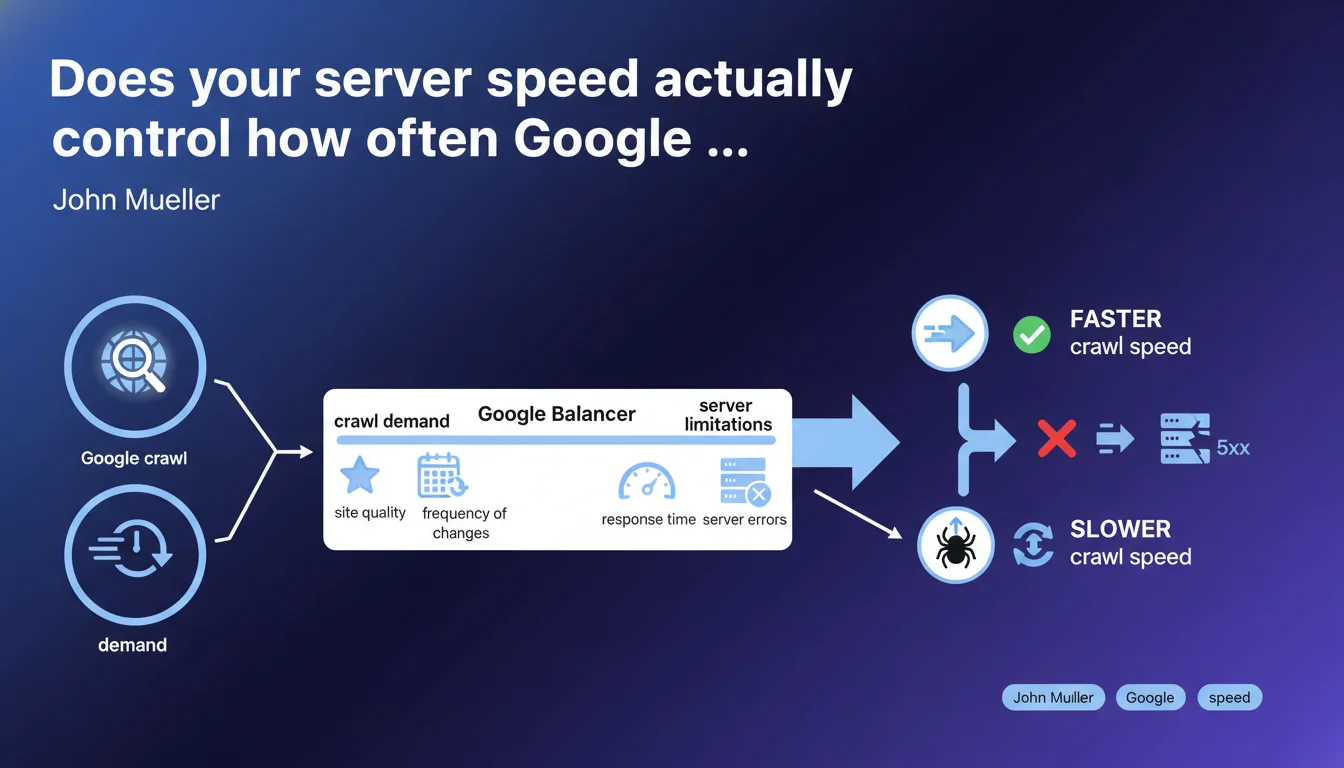
Google adjusts its crawl rate based on two parameters: demand (site quality, update frequency) and server limitations (response time, 5xx errors). In practice? A slow or unstable server directly slows down crawling, regardless of how good your content is.
What you need to understand
What does Google really mean by "crawl demand"?
The crawl demand refers to the interest Google has in your site. The more your content is deemed high-quality and updated frequently, the more often Googlebot wants to visit. It's a simple equation: a site with fresh, relevant content naturally generates more visits.
But be careful — this demand isn't a guarantee. It fluctuates based on your editorial performance and how your pages respond to user queries. A stagnant site will mechanically see its crawl frequency decline.
Why do server limitations carry so much weight?
Google doesn't want to overload your servers. If your response times increase or 5xx errors multiply, Googlebot automatically reduces its pace. This is a protective measure, both for your infrastructure and for crawl efficiency.
The signal is clear: a struggling server sends a negative message to Google. Even an editorially excellent site will be penalized if its infrastructure can't keep up.
What balance is Google trying to maintain?
Google optimizes its crawl budget — that is, the time and resources it allocates to each site. It wants to maximize the discovery of relevant content without ever jeopardizing the stability of your servers.
This balance requires constant adjustments. If your server speeds up, Google speeds up. If it slows down, Google slows down. It's a permanent technical dialogue between your infrastructure and the bots.
- The crawl rate is not fixed: it varies based on site quality and server health
- 5xx errors and slow response times are direct crawl blockers
- Google always prioritizes server stability before increasing crawl frequency
- A site with fresh, quality content naturally attracts more crawling
SEO Expert opinion
Is this statement consistent with real-world observations?
Absolutely. Every SEO professional who regularly analyzes server logs confirms this logic. When a site experiences consecutive 5xx errors or response times exceed several seconds, crawling drops — sometimes by 50% or more within days.
What's less often mentioned is that Google makes these adjustments in a granular way. A slow server on one section of a site can see that specific section slow down, while the rest continues to be crawled normally. This is visible in logs: certain site sections get neglected while others remain active.
What nuances should we add?
The term "site quality" remains deliberately vague. Google never specifies how it measures this quality to determine crawl demand. Is it based on Helpful Content? On click-through rates in SERPs? On user engagement? [Needs verification]
Similarly, "frequency of change" can be misinterpreted. Artificially modifying pages without adding real value doesn't increase crawling — quite the opposite, it can reduce it if Google detects cosmetic updates. Only substantial modifications count.
In what cases doesn't this rule fully apply?
For news sites or large e-commerce platforms, Google generally allocates a higher crawl budget by default, even if the server shows occasional signs of weakness. Tolerance is greater.
Conversely, a small site can have an ultra-fast server and decent content — but if it generates no real demand (no backlinks, no traffic, no freshness), crawling will remain low. Server performance alone isn't enough.
Practical impact and recommendations
What should you do concretely to optimize crawl?
First, monitor server response times. Use Search Console (section "Settings" > "Crawl statistics") to identify latency spikes. If TTFB regularly exceeds 500 ms, you have a problem.
Next, track 5xx errors in your server logs. A handful of sporadic errors aren't an issue, but recurring errors on the same URLs or sections send a strong negative signal. Fix them as a priority.
Finally, make sure your hosting can handle crawl spikes. Googlebot doesn't give notice before visiting — if your server saturates every time it crawls intensively, your crawl rate will be permanently throttled.
What mistakes must you absolutely avoid?
Don't artificially limit crawling via robots.txt or the "crawl-delay" parameter except in extreme cases. If your server can't handle Google's pace, that's an infrastructure problem to solve — not a reason to slow down crawling.
Also avoid creating chains of 301/302 redirects. Each redirect increases overall response time and wastes crawl budget unnecessarily. One URL, one destination — that's the rule.
How do you verify your site complies?
Analyze your server logs over at least 30 days. Identify crawled URLs, their frequency, and the HTTP codes returned. Cross-reference with Search Console data to spot inconsistencies.
Test your TTFB using tools like WebPageTest or GTmetrix. If you regularly exceed 600 ms, optimize your technical stack: server cache, CDN, database optimization, reduction of external requests.
- Monitor TTFB in Search Console and aim for under 500 ms
- Immediately fix any recurring 5xx errors
- Size your hosting to absorb crawl spikes without saturating
- Avoid redirect chains and artificial crawl-delays
- Analyze server logs monthly to identify anomalies
- Regularly publish substantial, quality content
- Optimize your technical stack: cache, CDN, database
❓ Frequently Asked Questions
Un TTFB lent impacte-t-il le référencement au-delà du crawl ?
Faut-il limiter le crawl via robots.txt si mon serveur est lent ?
Les Core Web Vitals influencent-ils le taux de crawl ?
Comment savoir si Google réduit mon crawl à cause d'erreurs serveur ?
Un CDN améliore-t-il le taux de crawl ?
🎥 From the same video 23
Other SEO insights extracted from this same Google Search Central video · published on 18/02/2022
🎥 Watch the full video on YouTube →
💬 Comments (0)
Be the first to comment.