
Official statement
Other statements from this video 14 ▾
- □ Do 404 errors and 301 redirects really hurt your SEO rankings?
- □ Does the canonical tag really prevent your pages from being indexed?
- □ Is Google really seeing your prices in US dollars by default?
- □ Why does Google treat hreflang and canonical tags as two completely separate mechanisms?
- □ Does the disavow tool really delete toxic backlinks from Google's index?
- □ How can you create unique content for identical products without falling into duplicate content traps?
- □ Should you really verify each subdomain separately in Search Console?
- □ Do you really need to worry about a high volume of 404 errors on your site?
- □ Should you really mark every affiliate link with rel=nofollow or rel=sponsored?
- □ Do Google's quality raters really affect your site's search rankings?
- □ How long does Google actually remember old URLs after a site migration?
- □ Is mobile-first indexing really the standard for every website on the web?
- □ Is the .ai domain really being treated as a gTLD by Google?
- □ Does cutting your indexed pages really boost SEO, or is it just a myth?
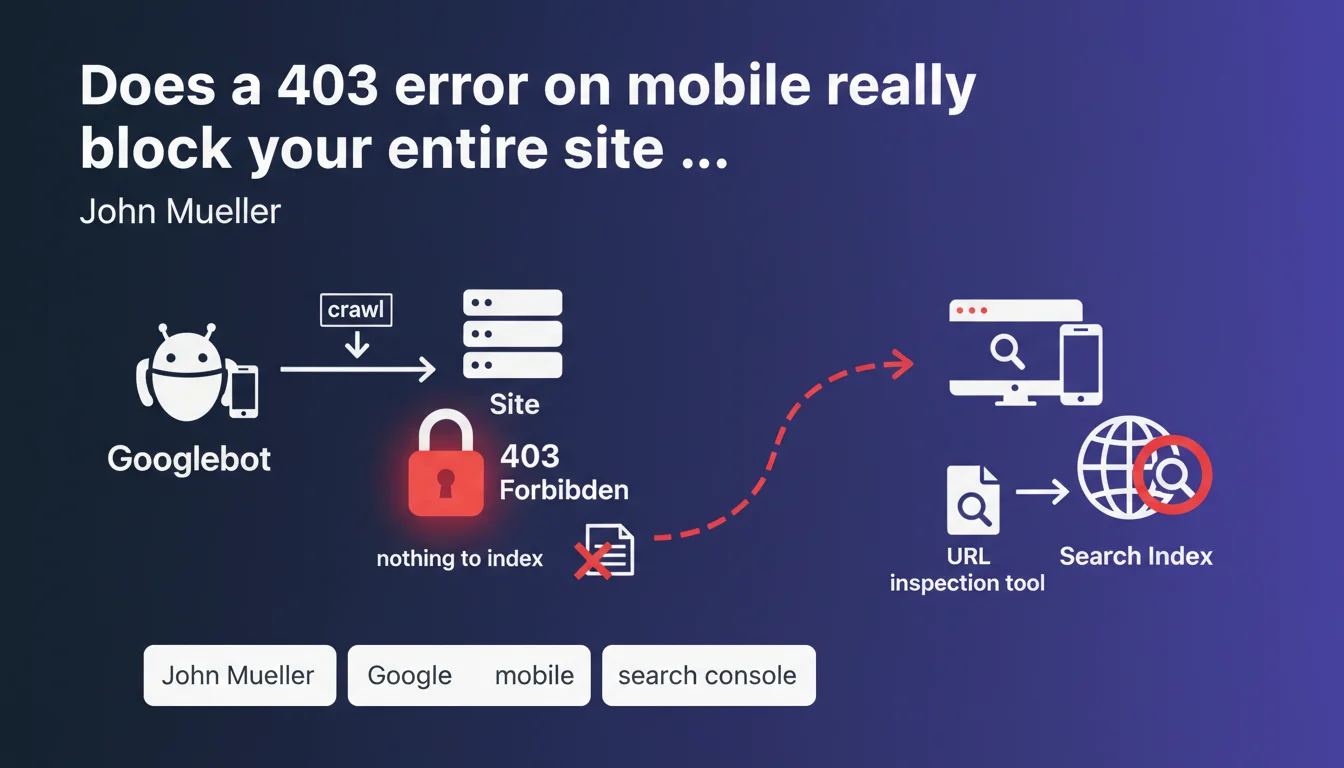
If Googlebot crawls your site with a mobile user agent and receives an HTTP 403 code, Google considers there is nothing to index and stops indexation. This situation can paralyze your site's mobile visibility. The URL inspection tool in Search Console allows you to diagnose this critical problem.
What you need to understand
Why does Google treat 403 as a signal of missing content?
An HTTP 403 code means "access forbidden" — the server explicitly refuses to deliver the requested resource. Unlike a 404 (resource not found) or 503 (temporary unavailability), 403 is perceived by Google as a deliberate decision by the site to block access.
When mobile Googlebot encounters a 403, it has no way to verify whether this is a configuration error or an actual intent to block robots. For safety, it considers there is nothing to index and abandons the attempt.
Does this rule apply only to mobile crawling?
Mueller's statement explicitly mentions the mobile user agent, which makes sense with mobile-first indexation that has been standard for several years. If your site returns a 403 to mobile Googlebot, you are stuck.
On the other hand, a 403 returned only to desktop Googlebot might not completely block indexation if mobile crawling works. But this configuration is extremely rare — most 403 blocks affect all user agents or are misconfigured.
How can you effectively diagnose a 403 problem?
The URL inspection tool in Search Console simulates Googlebot crawling and immediately reveals a 403 code. You see the HTTP code returned, the user agent used, and the content (or lack thereof) retrieved.
This is the most reliable way to confirm that a 403 is blocking indexation. Server logs and manual tests with curl can provide additional information, but Search Console remains the reference.
- A 403 code on mobile = no indexation by Google
- 403 is interpreted as a deliberate refusal of access, not a temporary error
- The URL inspection tool in Search Console is the standard diagnostic
- The problem primarily affects mobile Googlebot, the priority user agent
- Unlike 503 (temporary) or 404 (page doesn't exist), 403 signals a permanent ban
SEO Expert opinion
Is this statement consistent with real-world practices?
Yes, and it's a harsh reality that many discover too late. Configuration errors in security rules, application firewalls (WAF), or WordPress security plugins regularly generate 403 responses for mobile Googlebot without the site owner even realizing it.
The classic trap: a site accessible from a standard browser but blocked for Googlebot due to overly aggressive anti-bot rules. Result: progressive deindexation and unexplained drops in organic traffic. Server logs often reveal thousands of 403s on critical URLs.
What nuances should be added to this absolute rule?
Mueller states "there is nothing to index, so Google indexes nothing" — it's unambiguous. But be aware: if the 403 is intermittent (for example, a poorly calibrated WAF that randomly blocks), Google may alternate between successful and failed crawls. In this case, indexation remains possible but erratic and degraded.
Another nuance: if only part of your site (CSS, JS, images) returns 403s, Google may still index the main HTML, but rendering will be broken or incomplete. Text content may appear in the index, but without layout or interactivity — which hurts rankings. [To verify]: Could Google tolerate 403s on secondary resources without major impact? Observations show no, especially if rendering depends on them.
In what cases does this rule not apply?
If you intentionally return a 403 on private sections (member areas, admin, paid content), this is expected behavior and Google won't attempt to index them. No problem here.
The disaster occurs when 403 affects public and strategic pages by mistake. That's when indexation collapses. So this rule always applies — but it's only problematic if the 403 is unintentional.
Practical impact and recommendations
What should you do concretely if Googlebot receives a 403?
First step: confirm the problem using the URL inspection tool in Search Console. Test several strategic URLs (homepage, categories, products) to see if the 403 is widespread or localized.
Next, analyze server logs to identify the cause: WAF rule, security plugin, IP restriction, misconfigured .htaccess file. Most unintentional 403s come from security solutions that are too aggressive and confuse Googlebot with malicious bots.
What errors should you absolutely avoid?
Never block Googlebot via robots.txt and return a 403 — it's a double lock that paralyzes indexation. If you want to prevent access to a section, choose: either robots.txt (Google doesn't crawl but may index the URL), or 403 (Google can't even attempt to crawl).
Another common mistake: fixing the 403 without requesting reindexation via Search Console. Google may take weeks to naturally re-crawl affected URLs. Speed up the process by manually submitting critical pages.
How can you verify your site is compliant and protected against unintentional 403s?
Implement automated monitoring of HTTP codes returned for Googlebot. Tools like Oncrawl, Screaming Frog (in scheduled crawl mode), or custom scripts can alert you in real time to 403 occurrences.
Regularly test your site with user agents simulating mobile Googlebot. A simple curl script or a tool like Httpstatus.io is enough to validate accessibility.
- Use the URL inspection tool to confirm the HTTP code received by Googlebot
- Examine server logs to identify the source of the 403 (WAF, plugin, server rule)
- Check security rules on Cloudflare, Sucuri, mod_security and whitelist Googlebot if necessary
- Never combine robots.txt disallow and 403 code on the same URLs
- Submit corrected URLs via Search Console to speed up reindexation
- Implement automated monitoring of HTTP codes to detect regressions
- Regularly test with a mobile Googlebot user agent to validate accessibility
❓ Frequently Asked Questions
Un 403 temporaire peut-il causer une désindexation permanente ?
Dois-je m'inquiéter si seules les ressources CSS/JS reçoivent un 403 ?
Comment différencier un 403 légitime (zone privée) d'un 403 involontaire ?
Un 403 côté serveur est-il pire qu'un 403 côté WAF ou CDN ?
Combien de temps faut-il pour retrouver l'indexation après correction d'un 403 ?
🎥 From the same video 14
Other SEO insights extracted from this same Google Search Central video · published on 11/07/2023
🎥 Watch the full video on YouTube →
💬 Comments (0)
Be the first to comment.