
Official statement
Other statements from this video 20 ▾
- □ Should you really block AI-generated automatic translations from your site with noindex?
- □ Are site: searches polluting your Search Console data?
- □ Why Is Google Telling You to Ignore Your PageSpeed Insights Scores?
- □ Should you really stop obsessing over Core Web Vitals optimization?
- □ Should you really worry about buying an expired domain?
- □ Can AI Really Produce SEO-Quality Content with Just Human Proofreading?
- □ Can poor machine translation really tank your SEO rankings?
- □ Do affiliate links actually hurt your page's search rankings?
- □ Should you really fix every single broken backlink pointing to your site?
- □ Does Next.js really require specific SEO best practices from the start?
- □ Can you safely canonicalize pages that are 93% identical without damaging your SEO?
- □ Should you redirect or completely disable an unused subdomain for SEO?
- □ Should you really worry about toxic backlinks pointing to your site?
- □ Should you really match your page title and H1 tag?
- □ Does localized content really escape the duplicate content penalty?
- □ Why does Google discourage using site: queries to verify indexation?
- □ Why does a high ranking not guarantee strong CTR on Google?
- □ Could showing all product variants to Googlebot alone be quietly destroying your search visibility?
- □ Do you really need a dedicated page per video to rank in rich video results?
- □ Is content syndication really worth the risk to your organic visibility?
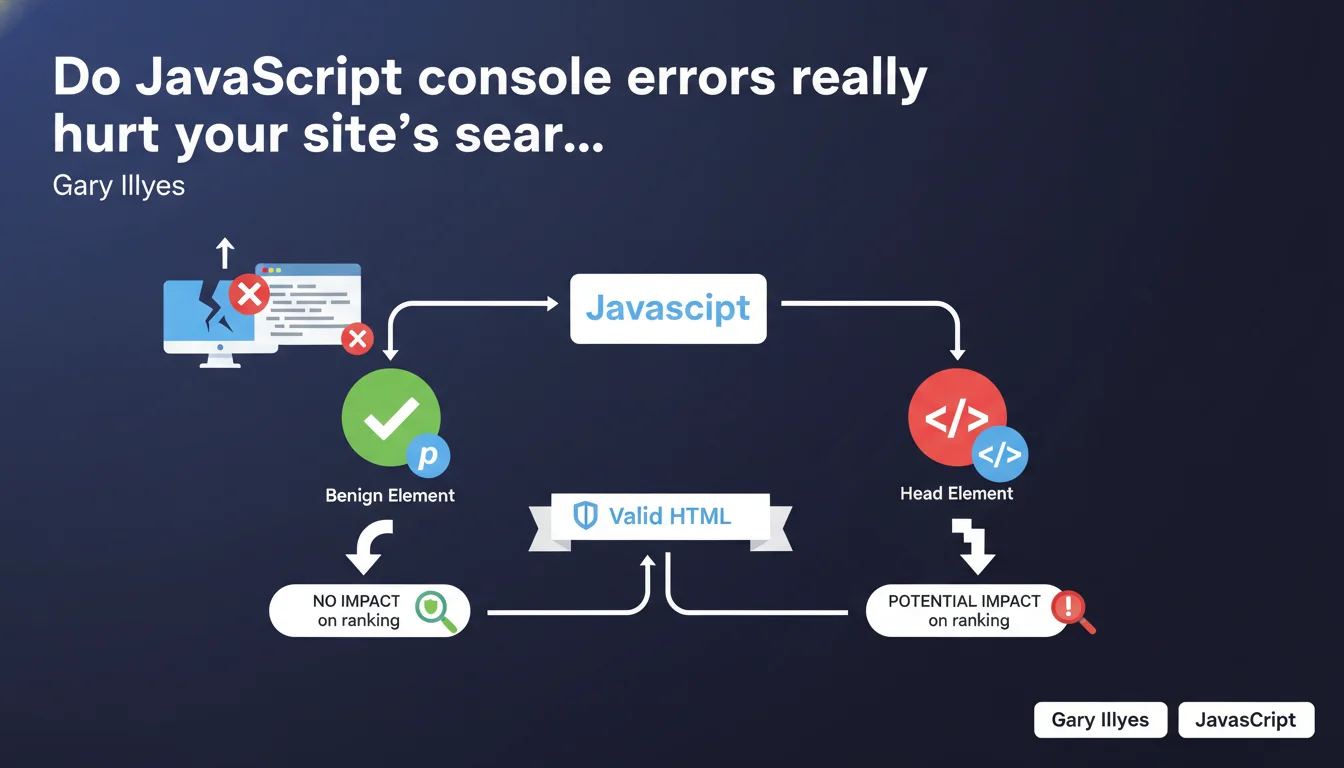
Not all console errors are equal. An error on a paragraph will likely go unnoticed, but an error that breaks the <head> can seriously harm crawling and indexation. Google recommends valid HTML, but it's the error location that determines its real SEO impact.
What you need to understand
Why does Google distinguish errors based on their location?
Google doesn't treat all errors the same way because its crawler operates by priorities. An error in the can prevent proper loading of metadata, block canonical tag injection, or break structured data.
Conversely, an isolated JavaScript error on a content element (paragraph, div, span) will probably affect neither the rendering nor Google's overall understanding of the page. The search engine has become robust enough to handle these minor failures.
What exactly is a "benign element" according to this statement?
Gary is talking about elements that don't carry critical semantic or structural weight. A paragraph, a decorative image, a non-essential button — their execution failure doesn't prevent Google from understanding the page.
However, if the error affects sensitive areas like structured markup, hreflang tags, or scripts that control the display of main content, the impact can be significant. It's a matter of functional criticality.
Do you really need to hunt down every console error?
No, not all of them. Launching a systematic hunt for console errors can quickly become counterproductive. The key is to prioritize by impact: start by auditing errors that affect the , Schema.org tags, or that block the rendering of main content.
Google doesn't penalize a site that has a few minor errors. But a technically fragile site with recurring critical errors sends a signal of degraded quality. And Google picks up on that.
- Errors in the are top priority: they can break metadata and structured data.
- Errors on secondary content elements (paragraphs, decorative images) have negligible impact.
- Google recommends valid HTML, but tolerates minor errors if they don't affect overall comprehension.
- Prioritize your audit: focus on what affects crawling, indexation, and rendering.
SEO Expert opinion
Is this statement consistent with what we observe in the field?
Yes, largely. We regularly see that sites with minor console errors rank perfectly well. Conversely, sites that are technically "clean" according to W3C validators can stagnate if their content or internal linking are weak.
What Gary confirms here is that Google doesn't function like a strict HTML validator. It favors a pragmatic approach: as long as content is accessible and understandable, small errors pass through. But be careful — [To verify] — this tolerance has its limits, especially in heavy JavaScript environments where errors can cascade.
What nuances should be added to this statement?
Gary remains deliberately vague about what exactly constitutes a "benign element." In practice, an error that seems harmless can have invisible side effects: a script that fails and, in cascade, prevents the injection of a tracking event or a poorly configured lazy-loading.
Another point: console errors are only part of the problem. If your HTML is valid but your JavaScript blocks rendering, or if your critical CSS doesn't load, the SEO impact will be equally real. Google's statement doesn't cover these cases.
In what cases does this rule not apply?
On sites with complex JavaScript rendering (SPA, frameworks like React/Vue), a console error can have much broader consequences. If the error prevents DOM hydration, Googlebot may receive an empty or incomplete page.
Similarly, if your site uses web components or poorly implemented custom elements, an error in the head can break the entire structure. In this context, Google's tolerance is significantly reduced.
Practical impact and recommendations
What should you actually do to audit your console errors?
Start by opening the developer console (F12) on your strategic pages: homepage, main categories, key product pages. Note the errors in red. Then filter by criticality: errors related to the head, Schema tags, canonicals, or hreflang are top priority.
Also use tools like Screaming Frog ("JavaScript" tab) or Google Search Console ("Coverage" section) to detect pages that don't render correctly. If Googlebot reports rendering issues, it's often because a JavaScript error is blocking content display.
What errors should you absolutely avoid?
Avoid any error that touches structured markup, metadata (title, description, canonical), or critical scripts. If a third-party script (analytics, tag manager, ads) crashes and blocks the rest from running, isolate it with async or defer.
Don't overlook CORS or CSP errors either, which can prevent external resources from loading. Even if they don't appear "serious" in the console, they can degrade user experience and, indirectly, behavioral signals.
How do you verify that your site complies?
Run an audit with Lighthouse ("Diagnostics" tab) to spot critical JavaScript errors. Supplement with PageSpeed Insights and verify that mobile rendering is correct. If you use JavaScript to inject content, test with the "URL inspection" tool in Search Console to see what Googlebot actually captures.
If you detect complex errors or recurring rendering issues, document them and prioritize their correction. A technically robust site is one that doesn't waste crawl time on avoidable errors.
- Audit console errors on your strategic pages (homepage, categories, featured products).
- Prioritize errors in the , Schema tags, and critical metadata.
- Use Screaming Frog and Search Console to detect rendering issues.
- Isolate problematic third-party scripts with async/defer to prevent cascade failures.
- Verify rendering with "URL inspection" in Search Console to see what Googlebot captures.
- Document and prioritize fixes based on actual crawling, indexation, and rendering impact.
❓ Frequently Asked Questions
Une erreur JavaScript dans la console peut-elle empêcher l'indexation de ma page ?
Google pénalise-t-il les sites avec du HTML non valide W3C ?
Comment savoir si mes erreurs console affectent Googlebot ?
Dois-je corriger toutes les erreurs console avant de lancer un site ?
Les erreurs de scripts tiers (analytics, publicité) peuvent-elles nuire au SEO ?
🎥 From the same video 20
Other SEO insights extracted from this same Google Search Central video · published on 13/06/2024
🎥 Watch the full video on YouTube →
💬 Comments (0)
Be the first to comment.