
Official statement
Other statements from this video 13 ▾
- □ Peut-on gérer plusieurs sites web sans pénalité SEO ?
- □ Tirets vs underscores dans les URLs : quel impact réel sur votre SEO ?
- □ Le noindex follow garantit-il vraiment l'exploration des liens par Google ?
- □ Pourquoi Google ignore-t-il les fragments d'URL avec # en SEO ?
- □ Les erreurs 503 brèves impactent-elles vraiment le crawl de votre site ?
- □ Changer d'hébergeur web impacte-t-il réellement votre référencement naturel ?
- □ Faut-il vraiment limiter l'API d'indexation aux offres d'emploi et événements ?
- □ Faut-il vraiment bannir le texte intégré directement dans les images ?
- □ Les menus burger dupliqués dans le DOM nuisent-ils au référencement ?
- □ Peut-on vraiment cibler plusieurs pays avec une seule page grâce à hreflang ?
- □ Les erreurs 404 externes nuisent-elles vraiment au classement Google ?
- □ Faut-il vraiment un sitemap.xml pour bien ranker sur Google ?
- □ Faut-il vraiment abandonner les URLs mobiles séparées (m-dot) pour le SEO ?
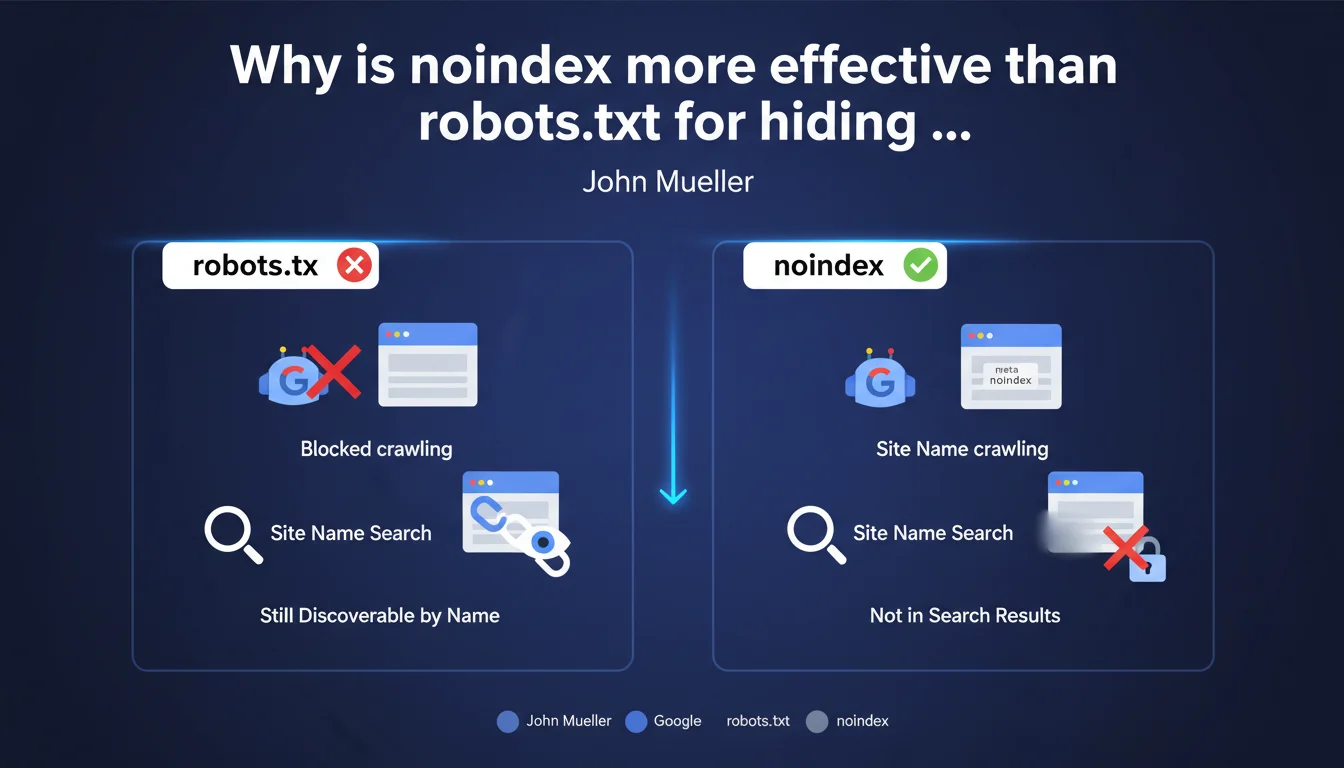
Google recommends using the meta robots noindex tag rather than robots.txt to remove a site from search results while keeping it accessible. With robots.txt, the site can still appear if someone searches for it by its exact name, because Google can index the URL without crawling the content.
What you need to understand
What is the fundamental difference between robots.txt and noindex?
The robots.txt file blocks crawling of pages by indexing robots. In practice, Google cannot access the page content, but can still index the URL if it is mentioned elsewhere on the web (backlinks, social media, etc.).
The meta robots noindex tag works differently: it allows Googlebot to crawl the page and access the content, but explicitly instructs it not to index it. It is a direct instruction to the search engine.
Why can a site blocked by robots.txt still appear in the SERP?
Paradoxically, blocking a page via robots.txt can create a ghost entry in the index. If external websites point to this URL, Google knows about it and can display it with the note "No information available for this page."
This is particularly problematic when someone searches for your brand by its exact name. The URL can appear even if the content is not crawled — exactly what Mueller is pointing out here.
In which cases is this distinction critical?
For staging sites, development pages, or private sections of a publicly accessible website, the nuance is crucial. A robots.txt does not guarantee complete invisibility.
Another classic case: websites under redesign temporarily launched on a permanent domain but that you don't want to see indexed before the official launch. Noindex is the only reliable protection.
- robots.txt blocks crawling, but does not prevent indexing of URLs known elsewhere
- meta robots noindex prevents indexing, even if the page is crawled
- Searching by exact brand name can reveal URLs blocked by robots.txt
- For complete masking from search results, noindex is the only guaranteed method
- Both directives can coexist, but with different objectives
SEO Expert opinion
Is this statement consistent with real-world observations?
Absolutely. I have observed dozens of cases where staging environments protected only by robots.txt have appeared in Google when searching for the exact domain name. The phenomenon is reproducible.
The confusion arises because robots.txt is often presented as a "blocking" method, when it actually only blocks access to content, not awareness of the URL's existence. This is a technical nuance that many practitioners overlook.
What situations escape this rule?
If a site is completely isolated — no external backlinks, no public mention, never submitted in Search Console — and protected by robots.txt, there is a chance it may never be discovered by Google. But that's a risky bet.
Another case: websites with HTTP authentication (server password). There, Google cannot even access the page to read a potential noindex. But as soon as authentication is removed, you're back to needing noindex.
[To verify]: Mueller does not specify how long effective deindexing takes after adding noindex. On sites with low crawl frequency, it can take weeks. The exact timeframe depends on multiple factors that Google does not document clearly.
The risk of combining robots.txt and noindex
Beware of the classic pitfall: if you block a page via robots.txt AND add noindex in the code, Google will never be able to read the noindex since it does not crawl the page. The URL can therefore remain indefinitely in the index.
The correct sequence to deindex a page already indexed and blocked by robots.txt: first allow crawling, add noindex, wait for deindexing, then possibly reblock via robots.txt if necessary.
Practical impact and recommendations
What should you do concretely to hide a site from the SERP?
Add the <meta name="robots" content="noindex, nofollow"> tag in the <head> of all affected pages. This is the most explicit and universal directive.
Alternatively, you can use an HTTP header X-Robots-Tag: noindex — particularly useful for non-HTML files (PDF, images) or sites with limited control over front-end code.
In both cases, make sure that robots.txt does not prevent crawling of these pages, otherwise Google will never see the noindex directive.
How to verify that deindexing is working?
Use the site:yourdomain.com command in Google to check indexed pages. If URLs persist despite noindex, verify that they are crawlable.
In Google Search Console, the "Coverage" section tells you which pages are "Excluded by noindex tag". This is confirmation that Google has read and respected the directive.
The deindexing timeframe varies depending on how frequently your site is crawled. To speed up the process, submit the affected URLs via the URL Inspection tool in Search Console.
What mistakes to absolutely avoid?
Never combine robots.txt Disallow and meta noindex on the same URLs. This is the most counterproductive configuration: Google cannot read the noindex and the URL remains indexable.
Also avoid noindex via JavaScript only if you are not certain that Google executes JS properly on your site. Always favor server-side implementation or raw HTML.
- Add
meta robots noindexin the<head>of each page to be hidden - Verify that robots.txt allows crawling of these pages
- Check in Search Console that pages are "Excluded by noindex tag"
- Use
site:domain.comto monitor pages still indexed - Submit URLs via the inspection tool to accelerate deindexing
- Never combine robots.txt Disallow and meta noindex on the same URLs
- Prefer server-side implementation (HTTP header) or raw HTML over JavaScript for noindex
❓ Frequently Asked Questions
Puis-je utiliser robots.txt pour désindexer une page déjà présente dans Google ?
Le noindex empêche-t-il le transfert de PageRank via les liens sortants ?
Combien de temps faut-il pour qu'une page avec noindex disparaisse de l'index ?
Un header HTTP X-Robots-Tag noindex est-il aussi efficace qu'une meta balise ?
Si je protège mon site par mot de passe HTTP, ai-je quand même besoin de noindex ?
🎥 From the same video 13
Other SEO insights extracted from this same Google Search Central video · published on 18/04/2024
🎥 Watch the full video on YouTube →
💬 Comments (0)
Be the first to comment.