
Official statement
Other statements from this video 15 ▾
- □ Why does Google cap sitemaps at 50,000 URLs, and how does it impact large websites?
- □ Do ARIA attributes really improve your website's SEO?
- □ Do you really need to redirect canonicalized URLs to improve your search rankings?
- □ Why isn't perfect technical optimization enough to rank your site anymore?
- □ Is your website hit by a manual penalty? Here's exactly how to check in Search Console
- □ Why is Product markup completely useless for real estate listings?
- □ Can you really use hreflang for non-translated content targeting different regions?
- □ Does color contrast really impact your SEO rankings?
- □ Does the HTML <article> tag really boost your SEO rankings?
- □ Do Relative and Absolute Links Really Make a Difference for SEO?
- □ Does Google really require English day names in structured data for non-English websites?
- □ How can you verify that a crawler is really Googlebot and block fake ones without hurting your SEO?
- □ Should you really use prefetch and prerender to boost your SEO rankings?
- □ Should you really stop relying on Google cache to diagnose indexation issues?
- □ Is Google really indexing content that doesn't exist on your site?
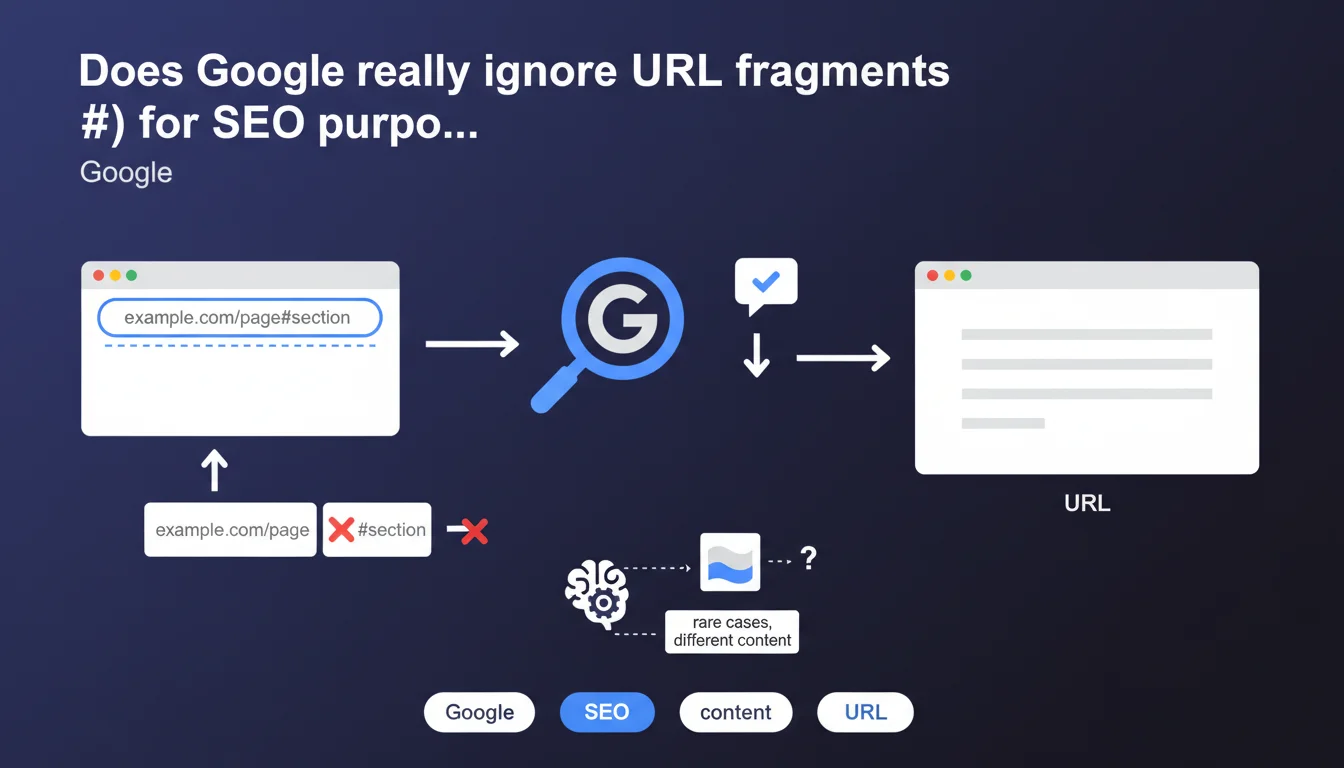
Google systematically ignores URL fragments (everything after the #) during crawling and indexing. The only exception: in very rare cases, Google may detect that a fragment displays different content, but this practice is not recommended by Google. In practice, don't rely on hashtags to structure your SEO content.
What you need to understand
What exactly is a URL fragment?
A URL fragment is the portion that follows the hash symbol (#) in a web address. Technically, this fragment is never sent to the server — it stays on the client side, in the browser. Its original purpose? To enable intra-page navigation to a specific HTML anchor.
Example: https://example.com/page#section-2. The fragment #section-2 tells the browser to scroll to the element with the corresponding ID. On the server side, the received request contains only https://example.com/page.
Why does Google claim to ignore these fragments?
Google bases its indexing on HTML content returned by the server. Since fragments are never transmitted to the server, they cannot influence server-side generated content. Googlebot therefore systematically processes the URL without the fragment.
The mentioned exception concerns modern JavaScript applications (SPAs) that dynamically modify content based on the fragment. But even in this case, Google explicitly discourages this approach — it unnecessarily complicates crawling and creates indexing problems.
What's the difference with URL parameters?
Unlike query parameters (?param=value), which are transmitted to the server and can therefore generate different content, fragments remain invisible to the server. Google can crawl and index URLs with different parameters as separate pages.
Fragments, however, are purely client-side. Two identical URLs except for their fragments will be considered as a single page by Google.
- Fragments (#): ignored by Googlebot, not transmitted to server, do not generate separate indexing
- Parameters (?): transmitted to server, can create unique content, potentially indexed separately
- Rare exception: Google may detect different JS content linked to a fragment, but this is discouraged
- HTML anchors: fragments remain useful for UX (intra-page navigation) but with no direct SEO impact
SEO Expert opinion
Does this statement match real-world observations?
Absolutely. In 99% of cases, tests show that Google treats example.com/page and example.com/page#section as strictly identical. Search Console, server logs, and crawl tests confirm that Googlebot never transmits the fragment in its requests.
The exception mentioned by Google primarily concerns older SPAs using the #! (hashbang) pattern for routing. These architectures, popular around 2010-2015, are now obsolete. Google has discouraged them for years in favor of HTML5 History API.
What does "in very rare cases" really mean?
Google remains intentionally vague here. [To verify] but the most likely hypothesis: Googlebot could execute JavaScript that modifies the DOM based on the fragment detected on the client side. This would require JS to read window.location.hash and load different content.
Let's be honest — this approach is a nightmare to maintain and creates total dependence on JavaScript for indexing. Rendering delay, JS errors, blocked resources... so many friction points that can torpedo your indexing. Don't count on it.
When do fragments really cause problems?
The real trap? Sites that generate canonical links including the fragment. Example: an SPA that defines <link rel="canonical" href="https://example.com/page#tab2">. Google will ignore this fragment in the canonical tag, potentially creating an inconsistency.
Another problematic case: analytics tools that track fragments as separate pages when Google indexes them as one. This completely distorts your landing page performance analysis.
Practical impact and recommendations
What must you absolutely avoid with URL fragments?
Never build your content architecture on fragments. If you have multiple sections of important content, create real distinct URLs. Example: instead of /products#shoes, use /products/shoes.
Also avoid generating internal links with fragments to unique content. If #important-section contains content you want to rank, pull it out into a dedicated page.
Do fragments still have any indirect SEO value?
Yes — for user experience, which indirectly influences SEO. An anchored menu that scrolls smoothly to sections improves time on page and reduces bounce rate. These behavioral signals matter.
Fragments in featured snippets can also be relevant. Google sometimes displays deep links with fragments to a specific section of your page in results. But Google chooses the anchor — you don't control this behavior.
How do you audit your site to detect fragment-related issues?
Run a complete crawl and filter for URLs containing #. Check if important content lives only behind these fragments. Also analyze your canonical tags — they should never include a fragment.
Then compare your Analytics data (which can track fragments) with Search Console (which doesn't see them). If you notice massive gaps between page views and impressions, that's a signal of an architecture problem.
- Replace all fragment-based routing with real URLs (History API or distinct URLs)
- Verify that canonical tags, hreflang, and og:url don't include any fragments
- Audit internal links: remove fragments pointing to unique content
- Keep fragments only for intra-page navigation (HTML anchors)
- Test Googlebot rendering to confirm content is accessible without fragments
- Configure Analytics to clearly distinguish intra-page navigation from real pages
URL fragments remain useful for UX but are invisible to SEO. Structure your content with real distinct URLs and reserve hashtags for intra-page navigation. If your current architecture relies on fragments, a redesign can be complex — it requires rethinking routing, managing redirects, and maintaining consistency between front-end and indexing. For in-depth diagnosis and migration without traffic loss, guidance from a specialized SEO agency experienced in JavaScript architectures can make the difference between a controlled project and an indexing disaster.
❓ Frequently Asked Questions
Google peut-il indexer deux URL identiques avec des fragments différents ?
Les ancres HTML (#) dans les liens internes ont-elles une valeur SEO ?
Faut-il supprimer tous les fragments de mon site ?
Qu'est-ce que le pattern hashbang (#!) et dois-je l'utiliser ?
Les fragments affectent-ils les balises canonical ou hreflang ?
🎥 From the same video 15
Other SEO insights extracted from this same Google Search Central video · published on 09/08/2023
🎥 Watch the full video on YouTube →
💬 Comments (0)
Be the first to comment.