
Official statement
Other statements from this video 12 ▾
- □ Does the meta robots noindex tag really prevent your pages from being indexed in Google?
- □ Can you really control Googlebot News and Googlebot Search separately with distinct meta robots tags?
- □ Can you really stack multiple meta robots directives in just one tag?
- □ Can the HTTP X-Robots Header Really Replace Your Meta Robots Tag?
- □ Where exactly should you place your robots.txt file for search engines to actually recognize it?
- □ Should you manage a separate robots.txt file for each subdomain?
- □ Does Google really respect robots.txt, or is it just a suggestion?
- □ Should you use wildcards in robots.txt to better control your crawl budget?
- □ Should you really declare your XML sitemap in the robots.txt file?
- □ Why should you never mix robots.txt blocking and meta noindex on the same page?
- □ Why is robots.txt preventing Google from deindexing your pages?
- □ Does Google's new robots.txt report really transform how you manage crawl access?
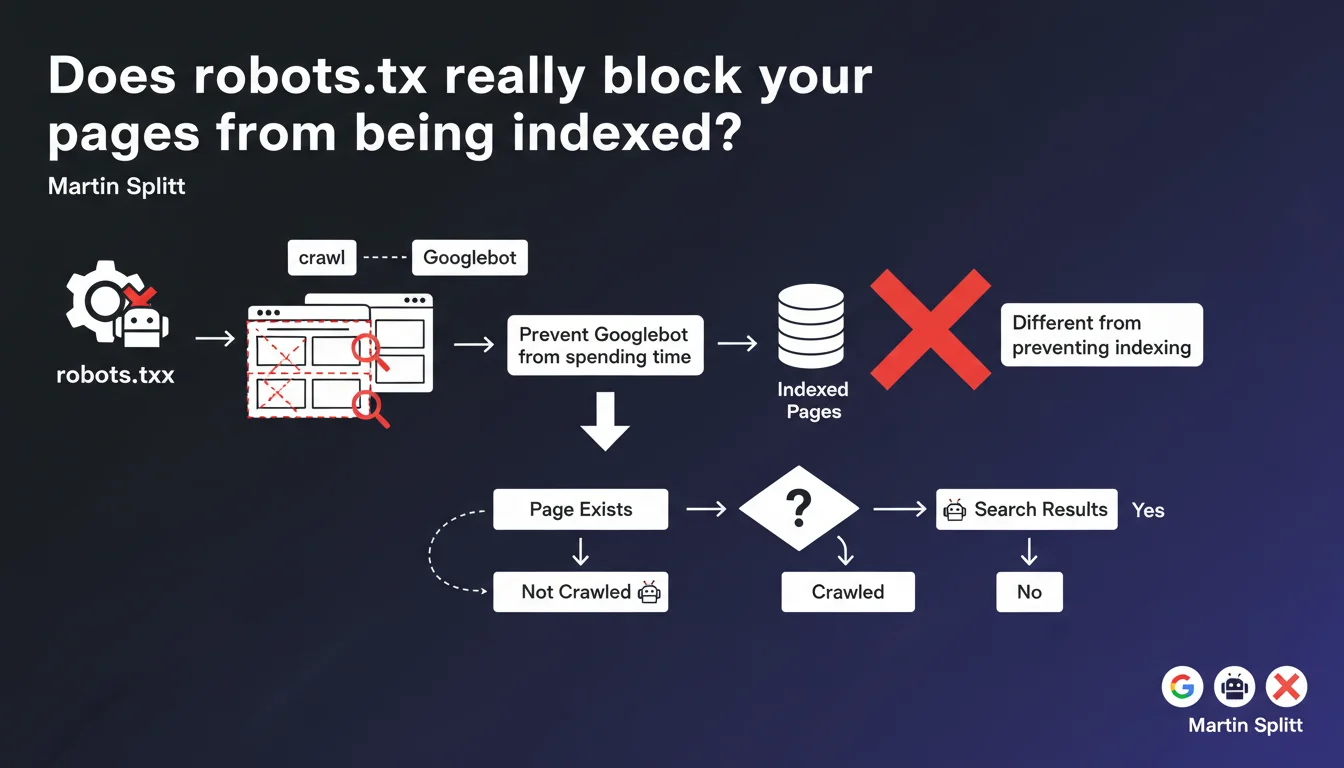
Robots.txt prevents Googlebot from crawling pages, but it doesn't block them from being indexed. Google can very well index a URL without ever having crawled it. If you truly want to prevent indexation, it's the noindex tag you need to use, not robots.txt.
What you need to understand
What's the difference between crawling and indexation?
The crawl refers to the action of Googlebot visiting a page to retrieve its content. Indexation is Google's decision to add that page to its index and make it accessible in search results.
Blocking the crawl via robots.txt doesn't prevent Google from indexing the URL — especially if it has external backlinks. Google can index a page without ever visiting it, based solely on the anchor text of links pointing to it.
Why does this confusion persist among so many practitioners?
For years, SEOs used robots.txt to "hide" content from Google. It worked... until Google refined its algorithm and started indexing URLs blocked from crawling, creating phantom results in the SERP.
The trap is persistent: many people see "Disallow" in robots.txt and think "forbidden to index". Wrong. Googlebot obeys robots.txt for crawling, but indexation follows different rules.
When should you use robots.txt then?
The robots.txt file serves to optimize crawl budget by preventing Googlebot from wasting time on unnecessary resources: internal search results, multiple URL parameters, infinite pagination pages, large CSS/JS assets.
It's a technical management tool, not an anti-indexation shield. If you really want a page to disappear from the index, it's noindex you need to use — and for that, Googlebot must be able to crawl the page to read the directive.
- Robots.txt: manages crawling, not indexation
- Noindex: prevents indexation (but requires the page to be crawled)
- Blocking from crawl a page with backlinks = risk of phantom indexation
- Robots.txt is useful for crawl budget, not for hiding content
SEO Expert opinion
Is this statement consistent with field observations?
Yes, completely. We regularly see URLs blocked in robots.txt appearing in SERPs with the mention "No information available for this page". Classic on e-commerce sites that block their filters or login pages.
The problem is that these phantom pages consume crawl budget and dilute your site's authority. Google wastes time re-evaluating URLs it can't crawl, while keeping them in the index as a precaution.
What nuances should be made in practice?
Martin Splitt says that robots.txt "prevents Googlebot from spending time on certain resources". Let's be honest: this phrasing is misleading. If you block a URL with 50 backlinks, Google will still come back periodically to check if the robots.txt has changed.
The real crawl budget gain is marginal on small sites. On a 500-page site, blocking 20 URLs in robots.txt changes little. On a 500,000-page site with 200,000 unnecessary parameterized URLs — there, yes, robots.txt becomes strategic.
[To verify]: Google never precisely documents how much time Googlebot "saves" by blocking resources. Actual gains vary greatly depending on site architecture and natural crawl frequency.
In what cases does this rule not apply?
If you block a page from crawling AND it has no external backlinks, Google will eventually deindex it — but it takes time. Sometimes months. This is not a reliable method for cleaning up an index.
Another trap: blocking a page in robots.txt then adding noindex inside it... serves no purpose. Googlebot will never crawl the page to read the noindex directive. Result: the URL stays indexed indefinitely.
Practical impact and recommendations
What should you concretely do to control indexation?
First rule: separate crawling and indexation in your strategy. If you want a page to disappear from Google, use the noindex tag in HTTP header or meta tag. Let Googlebot crawl it to read this directive.
Once the page is deindexed (verify in Search Console), you can decide to block crawling in robots.txt to save crawl budget. But never the other way around.
What errors should you avoid at all costs?
Classic mistake #1: blocking sensitive pages (admin, user account) in robots.txt thinking it hides them. If they have backlinks or appear in a sitemap, they'll be indexed anyway.
Classic mistake #2: blocking critical CSS/JS resources for rendering. Google needs these files to properly evaluate the page — blocking them can harm both crawling and SEO.
Classic mistake #3: over-optimizing robots.txt by blocking too many URLs. On an average site, an overly restrictive robots.txt does more harm than good. Let Google naturally discover your structure, then refine if necessary.
How do you verify that your configuration is correct?
- Audit Search Console: look for indexed URLs with "Blocked by robots.txt" — this is a sign of faulty configuration
- Test your robots.txt with Google's testing tool (in Search Console, Robots.txt section)
- Verify that noindex pages are crawlable (not blocked by robots.txt)
- List your pages blocked in robots.txt and verify they don't have external backlinks via Ahrefs/Semrush
- Use site:yourdomain.com in Google to spot phantom indexed URLs with no content
- Document your crawl/indexation strategy to avoid inconsistencies during updates
The distinction between crawling and indexation is fundamental, but it remains counter-intuitive for many practitioners. Robots.txt manages the former, noindex manages the latter — mixing the two creates problems that are difficult to diagnose.
On complex architectures with thousands of pages, these optimizations quickly become technical and require careful analysis of crawl budget, internal link structure, and indexation directives. If your site exceeds a few hundred pages or if you notice phantom URLs in the index, hiring a specialized SEO agency can save you time and avoid costly mistakes. Personalized support allows for precise auditing of your configuration and coherent adjustment of robots.txt, noindex, and sitemap.
❓ Frequently Asked Questions
Peut-on utiliser robots.txt pour cacher du duplicate content à Google ?
Si je bloque une page en robots.txt, combien de temps avant qu'elle sorte de l'index ?
Faut-il bloquer les filtres et facettes d'un site e-commerce en robots.txt ?
Googlebot peut-il ignorer le robots.txt dans certains cas ?
Comment désindexer rapidement une page déjà bloquée en robots.txt ?
🎥 From the same video 12
Other SEO insights extracted from this same Google Search Central video · published on 04/12/2024
🎥 Watch the full video on YouTube →
💬 Comments (0)
Be the first to comment.