
Official statement
Other statements from this video 20 ▾
- □ Do internal links in the header or footer really have less SEO value?
- □ Does Google really penalize a website that buys links in bulk?
- □ Do you really need technical perfection to rank well on Google?
- □ Does Google really crawl your site less when it perceives low quality?
- □ Is the 'Crawled, Currently Not Indexed' status really just a sign of poor website quality?
- □ Can invalid structured data penalize your SEO performance?
- □ Should you worry when the number of indexed pages drops?
- □ Crawled vs Discovered: Are these two non-indexed statuses really the same thing?
- □ Can you really control which images Google displays in your search snippets?
- □ Is your franchise network losing visibility because of duplicate content across multiple domains?
- □ CCTLD, subdomain or subdirectory: which structure for international geotargeting?
- □ Will accidental dofollow links in your PR coverage actually hurt your rankings?
- □ Can you really use the address change tool to merge or split websites?
- □ Why are your structured data disappearing on your localized pages?
- □ Do structured data really improve rankings, or just how results are displayed?
- □ Will Google ever display Core Web Vitals badges directly in search results?
- □ Why Does Google Cause Position Fluctuations for Two Months After URL Restructuring?
- □ Does internal linking really outperform URL structure for SEO?
- □ Should you really spend time calculating internal PageRank to optimize your website?
- □ Can Google Really Identify the Main Language of a Multilingual Page Without Hurting Your SEO?
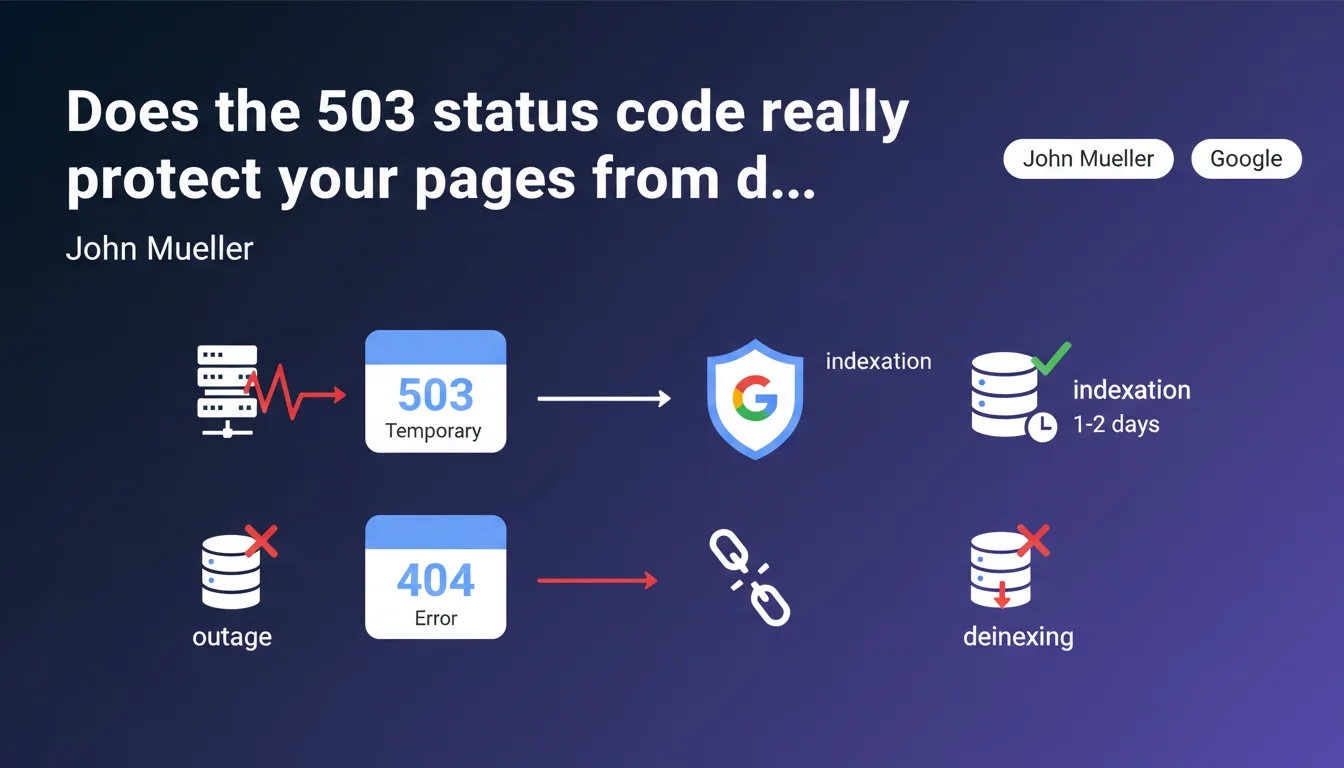
During a technical outage, serving an HTTP 503 code for one or two days signals Google a temporary problem and preserves your pages in the index. A 404 or standard error page would result in their removal from the index entirely. It's basic protection but critical for e-commerce and media sites that experience occasional incidents.
What you need to understand
Why does Google distinguish between a 503 and a 404?
The HTTP 503 status code (Service Unavailable) explicitly tells the search engine that the server is temporarily unavailable. It's structured information that Googlebot understands: "come back later, the content still exists".
Conversely, a 404 (Not Found) signals that the resource no longer exists. Google interprets this signal as definitive and progressively triggers the removal of the URL from its index. A generic error page without a 503 code produces the same effect — the bot doesn't distinguish between a technical error and a deliberate removal.
What is the maximum acceptable duration for a 503?
Mueller mentions "one or two days" as a safety window. Beyond that, Google begins to doubt the temporary nature of the outage and may decide to remove pages from the index despite the 503.
In practice, if your site serves 503s for a week, you risk partial or total deindexing. The exact boundary isn't publicly documented, but field experience shows that 48-72 hours is a reasonable limit.
What types of outages justify using a 503?
Typical scenarios include: planned maintenance, urgent server migration, database crash, traffic spike overwhelming infrastructure. In all these cases, you know the problem will be resolved quickly.
The 503 should never be used as a cosmetic solution to hide chronic application errors or broken pages you don't have time to fix. It's an emergency signal, not a permanent band-aid.
- 503 code: Google puts URLs on "pause" and retries regularly without deindexing them
- 404/410 codes: Google interprets the resource as deleted and triggers deindexing
- Critical duration: 1-2 days maximum to maintain protection
- Retry-After header: optional but recommended to indicate when to retry
- Scope: applicable to any type of content (HTML pages, images, PDFs, APIs)
SEO Expert opinion
Is this recommendation consistent with field observations?
Yes, it's one of the rare points where Google is perfectly aligned with technical reality. SEOs managing e-commerce or media sites with occasional incidents confirm that 503 actually preserves indexation over short windows.
I've observed cases where a site served 404s by mistake for 6 hours due to bad CDN configuration — result: 40% drop in organic traffic within 48 hours as Google deindexed main pages. A 503 would have prevented this disaster.
What nuances should be added?
Mueller doesn't specify what happens between day 2 and day 7. Is it progressive degradation or a hard threshold? [To verify] based on controlled tests, but public data is lacking.
Another gray area: does behavior differ based on usual crawl frequency? Does a site crawled 10 times/day benefit from a longer window than a site crawled once/week? Logic suggests yes, but Google documents nothing about this.
Finally, be aware: serving a 503 doesn't freeze PageRank or freshness signals. If your competitors publish content during your outage, you lose ground on competitive queries even if your pages remain indexed.
In what cases doesn't this rule apply?
If you serve a 503 with HTML content inside (like a nice "we'll be back soon" page without the proper status code in headers), Google risks crawling and indexing this maintenance page. You end up with poor snippets in the SERPs.
Another classic pitfall: CDNs and reverse proxies that generate their own error pages without respecting status codes configured in the backend. Cloudflare, Fastly, Akamai — all have default behaviors you need to verify in test environment before the actual outage.
Practical impact and recommendations
How do you properly configure a 503 in an emergency?
First step: define a dedicated maintenance page that explicitly returns the 503 HTTP status code in headers. Not just in HTML — the HTTP header must contain "HTTP/1.1 503 Service Unavailable".
Add the Retry-After header with a value in seconds or an HTTP date. Example: "Retry-After: 3600" tells Googlebot to retry in 1 hour. It's optional but helps the bot optimize its crawl budget.
Test your configuration in a staging environment. Use curl or Chrome DevTools to verify the correct status code is being served. Also verify that critical assets (CSS, JS, logo) remain accessible so the maintenance page displays correctly if crawled by humans.
What mistakes should you absolutely avoid?
Never serve 503 across the entire site if only one section is down. If your checkout module crashes, limit 503 to affected URLs — no need to block the blog or product sheets that are working.
Avoid preventive 503s "just in case". Some sites serve 503 during planned maintenance hours even though the site remains accessible. Result: Google learns your site is unstable and reduces crawl frequency permanently.
Never leave a 503 lingering "by mistake". I've seen devs push a maintenance page to production then go on vacation — the site serves 503s for 72 hours when maintenance only lasted 2 hours. Set up automatic alerts (Pingdom, UptimeRobot, StatusCake) to detect unplanned 503s.
How do you verify the protection is working?
During the outage, monitor Search Console. Look at the "Coverage" section: 503 URLs should appear in "Excluded" with the pattern "Server error (5xx)". If they appear in "Error" with a different pattern, your status code isn't being served correctly.
After returning to normal, verify that Googlebot quickly recrawls affected pages. Use the "URL Inspection" tool to force a recrawl of strategic pages if needed. Monitor rankings and traffic for 7-10 days to detect any residual impact.
- Configure a maintenance page with explicit HTTP 503 header
- Add the Retry-After header (optional but recommended)
- Test in staging with curl or DevTools before deployment
- Limit 503 scope to sections actually impacted
- Set up automatic alerts to detect unplanned 503s
- Never exceed 48 hours of continuous 503
- Monitor Search Console during and after the outage
- Force recrawl of critical pages after returning to normal
503 is effective protection but fragile: it works over short windows and requires flawless technical configuration. A header error, misconfigured CDN, or deactivation oversight can turn a minor incident into an SEO catastrophe.
For high-stakes websites, these protection mechanisms require pointed technical expertise and constant monitoring. If your critical infrastructure lacks redundancy or your technical teams don't master these subtleties, it may be wise to engage an SEO-specialized agency that can audit your technical stack, configure robust fallbacks, and intervene in emergencies if an incident occurs.
❓ Frequently Asked Questions
Peut-on servir un 503 uniquement à Googlebot et du 200 aux utilisateurs ?
Faut-il aussi servir un 503 pour les images et fichiers CSS/JS en cas de panne ?
Le 503 protège-t-il aussi les positions dans les SERPs ou juste l'indexation ?
Que se passe-t-il si on alterne 503 et 200 toutes les heures pendant une journée ?
Le header Retry-After est-il vraiment pris en compte par Googlebot ?
🎥 From the same video 20
Other SEO insights extracted from this same Google Search Central video · published on 21/01/2022
🎥 Watch the full video on YouTube →
💬 Comments (0)
Be the first to comment.