
Official statement
Other statements from this video 11 ▾
- □ Does Google really render every single HTML page without exception?
- □ Does Googlebot really follow Chrome in real-time?
- □ Does Google really crawl structured data injected through JavaScript?
- □ Does Google Really Treat JavaScript Redirects the Same as Server-Side Redirects?
- □ Why will Google's rendering never truly match a standard browser's behavior?
- □ Should you really unblock all your resources in robots.txt to avoid indexing problems?
- □ Does Google really keep cookies between each page render?
- □ Does Google really ignore cookie consent banners when crawling your site?
- □ Should you stop using dynamic rendering based on Googlebot's user-agent?
- □ Is the URL inspection tool really reliable for testing how Googlebot renders your pages?
- □ Does Google really render every HTML page even if most don't need JavaScript?
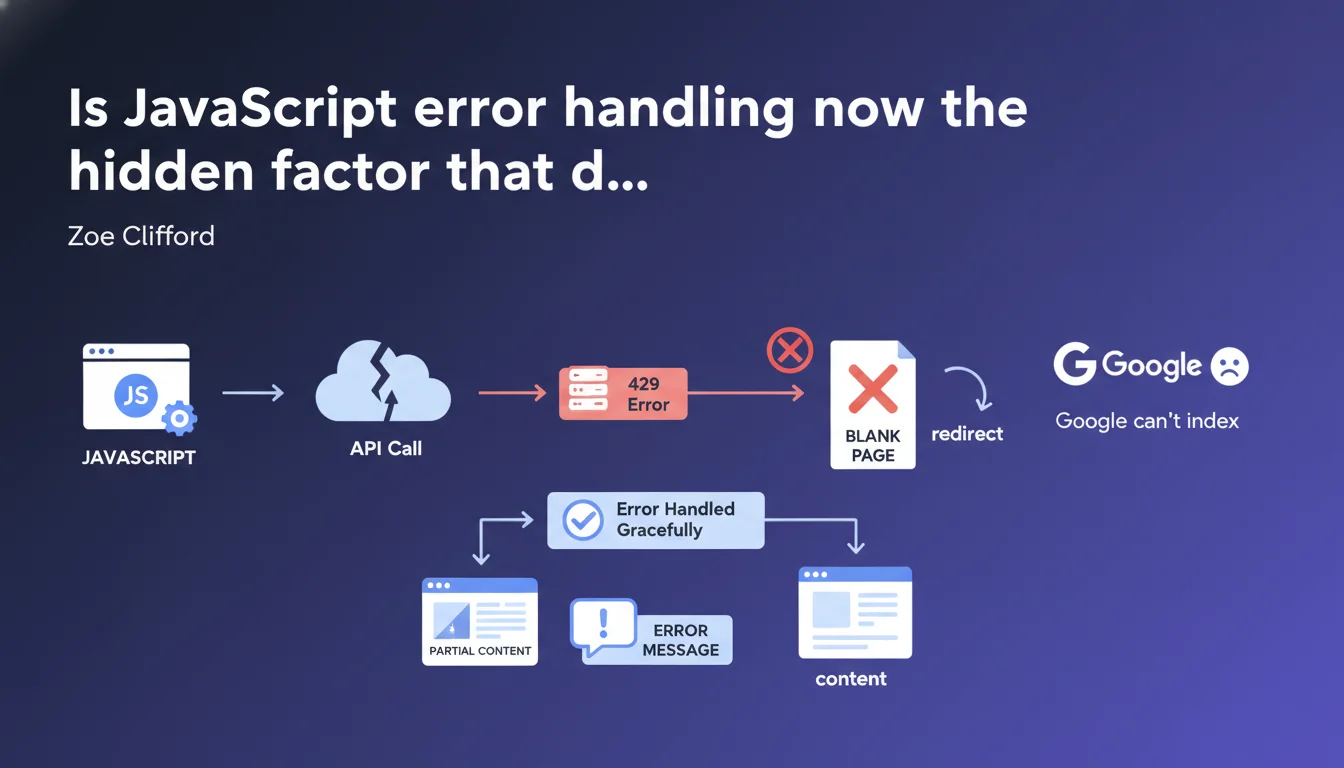
Google states that a page encountering a JavaScript error (API timeout, 429, etc.) must continue to function and display partial content, not a blank page or redirect. If your JavaScript crashes and breaks the display, Googlebot will see exactly what a visitor sees: nothing. This is the kind of technical detail that can kill indexation of an entire section of your site without you even noticing.
What you need to understand
What does "graceful error handling" actually mean in practice for Googlebot?
Googlebot executes JavaScript like a modern browser. If your JavaScript code encounters an error — API timeout, 429 error (too many requests), malformed server response — and that error is not caught, the entire page can crash.
The result? A blank page, a frozen screen stuck on a loader, or worse, a redirect to a generic error page. Googlebot crawls this broken version and indexes nothing useful. "Graceful degradation" means displaying a clear message ("Unable to load this module right now") or partial content, rather than breaking everything.
Why is Google pushing this point so hard right now?
Because modern sites rely heavily on asynchronous API calls — product recommendations, customer reviews, dynamic content. If these calls fail and no one has planned a fallback, the page becomes empty in Googlebot's eyes.
Google wants sites to be resilient. It's not asking you to guarantee zero errors — it's asking you to handle those errors so the essentials remain accessible. Concretely, that means: try/catch, rejected promise handling, conditional rendering.
What are the typical cases that trigger this problem?
- Unstable third-party APIs: social widgets, recommendation modules, analytics tools that crash and block rendering
- Server-side rate limiting: 429 error if Googlebot crawls your internal endpoints too fast
- Unhandled timeouts: a call that takes 10 seconds without a response and freezes the interface
- Network errors: unavailable CDN, expired SSL certificate on an external resource
- Poor state management: React/Vue components that crash if expected data is missing
SEO Expert opinion
Does this guidance truly reflect the observed behavior of Googlebot?
Yes, and it has been documented for years. Googlebot uses a recent version of Chrome and executes JavaScript with a ~5 second timeout by default. If your code blocks or crashes during that time window, it indexes what it sees: often, nothing.
Field tests confirm that sites with robust error handling have a more stable indexation rate on dynamic pages. Conversely, an uncaught JavaScript error can make an entire category of pages invisible during a traffic spike or API instability.
In what cases does this recommendation become complex to apply?
On sites with heavy SPA (Single Page Application) dependency, where all content depends on an initial API call. If that call fails and no SSR (Server-Side Rendering) fallback or static cache exists, you have nothing to display — graceful or not.
Another challenge: silent errors. Some third-party libraries (analytics, chatbots, advertising pixels) crash without raising a visible exception. You cannot catch what you cannot see. [To verify]: Google recommends using monitoring tools like Sentry to identify these invisible crashes, but it does not specify how Googlebot handles them concretely.
Is there a risk of over-optimizing this part?
Yes — if you spend too much time handling every edge case of non-critical third-party API. Focus on blocking calls: those that display main content, H1 titles, product descriptions.
Secondary modules (customer reviews, suggestions) can fail without breaking indexation, as long as the page core remains accessible. Do not waste three weeks hardening a social widget that brings no SEO value.
Practical impact and recommendations
What should you audit first on your site?
Test your key pages with network throttling (simulated slow 3G) and by blocking certain API endpoints. Use Chrome DevTools: Network tab, right-click a request, "Block request URL". Reload the page. What do you see?
If the page goes blank or displays an infinite loader, you have a problem. Googlebot will see exactly that. Run this test on: category pages, product sheets, blog articles, strategic landing pages.
What are the concrete technical solutions to implement?
First line of defense: wrap all your API calls in try/catch blocks or .catch() handlers on promises. If an error occurs, display a clear user message or default content.
Second lever: SSR or pre-rendering. If possible, generate a static HTML version of your critical pages at build time. Even if JavaScript hydration fails later, Googlebot indexes the base HTML.
Third option: Progressive Enhancement. Essential content (H1, main text, images) must be present in the initial HTML, not injected solely by JavaScript. Dynamic modules are added next, but their failure breaks nothing.
- Audit all strategic pages by simulating network and API errors
- Implement try/catch blocks around each critical asynchronous call
- Add fallback states: clear error messages, partial content, degraded versions
- Use a JavaScript monitoring tool (Sentry, LogRocket) to track production errors
- Test Googlebot rendering via Search Console (URL Inspection) after each deployment
- Prioritize SSR or pre-rendering for pages with high SEO stakes
- Document critical dependencies: which APIs must absolutely work for the page to remain indexable?
❓ Frequently Asked Questions
Est-ce que Googlebot exécute vraiment JavaScript sur toutes les pages qu'il crawle ?
Une erreur 429 sur une API tierce peut-elle impacter mon indexation ?
Comment savoir si mes pages JavaScript plantent pour Googlebot ?
Faut-il abandonner les SPAs pour être bien indexé par Google ?
Les outils de monitoring JavaScript aident-ils vraiment pour le SEO ?
🎥 From the same video 11
Other SEO insights extracted from this same Google Search Central video · published on 11/07/2024
🎥 Watch the full video on YouTube →
💬 Comments (0)
Be the first to comment.