
Official statement
Other statements from this video 11 ▾
- □ Google rend-il vraiment toutes les pages HTML indexables sans exception ?
- □ Les données structurées injectées en JavaScript sont-elles vraiment crawlées par Google ?
- □ Les redirections JavaScript sont-elles vraiment traitées comme des redirections serveur par Google ?
- □ Pourquoi le rendu Google ne sera jamais vraiment celui d'un navigateur standard ?
- □ Faut-il vraiment débloquer toutes vos ressources dans robots.txt pour éviter les problèmes d'indexation ?
- □ Google conserve-t-il vraiment les cookies entre chaque rendu de page ?
- □ Pourquoi Google ignore-t-il les bannières de consentement des cookies lors du crawl ?
- □ Faut-il abandonner le dynamic rendering basé sur le user-agent de Googlebot ?
- □ Pourquoi la gestion d'erreurs JavaScript conditionne-t-elle désormais votre capacité à être indexé par Google ?
- □ L'outil d'inspection d'URL est-il vraiment fiable pour tester le rendu par Googlebot ?
- □ Pourquoi Google rend-il toutes les pages HTML même celles qui n'ont pas besoin de JavaScript ?
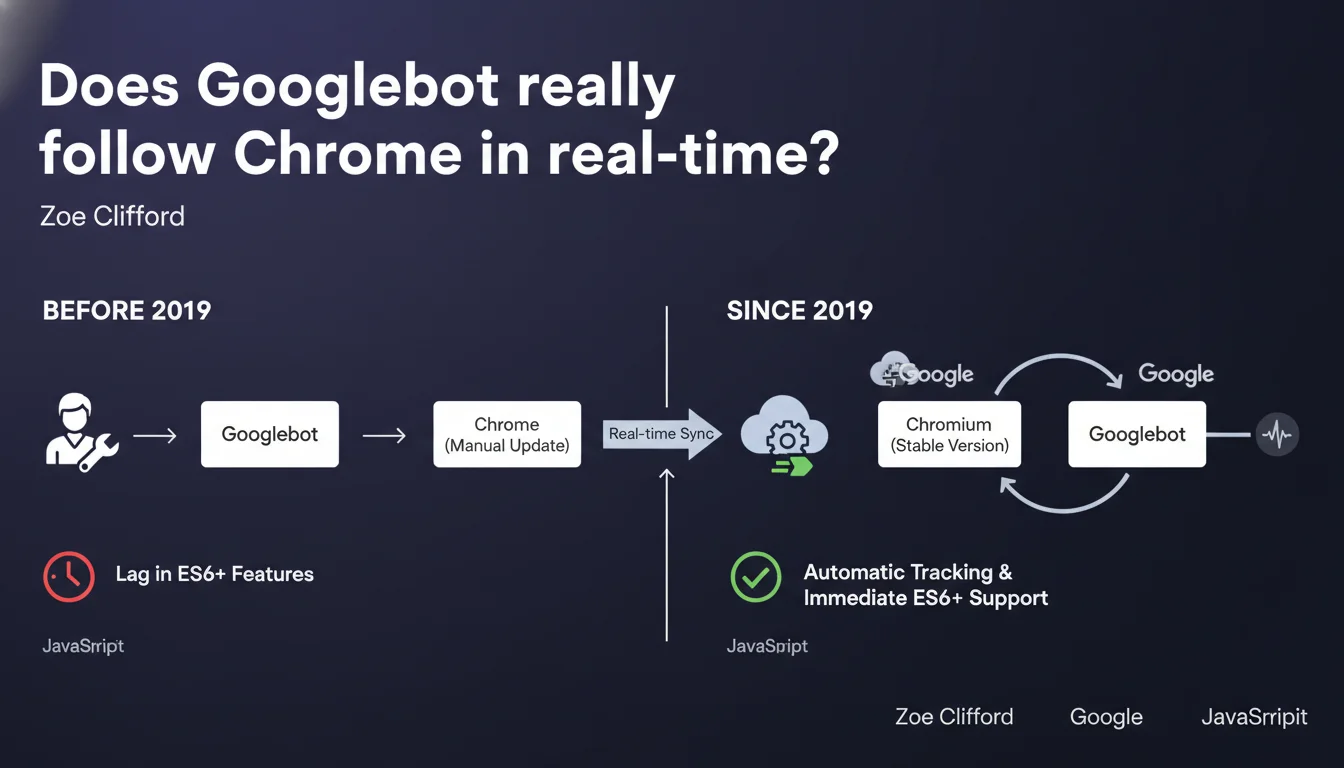
Googlebot has automatically tracked the stable version of Chromium since 2019 thanks to continuous integration. No more months-long delays in JavaScript support: each new Chrome version is now integrated without manual intervention. In practice, your ES6+ code and modern frameworks are rendered just like in an up-to-date browser.
What you need to understand
How does this differ from the old system?
Before 2019, Googlebot updates were manual. The result: a gap of several months between the release of a new JavaScript feature in Chrome and its support by the crawler. Sites using ES6, Promises, or async/await often found their content invisible to Google.
Since continuous integration, Googlebot follows the stable version of Chromium without human intervention. Each new Chrome release is automatically integrated. The crawler therefore benefits from the latest optimizations, bug fixes, and new web standards — exactly like a user with an up-to-date browser.
Does this mean all modern JavaScript works?
In theory, yes. In practice, there are still nuances. Googlebot now has a modern rendering engine capable of executing the majority of client-side JavaScript without issue. Frameworks like React, Vue, or Angular are generally handled well.
But — and this is where it gets tricky — JavaScript execution consumes crawl budget. The more your page requires network requests, client-side calculations, or complex interactions, the longer rendering takes. And Google won't wait indefinitely.
What were the main problems with the old system?
- Technological lag: Googlebot remained stuck on obsolete Chrome versions, sometimes with 6 to 12 months of delay
- Partial ES6 support: Modern syntax (arrow functions, classes, modules) wasn't always interpreted correctly
- Unfixed bugs: Security fixes and performance patches arrived with significant delays
- Complex testing: Difficult to know which Chrome version to simulate to replicate Googlebot's behavior
- Unpredictable SEO regression: A site could work perfectly in stable Chrome but fail when rendered on Google's side
SEO Expert opinion
Is this statement consistent with real-world observations?
Overall, yes. Tests with Search Console and rendering tools show that Googlebot correctly interprets modern JavaScript. Sites with React or Vue using light SSR, or even well-designed pure CSR, generally perform well in most cases.
But it's worth nuancing: continuous integration doesn't solve all problems. The rendering budget remains limited, and some sites with complex loading chains (aggressive lazy loading, late hydration, multiple sequential API requests) still encounter indexing issues. Google may follow Chrome, but with a much shorter timeout than a human user would have.
What gray areas remain in this announcement?
Google doesn't specify how long Googlebot waits before considering a page "rendered". We know there's an initial HTML crawl phase, then a queue for JavaScript rendering — but the exact timeframes remain unclear. [To verify]: do all pages benefit from the same budget, or is there prioritization based on site authority?
Another vague point: behavior with Single Page Applications (SPAs). Google claims Googlebot handles JavaScript state changes, but in practice, internal navigation within an SPA doesn't always trigger a new render. If your client router doesn't push state to the history or update metadata, Google might miss content.
In which cases does this evolution change nothing?
If your site relies on server-side rendering (SSR) or static generation, this announcement barely affects you. You were already sending complete HTML to Googlebot, so Chrome version doesn't matter much.
Similarly, sites with little or no JavaScript are unaffected. Continuous integration mainly benefits modern web applications that heavily depend on client-side JS to display main content.
Practical impact and recommendations
What should you do concretely on your site?
Stop systematically transpiling to ES5. If you're still targeting pre-2015 syntax "just in case", you can now serve modern JavaScript (ES6+) directly to Googlebot. This reduces bundle size and improves performance.
Verify that your critical content appears in the initial HTML render or at least quickly after JS execution. Use the URL inspection tool in Search Console to see what Google actually captures. If elements are missing, it's probably a timing issue, not a compatibility problem.
What errors should you avoid now that Googlebot follows Chrome?
- Don't rely solely on JavaScript for main content — even if Googlebot supports it, rendering delays can be problematic
- Avoid overly long API request chains: each network call extends rendering time and consumes crawl budget
- Don't assume Googlebot simulates user interactions: content behind clicks, infinite scroll, or hovers remains invisible
- Regularly test with Search Console: continuous integration also means behaviors can change quietly between Chrome versions
- Monitor Core Web Vitals: heavy JavaScript degrades user experience AND can slow down indexing
How can you verify your site is properly crawled?
First reflex: Search Console, URL Inspection tab. Compare raw HTML with the render captured by Google. If entire sections are missing, it means JavaScript didn't have time to execute or an error blocked rendering.
Next, analyze your server logs. Googlebot makes two passes: one for raw HTML, another for JavaScript rendering. If you see a significant gap between the two, or if the second pass never happens for some pages, you likely have a crawl budget or timeout problem.
❓ Frequently Asked Questions
Dois-je encore transpiler mon JavaScript en ES5 pour Googlebot ?
Est-ce que Googlebot exécute tous les frameworks JavaScript modernes ?
L'intégration continue signifie-t-elle que Googlebot se met à jour en même temps que Chrome ?
Les Single Page Applications sont-elles bien indexées maintenant ?
Comment vérifier que mon contenu JavaScript est bien capturé par Google ?
🎥 From the same video 11
Other SEO insights extracted from this same Google Search Central video · published on 11/07/2024
🎥 Watch the full video on YouTube →
💬 Comments (0)
Be the first to comment.