
Official statement
Other statements from this video 19 ▾
- □ Google indexe-t-il vraiment toutes les langues de la même manière ?
- □ Les liens nofollow et balises noindex nuisent-ils à votre référencement ?
- □ Les erreurs 404 pénalisent-elles vraiment le classement de votre site ?
- □ Faut-il vraiment rediriger toutes les pages 404 pour améliorer son SEO ?
- □ La vitesse de votre CDN d'images pénalise-t-elle vraiment votre référencement dans Google Images ?
- □ Peut-on réinitialiser les données Search Console d'un site repris ?
- □ Les sous-domaines régionaux suffisent-ils à cibler un marché géographique ?
- □ Pourquoi vos rich results affichent-ils la mauvaise devise et comment y remédier ?
- □ La transcription vidéo est-elle considérée comme du contenu dupliqué par Google ?
- □ Pourquoi Google refuse-t-il les avis agrégés dans les données structurées produit ?
- □ Google crawle-t-il les variations d'URL sans liens internes ou backlinks ?
- □ Le ratio texte/code est-il vraiment un facteur de classement Google ?
- □ Les paramètres UTM avec medium=referral tuent-ils vraiment la valeur SEO d'un backlink ?
- □ Faut-il absolument répondre aux commentaires de blog pour le SEO ?
- □ Faut-il s'inquiéter quand robots.txt apparaît comme soft 404 dans Search Console ?
- □ Faut-il vraiment s'inquiéter de l'absence de balises X-Robots-Tag et meta robots ?
- □ Pourquoi les redirections Geo IP automatiques sabotent-elles votre SEO international ?
- □ Modifier ses balises title et meta description peut-il vraiment faire bouger son classement Google ?
- □ Les liens ou le trafic de mauvaise qualité peuvent-ils nuire à la réputation de votre site ?
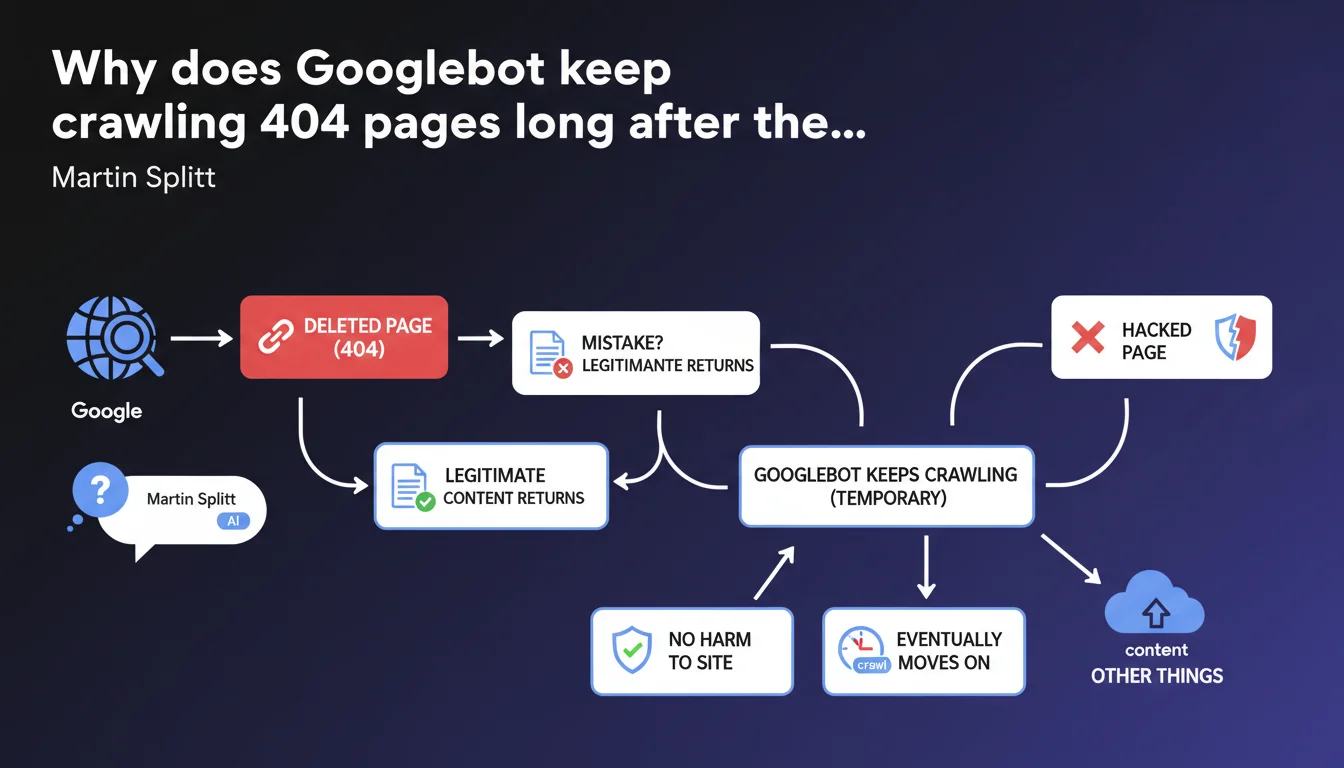
Googlebot continues crawling pages returning 404 for a certain period because they may have been deleted by mistake or return with legitimate content. This behavior doesn't negatively impact the site and the bot eventually abandons these URLs. Google considers this persistence a feature, not a bug.
What you need to understand
Why doesn't Googlebot immediately drop a 404 page?
Google takes a cautious approach to 404 errors. Instead of instantly removing these URLs from its index and stopping crawl, the bot continues to visit them for an indefinite period.
The logic is straightforward: distinguishing between accidental deletion and intentional deletion takes time. A webmaster may delete a page by mistake, a server might go down temporarily, or content might return after maintenance. Googlebot prefers to check multiple times before considering the page permanently dead.
How long does this grace period last?
Martin Splitt provides no specific figures. We're talking about a "certain period" without precision on the exact duration—days, weeks, months?
This lack of concrete timeline is typical of Google communications: the vagueness allows them to adjust the algorithm without having to communicate about every change. In practice? Expect to see these 404s in your logs for several weeks minimum, possibly much longer for pages that had authority.
Does crawling 404 pages waste crawl budget unnecessarily?
Google claims this behavior doesn't harm the site. Translation: it doesn't consume critical crawl budget that would prevent indexing important pages.
That said, technically, each request to a 404 is a request that could have gone elsewhere. For a site with thousands of deleted pages and tight crawl budget, the nuance deserves attention.
- Googlebot continues crawling 404s out of caution, in case content returns
- This persistence applies to both intentional deletions and pages temporarily removed after hacking
- Google doesn't specify the exact duration of this monitoring period
- Crawling these 404s is presented as neutral for site SEO performance
- Googlebot eventually abandons these URLs, but without a guaranteed timeline
SEO Expert opinion
Is this statement consistent with real-world observations?
Yes, completely. Every SEO professional has observed Googlebot continuing to hit deleted pages for weeks, even months. Server logs confirm it daily.
What's more debatable is the claim that this crawl doesn't harm the site. If you have 10,000 404 pages in your logs and limited crawl budget, saying it has zero impact is optimistic. Sure, Google prioritizes active pages, but each hit on a 404 is a server resource consumed and a bot request that could have gone elsewhere.
What about contradictions between this statement and actual practice?
Google presents this behavior as a protective feature. In reality, for a site that's massively cleaning its architecture or recovering from a hack, seeing Googlebot persist with hundreds of 404s is hardly reassuring.
The official advice is to wait for Google to "move on." Let's be honest: that can take time. A lot of time. And while it does, your logs are cluttered and your monitoring becomes less readable. [To verify]: the real impact on crawl budget for mid-sized sites with a few hundred persistent 404s deserves concrete data from Google.
In which cases does this tolerance cause problems?
Moreover, for e-commerce sites with rapid product rotation, old product pages returning 404 continue appearing in logs while you need to concentrate crawl on new items. The argument "it doesn't harm" becomes more theoretical than practical.
Practical impact and recommendations
Should you do anything to speed up Google's abandonment of these 404s?
The official position is to wait passively. But several levers can accelerate the process if you really want Google to stop crawling these dead pages.
First reflex: use Search Console to manually remove URLs you know are permanently dead. Yes, it's manual. Yes, it's tedious. But for high-visibility URLs, it works.
Second option: implement 301 redirects to relevant content instead of leaving naked 404s. Google will follow the redirect, understand the page has migrated, and stop crawling the old URL much faster. If no replacement page exists, a redirect to a category page or homepage is still preferable to an orphaned 404.
What mistakes to avoid when cleaning up 404s?
Never bulk-convert 404s to 200s with generic "page not found" content. Google detects these soft 404s and treats them even worse than true 404s. You lose on every front: wasted crawl budget and degraded quality signal.
Also avoid blocking these URLs in robots.txt thinking you'll save crawl budget. Blocking an already-404 page prevents Google from verifying its status and can paradoxically slow down the deindexation process. The bot needs to access the 404 to record it.
How do you monitor the evolution of these 404s over time?
- Set up regular monitoring of your server logs to identify 404s most crawled by Googlebot
- Use Search Console to track 404 errors reported and their crawl frequency
- Identify 404 pages still receiving external backlinks—these are the ones Google will crawl longest
- Implement 301 redirects for any 404 still getting traffic or links
- Document intentional deletions to avoid confusing them with actual errors in your reports
- Clean up your internal linking to eliminate links pointing to 404s—Google will follow these URLs less if they're no longer linked
❓ Frequently Asked Questions
Combien de temps Googlebot continue-t-il à crawler une page 404 ?
Ce crawl de 404 consomme-t-il du crawl budget inutilement ?
Faut-il bloquer les 404 dans le robots.txt pour économiser du crawl budget ?
Les redirections 301 accélèrent-elles l'abandon des anciennes URLs par Google ?
Peut-on forcer Google à arrêter de crawler une 404 spécifique ?
🎥 From the same video 19
Other SEO insights extracted from this same Google Search Central video · published on 21/08/2024
🎥 Watch the full video on YouTube →
💬 Comments (0)
Be the first to comment.