
Official statement
Other statements from this video 18 ▾
- □ Are images really slowing down your site's SEO performance?
- □ How can you actually boost your website's performance by selecting the right image format?
- □ Should you really automate image compression for SEO purposes?
- □ Is your website really serving the right image size to each device?
- □ Does Google really index all your responsive image variations with picture and srcset?
- □ Should you systematically use lazy-loading for all images below the fold?
- □ Should you really use the HTML loading attribute to optimize lazy-loading?
- □ Are images really the main bottleneck killing your site's performance?
- □ Are poorly configured images really harming your SEO through layout shifts?
- □ Does image quality really need to adapt by screen size for SEO success?
- □ Do you really need picture and srcset to optimize responsive images for SEO?
- □ Should you declare alternative image versions using structured data to boost Google's indexing?
- □ Should you really enable lazy-loading on every single below-the-fold image?
- □ Is lazy-loading all your images actually hurting your SEO performance?
- □ Should you really be using the HTML loading attribute for lazy-loading in 2024?
- 1:22 Do you really need to migrate your images to WebP and AVIF to boost your SEO?
- 1:57 Should you really automate image compression for SEO success?
- 1:57 Should you really manually verify automatic image compression results for your website?
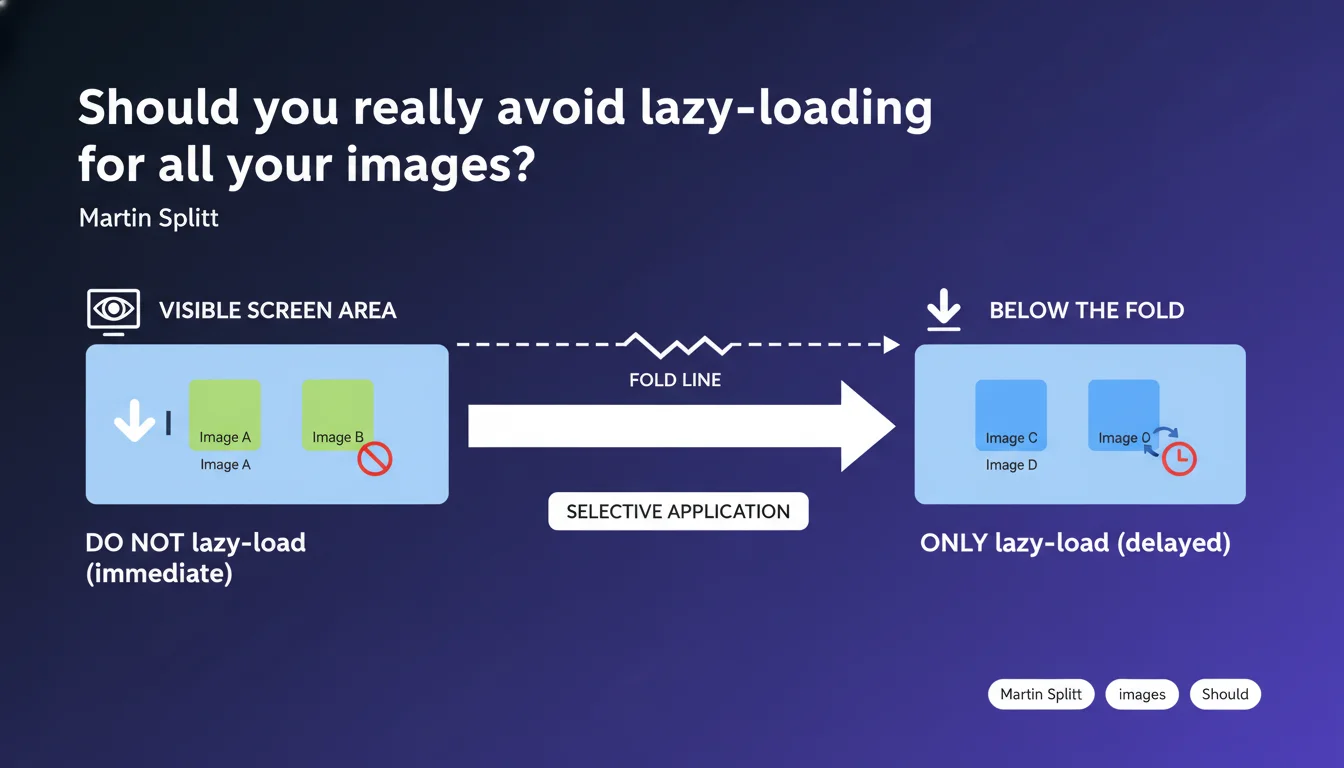
Google recommends against applying lazy-loading to all images on a page. Images that are immediately visible on screen (above the fold) should load normally, otherwise you risk degrading user experience and Core Web Vitals. Lazy-loading should remain targeted: only for content below the initial viewport.
What you need to understand
Why is Google so insistent about this specific point?
Lazy-loading defers image loading until they're about to enter the viewport. Applied to an image visible upon arriving on the page, this introduces an artificial delay: the browser must first parse the HTML, load the JavaScript, then trigger the image download. The result? A blank screen or white space for several hundred milliseconds.
This delay directly degrades the Largest Contentful Paint (LCP), a Core Web Vitals metric that measures the rendering time of the largest visible element. If your hero image is lazy-loaded, you're voluntarily sabotaging your LCP.
What exactly is the fold?
The fold (or "line of sight") refers to the lower limit of the screen upon initial load, before any scrolling. Everything visible immediately must load as a priority — images, text, buttons.
The problem: this line varies depending on the device. A smartphone in portrait mode, a tablet in landscape, a 27-inch desktop screen… the visible height changes dramatically. Modern browsers and frameworks (WordPress, Next.js) attempt to estimate this threshold, but it's never perfect.
What are the concrete consequences of poorly applied lazy-loading?
- LCP degradation: visible delay in loading main images, direct impact on Core Web Vitals
- Cumulative Layout Shift (CLS): if space isn't reserved with width/height, lazy-loaded images cause layout shifts
- Diminished user experience: blank screens, feeling of slowness even on fast connections
- Potential ranking loss: Core Web Vitals are a confirmed ranking signal since 2021
SEO Expert opinion
Is this recommendation really being applied by CMSs and frameworks?
Let's be honest: the vast majority of mainstream implementations get this wrong. WordPress, with its automatic loading="lazy" attribute since version 5.5, sometimes applies lazy-loading to images above the fold. The CMS attempts to detect the first images, but frequently fails.
JavaScript frameworks (React, Vue, Next.js) perform better with their optimized <Image> components, but developers must use them correctly. I've seen Next.js sites where all images had loading="lazy" hardcoded, including the logo and hero image.
What are the gray areas in this statement?
Google doesn't specify how many images should load normally. One? The first three? Up to what exact height? [To verify]: there's no official threshold in pixels or number of images.
Another unclear point: what about images in a carousel visible on the first screen? Lazy-load the second slide that will display in 5 seconds? The question remains open. My field advice: load the first slide normally, lazy-load the rest.
<img> tags without distinction. Check your WP Rocket, Imagify, ShortPixel settings and similar — they can sabotage your LCP without you knowing.Does this rule also apply to CSS background images?
Google explicitly mentions <img> tags, but the principle applies to critical background-image properties. If your hero is a div with a CSS background, don't defer it via JavaScript.
That said, browsers load CSS background-image differently — they only trigger the fetch if the element is in the DOM and visible. It's already a form of native lazy-loading, but less penalizing than poorly implemented custom JS.
Practical impact and recommendations
How do you identify which images shouldn't be lazy-loaded?
Use PageSpeed Insights or Lighthouse in mobile and desktop mode. Look at the LCP section: if the detected element is a lazy-loaded image, you have a problem. The report will explicitly tell you if lazy-loading is harming your LCP.
Manually inspect your page with DevTools: open the Network tab, filter by "Img", reload and observe the loading order. The first visible images should appear at the top of the cascade, not after 2 seconds of JS parsing.
What technical mistakes must you absolutely avoid?
Never force loading="lazy" on an image that has fetchpriority="high" or is marked as critical. That's a blatant contradiction that confuses the browser.
Avoid custom JavaScript solutions for lazy-loading if you don't have the technical expertise to properly exclude above-the-fold images. The native loading="lazy" API is sufficient in 90% of cases, provided you don't apply it blindly.
- Audit your site with Lighthouse/PageSpeed Insights to detect lazy-loaded LCP images
- Remove the
loading="lazy"attribute from the 1-2 first visible images on each page - Configure your CMS/plugin to exclude critical images from automatic lazy-loading
- Add
fetchpriority="high"to the LCP image if the browser supports it (Chrome, Edge) - Reserve space with
widthandheightto avoid CLS, even on non-lazy-loaded images - Test on both mobile AND desktop: the fold changes, so your exclusions must too
- Verify that your
<picture>tags andsrcsetdon't break native lazy-loading behavior
❓ Frequently Asked Questions
L'attribut loading="lazy" natif est-il suffisant ou faut-il du JavaScript custom ?
Comment WordPress gère-t-il le lazy-loading automatique ?
Que faire si mon plugin d'optimisation force le lazy-loading partout ?
Le lazy-loading impacte-t-il l'indexation des images par Google ?
Faut-il lazy-loader les images en fin d'article long ?
🎥 From the same video 18
Other SEO insights extracted from this same Google Search Central video · published on 02/07/2024
🎥 Watch the full video on YouTube →
💬 Comments (0)
Be the first to comment.