
Official statement
Other statements from this video 18 ▾
- □ Les images freinent-elles vraiment les performances SEO de votre site ?
- □ Faut-il vraiment automatiser la compression de vos images pour le SEO ?
- □ Faut-il vraiment adapter la taille de vos images selon l'appareil de l'utilisateur ?
- □ Picture et srcset pour le responsive : Google indexe-t-il vraiment toutes vos images ?
- □ Faut-il systématiquement utiliser le lazy-loading pour toutes les images en dessous de la ligne de flottaison ?
- □ Faut-il vraiment éviter le lazy-loading sur toutes vos images ?
- □ Faut-il vraiment utiliser l'attribut HTML loading pour optimiser le lazy-loading ?
- □ Les images sont-elles vraiment le principal frein à la performance de votre site ?
- □ Les images mal configurées nuisent-elles vraiment au référencement via les layout shifts ?
- □ Faut-il vraiment adapter la qualité d'image selon la taille d'écran pour le SEO ?
- □ Faut-il vraiment utiliser picture et srcset pour optimiser les images en responsive ?
- □ Comment exploiter les données structurées pour déclarer les versions alternatives d'images ?
- □ Faut-il vraiment activer le lazy-loading sur toutes les images below-the-fold ?
- □ Faut-il vraiment arrêter de lazy-loader toutes vos images ?
- □ Faut-il vraiment utiliser l'attribut HTML loading pour le lazy-loading ?
- 1:22 Faut-il vraiment migrer ses images vers WebP et AVIF pour améliorer son SEO ?
- 1:57 Faut-il vraiment automatiser la compression d'images pour le SEO ?
- 1:57 Faut-il vraiment vérifier manuellement la compression automatique de vos images ?
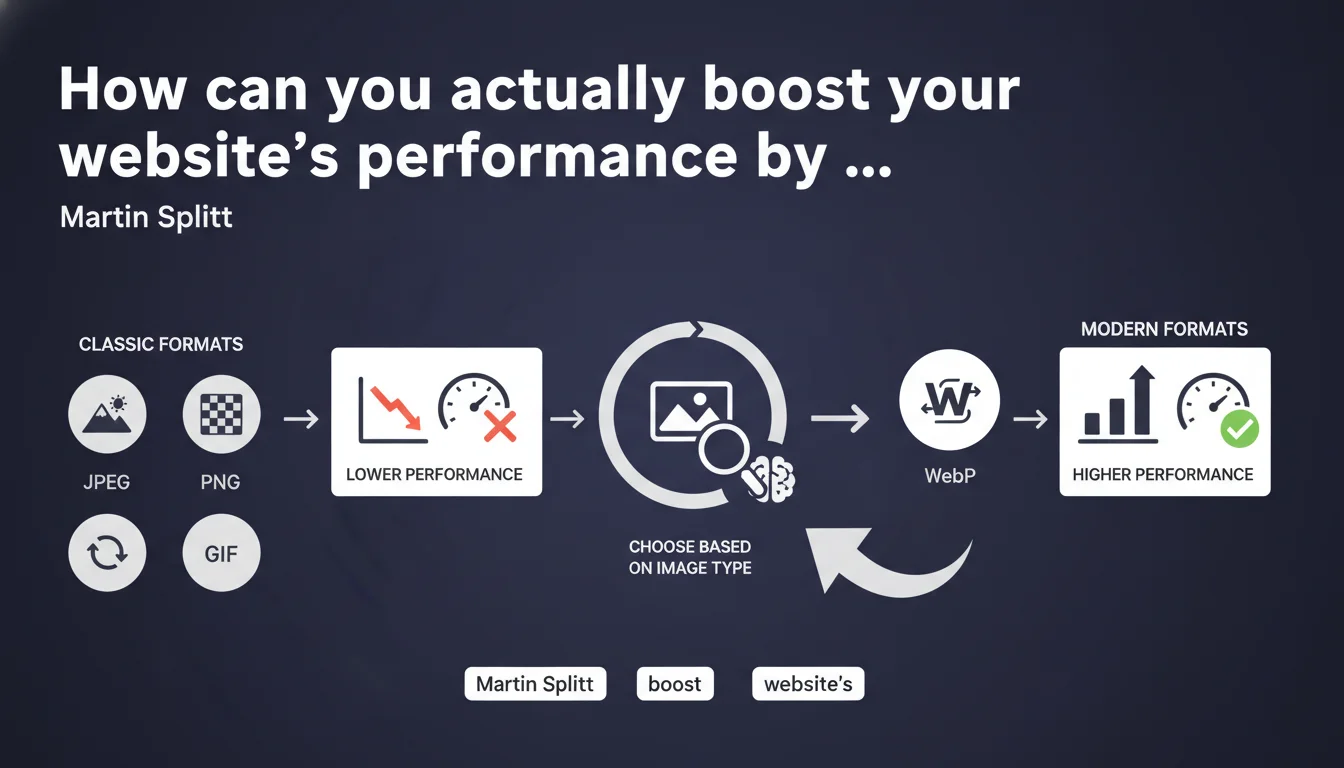
Google confirms that the choice of image format (JPEG, PNG, GIF vs WebP, AVIF) directly impacts website performance. Martin Splitt recommends adapting the format to the type of visual content rather than applying a uniform rule. Modern formats like WebP and AVIF offer better compression ratios, but their adoption must account for browser compatibility and image type.
What you need to understand
Why does image format matter so much to Google?
Images represent on average 50 to 60% of the total weight of a web page. A poorly chosen format slows down loading time, penalizes Core Web Vitals (particularly LCP) and degrades user experience.
Google doesn't judge formats in themselves — the algorithm measures the impact on the speed perceived by the user. An oversized JPEG will slow down the page just as much as a poorly optimized PNG. The problem isn't so much the format as the quality-to-weight ratio.
What are the "classic" formats and "modern" formats?
Traditional formats — JPEG for photos, PNG for graphics with transparency, GIF for animations — work everywhere but generate files that are often bulky.
Recent formats like WebP (supported since 2010 but generalized since 2020) and AVIF (arrived in 2021) reduce weight by 25 to 50% with equivalent visual quality. The catch? AVIF still has partial support on some older browsers.
What does "adapting the format to the image type" mean in concrete terms?
Martin Splitt refers to conditional logic: not all images are equal. An e-commerce product photo will benefit from AVIF (aggressive lossless compression), while a logo will require PNG or SVG to maintain sharp edges.
This statement implies there's no "miracle format" applicable uniformly. You need to segment asset types and test real compression gains against the risk of compatibility issues.
- JPEG/WebP/AVIF: photos, complex illustrations with gradients
- PNG/WebP: graphics, screenshots, images with transparent areas
- SVG: logos, icons, simple vector illustrations
- GIF/animated WebP: light animations (but video often more performant)
- Test gains with a tool like Squoosh or ImageOptim before large-scale migration
SEO Expert opinion
Does this statement really bring something new to the table?
Let's be honest: no. The impact of image format on performance has been documented for years. Google is reformulating here a consensus already well-established among experts.
What's critically missing? Specific numerical thresholds. From what weight savings does switching to WebP become significant for ranking? Splitt remains vague — and that's frustrating when you're looking for actionable guidelines.
Do compression gains really justify the technical complexity?
WebP offers approximately 25-35% weight reduction compared to JPEG (Google data), AVIF reaches up to 50% in some cases. On a site with 200 images per page, that translates to 1-2 seconds gained on LCP.
The problem? Implementation requires a fallback logic (picture tag with multiple sources) or a smart CDN that serves the right format according to the browser. On WordPress, plugins like ShortPixel automate this — but with non-negligible server costs for on-the-fly conversion. [To verify]: the real impact on Googlebot, which doesn't always execute JavaScript client-side during initial crawl.
Should you migrate all your images to AVIF immediately?
No. AVIF offers the best compression, but its browser support only reaches 85-90% of the installed base (Safari integrated it in late 2021, Edge in 2022). On B2B audiences with residual IE11 or emerging countries with older Android devices, you risk broken images.
The prudent strategy: WebP as priority (support >95%), with AVIF as the first source for compatible browsers, and JPEG/PNG as fallback. Test real impact with an A/B test on a sample of pages — some sites see zero ranking impact despite 40% weight savings, others gain 5-10 positions on competitive keywords. It all depends on the level of competitive optimization and the importance of LCP in your overall CWV score.
Practical impact and recommendations
How do you determine which format to use for each image type?
Start by auditing your assets: list images by category (products, banners, blog thumbnails, logos, icons). Use a crawler like Screaming Frog to extract all image URLs and their current weight.
Next, test compression on a representative sample with Squoosh.app or ImageMagick. Compare final weight and visual quality between JPEG, WebP and AVIF. If WebP reduces by less than 15%, the migration effort probably isn't worth it — focus on other levers (lazy loading, CDN, responsive sizing).
What mistakes should you avoid when switching to modern formats?
The classic mistake: converting without implementing a proper fallback. If you only serve WebP/AVIF and an older browser encounters it, the image won't display — Google may crawl with a user-agent that doesn't support these formats.
Another pitfall: converting PNGs with transparency to JPEG (loss of alpha channel). Use WebP with transparency or keep PNG for logos/icons. Finally, some conversion tools strip EXIF metadata useful for Google Images (geolocation, copyright) — verify that your pipeline preserves it.
How do you verify the implementation works correctly?
Inspect the source code and verify that <picture> tags properly include sources in order: AVIF, WebP, then JPEG/PNG. Test on multiple browsers (Chrome, Firefox, Safari, Edge) and devices (desktop, mobile, tablet).
Use PageSpeed Insights and WebPageTest to measure real impact on Core Web Vitals. Compare LCP, CLS and FID before and after migration. If LCP doesn't move despite -40% weight, dig deeper: lazy loading misconfigured? LCP image low priority? Missing preload?
- Audit images by category and measure current weight
- Test WebP/AVIF compression on a representative sample
- Implement the
<picture>tag with multi-format fallback - Configure the server/CDN to serve the right format according to Accept header
- Check browser support with Can I Use for AVIF/WebP
- Measure impact on LCP with Chrome UX Report (real-world data, not lab)
- Preserve EXIF metadata useful for Google Images
- Test rendering on varied browsers and devices
❓ Frequently Asked Questions
Faut-il convertir toutes les images en AVIF dès maintenant ?
Google pénalise-t-il les sites qui utilisent encore du JPEG/PNG ?
Comment implémenter le fallback multi-format sans casser l'indexation ?
Le passage à WebP/AVIF améliore-t-il le ranking Google Images ?
Quel gain de poids réel espérer en passant de JPEG à WebP ?
🎥 From the same video 18
Other SEO insights extracted from this same Google Search Central video · published on 02/07/2024
🎥 Watch the full video on YouTube →
💬 Comments (0)
Be the first to comment.