
Official statement
Other statements from this video 14 ▾
- □ Faut-il vraiment optimiser tout le site après une mise à jour algorithmique ?
- □ Search Console intègre les données IA : mais savez-vous vraiment ce que vous mesurez ?
- □ Faut-il vraiment optimiser différemment son site pour les AI Overviews de Google ?
- □ Google Trends est-il vraiment un outil stratégique pour orienter sa ligne éditoriale SEO ?
- □ Comment Search Console peut-il vraiment révéler ce que cherche votre audience ?
- □ Le SEO est-il vraiment mort ou juste en train de muter sous nos yeux ?
- □ Comment la qualité du contenu influence-t-elle directement le taux d'indexation par Google ?
- □ Un sitemap suffit-il vraiment à garantir l'indexation de vos pages ?
- □ Votre CDN ou firewall bloque-t-il Googlebot sans que vous le sachiez ?
- □ Comment Google Trends utilise-t-il réellement le Knowledge Graph pour identifier les topics ?
- □ L'index Google a-t-il vraiment une limite de capacité ?
- □ Le marketing traditionnel est-il devenu indispensable pour ranker sur Google ?
- □ Les données structurées sont-elles vraiment inutiles pour le classement SEO ?
- □ Faut-il vraiment faire vérifier toutes vos traductions automatiques pour le SEO ?
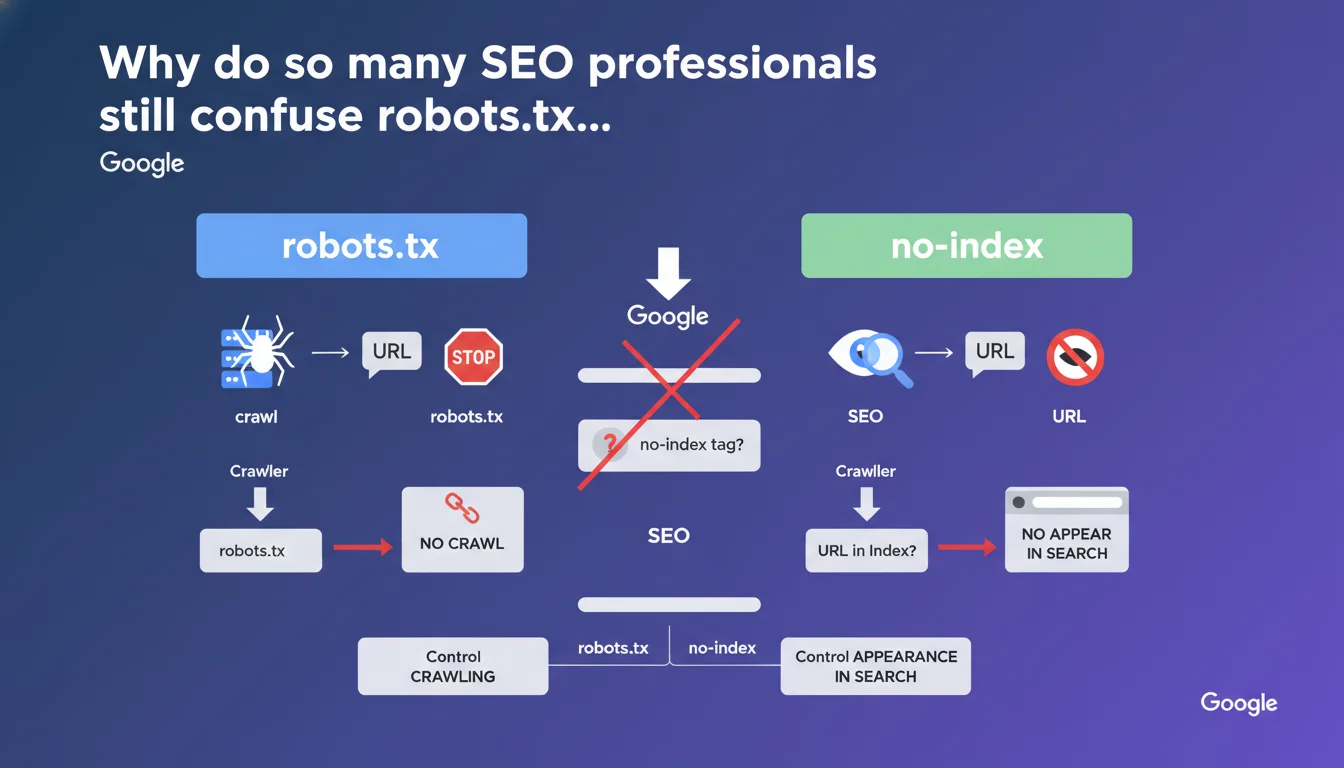
robots.txt and no-index do completely different things — one blocks crawling, the other blocks indexation. The trap? If you block a URL via robots.txt, Google will never see your no-index tag. Bottom line: use robots.txt to manage crawl budget, use no-index to control what appears in the SERPs.
What you need to understand
What's the real difference between robots.txt and no-index?
The robots.txt file acts like a "no entry" sign for crawlers. You tell it which URLs it shouldn't even attempt to explore. It's an upstream instruction, before Googlebot even touches your page.
The no-index tag, on the other hand, comes into play after crawling. The crawler visits your page, reads the content, but receives the order not to include it in the search index. The page exists, Google knows about it, but it will never appear in search results.
Why does blocking with robots.txt prevent no-index from working?
If you deny access to a URL via robots.txt, Googlebot will never visit it. It won't read the HTML or the meta tags it contains — including your precious no-index tag.
The result? The URL can remain indexed indefinitely. Google has no way of knowing you don't want it to appear in the results anymore. It's a classic cascade error — you think you've secured something, when in reality you've created a technical dead end.
When should you use one rather than the other?
Use robots.txt when you want to save crawl budget or prevent exploration of technical areas (admin sections, faceted filters, redundant parameters). It's a bot traffic management tool, not a de-indexation tool.
Use no-index when you want a page to be crawled (to pass link equity through its internal links, for example) but you don't want it to clutter the index. Typically: low-value pages, strategic duplicate content, temporary landing pages.
- robots.txt: controls crawling, acts before the crawler visits
- no-index: controls indexation, requires the page to be crawled
- Blocking with robots.txt makes the no-index tag invisible and therefore ineffective
- Never combine both on the same URL if your goal is to de-index
- robots.txt = crawl budget management; no-index = SERP visibility management
SEO Expert opinion
Is this distinction really respected in the field?
Let's be honest: yes and no. Google follows this logic in 95% of cases, but there are situations where a URL blocked in robots.txt disappears from the index anyway — without ever having been crawled.
This happens particularly when Google detects strong external signals (backlinks, mentions, cached versions). In such cases, it may display the URL with a generic snippet like "no information available." But this de-indexation remains partial, unreliable, and slow. It's not a strategy — it's an accident.
Should you really avoid combining robots.txt and no-index?
The official rule is clear, but it masks a nuance: if you already have an indexed URL and want to remove it permanently, the correct sequence is first to let Google crawl the page with the no-index tag, wait for complete de-indexation, and only then block in robots.txt if you want to save crawl budget.
Reversing this order — or blocking from the start — traps the URL in a zombie state. It remains known to Google, but inaccessible. And you no longer have any leverage to remove it cleanly.
What are the edge cases where this rule becomes unclear?
First case: 404 pages blocked in robots.txt. Google can't see the 404 status code, so the URL may persist in the index with an ambiguous status. It's better to leave the 404 accessible so Google properly records the removal.
Second case: 301 redirects blocked in robots.txt. The crawler never follows the redirect, so link equity doesn't transfer. If your goal was to consolidate authority, you've broken everything. Again, you need to allow the redirect to be crawled.
Practical impact and recommendations
How do you audit your site to spot these conflicts?
First step: extract all URLs blocked in robots.txt and cross-reference them with your Google index (via Search Console or a custom crawler). If you find blocked URLs that still appear in the SERPs, that's a red flag.
Second step: identify pages with no-index tag AND Disallow directive in robots.txt. This is often a sign of confusion in your strategy. Either you want to de-index properly (then remove the Disallow), or you want to block crawling (then remove the no-index, it's useless).
What mistakes should you absolutely avoid in production?
Never block an entire section in robots.txt thinking that's enough to de-index it. If those pages were already crawled, they'll remain visible in Google — sometimes for months.
Never add a no-index tag to a strategic page that you accidentally blocked in robots.txt. Google will never see it. You must first unblock, let the crawler pass through, then add the no-index tag if necessary.
Also avoid switching between the two methods randomly on constantly evolving URLs (facets, dynamic filters). Set a single rule: either block everything in robots.txt, or allow crawling with no-index. No random mixing.
What should you actually put in place?
- Audit robots.txt every quarter and verify that no strategic URLs are blocked by mistake
- Cross-reference the Disallow list with your actual Google index to detect zombie pages
- On pages to de-index: first no-index, wait for complete de-indexation, then possibly block in robots.txt
- Document the logic behind each robots.txt rule and each no-index tag to avoid inconsistencies during updates
- Use server logs to measure the real impact of changes on Googlebot behavior
- Train technical teams on this distinction to avoid contradictory configs during deployments
🎥 From the same video 14
Other SEO insights extracted from this same Google Search Central video · published on 18/12/2025
🎥 Watch the full video on YouTube →
💬 Comments (0)
Be the first to comment.