
Official statement
Other statements from this video 16 ▾
- □ Should you really remove meta keyword tags from your website?
- □ Should you update your sitemap's lastmod date every time you make a minor change?
- □ Should you really separate news sitemaps and general sitemaps to avoid duplicate URLs?
- □ Is Google really ignoring your carefully crafted meta description in favor of something else?
- □ Should you really waste time cleaning up spammy backlinks from your link profile?
- □ Should you still optimize keyword density for SEO in 2025?
- □ Does disavowing toxic backlinks really help you recover your lost rankings after a penalty?
- □ Why do 301 redirects remain absolutely critical when migrating to a new domain?
- □ Can a 404 code targeting Googlebot block the indexing of your pages?
- □ Does Google really require identical content on mobile and desktop for mobile-first indexing to work?
- □ Do you really need to request removal of redirected URLs from Google's index?
- □ Does verifying your site in Search Console really improve your SEO rankings?
- □ Why does Google refuse to index dynamic multilingual content on a single URL?
- □ What happens when your hreflang links fail to validate completely?
- □ Are 'Made by X' footer links really safe for your SEO?
- □ Are image EXIF data really useless for SEO?
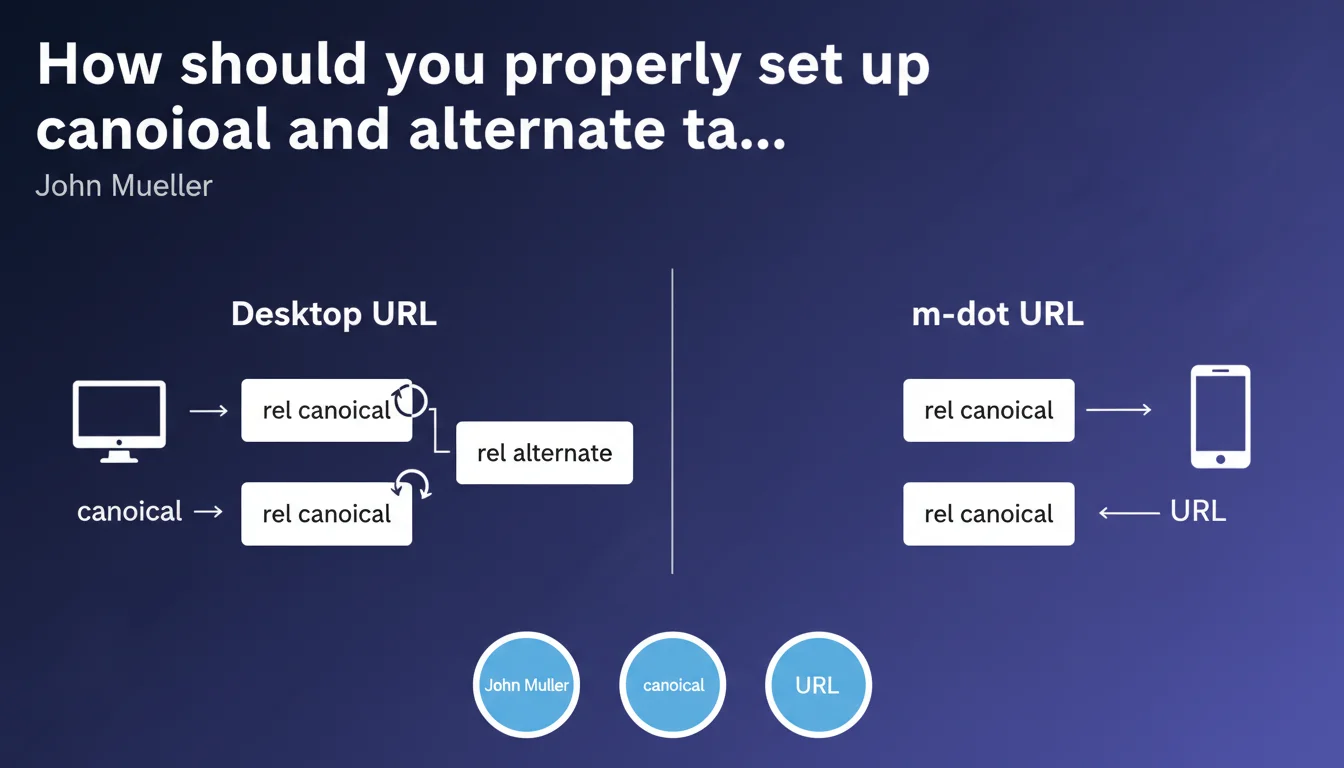
Google confirms that for a desktop + m-dot architecture, the desktop version remains the canonical URL. The desktop version points to itself via canonical and to m-dot via alternate. The mobile version only carries a canonical pointing to desktop — no reverse rel alternate.
What you need to understand
Why is Google still maintaining this configuration in 2023?
Because thousands of sites are still using a separate m-dot architecture, even though responsive design and mobile-first indexing now dominate. John Mueller's statement reminds us of the fundamentals of a configuration that, while outdated, remains active on many legacy sites.
The logic is straightforward: Google needs to understand that desktop.example.com and m.example.com are two versions of the same content, and that the desktop version is the canonical reference. Without this configuration, you risk duplication, cannibalization, and dilution of your SEO signal.
What's the difference between canonical and alternate in this context?
The rel canonical indicates the reference URL to index. The rel alternate signals the existence of an alternative version for a different context (in this case, mobile).
On the desktop version, the canonical points to itself (self-declaration), while the alternate points to m-dot. On m-dot, only the canonical pointing to desktop is needed — no reverse alternate required, as Google understands the bidirectional link.
Is this configuration still relevant today?
Honestly? No, for most modern projects. Responsive design with mobile-first indexing has rendered this architecture largely obsolete. Google crawls and indexes the mobile version of a single responsive site.
But if you're inheriting an m-dot site — costly migration, technical constraints, heavy legacy baggage — this configuration remains the official standard. Ignoring these rules on an existing m-dot site is playing with duplication.
- The desktop version is always canonical in an m-dot architecture
- Desktop carries
rel="canonical"to itself ANDrel="alternate" media="only screen and (max-width: 640px)"to m-dot - M-dot carries only
rel="canonical"to desktop - No reverse rel alternate on m-dot — Google infers the relationship
- This configuration is obsolete for new projects (favor responsive instead)
SEO Expert opinion
Is this rule still being applied by Google in practice?
Yes, and it's verifiable. M-dot sites that follow this configuration see both versions correctly handled in Search Console — desktop indexed, m-dot served to mobile users. Configuration errors (missing canonical, malformed alternate) still generate alerts in the "Coverage" section.
That said, Google tolerates certain approximations. An m-dot site without alternate tags can function if the canonical is clean and the content is sufficiently differentiated. But that's jury-rigging — you might as well do it right if you're staying with this architecture.
Why doesn't Google recommend migrating to responsive?
Because Mueller is answering a specific technical question here, not a broader strategy. Google obviously recommends responsive elsewhere in its documentation. But migrating a large m-dot site is expensive, time-consuming, and carries risks.
This statement assumes that some sites remain on m-dot for legitimate business reasons. It's not a blank check to maintain outdated architecture — it's an instruction manual for those who have no choice in the short term.
What errors are most commonly observed in the field?
The most frequent: a misconfigured cross-canonical. Desktop pointing to m-dot instead of itself, or m-dot self-declaring as canonical. Result: Google indexes the wrong version, or worse, oscillates between the two.
Another classic: the media attribute missing or malformed in the rel alternate. Google may then ignore the indication and treat both versions as distinct duplicate content. [To verify]: some sites with poorly configured alternate still appear well-indexed, likely thanks to other signals (separate sitemaps, hreflang, user-agent detection).
Practical impact and recommendations
What should you check on an existing m-dot site?
Start by crawling both versions — desktop and m-dot — with Screaming Frog or an equivalent tool. Verify the consistency of canonical and alternate tags across a representative sample of pages: homepage, category pages, product sheets, articles.
Then check Search Console: see what version Google is actually indexing, and whether coverage errors appear. Compare desktop and mobile sitemaps — they should list the correct URLs respectively.
How do you fix an incorrect configuration?
If desktop points to m-dot via canonical, reverse it immediately. Desktop must declare itself as canonical. If m-dot carries an alternate to desktop, remove it — only the canonical is needed.
Make sure the media="only screen and (max-width: 640px)" (or equivalent) attribute is present on the rel alternate on the desktop side. Without it, Google may ignore the instruction.
Deploy corrections in waves if the site is large — test first on an isolated section, monitor indexing in Search Console, then roll out globally.
Should you consider migrating to responsive?
If the m-dot site is working correctly, generating traffic and conversions, migration isn't urgent. But if you're planning a redesign — design, CMS, platform — that's the ideal time to switch to responsive.
Mobile-first indexing makes m-dot increasingly irrelevant. Google crawls and indexes the mobile version of a responsive site, which dramatically simplifies SEO management: single content, single URL, single configuration.
- Crawl desktop and m-dot to verify canonical/alternate across all page types
- Check Search Console to see which version is indexed and whether errors appear
- Fix desktop: rel canonical to itself + rel alternate media to m-dot
- Fix m-dot: rel canonical to desktop only
- Test corrections on an isolated section before global deployment
- Monitor indexing for 2-4 weeks after correction
- Assess the opportunity for a responsive migration during the next redesign
❓ Frequently Asked Questions
Peut-on utiliser un canonical de m-dot vers desktop et un alternate inverse de desktop vers m-dot ?
Que se passe-t-il si on oublie l'attribut media dans le rel alternate ?
Un site m-dot bien configuré est-il pénalisé par rapport à un site responsive en mobile-first indexing ?
Faut-il des sitemaps séparés pour desktop et m-dot ?
Peut-on mélanger responsive et m-dot sur différentes sections d'un même site ?
🎥 From the same video 16
Other SEO insights extracted from this same Google Search Central video · published on 31/01/2023
🎥 Watch the full video on YouTube →
💬 Comments (0)
Be the first to comment.