
Official statement
Other statements from this video 20 ▾
- □ Do internal links in the header or footer really have less SEO value?
- □ Does Google really penalize a website that buys links in bulk?
- □ Do you really need technical perfection to rank well on Google?
- □ Does Google really crawl your site less when it perceives low quality?
- □ Is the 'Crawled, Currently Not Indexed' status really just a sign of poor website quality?
- □ Can invalid structured data penalize your SEO performance?
- □ Should you worry when the number of indexed pages drops?
- □ Crawled vs Discovered: Are these two non-indexed statuses really the same thing?
- □ Can you really control which images Google displays in your search snippets?
- □ Is your franchise network losing visibility because of duplicate content across multiple domains?
- □ CCTLD, subdomain or subdirectory: which structure for international geotargeting?
- □ Does the 503 status code really protect your pages from deindexing during an outage?
- □ Will accidental dofollow links in your PR coverage actually hurt your rankings?
- □ Why are your structured data disappearing on your localized pages?
- □ Do structured data really improve rankings, or just how results are displayed?
- □ Will Google ever display Core Web Vitals badges directly in search results?
- □ Why Does Google Cause Position Fluctuations for Two Months After URL Restructuring?
- □ Does internal linking really outperform URL structure for SEO?
- □ Should you really spend time calculating internal PageRank to optimize your website?
- □ Can Google Really Identify the Main Language of a Multilingual Page Without Hurting Your SEO?
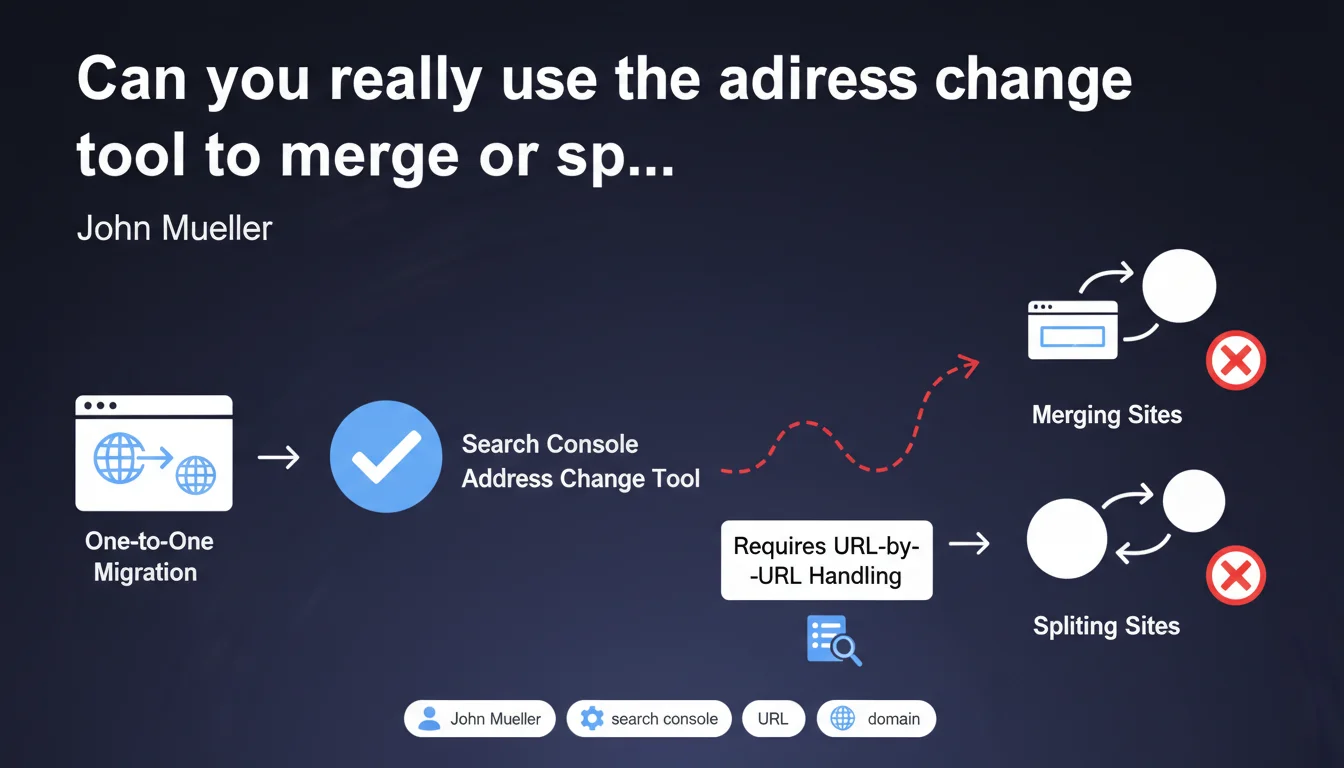
Google Search Console's address change tool is strictly designed for 1:1 migrations from one domain to another. John Mueller confirms it should not be used to merge multiple sites into one or split a site across multiple domains — these operations require URL-by-URL handling. Attempting to bypass this limitation risks compromising the transfer of SEO signals.
What you need to understand
Google Search Console's address change tool is often perceived as a miracle solution for any migration. Yet its function is very limited: it only works for simple migrations where domain A becomes entirely domain B, with a direct correspondence between URLs.
When a site merges with another or splits into multiple entities, the logic changes radically — each source URL can have multiple destinations or vice versa. Google's tool is not designed to handle this complexity.
What's the difference between a simple migration and a merger or split?
A one-to-one migration means that each URL from the old domain finds its exact equivalent on the new domain. For example: old-site.com/page-a becomes new-site.com/page-a. The structure remains identical, only the domain changes.
Conversely, a site merger implies that multiple domains converge into one, with URLs that regroup or reorganize. A split disperses a domain across multiple entities, with content distribution logic. In these cases, there is no global 1:1 relationship — only URL-by-URL correspondences.
Why can't the tool handle these cases?
The address change tool operates on a total substitution principle: it tells Google that the entire old domain is now replaced by the new one. It's a strong, global signal, not a granular mapping.
When you merge or split, there is no total substitution possible. Each URL must be handled individually with proper 301 redirects, a documented migration plan, and URL-by-URL monitoring in Search Console to verify signal transfers.
- 1:1 migration: the address change tool is appropriate and accelerates the transfer of SEO signals.
- Site merger: only manual 301 redirects work, the tool is useless or even counterproductive.
- Site split: same logic, each URL must point to its specific new destination.
- Incorrect use of the tool can confuse the signals sent to Google and slow down the migration.
- URL-by-URL processing remains the only reliable method for complex operations.
SEO Expert opinion
Is this limitation really that surprising?
Not really. The address change tool has existed for years and its operation has always been documented as a shortcut for simple migrations. What's surprising is that many professionals still try to use it for complex cases, probably due to lack of knowledge or a desire to save time.
In the field, we regularly observe botched migrations where the tool was activated even though the mapping wasn't 1:1. The result: loss of visibility, confusion in indexing, diluted SEO signals. Google can't guess which URL should go where if you send it a global replacement signal when the reality is fragmented.
Are 301 redirects really enough for mergers and splits?
Yes, but only if they are perfectly documented and verified. A site merger often involves thousands of URLs — each redirect must point to the most relevant page on the new domain, not the default homepage.
The major problem is monitoring. Without the address change tool, you must manually track the transfer of rankings, traffic, and indexation in Search Console. It's time-consuming, but it's the only reliable approach. [To verify]: Google does not communicate a specific timeline for full implementation of redirects in these complex scenarios — field reports vary between 3 weeks and several months depending on site size.
What are the concrete risks of misusing the tool?
Using the address change tool for a merger or split can mislead Google. The engine will consider that the entire old domain is replaced by the new one, when that's not the case. In practice, this can lead to chaotic indexation, orphaned URLs, or even ranking loss on key pages.
Some SEOs also report cases where Google ignored the tool after detecting a discrepancy between the global signal and the actual redirects. You end up losing both the benefit of the tool and the clarity of a well-executed manual migration.
Practical impact and recommendations
How do you properly migrate a site without the address change tool?
The foundation: a comprehensive URL mapping. For each URL on the old domain, identify the exact destination on the new one. This work can be partially automated with scripts, but always requires manual validation, especially for high-value SEO content.
Implement clean 301 permanent redirects, server by server. Verify that each redirect points to the correct page, not a 404 error or a chain of redirects. Test everything with a crawler before the final switchover.
What errors should you absolutely avoid during a merger or split?
First classic mistake: redirecting all URLs to the homepage of the new domain. That's SEO suicide. Google loses all the relevance signals associated with individual pages, and you start from scratch on most of your keywords.
Second mistake: not monitoring indexation post-migration. Use the index coverage reports in Search Console to track 404 errors, unindexed URLs, or misconfigured redirects. A complex migration requires daily monitoring for the first 2-3 weeks, then weekly for at least 2 months.
What should you concretely do after the migration?
Submit XML sitemaps for the new domains (or the single new domain in case of a merger) in Search Console. This accelerates the discovery of new URLs by Googlebot. Also verify that old domains return proper 301 HTTP codes, not 302 or 307.
Monitor the evolution of organic traffic and rankings in a rank tracking tool. If you notice a sudden drop that doesn't recover after 3-4 weeks, audit your redirects — there are probably orphaned URLs or redirect chains that dilute signals.
- Establish a complete URL-by-URL mapping before any migration
- Configure 301 permanent redirects, never temporary redirects
- Test all redirects with a crawler (Screaming Frog, Oncrawl, Botify)
- Submit new XML sitemaps in Search Console at switchover
- Monitor index coverage reports daily for at least 3 weeks minimum
- Verify that no important URLs redirect to a 404 or redirect chain
- Track the evolution of organic traffic and rankings on strategic keywords
- Keep old domains active with redirects for at least 6 months
❓ Frequently Asked Questions
Peut-on utiliser l'outil de changement d'adresse pour migrer un sous-domaine vers un domaine principal ?
Combien de temps faut-il pour que Google prenne en compte les redirections 301 dans une fusion de sites ?
Que faire si j'ai déjà utilisé l'outil de changement d'adresse pour une fusion ?
Les redirections 301 doivent-elles rester actives indéfiniment après une migration ?
Peut-on diviser un site en plusieurs domaines sans perdre de trafic organique ?
🎥 From the same video 20
Other SEO insights extracted from this same Google Search Central video · published on 21/01/2022
🎥 Watch the full video on YouTube →
💬 Comments (0)
Be the first to comment.