
Official statement
Other statements from this video 17 ▾
- □ Faut-il vraiment choisir entre www et non-www pour le SEO ?
- □ Pourquoi Googlebot ignore-t-il vos boutons et comment contourner cette limite ?
- □ Les guest posts pour des backlinks sont-ils vraiment bannis par Google ?
- □ Faut-il vraiment du texte sur les pages catégories pour bien ranker ?
- □ Le HTML sémantique a-t-il vraiment un impact sur le classement Google ?
- □ Faut-il vraiment s'inquiéter des erreurs 404 générées par JSON et JavaScript dans GSC ?
- □ Google privilégie-t-il vraiment la meta description quand le contenu est pauvre ?
- □ Faut-il vraiment bloquer l'indexation des menus et zones communes d'un site ?
- □ L'infinite scroll est-il compatible avec le SEO si chaque section possède une URL unique ?
- □ L'indexation mobile-first impose-t-elle vraiment la version mobile comme unique référence ?
- □ Les PDF hébergés sur Google Drive sont-ils vraiment indexables par Google ?
- □ Faut-il supprimer ou améliorer le contenu de faible qualité sur votre site ?
- □ Le CMS influence-t-il vraiment le jugement de Google sur votre site ?
- □ Un noindex sur la homepage peut-il vraiment faire apparaître d'autres pages en premier ?
- □ Faut-il vraiment optimiser l'INP si ce n'est pas (encore) un facteur de classement ?
- □ Faut-il vraiment nettoyer toutes les pages hackées ou laisser Google faire le tri ?
- □ Faut-il arrêter de forcer l'indexation quand Google désindexe vos pages ?
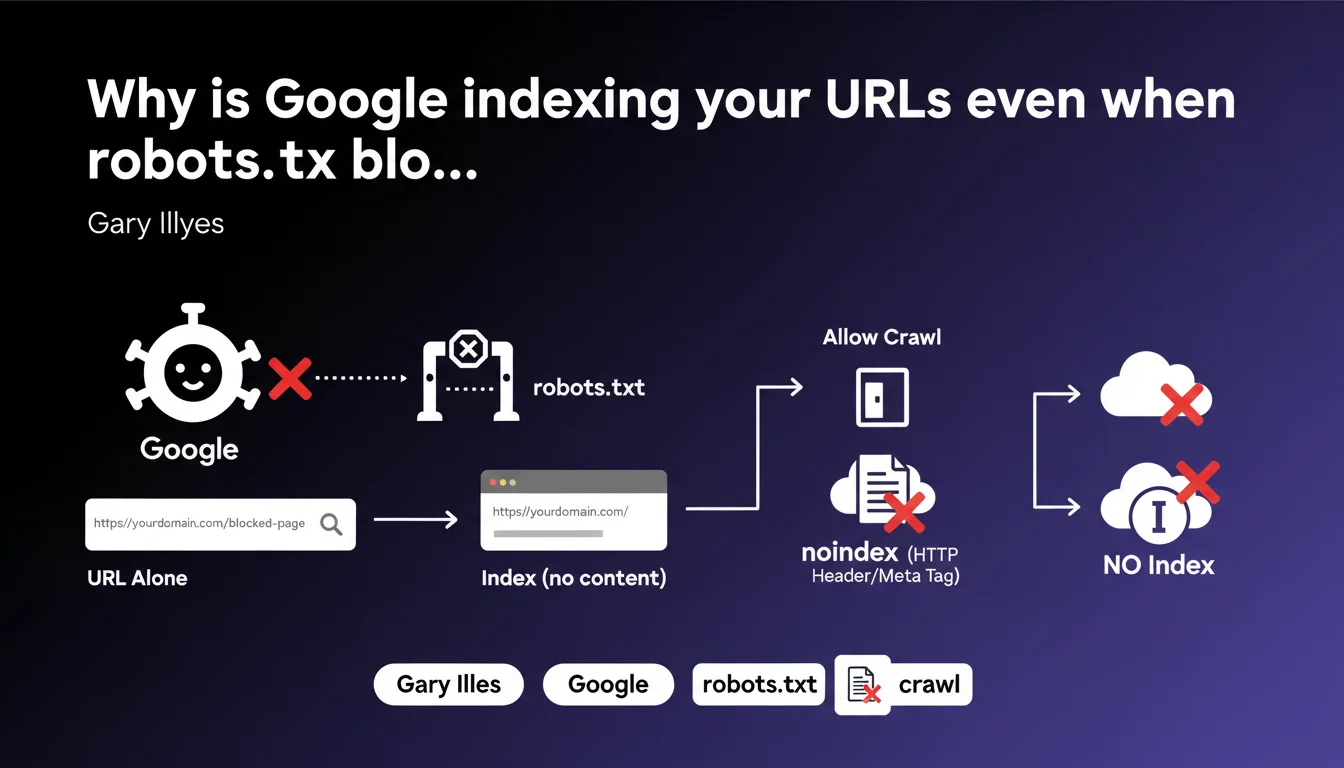
Google can index a URL (without its content) even if it's blocked by robots.txt. If this indexation is problematic, you need to allow crawling and add a noindex directive via meta tag or HTTP header. robots.txt blocking doesn't prevent appearance in the index, it only blocks content crawling.
What you need to understand
What's the difference between robots.txt blocking and noindex?
The robots.txt file prevents Googlebot from crawling a URL. But if that URL receives external backlinks, Google can still add it to its index — without having crawled the content. Only the URL appears, sometimes accompanied by an excerpt taken from the anchor text of links pointing to it.
The noindex directive, on the other hand, explicitly asks Google not to index the page. The problem: if robots.txt blocks access, Googlebot can't read that directive. That's why Gary Illyes recommends allowing crawling so Google can discover the noindex.
How does Google index a URL it has never crawled?
Google discovers URLs through several channels: sitemaps, internal links, external backlinks. Even if robots.txt forbids crawling, a URL can appear in the index if it receives enough external signals.
In this case, the listing in search results displays only the URL, with no title or description taken from actual content. Google relies on the context of links pointing to that page.
Why is this a problem for some websites?
Some URLs should never appear in search results: admin interfaces, test pages, staging environments, URLs with sensitive parameters. If these pages receive links, they can end up indexed.
Other cases include duplicate pages that you thought were blocked via robots.txt, or confidential URLs whose mere existence shouldn't be publicly revealed.
- robots.txt blocks crawling, not indexation
- A URL can be indexed if it receives backlinks, even without crawling
- noindex requires Googlebot to access the page to read the directive
- The solution: allow crawling AND add noindex
- noindex can be placed in a meta tag or an HTTP header X-Robots-Tag
SEO Expert opinion
Is this recommendation consistent with real-world observations?
Yes — and it's a classic case that still surprises many junior SEOs. We regularly observe URLs blocked by robots.txt that appear in the index, marked with "No information is available for this page."
The problem occurs especially on sites receiving parasitic backlinks or misconfigured internal links. A blocked page that's linked to eventually resurfaces in the index, and some clients discover sensitive URLs indexed by accident.
What common mistakes do we observe on this point?
First mistake: believing that robots.txt = deindexation. That's wrong. robots.txt controls access, not presence in the index. Many sites block entire sections by reflex, without realizing it complicates later deindexation.
Second mistake: putting noindex AND blocking in robots.txt simultaneously. That creates a conflict — Google can't read the noindex if crawling is forbidden. Result: the page sometimes stays indexed indefinitely. [To verify] in some edge cases, Google seems to handle HTTP header noindex differently versus meta tag noindex when robots.txt blocks — but Google has never provided precise data on this.
In what cases doesn't this rule apply?
If a URL receives no external or internal links and doesn't appear in any sitemap, it probably won't ever be discovered by Google. Blocking via robots.txt is then sufficient — in theory.
But in practice? URLs leak. Publicly accessible server logs, third-party crawl tools, scrapers, leaks in analytics tools… Counting only on obscurity is risky. If the URL really shouldn't be indexed, noindex remains the guarantee.
Practical impact and recommendations
What should you actually do if blocked URLs are indexed?
First reflex: remove the robots.txt block to allow Googlebot to crawl the URLs in question. Then add a noindex directive — either via a meta tag in the HTML or via HTTP header X-Robots-Tag if it's a non-HTML file.
Next, submit the URLs via Google Search Console using the URL removal tool. That speeds up processing, even if it's not strictly required. Google will eventually recrawl and deindex, but it can take weeks without manual intervention.
How do you verify that a URL is indexed despite robots.txt?
Use the site:yourdomain.com/exact-url command in Google. If the URL appears with "No information is available for this page," it means it's indexed without having been crawled.
Also monitor the Coverage report in Search Console. URLs "Excluded by robots.txt" don't necessarily appear in the index, but those that do despite this require corrective action.
Which method to choose: meta tag or HTTP header?
For standard HTML, the meta tag is simple: <meta name="robots" content="noindex">. That works perfectly for WordPress pages, standard CMS.
For PDFs, images, or API JSON responses, the HTTP header X-Robots-Tag: noindex is the only option. It's also convenient for applying noindex dynamically via server rules — useful on sites with thousands of parameterized URLs.
- Audit URLs blocked by robots.txt that receive backlinks
- Remove the robots.txt block for URLs to be deindexed
- Add noindex via meta tag or HTTP header depending on resource type
- Submit URLs via Google Search Console to accelerate deindexation
- Regularly verify with site: that sensitive URLs aren't indexed
- Prioritize HTTP headers for non-HTML files (PDFs, images, etc.)
- Document the strategy to prevent robots.txt from being accidentally modified later
❓ Frequently Asked Questions
Peut-on utiliser noindex et robots.txt simultanément ?
Combien de temps faut-il pour qu'une URL soit désindexée après ajout du noindex ?
Le noindex en en-tête HTTP est-il aussi efficace que la balise meta ?
Que se passe-t-il si une URL bloquée par robots.txt reçoit beaucoup de backlinks ?
Faut-il garder robots.txt pour protéger des pages sensibles ?
🎥 From the same video 17
Other SEO insights extracted from this same Google Search Central video · published on 06/09/2023
🎥 Watch the full video on YouTube →
💬 Comments (0)
Be the first to comment.