
Official statement
Other statements from this video 9 ▾
- □ Google lance un tableau de bord officiel pour les incidents de recherche : faut-il encore surveiller Twitter ?
- □ Pourquoi Google ne vous prévient-il pas de tous ses incidents techniques ?
- □ Comment Google détecte-t-il réellement les incidents sur son moteur de recherche ?
- □ Faut-il vraiment rester les bras croisés quand Google signale un incident ?
- □ Google garantit-il vraiment des mises à jour régulières sur ses incidents de recherche ?
- □ Pourquoi Google a-t-il séparé techniquement son Search Status Dashboard de google.com ?
- □ Pourquoi certaines fonctionnalités de recherche échappent-elles au monitoring de Google ?
- □ Faut-il s'abonner au flux RSS du Search Status Dashboard pour anticiper les incidents Google ?
- □ Pourquoi Google ne considère-t-il pas la chute de classement d'un seul site comme un incident ?
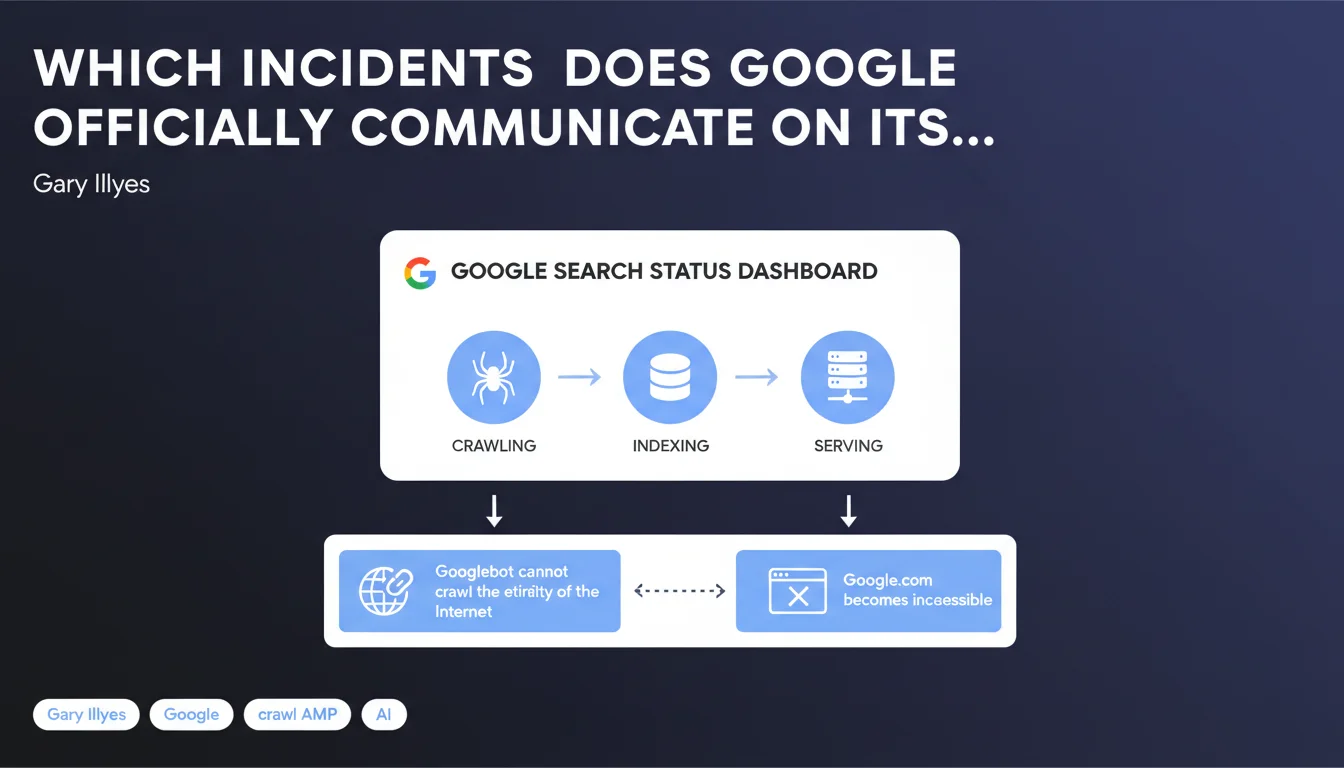
Google publishes on its status dashboard only major incidents affecting three critical systems: crawling, indexing, and serving. If Googlebot cannot crawl the entire web or if Google.com is inaccessible, this will be communicated. Minor or isolated issues are not covered — leaving SEO practitioners in the dark about many real malfunctions.
What you need to understand
What are the three systems covered by the status dashboard?
Google limits the scope of its official dashboard to three main systems: crawling (Googlebot's ability to browse web pages), indexing (the integration of pages into Google's index), and serving (the ability to deliver search results to users).
This means that if Googlebot encounters a bug preventing it from crawling the entire Internet, or if Google.com becomes globally inaccessible, the dashboard will publish an alert. But not for regional problems or issues limited to specific sites.
What counts as a "major" incident under this definition?
Gary Illyes does not specify a quantitative threshold. An incident is considered major if it affects the overall functioning of one of the three systems. The example given — "Googlebot cannot crawl the entire Internet" — suggests that a systemic impact is required, not just an isolated problem.
In concrete terms? If your site is not crawled for two weeks, this probably won't be considered a major incident — even though for you, it is one. The dashboard is not an individual diagnostic tool, but a control panel for global outages.
Why is this limited communication problematic?
Because the majority of bugs encountered by SEO practitioners do not fit within this narrow definition. Selective indexing problems, unexplained crawl budget variations, temporary page disappearances — all of this remains in the shadows.
Google only communicates about disasters visible to everyone. Everything else falls under on-the-ground diagnosis, log analysis, and peer comparison.
- The dashboard covers only major and systemic incidents
- Three systems are monitored: crawling, indexing, serving
- Isolated or regional problems are not published
- No official quantitative threshold is communicated to define "major"
- This tool does not help diagnose bugs affecting a specific site
SEO Expert opinion
Is this definition consistent with field observations?
Yes and no. On global outages, Google does indeed communicate — we've seen this during major Google.com outages or mass indexing bugs. But the problem is the gray area between major incident and isolated problem.
I've observed waves of deindexation affecting hundreds of sites in a specific sector, with no mention on the dashboard. Does Google consider this "isolated"? The boundary is fuzzy, and it's intentional. [To verify]: no official figures exist to define the severity threshold.
What are the practical limitations of this tool?
The dashboard is useful but insufficient. It tells you if Google.com is down — thanks, you would have noticed anyway. But it tells you nothing about a 40% crawl slowdown on your site, or indexing that has stalled for three weeks.
For these diagnostics, you're on your own. Server logs, Google Search Console, comparisons with other sites in your niche — these are the real tools. The dashboard is a last-resort indicator, not a daily monitoring tool.
Should you worry about a problem if the dashboard stays silent?
No. The absence of an alert does not mean everything is fine for your site. It simply means there's no global catastrophe. Your problem can be real, legitimate, and require immediate action — it just won't fit into Google's communication framework.
Practical impact and recommendations
What should you monitor if the dashboard isn't enough?
First, your own data. Google Search Console remains the primary source: evolution of indexed pages, crawl frequency, crawl errors. Cross-reference this data with your server logs to detect anomalies that Google will never report to you.
Then, stay in touch with other SEO practitioners. Sector-specific bugs or waves of deindexation are often detected by cross-referencing — multiple sites impacted simultaneously in the same topic. Forums, Slack groups, professional communities are essential.
How should you respond to an indexing or crawling problem?
First step: check the dashboard. If there's a major incident, wait for Google to resolve it — you can't do anything. If there's nothing, the problem probably comes from your side or from a targeted bug that wasn't communicated.
Analyze your logs to identify whether Googlebot is still accessing your pages. Check your robots.txt file, your meta robots tags, your redirects. Test the URL in Search Console. If everything is clean on your end and the problem persists, document precisely and escalate through official channels — with no guarantee of response.
What mistakes should you avoid in diagnosis?
Don't panic at the first sign of variation. Crawl and indexing naturally fluctuate. A 10-15% slowdown over a few days isn't necessarily a bug — it might just be a crawl budget reassessment.
Also avoid submitting multiple indexation requests via Search Console if the problem is systemic. This is pointless and can even slow down processing. Focus on technical diagnosis: server, HTTP status codes, response time, content quality.
- Monitor Google Search Console and your server logs daily
- Cross-reference your observations with other sites in your sector
- Check the dashboard only to confirm a global incident
- Document any persistent problem precisely with screenshots and numerical data
- Don't confuse normal fluctuation with an actual bug
- Maintain impeccable technical infrastructure to eliminate internal causes
❓ Frequently Asked Questions
Le dashboard de Google couvre-t-il les problèmes d'indexation affectant un site spécifique ?
Si mon site n'est plus crawlé mais que le dashboard ne signale rien, que faire ?
Combien de temps Google met-il pour publier un incident sur le dashboard ?
Les problèmes de ranking sont-ils couverts par ce dashboard ?
Peut-on se fier uniquement à ce dashboard pour surveiller la santé SEO d'un site ?
🎥 From the same video 9
Other SEO insights extracted from this same Google Search Central video · published on 14/12/2022
🎥 Watch the full video on YouTube →
💬 Comments (0)
Be the first to comment.